Voodoo Lab GCX Manuel utilisateur

OWNER’S MANUAL
GCX
Guitar audio Switcher

Please visit our web site at:
www.voodoolab.com
Copyright 1998 by Digital Music Corporation.
This publication is protected by copyright and all rights are reserved. No part of it may be
reproduced or transmitted by any means or in any form without the express prior consent in
writing from Digital Music Corporation.
Ground Control, System Mix, GCX, and Ground Link are trademarks of Digital Music Corp.

DIGITAL MUSIC CORPORATION
Table of Contents
________________________________________________________
Introduction . . . . . . . . . . . . . . . . . . . 3
Overview
Front Panel
Rear Panel
Unpacking
Buffered and Passive Feed Thru's . . . . . . . . 5
Why Use the Buffer?
Connection Options
Audio Loops . . . . . . . . . . . . . . . . . . . 7
Effects Loops
A/B Switching
Muting Sends
Combining Multiple Amps
Using Loops as Switches . . . . . . . . . . . . 10
Latching Type
Normally Open vs. Normally Closed
Momentary Type
Using the GCX with a Ground Control . . . . . . 12
Connection
Setup Mode
Controlling GCX Loops
Using the GCX without a Ground Control . . . . . 14
Warranty . . . . . . . . . . . . . . . . . . . . 15

DIGITAL MUSIC CORPORATION 3
Introduction
________________________________________________________
Overview
The GCX Guitar Audio Switcher greatly expands the capabilities of your
Ground Control foot controller. With the GCX, you can select pedal effects,
signal processors, multiple amps or preamps, amp channels and more.
The GCX has two 1/4 inch feed thru's from front to back. The feed thru
labeled "GUITAR IN" is buffered to maximize guitar pickup tone quality,
minimize noise, and allow signal splitting to drive multiple devices. The one
labeled "FEED THRU" is passive and can also be used from back to front as an
amp out.
The GCX has eight audio loops, each with separate IN, OUT, SEND and
RETURN jacks. They can switch effects in and out, A/B select or mute sends
for parallel effects systems, all at either instrument or line level. In addition,
loops can be used as latched or momentary switches.
Your GCX will phantom power both the Ground Control and Ground Link
foot controllers using a standard 5-pin MIDI cable.
Front Panel
•Power switch - turns power on to both the GCX and the Ground Control.
•GUITAR IN - buffered feed thru to the GUITAR OUT on the rear panel.
Also normals to the FEED THRU on the rear panel for splitting.
•FEED THRU - passive feed thru connects to FEED THRU on the rear panel.
•ACTIVE LED - indicates proper connection to the Ground Control. Also
flashes to show MIDI data activity.
•LOOP/SWITCH STATUS LEDs - show current state of each loop.

DIGITAL MUSIC CORPORATION 4
Rear Panel
•POWER - connect to the supplied external AC adapter.
•PEDAL IN* - receives MIDI data from the Ground Control and sends
power to the Ground Control.
•MIDI OUT - echoes MIDI data from the PEDAL IN.
•GUITAR OUT - buffered output from front panel GUITAR IN.
•FEED THRU - passive connection to the front panel FEED THRU. Also
duplicates the GUITAR OUT for splitting when the front panel FEED
THRU is not being used.
•IN/SEND/RETURN/OUT - audio connections for each of the eight loops.
* Warning: The Pedal In jack is not a standard MIDI In. To avoid damage, please
refer to the section "Using GCX without a Ground Control" before connecting the
Pedal In jack to anything other than a Ground Control.
Unpacking
Your factory carton should contain:
1. This manual
2. The GCX
3. Power adapter
4. Warranty card
Please fill out the enclosed warranty card and return it to Digital Music Corp.
By registering, you enable us to send you important information about related
products, updates and accessories.

DIGITAL MUSIC CORPORATION 5
Buffered and Passive Feed Thru's
________________________________________________________
There are two front panel feed thru's which provide convenient connection to
your switching system. The feed thru labeled "GUITAR IN" is buffered and the
the feed thru labeled "FEED THRU" is passive.
The passive feed thru is simply hard-wired from the front jack to the rear. The
most common use for the passive feed thru is for an "amp out" connection
(passing from the back to the front). You can also use it as an instrument input
if you do not wish to use the buffer.
Using at least one feed thru ties audio ground to the GCX chassis. This allows
the GCX chassis to act as a noise shield for the audio loops and circuitry.
Why Use the buffer?
Guitar pickup tone is greatly affected by the input characteristics of the device
it's plugged into. Unlike typical buffers which utilize bipolar transistor
components resulting in unnatural sound, our buffer inputs are carefully
matched in both impedance and capacitance to those of tube amplifier inputs.
Further, using the latest ultra low noise FET technology provides tube amp
characteristics with the lowest possible noise level. The result is an
exceptionally transparent buffer which optimizes guitar pickup tone quality.
Using the GUITAR IN passes your guitar signal through the in-line buffer which
converts from high to low impedance. This improves signal quality, lowers
noise, and allows splitting with simple Y-cables to drive multiple devices.
Connection Options
The rear panel feed thru jacks are both normalled to the buffer. This means
that if you use only the GUITAR IN, your buffered signal will appear at both the
GUITAR OUT and FEED THRU jacks. This split can be useful for driving a tuner or
multiple amps and preamps.

DIGITAL MUSIC CORPORATION 6
The following diagrams show some common examples of buffered feed thru
connections.
Example 1. Using with one instrument:
The guitar signal passes from GUITAR IN to GUITAR OUT.
Example 2. Splitting from one instrument to two devices:
Since the two feed thru's are normalled together, the guitar signal passes from
GUITAR IN to both GUITAR OUT and FEED THRU.
Example 3. Splitting to more than two devices using Y-cables:
Because GCX feed thru's have low impedance outputs, you can drive multiple
devices from each output. In this example, the guitar signal passes to all four
devices using two Y-cables.

DIGITAL MUSIC CORPORATION 7
Audio Loops
_______________________________________________________
Important: GCX audio loops are for instrument and line level signals only. Using
them to switch amplifier or speaker outputs will severely damage your GCX.
The most important characteristic of an audio switcher is sonic transparency.
Some manufacturers implement loops using either optoFETs (optical
transistors) or LDRs (light dependent resistors), or a combination of the two.
Both optoFETs and LDRs cause sound coloration and measurable distortion.
Some even claim their switching to be passive while using optoFETs
(transistors are not passive). LDRs, while technically passive, are not linear
and therefore degrade tone quality.
The only completely transparent way to switch both instrument and line level
signals with no audible distortion is with relays. The GCX uses the finest gold
contact relays sealed in nitrogen. We also include a snubber circuit to improve
operation by filtering audio frequencies from the relay coil.
Great care has been taken to reduce the possibility of ground loops and hum.
GCX audio loop grounds are isolated, the return ground is lifted, and the
circuit board includes a noise reducing ground plane.
Effects Loops
The basic function of a GCX loop is to switch effects in and out of the signal
path.
In this example, when the loop is ON, the pedal is active. When the loop is
OFF, the pedal is bypassed.

DIGITAL MUSIC CORPORATION 8
A/B Switching
GCX loops can be used for A/B switching. The following are two examples.
Example 1. Selecting between two preamps:
When the loop is OFF, Preamp-1 feeds the audio out. When the loop is ON,
Preamp-2 is selected.
Example 2. Selecting between two amps:
When the loop is OFF, Amp-1 plays. When the loop is ON, Amp-2 plays.
Muting Sends
Loops can be used to mute the input to effects.
When the loop is ON, "Audio In" feeds the input of "FX". When the loop is
off, the input to "FX" is muted.
DIGITAL MUSIC CORPORATION 9
Combining Multiple Amps
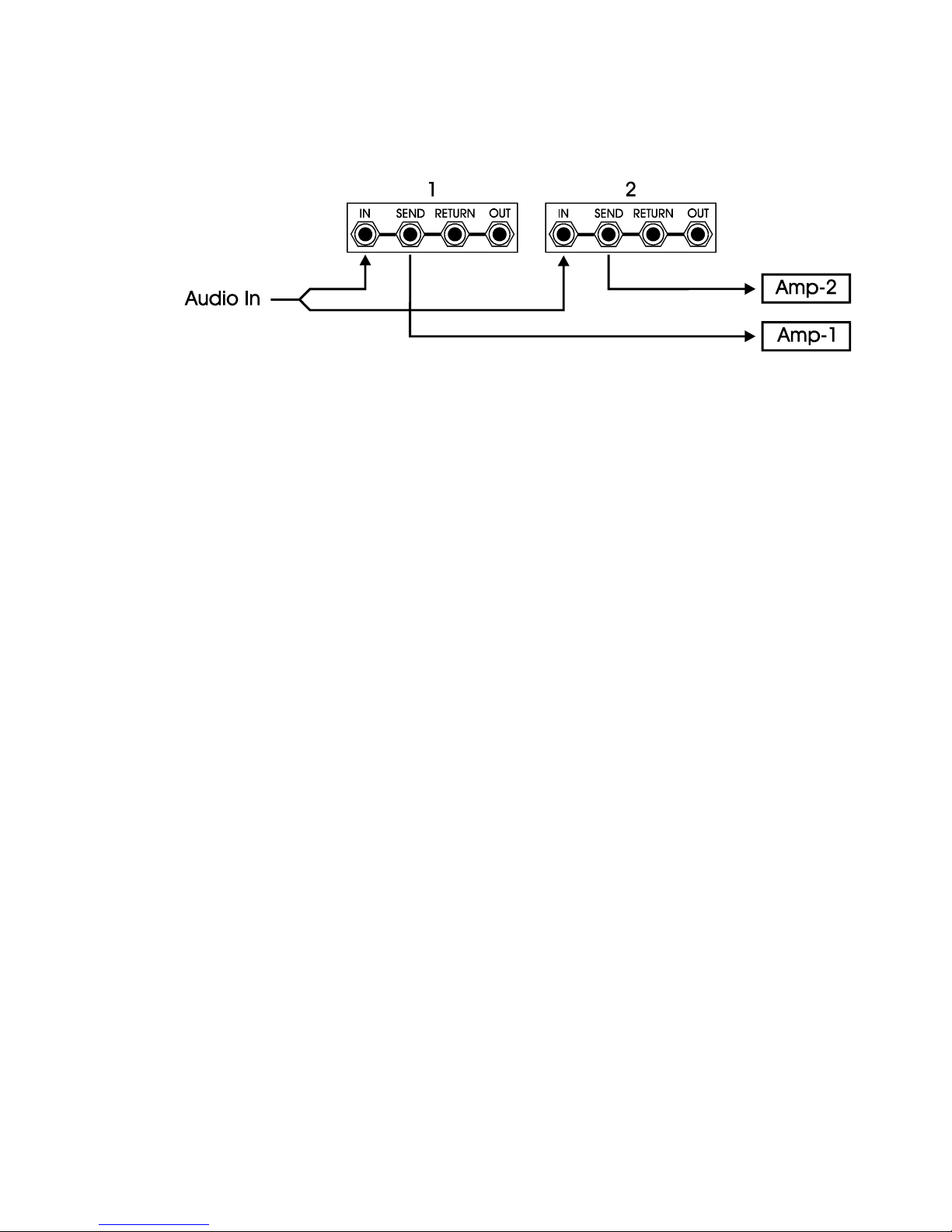
By using multiple loops, combining amps is possible.
When loop #1 is ON and loop #2 is OFF, only Amp-1 is active. With loop #1
OFF and loop #2 ON, only Amp-2 is active. When both loops are ON, both amps
play at the same time.
Table des matières
Autres manuels Voodoo Lab Changer