
VKOM 403NR Manuel utilisateur

1
LTE MiFi
USER GUIDE
Safety Precautions
Read the safety precautions carefully to ensure the correct and safe use of your wireless
device.
Do not switch on your device when the device use is prohibited or when
the device use may cause interference or danger.
Follow the rules or regulations in hospitals and health care facilities.
Switch off your device near medical apparatus.
Switch off your device in an aircraft. The device may cause interference
to control signals of the aircraft.
Switch off your device near high-precision electronic devices. The
device may affect the performance of these devices.
Do not attempt to disassemble your device or its accessories. Only
qualified personnel are allowed to service or repair the device.
Do not place your device or its accessories in containers with strong
electromagnetic field.
Do not place magnetic storage media near your device. Radiation from
the device may erase the information stored on them.
Do not put your device in a high-temperature place or use it in a place
with flammable gas such as a gas station.
Keep your device and its accessories away from children. Do not allow
children to use your device without guidance.
Use approved batteries and chargers only to avoid explosion.
Observe the laws or regulations on device use. Respect others’ privacy
and legal rights when using your device.
Recommend that you use the equipment in this environment: Temperature: 0 ℃-35 ℃.
Humidity: 10% -90%.
Recommend that you save the environment: Temperature: -10 ℃to -55 ℃. Humidity: 5%
-95%.
403NR

2
1. Overview
The device provides a simple way to use LTE connect to the Internet with any
WIFI-enabled device and to fulfill needs of sharing your internet connection during outside
home.
1.1 Introduction
Indicator Description
ID appearance
Interface Specification
ITEM
INTRODUCTION
1
LCD screen
Displays current status of the device
2
USB interface
Connect the USB cable to power adapter or
PC/Laptop
3
Internet buttons
Connect/Disconnect Internet access
4
WPS / WIFI button
long press (5 seconds) to turn on / off WIFI
short press (less than 2 seconds) to open the
WPS PBC mode

3
5
Power button
long press (5 seconds) to start on / off the device
Sleep mode short press (less than 2 seconds) to
exit Sleep
Equipment work properly, and the LCD screen
backlight is turned on, Display SSID number and
WIFI password short press (less than 2 seconds)
6
Reset button
short press (less than 2 seconds) equipment to
restart
long press (more than 5 seconds) to restore the
factory settings
(U)SIM card installation instruction
Open the back cover, remove the battery.
Insert (U)SIM card into the slot.

4
1.2 LCD Specification
1. LCD screen status indicators.
2. LCD screen text information.
Status Information
Category
Icon Display
Signal Strength
Strongest signal status
Roaming or not
Roaming
User
…… the number of WIFI users
No WIFI user
Battery
Battery level from critical to full charge.
Micro SD card
Micro SD card detected Micro SD card error
Micro SD card not detected
SMS
Full warning Unread messages
USB Status
Equipment connected to the power adapter or use the
USB connection to PC

5
1.3 System Requirements
Item
Description
Operating
System
Windows
Windows XP 64bit,32bit(SP3)/
Vista 64bit,32bit(SP2)/
Windows7 64bit,32bit(SP1)/
Windows 8
Mac
X 10.6 or higher, but no higher than X10.8.0
Browser
Internet Explorer
Internet Explorer 7.0 or higher
Safari
Safari 4.0 or higher
6
2. Equipment installation
2.1 Connect the Device
Before you want to use the device, setup your device as following:
1. Insert SIM;
2. Insert Micro SD Card;
3. Insert the battery;
4. Hold the Power/Connect button to power on;
5. Connect this device to your terminal device.
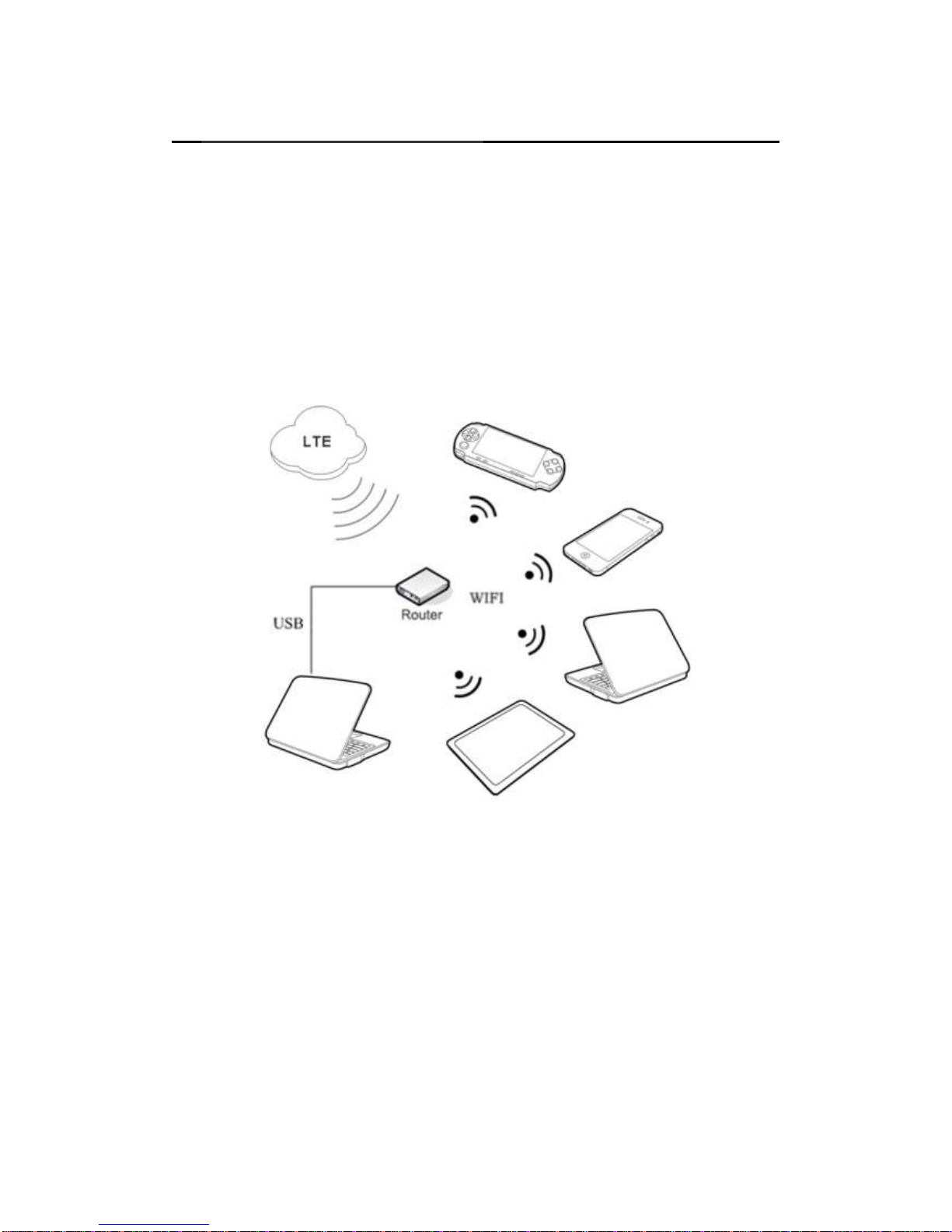
The device applications scenes Figure
PC devices can be connected via USB or via WIFI network. Micro-SD card inside
the device provides network storage sharing function.
Note:
If the computer does not have a CDROM auto-run function when the device is
connected to the computer via USB and install the drivers, please click on the
"My Computer" to open the CDROM, and manually install the driver.
If automatic installation failed, please check whether the antivirus and security
software is working. If it is, close it and reinstall.

7
2.2 Startup
Power up the device
After all installation is complete, Press and hold the power button over 5 second to
power up the device.
Restart the device
Some configurations may take effect after system reboot. The device will reboot
automatically once these configurations to be modified.After reboot the webpage
will be automatically redirected to Homepage and need you to re-login for further
changes.
Shutdown the device
Hold the power button over 5 second when the device is powered on, the device will
automatically shutdown.
3. Description for Client Interface
3.1 Activate Client
Open the browser, and then enter the IP address http://192.168.0.1 device interface
will open in your browser.
Note:
If the user enters the IP address can’t open the device software interface, double-click
the shortcut icon of the desktop client to re-enter the IP address in the browser and
refresh the page.
3.2 Introduction to Interface
Function Icon
The definition of function icon provided by client is as follows:
The left-hand menu
Shortcut icon
Description
Registration

8
Connection
SMS
Phonebook
Application
Sharing
Application list
Theme
Settings
Settings menu expand
Shortcut icon
Description
HELP
Wan
WIFI
Router
Service
System

9
Status Information
The status information displayed by client is as follows:
Status
Information
Description
Network signal
Signal display
Connection Status
Connected Unconnected
Connected Unconnected
GPRS Connected GPRS Unconnected
EDGE Connected EDGE Unconnected
Roaming or not
Roaming On Roaming Off
Micro-SD Card
SD Error
SD Card not detected
SD Enabled
Battery
Battery power display
SMS
Full warning Unread messages
Others
Display WIFI SSID, WIFI users, WIFI security type, channel,
WIFI MAC.
IP Address, Gateway, DNS, IMEI,
language settings
The client language option, respectively: English.

10
4 Registration
User login interface
When you click the left icon will pop up the login screen, enter your login
password, click 'Login' landing completed.
Note:
The default user password: admin, password input into lower case.
5 Connection
Network connection
When you click on the icon , the software will automatically log on to the network.
Click again to disconnect from the network .
Note:
Make sure you have inserted the (U) SIM card.
Operational Instruction for PIN: If the user activates PIN under the setting menu, it
shall be required to input the correct PIN while using the application procedure
(totally 3 times to input PIN, if the number is wrongly-input after 3 times, thus,
PUK should be used to decode the PIN, and the input of PUK is only 10 times, if
the number is wrongly-input after 10 times, (U)SIM will be locked or damaged,
Please contact the local operator for settlement).
(U)SIM is provided by the network operator. Please contact the operator for more
information.
6 Application
App list
Network service providers to provide application interface.
Application a list of items, click on the application can perform.
Table des matières


