
Virax Micro Visioval 294200 Manuel utilisateur

Original operating manual
User
manual
Read carefully and keep safe for future reference
5 in 1 camera
Micro Visioval® Ref. 294200
5 in 1 camera
WW-ABS-20/18
09/2018
K620258
EN

2
EN
Scope of delivery / parts list..................................................................................................................4
General...........................................................................................................................................................................6
Read and keep the user manual carefully .............................................................................6
Symbols used in this manual...............................................................................................................6
Safety................................................................................................................................................................................8
Proper use..............................................................................................................................................................8
Residual risk.........................................................................................................................................................9
General safety instructions.....................................................................................................................9
Safety warnings for batteries................................................................................................................10
Proper use of the camera........................................................................................................................11
Before Use..................................................................................................................................................................12
Check the inspection camera and scope of delivery....................................................12
Inserting / replacing the batteries.....................................................................................................13
Mounting / removing the tripod...........................................................................................................14
Coiling / uncoiling the flexible shaft................................................................................................14
Usage - General applications...............................................................................................................15
Switching the inspection camera on / off..................................................................................15
Switching the LED work light on / off............................................................................................16
Switching the laser pointer ON / OFF..........................................................................................17
Selecting the mode........................................................................................................................................17
Mounting / removing the inspection attachments............................................................18
Table of contents

3
EN
Usage - Camera recording.......................................................................................................................19
Switching the LED camera light on / off....................................................................................19
Zooming....................................................................................................................................................................20
Setting the display alignment...............................................................................................................21
Adjusting background brightness.....................................................................................................21
Colour change.....................................................................................................................................................22
Freezing images...............................................................................................................................................22
Seeing images....................................................................................................................................................23
Deleting images.................................................................................................................................................23
Transferring images ......................................................................................................................................23
Usage - Distance measurement.........................................................................................................24
Usage - Temperature measurement..............................................................................................26
Maintenance, cleaning, storage and transport................................................................28
Maintenance.........................................................................................................................................................28
Cleaning....................................................................................................................................................................28
Storage.......................................................................................................................................................................29
Transport..................................................................................................................................................................29
Troubleshooting...................................................................................................................................................30
Technical data........................................................................................................................................................31
Recycling ....................................................................................................................................................................32
Disposal of packaging.................................................................................................................................32
Disposal of inspection camera ........................................................................................................32
Declaration of conformity.........................................................................................................................32

Scope of delivery / parts list
4
EN
1. Front housing part
2. Rear housing part
3. "LED light / laser pointer"
function switch
4. "Delete / alignment" function
switch
5. "Play / display brightness"
function switch
6. Flexible shaft
7. "Zoom / UP" function switch
8. "LED brightness / DOWN"
function switch
9. "On / Off" function switch
10. 1.5 V batteries, type LR6 / AA
11. Carry bag
12. USB cable
13. Inspection attachment
14. Double hook attachment
15. Magnetic attachment
16. Mirror attachment
17. Battery compartment cover
18. Tripod
19. Battery compartment
20. "Temperature measurement"
selection switch
21. USB Port
22. "Camera recording" selection
switch
23. "Distance measurement"
selection switch
24. LED camera light
25. LED work light
26. Laser pointer
27. Flexible shaft outlet
28. Red indicator light
29. Display
Scope of delivery / parts list

Scope of delivery / parts list
5
EN
28
29
3
1
2
7
6
4
8
5
9
24
27
22
21
20
25
26
23
111213141516
18
19
17
10

General
6
EN
General
Read and keep the user manual carefully
This operating manual is an integral part of this 5-in-1 multi-function
camera (hereafter referred to only as "inspection camera"). It contains
important information on safety, usage and maintenance. Please read
the operating manual carefully before using the inspection camera. Pay
particular attention to the safety instructions and warnings. Failure to follow
the instructions given in this manual may result in serious injury or damage
to the inspection camera. Always include the manual when you give the
inspection camera to others. Keep this manual in a safe place for future
reference.
The following symbols and key words will be used in this manual, on the
inspection camera or the packaging.
Indicates a hazardous situation that, if not
avoided, could result in death or serious injury.
Signals a hazard that can cause injuries when
ignored.
Warns against possible damages.
This symbol refers to useful information on
assembly or usage.
Products marked with this symbol comply with
all applicable regulations of the European
economic area.
Read the operating manual.
DC Voltage.
Symbols used in this manual
WARNING!
NOTICE!
CAUTION!
General
7
EN
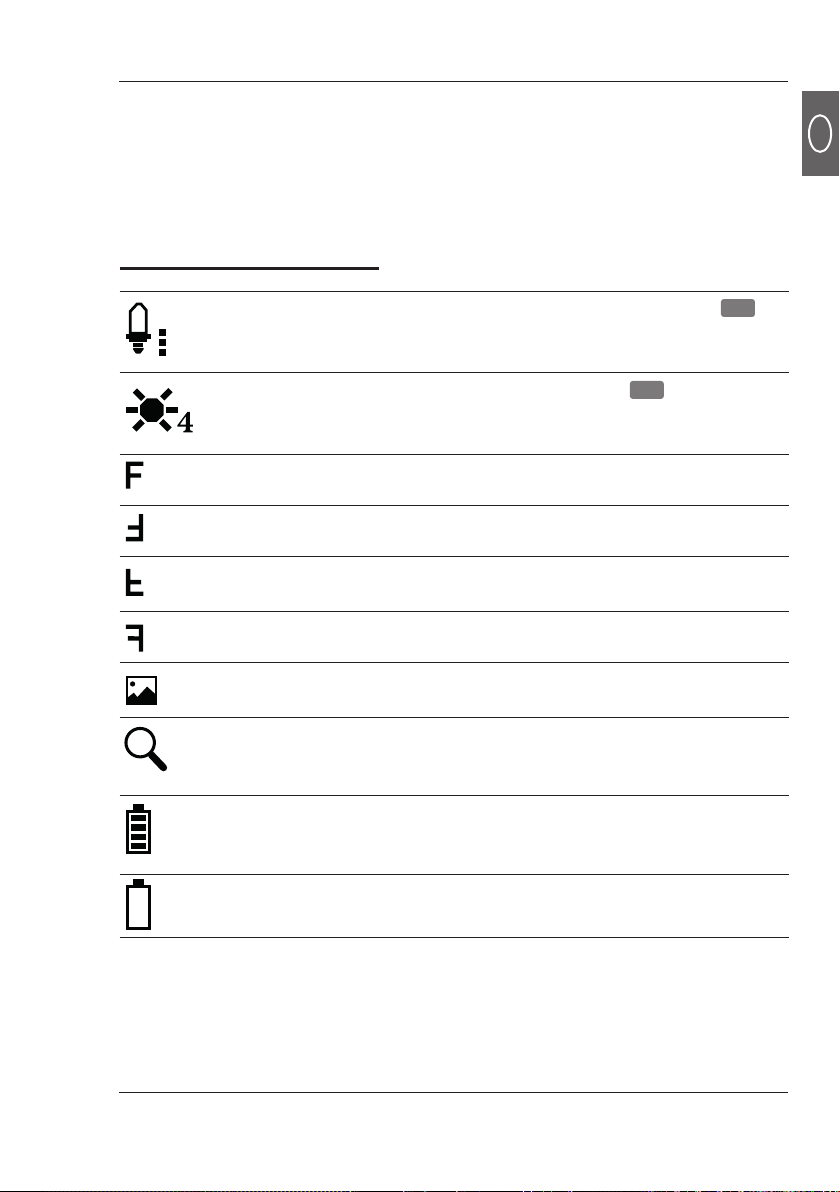
Indicates the brightness of the LED camera light 24
in 7 levels (the dots next to the symbols indicate the
respective level).
Indicates the brightness of the display 29 in 7 levels
(the number next to the symbol indicates the respective
level).
Indicates the orientation of the display at 0°.
Indicates the orientation of the display at 180°.
Indicates the orientation of the display at 180°
(mirrored).
Indicates the orientation of the display at 0° (mirrored).
Indicates the (consecutive) number of the displayed
image in relation to the number of stored images.
Indicates the magnification factor ( "Zoom") in 4 levels
(the number next to the symbol indicates the respective
level).
Indicates the available battery power in 5 levels (the
number of bars shown in the battery symbol indicates
the respective level).
Indicates insufficient battery power and prompts for
immediate replacement of the batteries.
Explanations of symbols
The model name is a combination of letters and numbers:
Micro Visioval®Ref. 294200
2X
029/100

Safety
8
EN
Safety
The inspection camera is intended for private and DIY use only for the
following purposes:
- for visual examination, inspection and troubleshooting on disconnected
systems and equipment.
- for measuring the distance to fixed objects easily;
- for contactless measurement of surface temperature.
Any other use is expressly prohibited and is considered as misuse. The
manufacturer cannot be held responsible for damage or injury caused by
misuse of the product. Examples of misuse are given in the following non-
exhaustive list:
- Using unsuitable accessories
- Using non-original spare parts.
- Incorrect operation or misuse.
- Non-observance of the operating manual.
- Repairs performed by unauthorised third party workshops.
- Power cuts or faults caused by non-observance of electrical regulations.
- Use and maintenance of the inspection camera by someone who is not
familiar with the inspection camera and/or who lacks suitable experience.
- Commercial, non-industrial or industrial use of the inspection camera.
Use the accessories according to these instructions. Failure to follow the
instructions given in this user manual may result in serious injuries and loss
of warranty. Comply with applicable local or national regulations concerning
the use of this inspection camera. Do not make any modifications to the
inspection camera. Any modification to the inspection camera may be
dangerous and is prohibited.
Proper use

Safety
9
EN
General safety instructions
WARNING!
Read the warnings and safety instructions carefully. Failure to
follow the warnings and safety instructions may result in electric
shock, fire and/or serious injuries.
a) Never use the camera on people or animals.
The camera is
not a medical device.
b) Take appropriate protective measures for the area to be
inspected.
Drains and waste pipes may contain matter or
chemicals which may be poisonous, infectious or corrosive.
c) Wear appropriate personal protective equipment such as
safety gloves, safety goggles or safety mask, respirator or
face shield.
d) To reduce the risk of contamination or infection through
germs and pathogens,
never eat, drink or smoke when
operating the camera.
e) Wash your hands and other exposed body parts thoroughly
with hot soapy water after using the camera to inspect areas
exposed to waste, chemicals or bacteria.
f) Rinse the device’s shaft thoroughly after use.
g)
Improper or negligent use can cause serious injuries.
h) Do not look directly into the LED light of the camera head,
as this can cause glare or eye damages.
Residual risk
Residual risks cannot be completely ruled out even in case of proper use.
Due to the nature of the inspection camera, the following risks may arise:
- Health hazards as a result of working with toxic or harmful materials
(e.g. asbestos).

Safety
10
EN
i) Do not use the camera in areas with live parts.
You may get
an electric shock.
Before starting the work, make sure that all
the circuits in the work area are switched off and secured
against accidental switching on.
j) Do not use the camera in areas where it may come into
contact with moving parts.
If the flexible shaft gets caught in
moving parts, it may result in damage or injury.
Before starting
the work, make sure that all the machines in the work area
are switched off and secured against accidental starting.
k) Do not use the camera in potentially explosive areas (e.g.
fuel or gas tanks),
as the static discharge can lead to an
explosion.
l) Keep children away from the camera and the attachments.
Safety warnings for batteries
CAUTION!
Batteries may contain flammable substances. If batteries are not
handled properly, they may leak, become hot, catch fire or explode
under certain circumstances. This may cause serious injuries.
a) Do not expose the batteries and the camera to extreme
conditions, like radiators or direct sunlight.
b) Never attempt to charge non-rechargeable batteries.
c) Batteries should not be reactivated using other means,
taken apart, thrown into a fire or shorted.
d) Keep the batteries out of reach of children. If children
or pets swallow the battery, seek medical attention
immediately.
e) Avoid battery fluid from coming into contact with the skin,
eyes and mucous membranes. If they come into contact
with battery fluid, rinse the affected area with clean water
and seek medical attention immediately.
Table des matières
Autres manuels Virax Appareil photo numérique


