
VIA Technologies ARTiGO-A600 Manuel utilisateur

1.00-09232015-100600
DEVELOPMENT GUIDE
ARTiGO-A600
Linux BSP v1.2

Copyright
Copyright © 2015 VIA Technologies Incorporated. All rights reser ed.
No part of this document may be reproduced, transmitted, transcribed, stored in a retrie al system, or translated into any language,
in any form or by any means, electronic, mechanical, magnetic, optical, chemical, manual or otherwise without the prior written
permission of VIA Technologies, Incorporated.
Trademarks
All brands, product names, company names, trademarks and ser ice marks are the property of their respecti e holders.
Disclaimer
VIA Technologies makes no warranties, implied or otherwise, in regard to this document and to the products described in this
document. The information pro ided in this document is belie ed to be accurate and reliable as of the publication date of this
document. Howe er, VIA Technologies assumes no responsibility for the use or misuse of the information in this document and for
any patent infringements that may arise from the use of this document. The information and product specifications within this
document are subject to change at any time, without notice and without obligation to notify any person of such change.
VIA Technologies, Inc. reser es the right the make changes to the products described in this manual at any time without prior
notice.

Linux BSP v1.
Linux BSP v1.Linux BSP v1.
Linux BSP v1.2
22
2.
..
.0
00
0 Development
Development Development
Development Guide
Guide Guide
Guide
iii
Revision History
Version
VersionVersion
Version
Date
DateDate
Date
Remarks
RemarksRemarks
Remarks
1.00 09/22/2015 Initial external release

Linux BSP v1.
Linux BSP v1.Linux BSP v1.
Linux BSP v1.2
22
2.
..
.0
00
0 Development
Development Development
Development Guide
Guide Guide
Guide
iv
Table of Contents
1.
1.1.
1.
Introduction
IntroductionIntroduction
Introduction ................................
................................................................
................................................................
................................................................
................................................................
................................................................
..........................................
....................
.......... 1
11
1
1.1.
Overview........................................................................................................ 1
1.2.
Package content............................................................................................ 1
2.
2.2.
2.
Setup Environment
Setup EnvironmentSetup Environment
Setup Environment................................
................................................................
................................................................
................................................................
...............................................................
..............................................................
............................... 2
22
2
2.1.
System requirement..................................................................................... 2
2.2.
Setup cross-compiling environment........................................................ 2
3.
3.3.
3.
Building the BSP
Building the BSPBuilding the BSP
Building the BSP ................................
................................................................
................................................................
................................................................
................................................................
................................................................
...................................
......
... 6
66
6
3.1.
Building the kernel.......................................................................................
3.1.1.
Setup the kernel source ........................................................................
3.1.2.
Build 3.0.8 kernel source.......................................................................
4.
4.4.
4.
Making Sy tem Booting Media
Making Sy tem Booting MediaMaking Sy tem Booting Media
Making Sy tem Booting Media................................
................................................................
................................................................
................................................................
............................................
........................
............ 9
99
9
4.1.
Set booting media........................................................................................ 9
4.1.1.
Prepare the Debian 7 file system ........................................................ 9
4.1.2.
Boot from eMMC..................................................................................... 9
4.1.3.
Boot from SD card................................................................................ 10
4.1.3.1.
Update the uboot parameters................................................. 10
4.1.3.2.
Format the SD card .................................................................... 11
4.1.3.3.
Install the kernel and root filesystem to SD card ............... 11
4.1.3.4.
Download the fully Debian7 file system .............................. 12
4.2.
Install the graphics and multimedia package ...................................... 15
4.2.1.
Prerequisites ........................................................................................... 15
4.2.2.
Install the graphics driver package ................................................... 15
4.2.3.
Install the Multimedia package.......................................................... 1
5.
5.5.
5.
Functionality
FunctionalityFunctionality
Functionality................................
................................................................
................................................................
................................................................
................................................................
................................................................
........................................
................
........ 18
1818
18
5.1.
Light HDMI monitor ................................................................................... 18
5.2.
Switch HDMI mode by xrandr tool ....................................................... 19
5.3.
Change the Color Depth/bpp. ................................................................ 21

Linux BSP v1.
Linux BSP v1.Linux BSP v1.
Linux BSP v1.2
22
2.
..
.0
00
0 Development
Development Development
Development Guide
Guide Guide
Guide
v
5.4.
Multimedia local playback ...................................................................... 21
5.5.
Audio adjustment....................................................................................... 22
5. .
GPIO control ............................................................................................... 24
5. .1.
GPIO hardware design......................................................................... 24
5. .2.
devmem2 utility..................................................................................... 25
5. .2.1.
devmem2 utility read and write.............................................. 2
5. .3.
Test GPIO input and output ............................................................... 28
5. .3.1.
Test GPIO connection ............................................................... 28
5. .3.2.
Set GPIO 20-23 to change GPIO 24-27 ................................ 28
5. .3.3.
Set GPIO 24-27 to change GPIO 20-23 ................................ 30
5.7.
External RTC control ................................................................................. 31
5.7.1.
External RTC hardware design........................................................... 31
5.7.2.
Display external RTC timekeeper registers..................................... 32
5.7.3.
Set date and time to external RTC.................................................... 32
5.7.4.
Test auto power-on control of external RTC................................. 33
5.7.5.
Disable alarm2 and clear alarm2 status of external RTC ............ 33
5.8.
Watch dog control .................................................................................... 34
5.8.1.
Enable the watch dog.......................................................................... 35
5.8.2.
Set the watch dog timer...................................................................... 35
5.8.3.
Get the watch dog timer..................................................................... 3
5.8.4.
Disable the watch dog ........................................................................ 37
5.9.
Set up VAB- 00-E RS485.......................................................................... 39
5.9.1.
Check whether VAB- 00-E RS485 is running on VAB- 00.......... 39
5.9.2.
How to test VAB- 00-E RS485 function .......................................... 40
5.9.3.
How to program VAB- 00-E RS485 registries ............................... 41
6.
6.6.
6.
Debug Me age
Debug Me ageDebug Me age
Debug Me age................................
................................................................
................................................................
................................................................
................................................................
................................................................
..................................
....
.. 42
4242
42
.1.
Enter U-Boot environment ....................................................................... 42
.2.
Default u-boot parameters ...................................................................... 43
Appendix A.
Appendix A.Appendix A.
Appendix A. Q&A
Q&A Q&A
Q&A................................
................................................................
................................................................
................................................................
................................................................
................................................................
......................................
............
...... 44
4444
44
Appendix B.
Appendix B.Appendix B.
Appendix B. Limitation
Limitation Limitation
Limitation ................................
................................................................
................................................................
................................................................
..............................................................
............................................................
.............................. 45
4545
45

Linux BSP v1.
Linux BSP v1.Linux BSP v1.
Linux BSP v1.2
22
2.
..
.0
00
0 Development
Development Development
Development Guide
Guide Guide
Guide
vi
Appendix C.
Appendix C.Appendix C.
Appendix C. GPIO regi ter
GPIO regi ter GPIO regi ter
GPIO regi ter ................................
................................................................
................................................................
................................................................
......................................................
............................................
...................... 46
4646
46
GPIO Input Data Registers ........................................................................................ 4
GPIO Enable Registers............................................................................................... 4
GPIO Output Enable Registers ................................................................................ 47
GPIO Output Data Registers .................................................................................... 47
GPIO Pull-up/Pull-down Enable Registers ........................................................... 48
GPIO Pull-up/Pull-down Control Registers.......................................................... 48
GPIO Interrupt Request Status Registers ........................................................... 49

Linux BSP v1.
Linux BSP v1.Linux BSP v1.
Linux BSP v1.2
22
2.
..
.0
00
0 Development
Development Development
Development Guide
Guide Guide
Guide
1
1.
1.1.
1. Introduction
IntroductionIntroduction
Introduction
1.1. Overview
This document describes how to run the Debian 7.0 OS on ARTiGO-A 00
platform and evaluate thin client functions.
1.2. Package content
The evaluation package includes:
1. Kernel source:
“/BSP/Kernel_Source_Codes/
VAB- 00_Linux_BSP_Kernel_Source_0.07.tar.gz”,
“/BSP/Frame_Buffer_Driver/ANDROID_3.0.8_VE“
2. Toolchain: “/BSP/arm_201103_gcc4.5.2.tgz“
3. Kernel image: “/EVK/Kernel_Image/uzImage.bin”
4. Graphics driver package: located in “/EVK/BSP/Graphics_Driver”folder
5. Multimedia package: located in“/EVK/BSP/Multimedia”folder
. Other file system patches:
locates in“/EVK/BSP/Others”folder
7. Uboot update package:“/EVK/Update_Package”

Linux BSP v1.
Linux BSP v1.Linux BSP v1.
Linux BSP v1.2
22
2.
..
.0
00
0 Development
Development Development
Development Guide
Guide Guide
Guide
2
2.
2.2.
2. Setup Environment
Setup Environment Setup Environment
Setup Environment
2.1. System requirement
Ho t PC:
Ho t PC:Ho t PC:
Ho t PC:
SD Card reader: SDHC compliant
Operation System: Ubuntu 10.04 x 4 version
Target board:
Target board:Target board:
Target board:
ARTiGO-A 00 platform (with 4G EMMC)
SD Card: 4GB SDHC (at least). ARTiGO-A 00 now supports up to class
SDHC.
2.2. Setup cross-compiling environment
Get root permi ion
Get root permi ionGet root permi ion
Get root permi ion
If you are not login as a root, use “su” command to get the root permission.
Setup the
Setup the Setup the
Setup the Tool Chain
Tool ChainTool Chain
Tool Chain
Please refer to 4.2.1 to connect to the network. Then perform the packages
update.
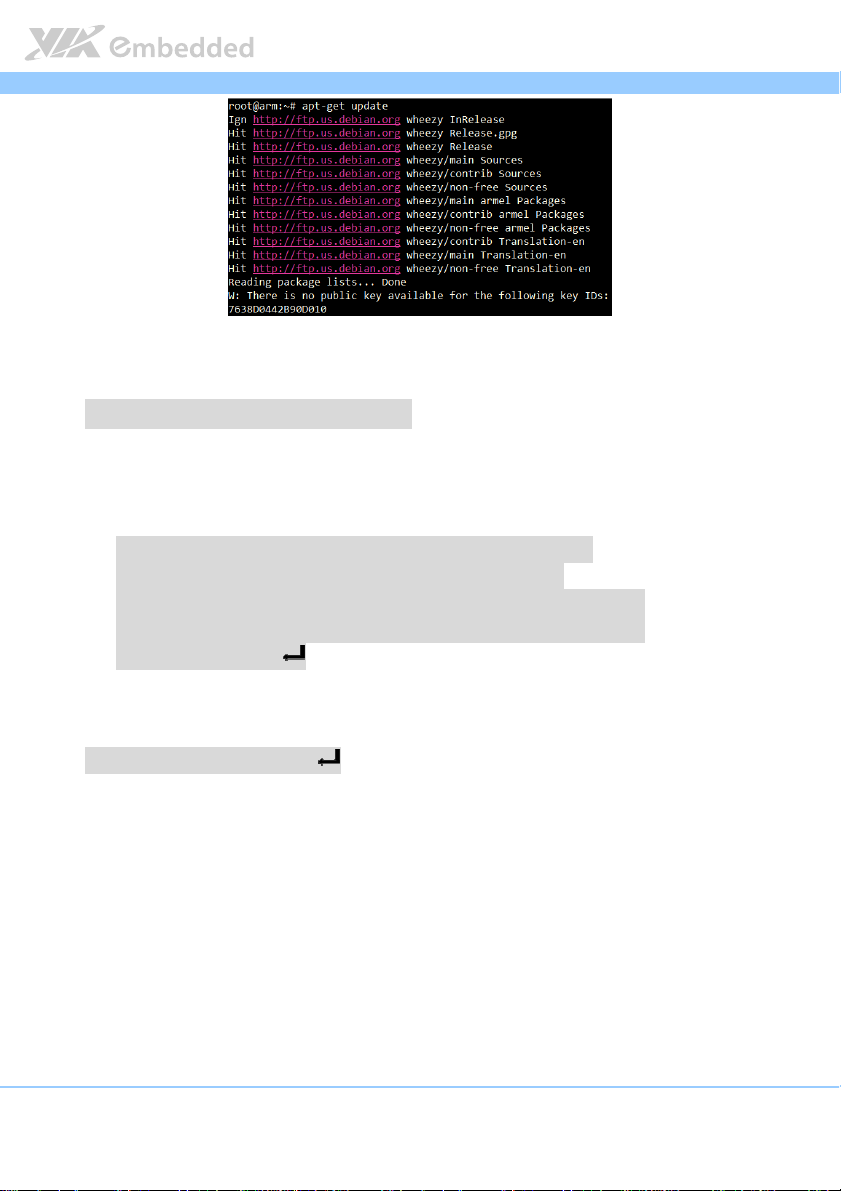
apt-get update
If apt gives a warning like this:
Linux BSP v1.
Linux BSP v1.Linux BSP v1.
Linux BSP v1.2
22
2.
..
.0
00
0 Development
Development Development
Development Guide
Guide Guide
Guide
3
Type the following command to update the debian-archive-keyring package,
the warning will go away.
#
##
#
apt
aptapt
apt-
--
-get in tall debian
get in tall debianget in tall debian
get in tall debian-
--
-archive
archivearchive
archive-
--
-keyring
keyringkeyring
keyring
Install the build essential packages.
apt-get install git-core gnupg flex bison gperf build-essential \
zip curl zlib1g-dev libc6-dev lib32ncurses5-dev ia32-libs \
x11proto-core-dev libx11-dev lib32readline-gplv2-dev lib32z1-dev \
libgl1-mesa-dev g++-multilib mingw32 tofrodos pyt on-markdown \
libxml2-utils xsltproc
Install the uboot mkimage tool.
apt-get install uboot-mkimage

Linux BSP v1.
Linux BSP v1.Linux BSP v1.
Linux BSP v1.2
22
2.
..
.0
00
0 Development
Development Development
Development Guide
Guide Guide
Guide
4
Confirm if the GNU C library version is 2.11 or newer.
# ldd --version
ldd (Ubuntu EGLIBC 2.1.11-0ubuntu7.11) 2.11.1
Copyrig t (C) 2009 Free Software Foundation, Inc.
T is is free software; see t e source for copying conditions. T ere is NO
warranty; not even for MERCHANTABILITY or FITNESS FOR A PARTICULAR PURPOSE.
Written by Roland McGrat and Ulric Drepper.
Unzip the Tool Chain to “/usr/local/arm/” (If this folder doesn’t exist in your
system previously, you must create manually with “# mkdir /usr/local/arm”)
# tar -zxvf arm_201103_gcc4.5.2.tgz -C /usr/local/arm/
As Figure 1 shows, the cross compiler is located in
“/usr/local/arm/arm_201103_gcc4.5.2/”
Figure
Figure Figure
Figure 1. The
1. The 1. The
1. The Tool
ToolTool
Toolc
cc
chain
hainhain
hain for
for for
for ARTiGO
ARTiGOARTiGO
ARTiGO-
--
-A
AA
A600
600600
600
Autres manuels pour ARTiGO-A600
1
Table des matières
Autres manuels VIA Technologies Système de contrôle


