
V-Tec DT607C Series Manuel utilisateur

USER MANUAL
DT-ENG-DT607C-V1 / 201705
• Please read this manual carefully to ensure safe and correct operation.
• Keep this manual well for future reference.
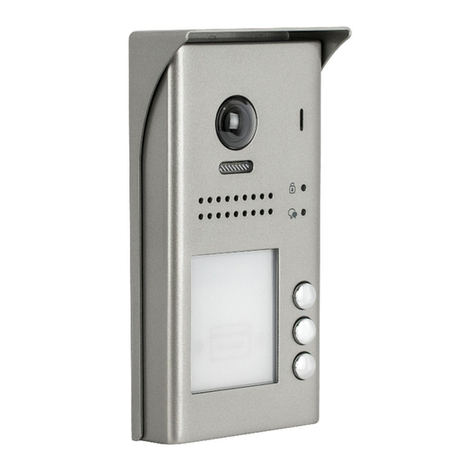
DT607C-S1 DT607C-S2
DT607C-S3 DT607C-S4
DT607C Series
2 WIRE SYSTEM


CONTENTS
PARTS AND FUNCTIONS ..................................................................................... 1
Part Names............................................................................................................. 1
Mounting................................................................................................................. 1
External Motion Detection ...................................................................................... 2
SETUP INSTRUCTIONS........................................................................................ 3
Functions Setting Up .............................................................................................. 3
Setting Door Station Address ................................................................................. 4
Setting Door Station Calling Mode ......................................................................... 4
Setting Unlock Mode .............................................................................................. 6
Setting Unlock Time................................................................................................ 6
Setting Nameplate Illumination Mode..................................................................... 7
Setting Night View LED Illumination Mode............................................................. 7
Setting Ring-back Tone .......................................................................................... 8
WIRING .................................................................................................................. 9
Connecting Electric Lock........................................................................................ 9
Connecting Basic One-to-one ............................................................................... 10
Connecting Multi Door Stations............................................................................. 10
Connecting Multi Monitors..................................................................................... 11
APPENDIX ............................................................................................................ 13
Precautions............................................................................................................ 13
Specication .......................................................................................................... 13
Cables and Requirments....................................................................................... 14

-1-
Part Names
PARTS AND FUNCTIONS
[11] [10]
[9]
[1]
[3]
[4]
[8]
[7]
[6]
[5]
[12]
[13]
[2]
[1] Microphone
[2] UNLOCK indicator
[3] CALL indicator
[4] Call button
[5] Nameplate
[6] Front panel
[7] Speaker
[8] Night view LED
[9] Camera lens
[10] Rainy cover
[11] Mounting hook
[12] Connection port
[13] Screw hole
Mounting
1 2 3 4 5
AcDbMLeader (ACDB_MLEADER_CLASS)
AcDbMLeader (ACDB_MLEADER_CLASS)
Rainy cover
Rainy cover
The distance between
the top of main unit
and rain cover should
be not less than 3mm.
Main unit
Main unit
≥3mm
1. Connect the cable correctly.
2. Drill holes in the wall to match the size of screw stoppers,then attach the rainy cover and
main unit to the wall, and the distance between the top of main unit and rain cover should be not
less than 3mm.
3. Install the name plate.
4. Attach the front panel to the main unit.
5. Use the special screwdriver and the screws to x the panel.
The installation height is suggested to 145~160cm.

-2-
PARTS AND FUNCTIONS
Terminal description
Lock Control Jumper: To select the lock type.
Motion Detector Connect Port: To connect external PIR motion detector.
Main Connect Port: To connect the bus line and the electronic locks.
• L1,L2: Connect to the bus line, no polarity.
• PL: External lock power input, connect to the power positive(power +).
• S+: Lock power(+) output.
• S-: Lock power(-) output, connect to the power(-) input of locks(only when using the door
station to power the locks, if using the external power supply for the locks, the S- will not be
connected).
1 2 3
Lock Control Jumper
PIR Motion Detector
Connect Port
+12V
GND
PIR
L1 L2
PL
S+ S-
Main Connect Port
External Motion Detection
The door station is equipped with a terminal to
connect external motion detector.
If the external motion detector is connected to
the system,following functions will be effective:
If detect someone passing by, the door station
can be activated operation to unlock or turn on
light.
12V
Motion
detector
GND
PIR
* Please contact with supplier for more details about detector connection.

-3-
SETUP INSTRUCTIONS
Functions Setting Up
KEY_1
KEY_2
KEY_3
KEY_4
KEY_SET
LED_UNLOCK
LED_TALK
LED_NAME
This section explains the settings of each
function,please refer to the following table:
To perform the settings for the function
you want,you should move away the metal
front panel. Please refer to the sketch
map.
Each operation is indicated by the lighting
up of the LED indicator on the unit, and by
the sounding of the buzzer.
Order Setting items Setting range Default value
1 Setting door station address 0~3 0
2Setting door station
calling mode Standard/Group calling mode Standard calling mode
3 Setting the unlock mode 0:opened/1:closed 0:opened
4 Setting the unlock time 01 to 99 seconds 1 seconds
5Setting the nameplate
illumination mode On/Off/Auto On
6Setting night view LED
illumination mode On/Off/Auto Auto
7 Setting ring-back tone
Ringing one time
Ring continuously
No ring-back tone
Ringing one time

-4-
Setting Door Station Address
Setting Door Station Calling Mode
Total 4 addresses can be congured. It can be modied either before or after installation.
0 is default, to change the setting, please follow the steps:
UNLOCK Indicator:OFF
TALK Indicator:OFF Buzzer Beep+, Beep
UNLOCK Indicator:OFF
TALK Indicator:OFF
Buzzer Beep+
In standby mode, press
KEY_SET button once
Press KEY_1 button to set
the first door station.
Press KEY_2 button to set
the second door station.
Press KEY_3 button to set
the third door station.
Press KEY_4 button to set
the fourth door station.
UNLOCK Indicator:OFF
TALK Indicator:OFF
Buzzer Beep,Beep
UNLOCK Indicator:OFF
TALK Indicator:OFF
Buzzer Beep,Beep,Beep
UNLOCK Indicator:OFF
TALK Indicator:OFF
Buzzer Beep,Beep,Beep,Beep
ID=0,1st door station ID=1,2nd door station ID=2,3rd door station ID=3,4th door station
SETUP INSTRUCTIONS
• If setting mode has not been exited, you can change the address of door station by pressing KEY1~4
freely.
• The LED_NAME indicator will always blink until exit out the setting mode.
• If without any operation in 10 seconds, it will exit out setting mode automatically.
• In this step,press KEY_SET button four times to exit out the setting mode manually.
There are two calling modes for door station,Standard calling mode and Group calling mode.
Please know that the door station work in Standard calling mode by default.

-5-
• If setting mode has not been exited, you can change the calling mode by pressing KEY1 circularly.
• The LED_NAME indicator will blink all the time until exit out the setting mode.
• If without any operation in 10 seconds, it will exit out setting mode automatically.
• In this step,press KEY_SET button three times to exit out the setting mode manually.
SETUP INSTRUCTIONS
* More details about code setting for monitor, please refer to corresponding user manual .
Each call button will respond different addresses when set in different calling mode. Refer to the
followings for more informations.
Call buttonA: call the monitor with address 01 by default.
Call buttonB: call the monitor with address 02 by default.
Call buttonC: call the monitor with address 03 by default.
Call buttonD: call the monitor with address 04 by default.
Call buttonA: Call all monitors in group address from
00~15.(one of the monitor should be set to 00)
Call buttonB,C,D: Call all monitors in group address from
16~31. (one of the monitor should be set to 16)
UNLOCK Indicator:OFF
TALK Indicator:ON
Buzzer Beep+, Beep
In standby mode, press
KEY_SET button twice.
UNLOCK Indicator:OFF
TALK Indicator:ON
Buzzer Beep+
Press KEY_1 button to
activate Standard calling
mode for door station.
UNLOCK Indicator:OFF
TALK Indicator:ON
Buzzer Beep, Beep
Press KEY_1 button again
to activate Group calling
mode for door station.
Press KEY_1
A
B
C
A
B
C
D
A A
B
1.Standard calling mode(Address range 01-04
by default)
2.Group calling mode
To change this setting, please follow the steps:

-6-
SETUP INSTRUCTIONS
Setting Unlock Mode
There are 2 unlock modes, Normally opened and Normally closed.
Normally opened is default, to change the setting, please follow the steps:
UNLOCK Indicator:ON
TALK Indicator:OFF
Buzzer Beep+, Beep
In standby mode, press
KEY_SET button three
times.
UNLOCK Indicator:ON
TALK Indicator:OFF
Buzzer Beep+
Press KEY_1 button to set
the unlock mode to
Normally opened.
UNLOCK Indicator:ON
TALK Indicator:OFF
Buzzer Beep, Beep
Press KEY_1 button again
to set the unlock mode to
Normally closed.
Press KEY_1
• If setting mode has not been exited, you can change the unlock mode by pressing KEY1 circularly.
• The LED_NAME indicator will blink all the time until exit out the setting mode.
• If without any operation in 10 seconds, it will exit out setting mode automatically.
• In this step,press KEY_SET button twice to exit out the setting mode manually.
Setting Unlock Time
By default, the unlock time is 1s, but it can be changed,the setting range is 1s~99s.
Follow the steps:
UNLOCK Indicator:ON
TALK Indicator:OFF
Buzzer Beep+, Beep
In standby mode, press
KEY_SET button three
times.
UNLOCK Indicator:ON
TALK Indicator:OFF
Buzzer Beep,Beep......
Press and hold on KEY_2
button. The time you holding
on is the new unlock time.
• When entering time delayed setting, the buzzer sound one time every second.
• The LED_NAME indicator will blink all the time until exit out the setting mode.
• If without any operation in 10 seconds, it will exit out setting mode automatically.
• In this step,press KEY_SET button twice to exit out the setting mode manually.

-7-
SETUP INSTRUCTIONS
Setting Nameplate Illumination Mode
There are 3 illumination modes for nameplate indicator, Normally on,Normally off and Auto.
Normally on is default, to change the setting, please follow the steps:
UNLOCK Indicator:ON
TALK Indicator:OFF
Buzzer Beep+, Beep
In standby mode, press
KEY_SET button three
times.
UNLOCK Indicator:ON
TALK Indicator:OFF
Buzzer Beep+
Press KEY_3 button to set
the nameplate illumination
mode to Normally on.
UNLOCK Indicator:ON
TALK Indicator:OFF
Buzzer Beep, Beep
Press KEY_3 button again
to set the nameplate illumina-
tion mode to Normally off.
UNLOCK Indicator:ON
TALK Indicator:OFF
Buzzer Beep, Beep,Beep
Press KEY_3 button again
and again to set the nameplate
illumination mode to Auto.
Press KEY_3
• If setting mode has not been exited, you can change the nameplate illumination mode by pressing KEY3
circularly.
• The LED_NAME indicator will blink all the time until exit out the setting mode.
• If without any operation in 10 seconds, it will exit out setting mode automatically.
• In this step,press KEY_SET button twice to exit out the setting mode manually.
Setting Night View LED Illumination Mode
There are 3 working modes for night view LED indicator, Normally on,Normally off and Auto.
Auto is default, to change the setting, please follow the steps:
UNLOCK Indicator:ON
TALK Indicator:OFF
Buzzer Beep+, Beep
In standby mode, press
KEY_SET button three
times.
UNLOCK Indicator:ON
TALK Indicator:OFF
Buzzer Beep+
Press KEY_4 button to set
the night view LED mode
to Normally on.
UNLOCK Indicator:ON
TALK Indicator:OFF
Buzzer Beep, Beep
Press KEY_4 button again
to set the night view LED
mode to Normally off.
UNLOCK Indicator:ON
TALK Indicator:OFF
Buzzer Beep, Beep,Beep
Press KEY_4 button again
and again to set the night
view LED mode to Auto.
Press KEY_4
• If setting mode has not been exited, you can change the night view LED illumination mode by pressing
KEY4 circularly.
• The LED_NAME indicator will blink all the time until exit out the setting mode.
• If without any operation in 10 seconds, it will exit out setting mode automatically.
• In this step,press KEY_SET button twice to exit out the setting mode manually.
Ce manuel convient aux modèles suivants
4
Table des matières
Autres manuels V-Tec Système de sécurité



Manuels Système de sécurité populaires d'autres marques


EDM
EDM Solution 6+6 Wireless-AE Manuel utilisateur

Highway Safety Group
Highway Safety Group EA401 Manuel utilisateur

Siren
Siren LED GSM Manuel utilisateur

Detection Systems
Detection Systems 7090i Instructions de montage

Se-Kure Controls
Se-Kure Controls MicroMini SK-4841 Manuel utilisateur

Siemens
Siemens FDM273 Manuel utilisateur