Ultimate Power UPL-12100F Manuel utilisateur

Lithium Iron Phosphate (LiFePO4)
UPL-12100F Rechargeable Battery
Operator's ManualOperator's Manual

Table of Contents
Battery Diagrams -1-
Product Information -2-
Battery Operation -2-
Battery Specications -2-
Operating Conditions -2-
Battery Heater Function -2-
Installation Instructions -3-
Charging Instructions -3-
Disharging Instructions -4-
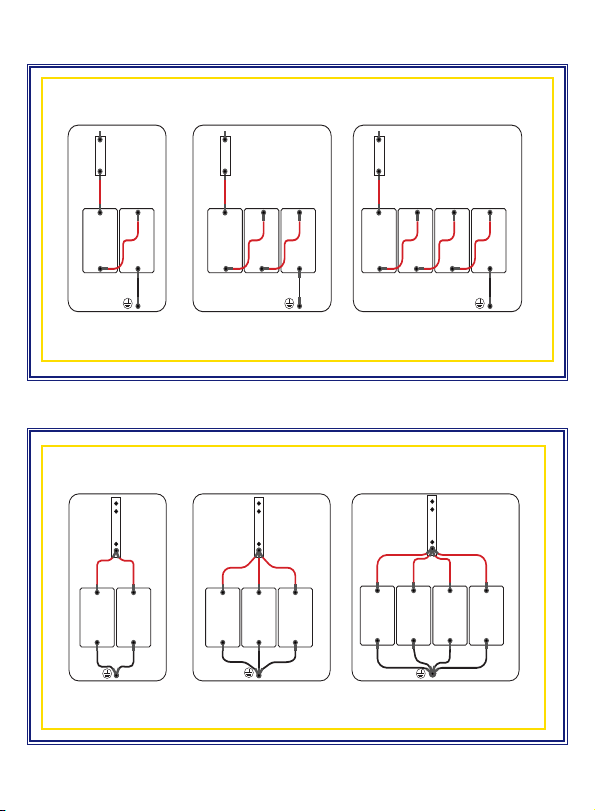
Series and Parallel Connection Instructions -4-
Wiring Diagram for Batteries in Series -5-
Wiring Diagram for Batteries in Parallel -5-
Warning & Attention -6-
Troubleshooting -7-
Storage & Transportation -8-
Warranty Information -9-
PLEASE KEEP THIS MANUAL FOR FUTURE REFERENCEPLEASE KEEP THIS MANUAL FOR FUTURE REFERENCE

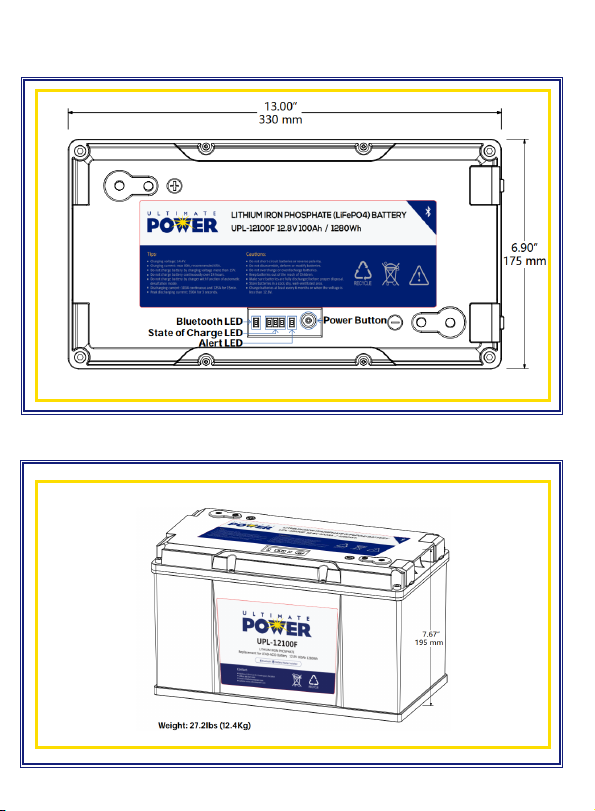
Battery Diagrams
Top View
Side View
–1–

The battery is designed and intended only for use in deep cycle applications. It is equipped with Ultimate
Power's (UP) Battery Management System (BMS) which can manage and monitor battery performance
during charge and discharge to ensure the safety and optimization of the battery. Common applications
include utility trucks, emergency vehicles, RV, yacht, golf cart, solar street light, UPS, emergency lighting,
alarm system and photovoltaic energy storage.
Product Information
C APA CI T Y
CHARGE
CURRENT
(A)
MAX
CHARGE
CURRENT
(A)
DISCHARGE
CURRENT
(A)
MAX
DISCHARGE
CURRENT
FOR 15 MIN
(A)
PULSE DIMENSIONS/
WEIGHT
INCHES (MM)
LBS (KG)
TERMINAL
BLUETOOTH
100 20 80 100 125 350 13" x 6.7" x 7.7"
(330 x 170 x 195)
27.2LBS (12.4kg)
M8 Y
Battery Specications
Operating Conditions
OPERATING AMBIENT TEMPER ATURES CHARGING VOLTAGE
AMBIENT HUMIDITY
CHARGING: -4°F to 131°F (-20°C to 55°C)
14.4V (+/- .2V) </= 85%
DISCHARGING: -4°F to 131°F (-20°C to 55°C)*
*see battery heater function for more details
Battery Heater Function
The battery uses 75W of heating strip that is installed in between the lithium cells. The battery will
only turn on below 41°F (5°C), and if the voltage rises above 13.6V. The heater will only keep heating
the battery until the battery temperature reaches 50°F (10°C.) The heater does not drain cells itself as it
runs on an external power source (i.e. alternator and/or charger.)
CAUTION:
Improper use will cause irreversible damage to the battery and could cause swelling and vent in
extreme cases.
–2–
Battery Operation
The top of the battery has one ON/OFF switch, one Alert LED, three State of Charge LED and one
Bluetooth LED. When the battery is in sleep mode it can be turned ON from the top ON/OFF switch or
through a min 2A DC load. To turn the battery o press and hold the ON/OFF button for ve seconds
then release the button. Do this twice and the battery will turn o and all the LEDs on top will turn
o. The Alert LED will turn Red once there is a fault with the battery. See Troubleshooting section for
possible faults. The three State of Charge LEDs will show how much power the battery has in it. The
Bluetooth LED will turn green if a device is connected to the batteries Bluetooth (Bluetooth application
for IOS and Android coming soon.)

Please follow the vehicle/equipment manufacturer's instructions:
• When replacing various types of deep cycle applications, please ensure the battery capacity
is not less than the original lead-acid battery.
Please check the following items for battery before installation:
• Check the battery voltage with a multimeter. If <13V, please recharge the battery
(Refer to "Charging Instruction" for guidance on recharging.)
• When connecting in series or in parallel, please ensure the capacity and voltage between
each battery is consistent (Refer to "Instruction for Connecting in Series and Parallel.")
• Please check the battery to ensure the terminals are clean, rust-free and that the screws are
clean without foreign objects.
• Please ensure that the cable connecting the battery terminals is rated for the Max Continuous
Amperage.
• Please ensure that the screws on the terminals are xed/tightened to the maximum to avoid
loosening during operation. Ensure washers are not placed between conductive connectors.
Charging Instructions
• Please ensure charging voltage is 14.4V (+/- .2V) when charging the battery.
• The charging current must not exceed the maximum charging current indicated in the
Specication section of this User Manual.
• The batteries used in series do not need to be disassembled for seperate charging. Also ensure
that the individual batteries are fully charged before connecting in series (for more details
refer to "Series and Parallel Precautions.")
• Please charge at an ambient temperature of -4°F to 131°F (-20°C to 55°C.) Charging below -4°F
or above 131°F may cause irreversible damage to battery and/or pose a safety risk (for more
details refer to "Battery Heater Function on Page 2.")
• Do not use the following modes or functions on any lithium batteries:
Equalization Mode | Desulfation Mode | Pulse Function
Installation Instructions
–3–

• Please do not exceed the maximum discharge current listed in the table under the "Specications"
section. Do not discharge the battery with Max Discharge Current several times in succession.
The battery can be discharged up to 150A @ 30 mins in emergency situations only. Repetitive
discharging at this rate can lead to battery damage and may void product warranty.
• The maximum continuous power should not exceed 1280W (i.e. battery can support 1000W
inverter) and the maximum continuous load should not exceed 1100W.
• Do not mix a new battery with a used battery in the same conguration.
Discharging Instructions
Series and Parallel Connection Instructions
• Please ensure battery is fully charged before connecting in series or parallel.
• If the battery top cover has a label showing number 1-# (i.e. 1-1, 1-2, 1-3 etc.) this means
that the batteries are grouped in manufacturing factory to ensure consistency in case
batteries are connected in series or parallel. The rst number is the group number. The
second number is the sequence within the group. Please do not mix dierent groups of
batteries.
• The battery can be connected in both series and parallel up to 4 batteries. For example, (4)
12V100Ah batteries connected in parallel can create a 12V400Ah battery bank. The parallel
wiring for the positive and negative post must be the same gauge and length (4 AWG - 16 inches.)
If you want to use them in series and in parallel concurrently, please contact Ultimate Power (UP.)
If not wired as per guidance from UP, then UP reserves the right to nullify and void product
warranty. Please contact UP for a solution.
–4–
• Do not leave battery charger connected to maintain or store the battery unless specically
programmed for 3-stage LiFePO4 battery charger. Leave charger unattended at your own risk.
• To charge a battery with a lead-acid charging system, make sure the charging voltage is <14.6V (+/-
.2V). If charging in a series, please ensure the charging voltage is <14.6V times the series number
(e.g. the charging voltage for a 4 Series Battery Charge should be <58.4V, and the charging
current must follow the instruction outlined in "Charging Instructions.")

Wiring Diagram for Batteries in Series
Wiring Diagram for Batteries in Parallel
Wiring Diagram For Lithium Batteries in Parallel Copyright ©2020 Ultimate Power Company, All Rights Reserved Nov 25, 2020 Rev:A
250A
UPL-12100F
+
-
UPL-12100F
+
-
- -
- -
- - -
UPL-12100F
+
-
UPL-12100F
+
-
UPL-12100F
+
-
300A
- - -
- - -
350A
UPL-12100F
+
-
UPL-12100F
+
-
UPL-12100F
+
-
UPL-12100F
+
-
- - - -
- - - -
Lithium Batteries in ParaLLeL
Wiring Diagram For Batteries In Series Copyright ©2020 Ultimate Power Company, All Rights Reserved Nov 25, 2020 Rev:C
UPL-12100F
+ -
UPL-12100F
+ -
UPL-12100F
+ -
UPL-12100F
+ -
- - -
-
-
150A
UPL-12100F
+ -
UPL-12100F
+ -
UPL-12100F
+ -
- -
-
-
150A
-
UPL-12100F
+ -
UPL-12100F
+ -
-
-
-
150A
-
Lithium Batteries in series
-
–5–
Note: Parallel wiring for the positive and negative post must be the same gauge and length (4 AWG - 16 inches.)

Warning and Attention
• Do not reverse the positive and negative of the battery.
• Do not touch or store the electrodes of the battery with unnecessary wires or other metal
materials to avoid short circuit.
• Do not puncture, impact, drop or step on the battery.
• Do not disassemble the battery or modify the outer casing.
• Do not expose the battery under the sun since this may cause overheat, re or failure to battery.
• Do not put the battery in a re or heat the battery. Do not store the battery in a high
temperature environment.
• Do not put the battery into water or expose to rain for a long period of time. Battery should be
stored in a cool and dry environment.
• If you detect any abnormal smell or noise while charging or discharging, remove the battery
immediately and contact the dealer.
• When the battery is operated in the temperature range of 32°F to 122°F (0°C to 50°C) the
capacity may decrease, but this does not mean that the battery is damaged.
–6–

No. Symptom Possible Causes Corrective Actions
1No DC Output
Battery being protected by BMS
Check the circuits/working
environment and conrm the
load power to ensure battery
is being charged/discharged
within Max charging/
discharging current stated in the
Specications
BMS failed Replace the battery
2
Battery work-
ing time is too
short
Charging voltage is too low and
battery cannot be fully
charged
Adjust the
charging voltage
at 14.4V
Load voltage is too high and
the battery cannot be
fully discharged
Reduce the load voltage or
replace the battery with a
larger capacity one
Over temperature Lower down ambient
temperature
Battery capacity becomes lower Replace battery
3Battery heat up
Over current Reduce load power
Over temperature Working within the operating
temperature
4Spark occurs
on cable
terminals
Initial connect to capacitive
or inductive load
No action
is required.
Power supply short circuit
Check the cause of the
short circuit and
disconnect it
Troubleshooting
–7–

Storage and Transportation
Item Criteria
Storage Temperature
<1 month 14°F to 113°F (-10°C to 45°C)
<3 months 14°F to 95°F (-10°C to 35°C)
>3 months 32°F to 86°F (0°C to 30°C)
Relative Humidity <75% RH
SOC 40% to ~60%
• To ensure longer battery lifespan, please recharge battery every 3-6 months.
• Please ensure the battery terminals and screw holes are clean and securely connected.
• If the load is in an unused situation for a long time, disconnect the battery from the load to
prevent the battery/load from leakage and causing the battery to be over-discharged.
• Insulation and shockproof materials should be used for the outer packaging to avoid sudden
collisions and squeezing during transportation.
–8–
Table des matières