
UKIND MCT-I820 Manuel utilisateur

VERSION1.02017/5/24 Page 1 of12
UKIND CO., LTD.
(11493) A3, 4F, No. 58, Zhouzi St., Neihu Dist., Taipei City, Taiwan ( R .O . C. )
TEL: 886-2-27978345; FAX: 886-2-27978834
www.uki.com.tw
MCT-I820 Body Worn Camera
Specifications
Customer:
Customer Part NO:
Maker Part No:
Maker Part Name:
Release Rev.:
Date Submitted: 2017/5/24
Specification submitted
Specification 1
Others:
Please confirm your acceptance of this approve
sheet return to send by post.
Customer’s signature:
DATE :
Approved Checked Prepared

VERSION1.02017/5/24 Page 2 of12
Police Body Worn Camera
I820
Thanks for choosing our police body worn camera - I820. Hope the camera can help you in the work of law
enforcement
1. Product Overview
The Police Body Worn camera developed by us has many process technologies such as WIFI/GPS,
photography, video and audio recording. It can help you collect evidence, standardize law-enforcing
conduct, and assure the accuracy and fairness of law enforcement.
2. Product Features
Item Parameter

VERSION1.02017/5/24 Page 3 of12
WIFI Ambarella A7LA55 Super Clear Wifi Chipset
Max Pixel 32 Mega Pixels
Video 2304x1296 30p / 1920x1080 30p / 1440x1080 30p/
1280x720 60p / 1280x720 30p / 848x480 60p/
848x480 30p / 720x480 30p
Display Screen 2 inch TFT-LCD HD Clear color display screen
Wide Angle 140°wide-angle lens
Memory Capacity Building-in 32G/ 64G
Data Interface HDMI 1.3 Support 1080P TV Output JNTSC
Continuous Recording Times 11 hours(2 Batteries)
Shoulder Microphone Support all kind of walkie-talkie
Positioning System(Optional) GPS/ Beidou Positioning
Car Mount(Optional) Support
External Power Supply(Optional) Support
3.
Quick Operation
Long press to power on or off the screen.
Short press to start voice recording, and short press again to stop recording.
Short press to take a photo.
Short press to start video recording, and short press again to stop recording.
Short press to turn on infrared light, and short press again to turn it off.
Short press to playback the last photo, video or audio files.
Short press to set the function and parameter.
Press to return the last screen.
4. Appearance and Key Description
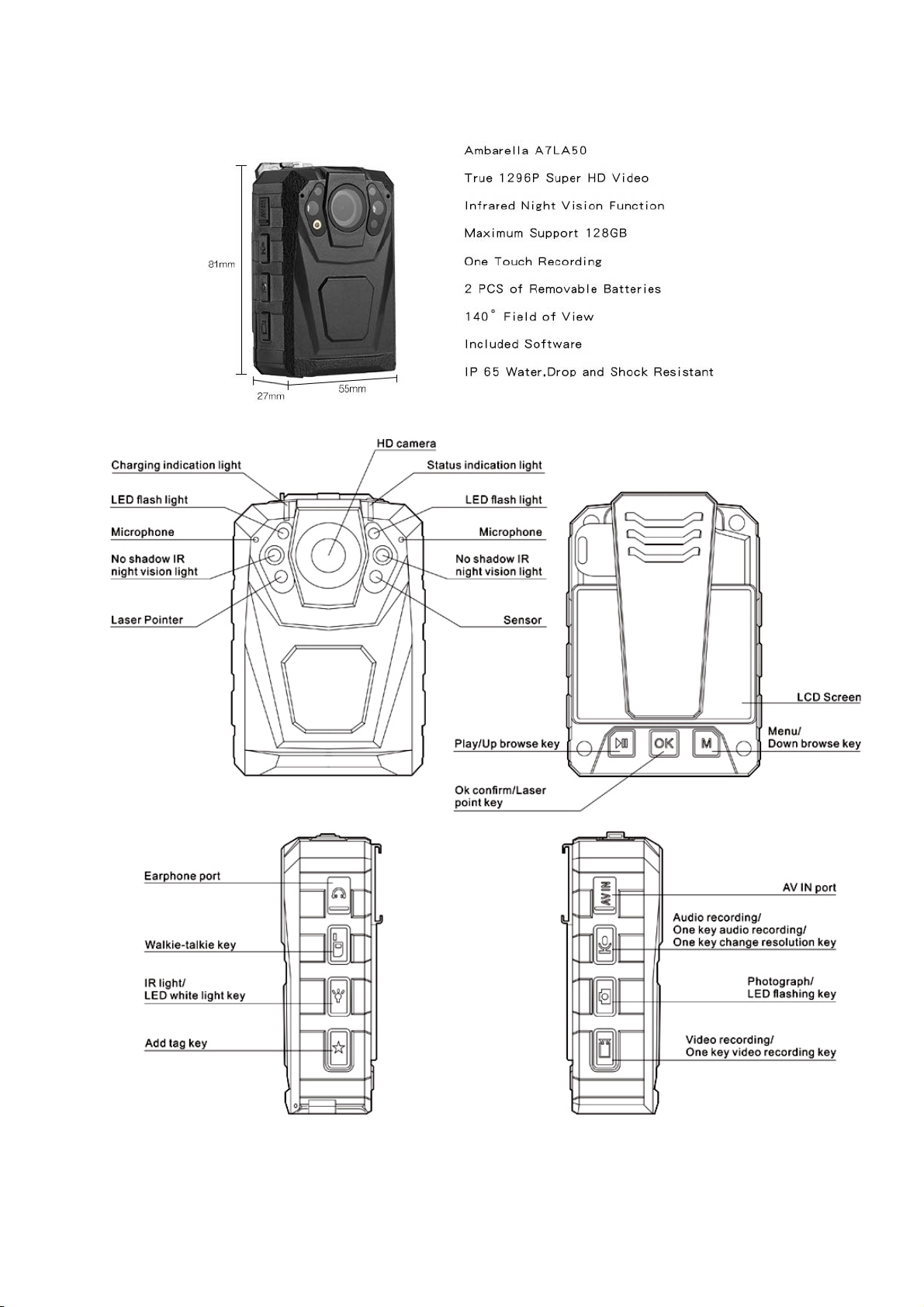
VERSION1.02017/5/24 Page 4 of12
VERSION1.02017/5/24 Page 5 of12
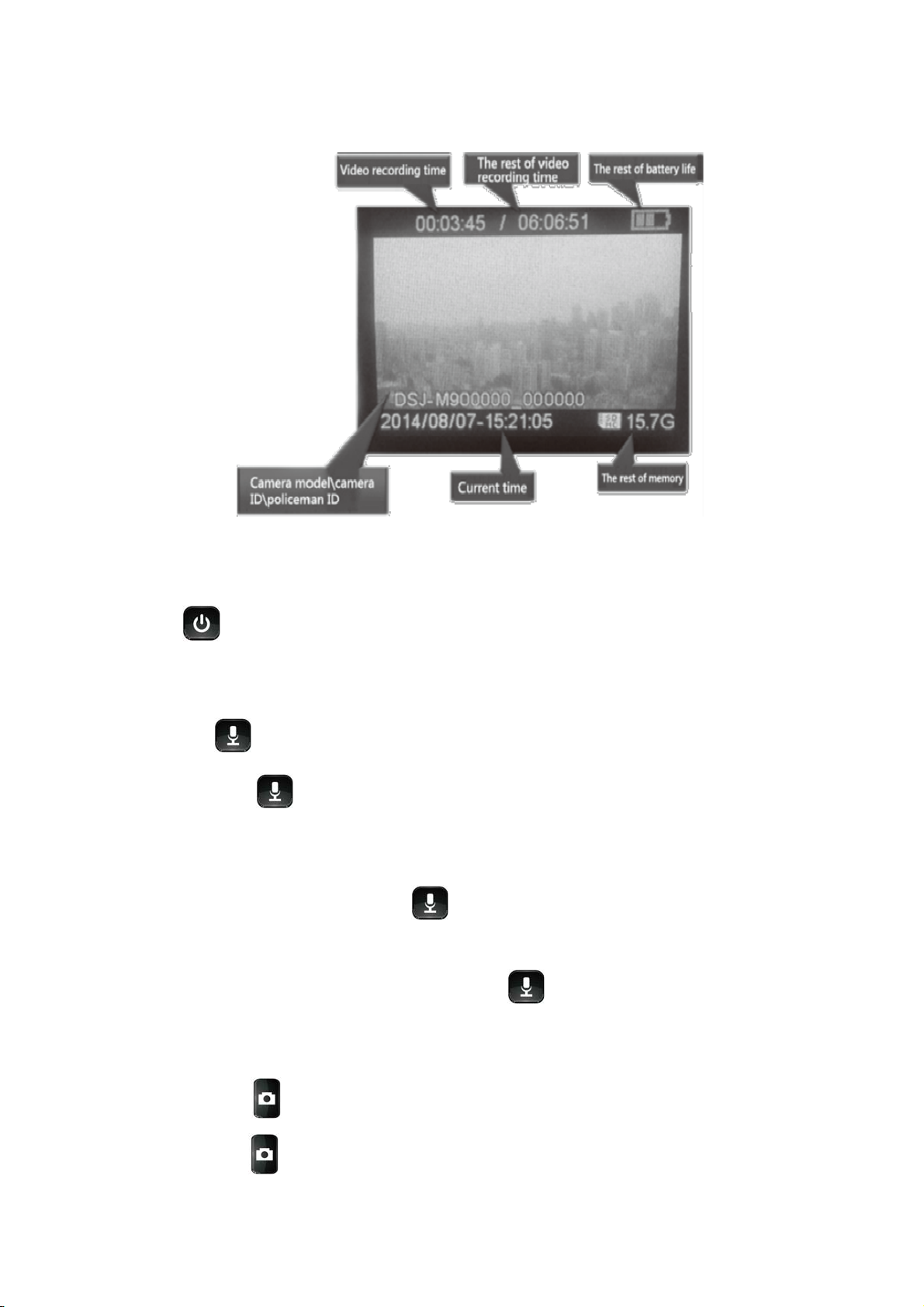
5. Display Screen Description
6. Basic Operation Description
● Boot
Press for 2 seconds, the camera will beep on with a green LED, and the camera turn to standby
mode with the screen lighted on.
● Audio recording
Short press , the camera will shake, then the LED flash to yellow and the camera start audio
recording. Press again when you want to end the audio recording, and the camera shakes again,
with the yellow LED light off and the recording stored automatically.
● One Key Audio Recording
When the camera is off, long press key for 4 seconds to start one key recording.
● One Key Change Video Resolution
When the camera is in standby mode, long press key for 4 seconds, then the camera will
automatically turn to SD or HD resolution by choice.
● Photo Taking
Short press key to take photo when the camera is in standby mode.
Long press key for 4 seconds to turn on the LED flashlight, and the light will flash under specific

VERSION1.02017/5/24 Page 6 of12
frequency.
● Video Recording
When the camera is in standby mode, short press , then the camera body will shake with voice
Guide Law-enforcement, video recording start, and afterwards the red video light flash on, which
indicates the video recording start. Press key again to stop recording, and the camera body will
shake again, with red video light off, and the recording is finished and saved. (Note: this function is
close in default)
● One Key Video Recording
When the camera is off, Long press for 4 seconds to start one key video recording.
● Focus adjustment
Long press key or to adjust the focus. (Note: Focus can’t be adjusted under HD 1920*1080
video resolution)
● Laser Pointer
Long press for 4 seconds to open laser point light. Do it again to turn it off.
● Snapshot under Video Recording
Short press key to take a photo in video recording mode.
● Switch between IR red light and LED white light
Short press to turn on IR red light. Press it again to shut down in video recording or standby mode.
The IR red light can help to record video in the night or dark environment. Long press to turn on
LED white light. Long press for 4 seconds again to turn the LED off.
● One Key Playback
Short press to fast browse the last photo, recorded audio or video file under standby mode.
● Fast forward and fast reverse.
Short press or to fast forward or fast reverse at 2X, 4X, 8x, 16X, 32X ,64X under playback
mode.
● Ok Confirm
Short press to get into video, photo, audio folder and select a file to play. Long press for 4

VERSION1.02017/5/24 Page 7 of12
seconds to open laser point light, do it again to turn off.
● Menu selection
Short press to set the function and parameter as below in standby mode.
● Resolution:
8 modes of video resolution, 2304x1296 30p/ 1920x1080 30p / 1440*1080 30P/ 1280x720 60p
/1280x720 30p / 848x480 60p/ 848*480 30P/ 720*480 30P. Short press or to select it.
( is the Page Up key, is the Page Down key in selection mode.)
● Video length selection
5mins, 10mins, 15mins, 30mins and 45mins for selection. Short press , and Short press or
to select the length.
● Video quality:
3 modes are optional to adjust video quality: best, fine and standard. Short press to enter, and
short press or to select.
● Photo size:
5M, 8M, 10M, 12M, 16M, 21M and 32M for the photo definition. Short press and short press
or to select.
● Continuous shooting:
Close (one shooting), 2/3/5/10/15/20 continuous shootings for selection. Short press to enter,
and short press or to select
● Alert tone:
Shut down, voice guide, alert tone, shake modes for option to select the key tone and video audio. If
choose shut down, the camera is mute. While choose voice guide, it will prompt Law-enforcement
video recording start.
● Sound volume: adjust the alert tone and playback sound volume.
● Slide: It will get into slide browse mode during the photo playback.
● Video pre-recording:
Pre-recording before press recording key and pre-record 10 seconds video information.

VERSION1.02017/5/24 Page 8 of12
● Delay recording:
Delay recording after press stop recording key, delay record 10 seconds video information.
● IR switch: Manual or automatic.
● GPS (optional): Open or Close.
● Vehicle-Mounted:
Open Vehicle-Mounted mode, and assemble the camera to the base, one side of data cable connect to
mini USB port on the base, the other side connect to USB port of the car. Fire the car and it will auto-
recording while fire off it will stop recording and save the video automatically. (Set it open or close in the
menu)
● LCD Brightness: High, middle, or low.
● Led light: On or off.
● Video Type:
Traffic control, criminal investigation, public security can be selected by long press key for 4
seconds. Short press or to select the mode, and short press to confirm your
selection. (Note: this function is close in default)
● Chime: voice alert hourly. (Note: this function is closed in default)
● Reset: When hang up, press , Camera will reboot and return to normal. And the data will not left.
7. Indicator Light
Standby indicator light (GREEN)
The light turns to green when the camera is powered on.
Charge indicator light (BLUE)
The light turns blue during charging, and turn off when it is full.
Video recording indicator light (RED)
The light turns red and flashing under video recording.
Audio indicator light (YELLOW)
The light turns yellow and flashing under audio recording
● Key Function Description
■ Reset key
Reset it when the camera is running wrong or hang up.
■ Combination key:
One Key Play Key / Page Up key / Focus adjustment function
■ One Key Play Key
In standby mode, press this key to playback the last audio or video file.

VERSION1.02017/5/24 Page 9 of12
■ Page Up key
Go to menu, press this key can select object to up and left.
■ Focus adjustment function.
Long press this key can adjust 8X focus change under standby or video recording mode. Press this key
can fast reverse by 2X, 4X, 8X, 16X, 32X, 64X under video recording. (Note: Focus cannot be adjusted
under HD 2304*1296 resolution)
■ Combination key: OK Confirm Key / Laser Pointer Key
■ OK confirm Key
Press this key into video, photo, audio file browse mode and confirm it.
■ Laser Pointer Key
Long press to open Laser Point light for the best positioning, and do it again to turn it off.
■Combination key:
Add * on important file
Short press this key, then a * mark for important file can be marked on the top left corner of the screen.
Video classification key
Traffic control, criminal investigation and public security can be selected when long press this key for 4
seconds. Short press or to select the mode, and short press to confirm.
WIFI Connection
Power on the police body camera, press , when the WIFI LOGO in the LCD turns green, it means
that the WIFI of the camera has been set up and started. Next step turn on the cell phone's WIFI, and
find WIFI network “body-camera-XXXX” (XXXX is the serial number.) and connect it. The initial password
for the WIFI connection is 1234567890, After connect the cell phone with the camera by WIFI, open the
APP LinkinEyes in the cell phone, and you can do the following operation: Photograph, Video Recording,
Video Playback, Settings.
To stop the WIFI connection, long press in the camera to turn off the WIFI.
When WIFI is connected, all the buttons in the camera will be locked except the power key, so the user
cannot operate the buttons of the camera, however the user can control the camera in the APP during
this time. After the WIFI is turned off, the user can operate the camera buttons normally.
■ Walkie-talkie After connect with the walkie-talkie, press this key start to talk.
■ Combination Key:
Audio recording key

VERSION1.02017/5/24 Page 10 of12
Press this key to start audio recording, press it again to stop it.
One Key Audio Recording Key
When the camera is under turn off status, 4 seconds long press this key to start audio recording, press it
again to stop it
Video Resolution Change Key
When the camera is under standby mode, long press this key for 4 seconds, the video resolution can be
changed to480 or 720.
■ Combination key: Photograph key / LED Flash light Key
Photograph Key
Short press this key to take photo.
LED Flash light Key
Long press to turn on LED flash light function.
■ Combination Key: Video Recording Key
Video Recording Key
When the camera is in standby mode, press this key to start video recording, and press it again to stop it.
One Key Video Recording Key
Under turn off status, long press for 4 seconds to start video recording, and press it again to stop it.
■ Combination key: Menu Key /Page down Key
Menu Key
Press this key into system setting interface.
Page down Key
Also press this key to select file from up and left when browse the files.
Zoom Lens Key
This key also has focus adjust function. Long press this key can adjust 8X focus change under standby
or video recording status. Press this can fast reverse by 2X, 4X, 8X, 16X, 32X, 64X under video
recording.(Note: Cannot adjust focus under HD 2304*1296 resolution )
■ Combination Key: No shadow IR night vision light key / LED Illumination Light
No shadow IR night vision light key
Short press it to open no shadow IR night vision light and help to calibrate the video object. Short Press it
again to turn it off.
LED Illumination Light
Long press this key for 4 seconds to open LED illumination function, long press it again to turn it off.
Ce manuel convient aux modèles suivants
1
Table des matières
Autres manuels UKIND Appareil photo numérique


