
UfiSpace S9705-48D Manuel


S9705-48D Hardware Installaon Guide | i
Table of Contents
1 Overview.......................................................................................1
2 Preparaon ...................................................................................2
2.1 Installaon Tools..........................................................................................2
2.2 Installaon Environment Requirements......................................................3
2.2.1 AC Version...........................................................................................3
2.2.2 DC Version...........................................................................................4
2.3 Preparaon Task Checklist...........................................................................5
3 Package Contents ..........................................................................6
4 IdenfyingYourSystem .................................................................7
4.1 S9705-48D Overview ...................................................................................7
4.2 PSU FRU Overview.......................................................................................7
4.2.1 AC Version...........................................................................................7
4.2.2 DC Version...........................................................................................8
4.3 Fan FRU Overview .......................................................................................8
4.4 Port Overview..............................................................................................9
5 MounngtheSwitchinaRack .................................................... 10
6 InstallingtheFanModules........................................................... 11
7 InstallingthePowerSupplyUnits ................................................ 12
8 GroundingtheSwitch .................................................................. 13
9 ConnecngPower ....................................................................... 15
9.1 System Power Consumpon......................................................................15
9.2 Connecng the AC Version PSU.................................................................15
9.2.1 Aaching the AC Power Cord............................................................15
9.2.2 Feeding AC Power .............................................................................15
9.3 Connecng the DC Version PSU.................................................................15
9.3.1 Before Aaching the DC Power Cable...............................................15
9.3.2 Aaching the DC Power Cable ..........................................................17
9.3.3 Tightening the Screws.......................................................................17
9.3.4 Feeding DC Power ............................................................................17
10 VerifyingSwitchOperaon .......................................................... 18
10.1 Front Panel LED .........................................................................................18
10.2 PSU FRU LED ..............................................................................................19
10.3 Fan FRU LED...............................................................................................19
11 InialSystemSetup..................................................................... 20
11.1 Connecng Console Cables .......................................................................20
11.3 Launching a Terminal Emulator ................................................................21
11.4 Accessing CLI .............................................................................................21

S9705-48D Hardware Installaon Guide | ii
12 InstallingtheTransceiver............................................................. 22
13 CauonsandWarnings................................................................ 23
13.1 Cauons and Regulatory Compliance Statements.....................................23
13.2 Installaon Locaon Statement.................................................................24
13.3 Compliance Statements.............................................................................24

S9705-48D Hardware Installaon Guide | 1
1 Overview
Providing 400GbE fabric ports, the S9705-48D enables the disaggregated architecture required
to fulll the high trac loading in a 5G mobile Ethernet network. As part of USpace’s S9700
Series, the S9705-48D is a robust, exible and carrier-grade router that is coupled with the
S9700-53DX and/or S9700-23D routers for small/medium or large clusters. Suitable for core
networking, the S9705-48D adopts service and fabric routers building blocks to provide carriers
with a beer soluon in place of the tradional chassis
With 1+1 redundancy hot-swappable PSU FRU, 3+1 redundancy hot-swappable Fan FRU,
and a high port density design, the S9705-48D delivers high system reliability, Ethernet
switching performance and intelligence to the network that helps reduce infrastructure and
administrave costs.
This document describes the hardware installaon process for S9705-48D.
S9705-48D PSU, FAN &IO ports conguraons are shown as below:
Managementport IO ports FAN PSU
1 x 10/100/1000BASE-T RJ45 48 x QSFP-DD 3+1 Redundant 1+1 Redundant
2 x 10G SFP+ 8038 FAN Module 2000W PSU
1 x RJ45/Micro USB Serial Console
*Note: Serial Console works either one in the same me and RJ45 has higher priority

S9705-48D Hardware Installaon Guide | 2
2 Preparaon
2.1 InstallaonTools
Screwdriver (Phillips head #2)
Insulaon Wire Lead
Ground Wire
(size #6 AWG)
0.5 +/- 0.02”
(12.7 +/- 0.5 mm)
Philips screwdriver 6-AWG wire for grounding
Crimping Tool
Grounding Lug
Wire Stripping Tool Stripping Tool
• Desktop or laptop with terminal emulaon soware. Refer to secon 11, for details.
• Baud rate: 115200 bps
• Data bits: 8
• Parity: None
• Stop bits: 1
• Flow control: None
S9705-48D Hardware Installaon Guide | 3
2.2 InstallaonEnvironmentRequirements
2.2.1 ACVersion
• Power Reserve: The S9705-48D uses two 1+1 redundant, acve/acve 200 to 240 voltage
AC power supply eld replaceable units. To ensure the acve/acve feed power design
funcons properly, it is recommended that the eld has dual power circuits and has a
reserve of at least 1500 wa on each circuit.
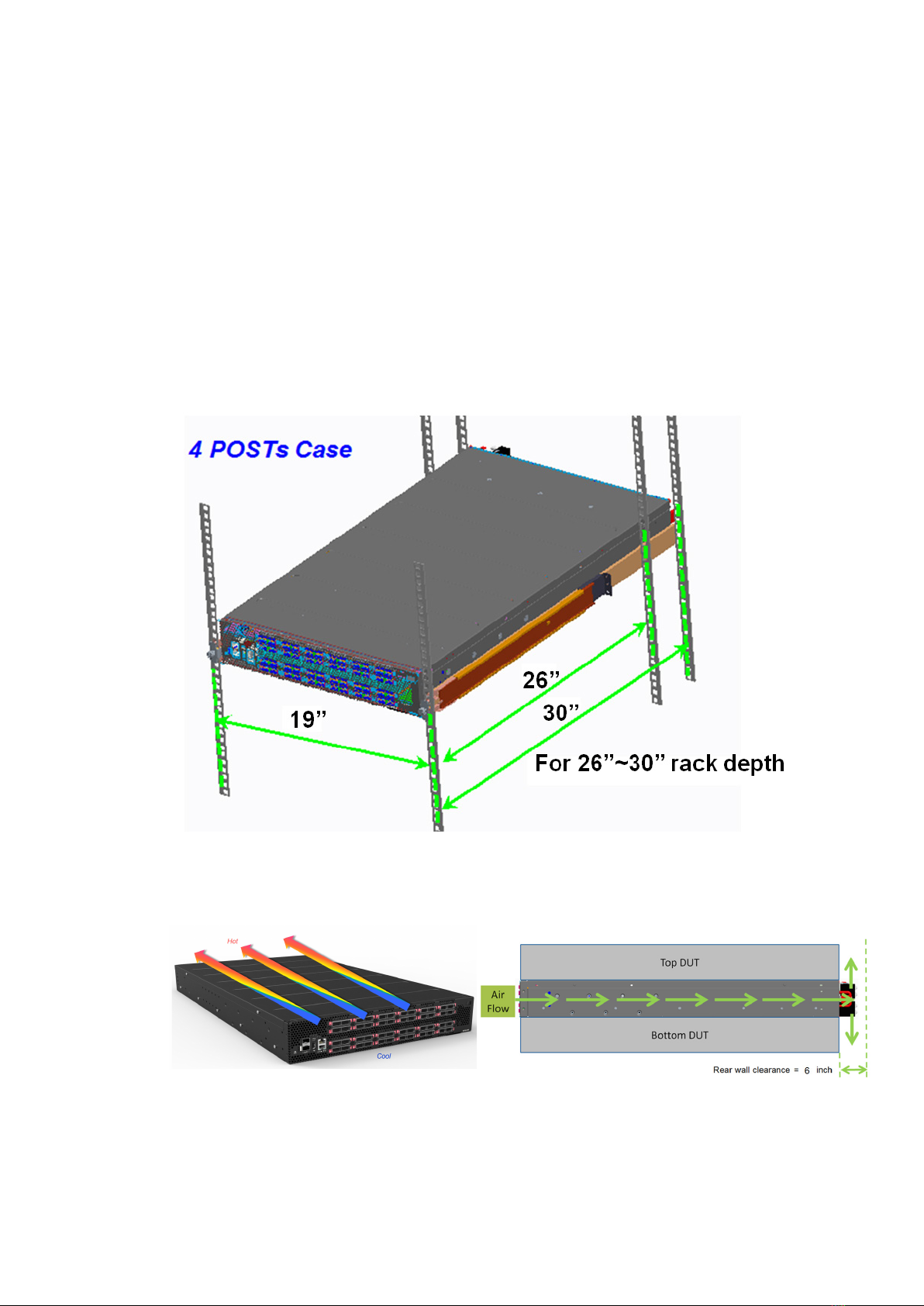
• Space Clearance: The S9705-48D chassis width is 17.16 inches (43.6cm) and shipped with
rail rack kit and adjustable mounng rails suit for 19 inch (48.3cm) wide racks. The depth of
the S9705-48D chassis is 30 inches (76.2cm) without the eld replaceable units (FRUs). The
handle of fan FRU is 1 inch (2.5cm) and the handle of the PSU FRU is 1.5 inches (3.8cm). A
minimum space clearance of 6 inches (15.2cm) is required for the side with the fan FRUs
and PSU FRUs. A total minimum reserve depth for the cabinet is 36 inches (94.4cm).
• Cooling: The S9705-48D airow direcon is front-to-back. Make sure the air ow is in the
same direcon with other equipment in the same rack

S9705-48D Hardware Installaon Guide | 4
2.2.2 DC Version
• Power Reserve: The S9705-48D uses two 1+1 redundant, acve/acve -48 voltage DC power
supply eld replaceable units. To ensure the acve/acve feed power design funcons
properly, it is recommended that the eld has dual power circuits and has a reserve of at
least 1500 wa on each circuit.
• Space Clearance: The S9705-48D chassis width is 17.16 inches (43.6cm) and shipped with
rail rack kit and adjustable mounng rails suit for 19 inch (48.3cm) wide racks. The depth of
the S9705-48D chassis is 30 inches (76.2cm) without the eld replaceable units (FRUs). The
handle of the fan FRU is 1 inch (2.5cm) and the handle of the PSU FRU is 1.5 inches (3.8cm).
A minimum space clearance of 6 inches (15.2cm) is required for the side with the fan FRUs
and PSU FRUs. A total minimum reserve depth for the cabinet is 36 inches (94.4cm).
• Cooling: The S9705-48D airow direcon is front-to-back. Make sure the air ow is in the
same direcon with other equipment in the same rack

S9705-48D Hardware Installaon Guide | 5
2.3 PreparaonTaskChecklist
Task Check Date
Powervoltageandelectriccurrentrequirement:
(AC Version: 200 to 240V AC, 12.5 x 2 ampere maximum
DC Version: -40 to -72V DC, 60 to 33 x 2 ampere maximum)
Installingspaceandweightloadrequirement:
(S9705-48D chassis has a height of 2RU (3.45”/8.8cm), a width of 19”
(48.3cm), and a depth of 30” (76.2cm) without considering cable roung).
Thermalrequirement
(S9705-48D working temperature is 32 to 113°F (0 to 45°C), airow
direcon is front-to-back)
Installingtoolsrequirement
(Screwdriver Philips head #2, Wire-stripping tools for stripping 6-AWG,
crimping tool for ground lug)
Accessoryrequirement
(Desktop or laptop with terminal emulaon soware and USB port)

S9705-48D Hardware Installaon Guide | 6
3 Package Contents
AccessoryList:
Item Descripon Sepc.&Dimensions Q’ty Weight
1
1-1 Grounding Lug
DC Version:
1.54” x 1.47” x 0.49”
(# 6 AWG)
(39 x 37.5 x 12.5mm)
5 pcs 0.14lbs (63.6g)/1 pcs
AC Version:
1.54” x 1.47” x 0.49”
(# 6 AWG)
(39 x 37.5 x 12.5mm)
1 pcs 0.14lbs (63.6g)/1 pcs
1-2 Screw Kit
(for Ground Lug)
2 x Screw M4*L8.0mm
2 x M4 Lock Washers
2 sets 0.01lbs (2.6g)/1 set
1-3 Micro USB Cable 3.28’ (1m) 1 pcs 0.5lbs (24.4g)/1 pcs
1-4 RJ45 to DB9 Female
Cable 8’ (2.4m) 1 pcs 0.27lbs (123.9g)/1 pcs
2
2-1 Adjustable Mounng
Rail (for 4 post)
30.4” x 1.7” x 0.9”
(771 x 44 x 22mm)
(22”~33” rack depth)
2 pcs 7.01lbs (3.2kg)/2 pcs
3.5lbs (1.6kg)/1 pcs
2-2
Screw Kit
(for Rack Mount
Bracket)
2 x Screw M4.0*L5.5mm 2 sets 0.004lbs (1.9g)/1 set
Physicalinformaon:
Componentphysicalinformaon
Weight
Chassis without FRUs 45.2lbs (20.5kg)
S9705-48D full set 54.9lbs (24.9kg)
PSU DC PSU: 2.6lbs (1.2kg)
AC PSU: 2.6lbs (1.2kg)
Fan module 1.1lbs (498g)
Ground lug kit 0.6lbs (66.2g)
Adjustable rail slide 7lbs (3.2kg)
Micro USB cable 0.1lbs (24.4g)
RJ45 to DB9 Female
cable 0.27lbs (123.9g)
AC power cord
(AC version only) 0.7lbs (318g)
Dimension
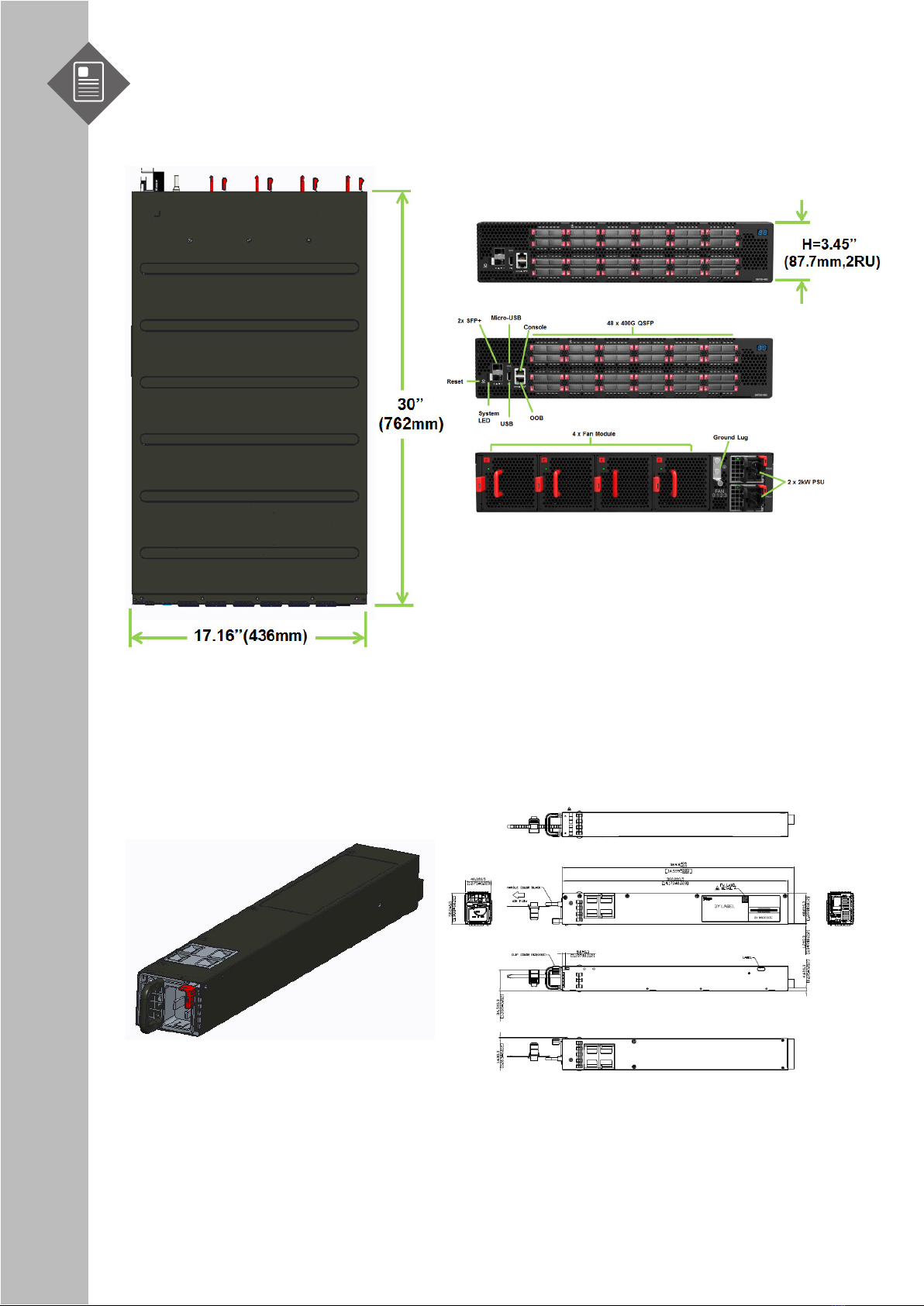
S9705-48D (W x D x H) 17.16” x 30” x 3.45” (436 x 762 x 87.6mm)
PSU FRU (W x L x H) 1.99” x 14.17” x 1.58” (50.5 x 360 x 40mm)
Fan module (W x H x D 3.15” x 3.15” x 4.8” (80 x 80 x 122mm)
S9705-48D Hardware Installaon Guide | 7
4 IdenfyingYourSystem
4.1 S9705-48D Overview
4.2 PSUFRUOverview
1+1 Redundant, hot swappable power supply eld replaceable unit (PSU FRU).
4.2.1 ACVersion
Autres manuels pour S9705-48D
1
Table des matières
Autres manuels UfiSpace Routeur réseau

UfiSpace
UfiSpace S9600-32X Manuel

UfiSpace
UfiSpace S9610-36D Manuel

UfiSpace
UfiSpace S9600-56DX Manuel

UfiSpace
UfiSpace S9600-30DX Manuel

UfiSpace
UfiSpace S9705-48D Manuel

UfiSpace
UfiSpace S9701-82DC Manuel

UfiSpace
UfiSpace S9600-28DX Manuel

UfiSpace
UfiSpace S9601-104BC Manuel

UfiSpace
UfiSpace S9600-72XC Manuel

UfiSpace
UfiSpace S9700-23D Manuel
Manuels Routeur réseau populaires d'autres marques


NETGEAR
NETGEAR FS526T - Switch Manuel utilisateur

Korenix
Korenix JetNet 5710G Series Manuel utilisateur

Automated Logic
Automated Logic ZN551 Manuel du propriétaire

Cisco
Cisco ASR 1000 Series Manuel de l'opérateur

EnGenius
EnGenius ESR-9710 Manuel utilisateur

Cisco
Cisco 805 Series Instructions d'utilisation et de sécurité