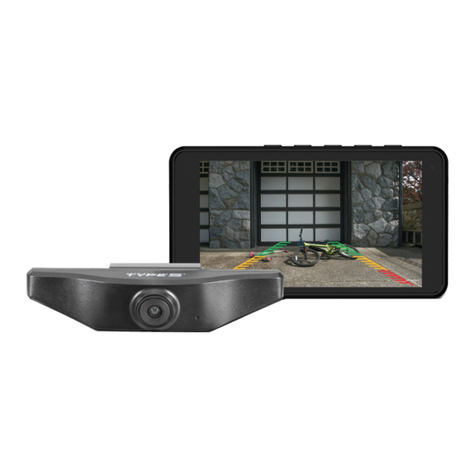
TypeS BT56780 Mode d’emploi

Important, retain for future reference:
Read carefully
ADD-ON WIRELESS PARKING CAMERA
Extension Kit for Wireless Backup Camera - BT57132 / Costco ITM. / ART. 1344584
ITM. / ART. 1362874
WP ITM. BT56780
Care & Use Instructions

TABLE OF CONTENTS
1. Introduction ...............................................................................................................................................................................1
2. Package Contents ...................................................................................................................................................................2
3. Product Specications ..........................................................................................................................................................3
4. Product Overview.....................................................................................................................................................................3
5. Before You Install ......................................................................................................................................................................4
6. Installation Guide ....................................................................................................................................................................4
7. Pairing ...........................................................................................................................................................................................7
8. Safety Information ..................................................................................................................................................................8
9. Maintenance & Warranty ...................................................................................................................................................11
10. General Information ..........................................................................................................................................................14

1
Please read all of the installation instructions carefully before installing the product. Improper
installation will void manufacturer’s warranty. The installation instructions do not apply to all types
of vehicles, and are written as guidelines to assist in installing the system.
Consult an experienced technician if you are not comfortable installing the product. You can also
contact Type S at 866.294.9244 to speak to one of our installation specialists if you have any specic
questions regarding the Add-on Wireless Parking Camera.
BEFORE using the Add-on Wireless Parking Camera, please read the safety information
provided in this user manual. ALWAYS use the product as outlined in this user manual.
Please make sure to read and understand all local laws and regulations regarding cameras and their
use in a vehicle. Laws vary by state.
1. INTRODUCTION

2
1. Add-on Wireless Parking Camera
2. 33” MicroUSB Charging/Data Cable
3. 2 x License Plate Machine Screw
(Optional)
2 x License Plate Self-Tapping Screw
(Optional)
4. 2 x Two Way Mounting Tab (Optional)
5. 2 x Mounting Screw & Nut (Optional)
6. Instruction Manual
7. Quick Install Guide
8. Warranty Card
2. PACKAGE CONTENTS
1. 5.
2. 6.
3. 7.
4. 8.

3
3. PRODUCT SPECIFICATIONS
4. PRODUCT OVERVIEW
Frequency: 2.4GHz
Operating Voltage: DC 5V
Operating Temperature: 14ºF~122ºF (-10ºC~50ºC)
Camera Water Resistance: IP65 Rating
Battery Capacity: 3350mAh
Maximum Signal Range: 33 Feet/10 Meters
(without interference or obstruction)
Power Button
MicroUSB
Charging Port
Blue LED Indicator

4
Please charge and test the Camera before you install on your vehicle.
1. Fully charge camera. Fold back camera power port plug and insert included charging cable.
Most AC wall adapters will work with the USB charging cable.
2. Make sure you already purchase and install the Solar Wireless Backup Camera with 6.8”
Widescreen HD Monitor - BT57132 / Costco ITM. / ART. 1344584.
6. INSTALLATION GUIDE
5. BEFORE YOU INSTALL
A STANDARD INSTALLATION:
2. Secure the Solar Wireless Backup Camera
and license plate with screws
back onto the rear of your vehicle.
Blue LED light
4. Power on the Monitor with the 12V/24V
adapter. You can see the parking view when
you wake up the Solar Wireless Backup
Camera by tapping once on the screen or
motion trigger in front of Monitor.
3. Push and hold the power button of
the Solar Wireless Backup Camera
for 1 second, the blue LED light
will ash 2 times.
1. Unscrew your license plate.

5
B LOWERING INSTALLATION FOR VEHICLES WITH TRUNK OR HATCH DOOR RELEASE
1. Unscrew and remove your license plate.
2a. Unscrew and detach the original
Mounting Tabs from the back of the
Solar Wireless Backup Camera.
3. Install the license plate onto the Solar Wireless
Backup Camera with the Mounting Screws &
Nuts.
4. Secure the Solar Wireless Backup Camera
with the license plate back onto the rear of your
vehicle.
2b. Install the Two Way Mounting Tabs onto
the Solar Wireless Backup Camera.
(This allows more clearance for nger tips to release door latch)

6
C RAISED INSTALLATION FOR TRUCKS & SUV WITH STEP BUMPERS
1. Unscrew and remove your license plate.
3. Finally, install the Solar Wireless Backup
Camera and license plate onto the rear of
your vehicle and tighten the Mounting Nuts
with a wrench.
2. Install the Two Way Mounting Tabs using
original Plates Screws and Mounting Screws.
Warning: Lower tailgate on pickup trucks slowly and check for minimum ¼ inch clearance between
gate and top of camera frame. This check is because some bumpers are installed higher than others.
*Please follow your local laws and regulations regarding constant monitoring while driving. It is
recommended that you glance at the image only when in reverse, and use as an aid. Do not rely
solely on the camera view to back up.
(This will raise the camera frame out of the cavity of the step bumper)
Original Plate Screw
Step Bumper
Mounting
Screw
Two Way
Mounting Tab
Mounting
Nut

7
With the Solar Wireless Backup Camera with 6.8” Widescreen HD Monitor - BT57132 / Costco
ITM. / ART. 1344584 pre-paired as rear camera, you can set the Add-on Wireless Parking Camera -
BT56780 as the front camera following these easy steps:
1. Press and hold the Power Button under
the Add-on Wireless Parking Camera for
6 seconds, or until the LED ashes Blue
continuously. The camera will be turned on
and enter Pairing Mode for 1 minute.
2. On the Dash Monitor, tap
the Settings icon and then
tap Pair Camera to enter
the pairing screen. Tap Front
Camera - Click to pair.
3. The camera should be paired
within 2 seconds.
Blue LED light
7. PAIRING

8
WARNING: A failure to read and follow these warnings and instructions may result in a serious
accident, including damaged property or a serious injury, including loss of life.
• The Add-on Wireless Parking Camera is designed as an aid to the driver in detecting large
stationary objects to help avoid damaging the vehicle. However, you, the driver, must use it
safely and properly. Use of the Add-on Wireless Parking Camera is not a substitute for safe,
proper and legal driving.
• Never back up while looking only at the screen. You should always check behind and around
the vehicle when backing up just as you would if the vehicle did not have the Add-on Wireless
Parking Camera. Always make sure your intended path is clear. If you back up while looking only
at the Monitor, you may hit a vehicle, pedestrian, bicyclist, child, pet or other object resulting in
injury or death. Always back up slowly.
IMPORTANT SAFETY INSTRUCTIONS
1. SAVE THESE INSTRUCTIONS– This manual contains important safety and operating instructions of
12V Car charger for Model BT56780.
2. Before using the product, read all instructions and cautionary markings.
3. Do not expose car charger to rain, moisture, or snow.
4. Use of an attachment not recommended or sold by the product manufacturer may result in a risk
of re, electric shock, or injury to persons.
5. To reduce risk of damage to cigarette lighter connector and cord, pull by cigarette lighter
connector rather than cord when disconnecting car charger.
6. Make sure cord is located so that it will not be stepped on, tripped over, or otherwise subjected to
damage or stress.
7. Do not operate car charger with damaged cord or cigarette lighter connector – replace it
immediately.
8. Do not operate car charger if it has received a sharp blow, been dropped, or otherwise damaged
in any way; take it to a qualied serviceperson.
9. Do not disassemble car charger; take it to a qualied serviceperson when service or repair is
required. Incorrect reassembly may result in a risk of electric shock or re.
10. To reduce risk of electric shock, unplug charger before attempting any maintenance or cleaning.
Turning o controls will not reduce this risk.
8. SAFETY INFORMATION
Ce manuel convient aux modèles suivants
1
Table des matières
Autres manuels TypeS Appareil photo numérique