
Tuta B12 Manuel utilisateur

TUTA B12
GSM REMOTE CAMERA
User Manual
Manual version 3.0

TUTA-B12 GSM REMOTE CAMERA USER MANUAL
2
TUTA Series GSM Remote Camera
Thank you for purchasing the TUTA camera. This camera is a remotely controlled
image-capturing device consisting of a microphone, infrared lighting and a high quality
300,000-pixel camera. The TUTA camera can capture images according to
pre-programmed remote commands and send them to your multimedia messaging (MMS)
enabled mobile phone. You can control and change the camera settings via SMS
command.
The MMS sent by the TUTA camera can be viewed by using your mobile phone. You also
can opt to view a slide of consecutive photos taken by the GSM Remote camera.
The built-in high-light infrared LED’s allows the camera to capture clear images, even in
dark environment.
The TUTA camera is compatible with standard 433MHz wireless sensors such as panic
buttons, PIR-, door magnet- and smoking sensors.
All services and functions need to be supported by the selected GSM network and a SIM
card.
This brochure suits for TUTA-B12 model.
Details of the functioning and advanced operation of this camera are described in this
instruction manual.

TUTA-B12 GSM REMOTE CAMERA USER MANUAL
3
CONTENTS
For your safety ...........................................................................................................5
Exception clause........................................................................................................6
Chapter 1 Structure Instruction ........................................................................................7
1.1 Package contents...............................................................................................7
1.2 Products features...............................................................................................8
1.3 Remote control instruction..................................................................................9
Chapter 2 Installation and power on/off..........................................................................10
2.1 Installing the SIM card....................................................................................100
2.2 Extending the camera’s base board ..Σφάλμα! Δεν έχει οριστεί σελιδοδείκτης.0
2.3 Connecting to power adapter..........................................................................111
2.4 Mounting the camera ......................................................................................111
2.5 Power on/ off..................................................................................................122
Chapter 3 Define the user and basic operation ............................................................133
3.1 User authorization level..................................................................................133
3.2 Setup master number.....................................................................................144
3.2.1 Add a master number to the camera..........................................................144
3.2.2 Change the master number.......................................................................144
3.2.3 Change password.....................................................................................144
3.3 Define family user ..........................................................................................155
3.3.1 Add a family number .................................................................................155
3.3.2 Delete family number................................................................................155
3.4 Define guest user...........................................................................................155
3.5 MMS parameter settings ................................................................................155
3.6 Capturing images...........................................................................................166
3.7 Arming or disarming the camera.....................................................................177
3.7.1 Arming TUTA camera................................................................................177
3.7.2 Camera alarm...........................................................................................177
3.7.3 Disarming TUTA camera ...........................................................................177
3.8 Emergency alarms .........................................................................................188

TUTA-B12 GSM REMOTE CAMERA USER MANUAL
4
3.9 Wireless sensor(s) ...........................................................................................18
3.9.1 Loading sensor to camera...........................................................................18
3.9.2 Removing a sensor from camera.................................................................19
3.10 Resetting the camera .....................................................................................19
Chapter 4 Advanced settings.......................................................................................200
4.1 Remote control...............................................................................................200
4.1.1 Pairing a remote control............................................................................200
4.1.2 Remote control instruction.........................................................................200
4.1.3 Removing remote controls from the camera ..............................................211
4.2 Infrared body detector....................................................................................211
4.3 Camera language...........................................................................................211
4.4 Image size .....................................................................................................211
4.5 Image quantity ...............................................................................................211
4.6 Beep tone ......................................................................................................222
4.7 SMS alarm setting..........................................................................................222
4.8 MMS alarm setting .........................................................................................222
4.9 Dialing phone call when the alarm is triggered................................................222
4.10 LED indicator setting....................................................................................222
4.11 SMS notification upon the power supply changes .........................................222
Chapter 5 General troubleshooting..............................................................................233
Chapter 6 Main technical parameters...........................................................................244
Appendix: SMS commands list ....................................................................................255

TUTA-B12 GSM REMOTE CAMERA USER MANUAL
5
1. Purchase a GSM SIM card (mobile phone card) from a
GSM network service provider and install it in the camera.
This SIM card number is referred as TUTA camera number
on this brochure.
2. The user needs to activate the MMS function and Caller ID
Presentation function of SIM card, and deactivate PIN
code of the SIM. Contact with GSM network service for
support.
3. Change the original password at the beginning use. Be
sure to keep the password and SIM card number secret.
Do not disclose this information to anyone other than the
authorized users in order to ensure your safety.
For your safety
This product is a wireless signal
transmission device. Keep it away from
electronic equipment likely to interfere
with the wireless signals to avoid signal
interference.
Switch off your TUTA and mobile phone
when entering areas marked
"Explosive", "Might explode", "Turn Off
wireless transceiver devices", etc.

TUTA-B12 GSM REMOTE CAMERA USER MANUAL
6
Do not throw this product in a fire, as
this may cause the battery to explode.
Exception clause
1. We operate on a policy of continuous
development. We reserve the right to make
changes and improvements to any of the
products described in this document without
prior notice.
2. For the latest product information, please
visit: http://www.i-tuta.com. We don’t
guarantee for the document veracity,
reliability or any content except regulate in
proper laws, including no guarantee for
product suitability for intended application.
3. Use only this product according to the law.
We take no responsibility for the illegal use
of this product.
4. We take no responsibility for any loss of data
or income; or any special, incidental,
consequential or indirect damages
howsoever caused.
5. The contents of this document are provided
(as is). Except as required by applicable
law, we provide no warranties of any kind,
expressed or implied, including, but not
limited to the accuracy, reliability or contents
of this document. We reserve the right to
revise this document or withdraw it at any
time without prior notice.
This product should only be operated
from power approved by the product
manufacturer. The use of any other
types of power may damage the
product.
Keep the product and its accessories
out of the reach of children.

TUTA-B12 GSM REMOTE CAMERA USER MANUAL
7
Chapter 1
Structure Instruction
1.1 Package contents
Camera host 1 pc Remote control 2 pcs
Power adapter 1 pc User manual 1 pc

TUTA-B12 GSM REMOTE CAMERA USER MANUAL
8
1.2 Products features
Figure 1: TUTA camera instructions
Tip: Keep the camera lens clean to insure best image quality.

TUTA-B12 GSM REMOTE CAMERA USER MANUAL
9
1.3 Remote control instruction
Battery: One 3.0V CR2032 battery.
Battery: One 27A/12V battery.
Figure 2: Remote control instruction
Note: There is battery holder on the rear of the remote control. When this battery is running
out of power, the TUTA camera will emit BEEP warning tone and then send a SMS
notification message to Master user.
TUTA-B12 GSM REMOTE CAMERA USER MANUAL
10
Chapter 2
Installation and power on/off
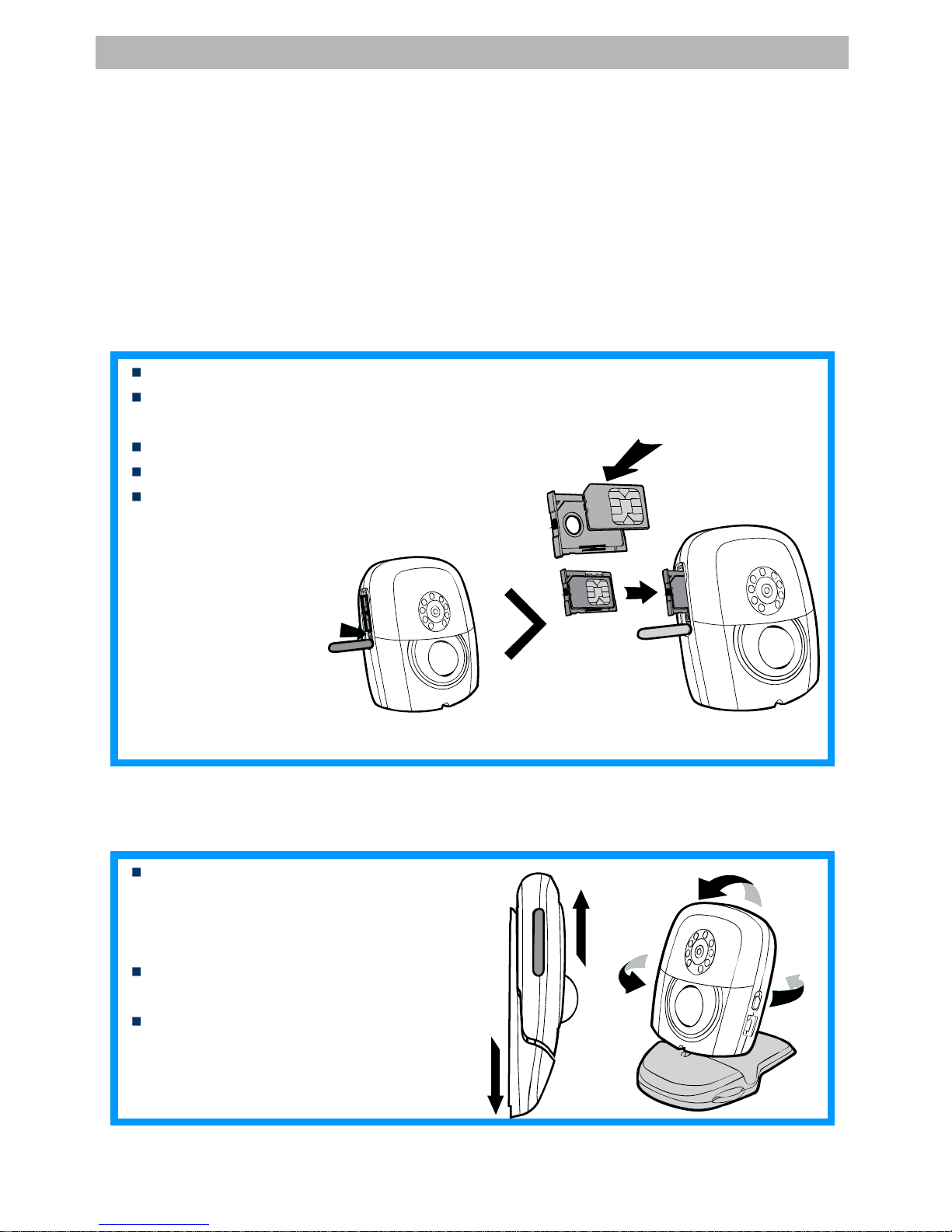
2.1 Installing the SIM card
Remove the rubber cover from the left side of the camera.
Open the SIM/USIM card slot by pressing the small dot beside the card slot with
the tip of a pencil, and pop open the slot.
Insert the card into the slot.
Push the slot back into place.
Put the rubber cover back in its place.
2.2 Extending the camera’s base board
Hold the base of the camera and
pull the top part and the bottom part
(base) in opposite directions (i.e.
away from each other).
Then the slot buckle will be pulling
open.
The head of the camera can now be
moved freely and located at any
direction.
Table des matières
Autres manuels Tuta Appareil photo numérique


