
TTI SVC100GPS Manuel utilisateur

1
www.smartwitness.com
User Guide
VEHICLE JOURNEY RECORDER
Buddy BX1 with Cigarette Lighter (SVC100GPS)
Buddy BX1 Hardwired (SVC100GPS-LCA)
Buddy BX1 Hardwired with telematics (SVC100GPS-LCA2)
TTI Tracking Technology Inc.

www.tt-i.info
CONTENTS
GPS Function .............................................................................. 5
1. Overview ................................................................................ 6
SVC100GPS .................................................................. 7
SVC100GPS-LCA/-LCA2 ............................................... 8
SVC100GPS-LCA/-LCA2 - Wiring Description .............. 9
2. Contents ................................................................................ 10
3. Software Installation .............................................................. 11
4. SD Card Insert ....................................................................... 12
SD Card Care ................................................................ 15
5. Product Installation .............................................................. 16
SVC100GPS .................................................................. 16
SVC100GPS-LCA/-LCA2 .............................................. 16
6. LED Guide ............................................................................. 17
7. Camera Functions ................................................................ 18
Camera Operation ......................................................... 19
8. Software User Guide ............................................................ 20
PC Viewer Setting ......................................................... 20
File Loading ................................................................... 21
Playback Screen ........................................................... 23
Playback ....................................................................... 24
Google Maps ................................................................ 26
Thumbnail Function ...................................................... 27
Save JPG and AVI File ................................................. 28
Print Image ................................................................... 29
Reporting ...................................................................... 30
Backup Event/Log ........................................................ 31
Product Information ...................................................... 32
Log File Playback ......................................................... 33

CONTINUED...
GPS Log to KML Converter .............................................. 34
Enhanced Driver Report Function .................................... 35
9. Cloud Upload ........................................................................... 47
10. Setting the Journey Recorder ............................................. 48
Speed Dependant G-Sensor ........................................... 48
UserDenedG-Sensor................................................... 49
Auto Format Feature ....................................................... 50
Alarm Outputs ................................................................. 50
11. Specications ....................................................................... 52
Appendices
Appendix 1 - Recording Time Table ......................................... 53
Appendix 2 - Optional Accessory ............................................ 54
Appendix 3 - Firmware Upgrade .............................................. 57

4
SAFETY ADVICE
CAUTION
RISK OF ELECTRIC SHOCK
DO NOT OPEN
DO NOT REMOVE THE COVER
REFER SERVICING TO QUALIFIED SERVICE PERSONNEL
Connect your vehicle’s power cable (Cigarette Jack) to the
product after starting the vehicle to avoid damage.
Install the product where it does not block the driver’s view of
the road. Please refer to the installation section in the user
manual for a full guide on where to install product.
Damages caused by production malfunction, loss of data or
other damages that may occur while using this product is not
the responsibility of the manufacturer. When malfunction
occurs, the product may not save all videos and the sensor
may not recognise shock impacts.
WARNING:
DO NOT EXPOSE PRODUCT TO RAIN OR MOISTURE

5
1. Activate the product in an area without large buildings to improve
GPS reception.
For commercial purposes GPS has an average range error of more than 15
meters and the range error could be more than 100 meters depending on
environmental conditions like buildings and roadside trees etc.
2. The temperature range for optimum operation of the GPS receiver in
your car is -10 ~ 50°C.
3. When using the product for the rst time or after a long period (more
than three days), it may take a little longer to recognise your current
location.
ItmaytakebetweenveandthirtyminutestogetGPSreception.
1) If there is an object at the end of the GPS antenna
2) If your vehicle has metallic elements on the windshield
3) If equipment generating electromagnetic waves that interfere with the GPS
signal are installed in the vehicle e.g. other GPS devices including certain
types of wireless activated alarms, MP3 and CD players and camera
alarms using GPS.
4) If you are using a receiver connected by a cable, electrical interference can
be avoided by simply changing the location of the receiver (antenna).
5) On heavily overcast or cloudy days, if the vehicle is in a covered location
such as under a bridge or raised roadway, in a tunnel, an underground
roadway or parking area, inside a building or surrounded by high-rise
buildings.
6) If GPS signal reception is poor, it may take longer to locate your current
position when the vehicle is moving than when it is stationary.
GPS reception may be impaired under the following circumstances:
GPS RECEPTION

6
The SVC100GPS-LCA/-LCA2 is a Vehicle Journey/Accident Recorder with
3 Axis Shock Sensor & GPS for measuring braking, acceleration, driving
style and recording location. The unit includes a transparent locking case to
prevent tampering with evidence.
This evidence can protect a driver from many of the issues faced on the
roads today:
•Cash for Crash / Pre-meditated staged accidents
•False/Exaggerated Whiplash Claims
• ConictingReportsofActualEvents
•Lack of Witnesses
• DrivingOffenceAllegations(SpeedCameras,TrafcSignalViolations
etc...)
Features:
•Continuously records the driver’s view via a 170º high-quality lens
• Continuouslyrecordsbraking/acceleration/collisionG-forces
•Approved for installation in commercial vehicles
• Built-inGPSreceiverensuresthehighestaccuracyforvehicle
location and speed
• SimpleDIYinstallation
• E-mark,EMC,CEandFCCapprovedforextrapieceofmind
• VOSAandDataProtectionActcompliant
1. BUDDY - OVERVIEW
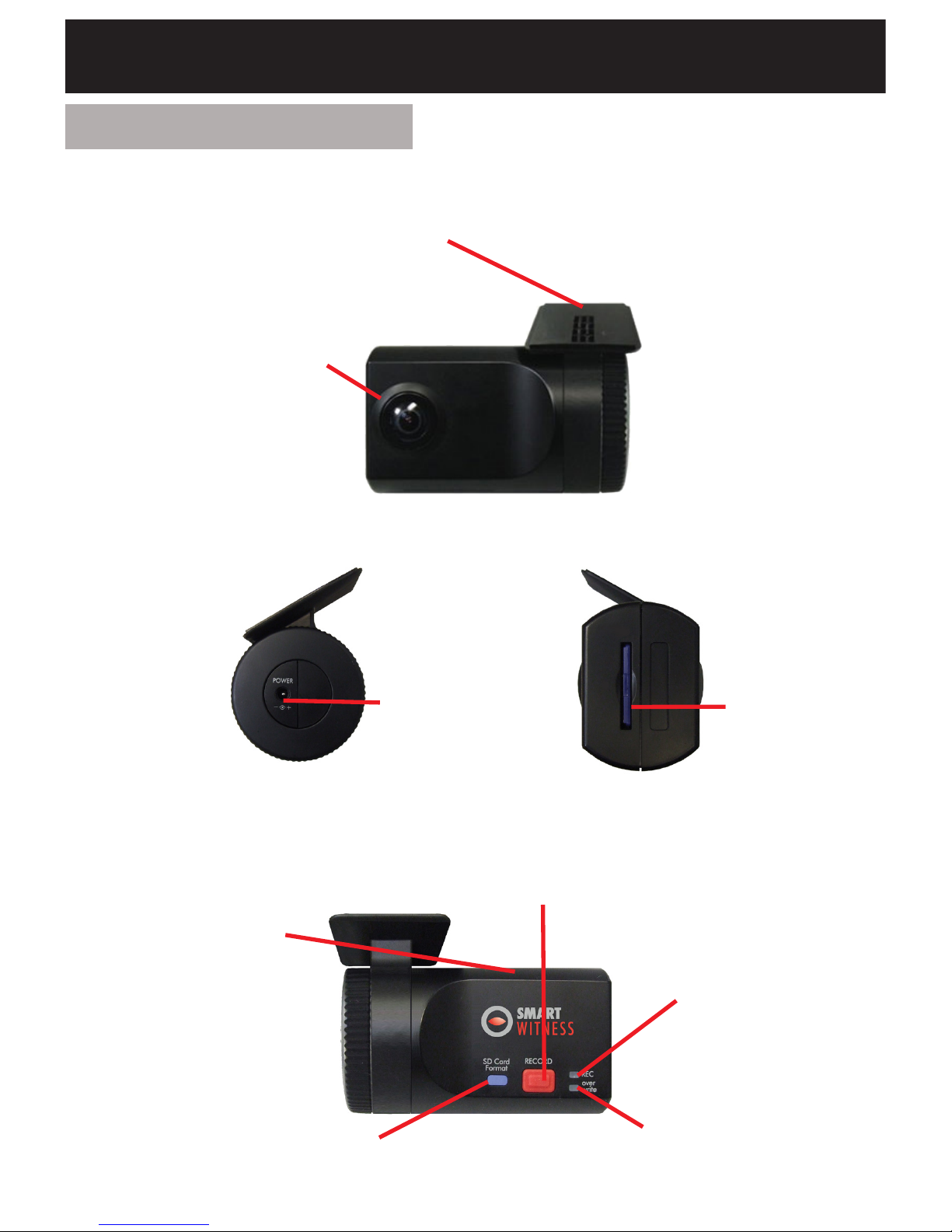
7
FRONT
Bracket
Stick adhesive
tape here
Camera Lens
SVC100GPS
RIGHT LEFT
DC Power In
(DC 12V~24V)
Memory
Card Slot
Internal GPS
Antenna
SD Card Format
Button
Record Button
Record LED
Blue LED
Overwrite LED
Red LED
REAR

8
FRONT
SVC100GPS-LCA/-LCA2
Bracket
Stick adhesive
tape here
Camera Lens
Tamper Resistant
Locking Case
RIGHT LEFT
Key Lock
Protects SD
Card Slot
DC Power Input
Connected with
permanent wiring
Rear
Internal GPS
Antenna
SD Card Format
Button
Record Button
Record LED
Blue LED
Overwrite LED
Red LED

9
SVC100GPS-LCA - Wiring Description
Remote SW+
Remote SW-
Battery -
Alarm Out (G-Sensor & Panic)
Battery+ (Connect to ignition)
For further information, please contact your installer.
If you want to power your camera permanently, please see Appendix 2 on
page 54.
SVC100GPS-LCA2 - Wiring Description
Remote SW+
Remote SW-
Battery -
Alarm Out (G-Sensor & Panic)
Battery+ (Connect to ignition)
Alarm Out (SD Card Fault)

10
2. CONTENTS
SVC100GPS Camera
/Recording Unit including bracket
Wire Splice Clips
Sticker for Windscreen
Mounting (Double-sided Tape x 2)
Power Cable (Cigarette Jack)
Spare Mounting Bracket
USB 2.0 SD Card Reader
Spare Mounting Bracket
SD Memory Card*
*SD Card size will depend on the
model and may not be included.
SVC100GPS SVC100GPS-LCA/-LCA2
Item contains all accessories on
the left, plus the following:
Keys for Locking Case
Transparent Locking Case
Telematics Cable
Please note: The SVC100GPS-
LCA2 will have an extra alarm
output wire
Ce manuel convient aux modèles suivants
3
Table des matières
Autres manuels TTI Caméra embarquée


