Topshine MT01 Manuel utilisateur

Guangzhou Topshine Information Technic Co., LTD
Address: RM 605, #52 SHUI YIN RD, YUE XIU DIST, GUANGZHOU, CHINA
User manual of tracker MT01
-1-
GPS Vehicle Tracker
User Manual (Model: MT01)
2017-09-14
Please Read Carefully Before Operation

Guangzhou Topshine Information Technic Co., LTD
Address: RM 605, #52 SHUI YIN RD, YUE XIU DIST, GUANGZHOU, CHINA
User manual of tracker MT01
-2-

Guangzhou Topshine Information Technic Co., LTD
Address: RM 605, #52 SHUI YIN RD, YUE XIU DIST, GUANGZHOU, CHINA
User manual of tracker MT01
-3-
Contents
Contents...............................................................................................................................................3
1. Product Overview............................................................................................................................4
2. Applications.....................................................................................................................................4
3. Features & Functions...................................................................................................................... 4
4. Specifications.................................................................................................................................. 5
5. First Use.......................................................................................................................................... 6
5.1 Install SIM Card....................................................................................................................6
5.2 Charging................................................................................................................................ 6
5.3 LED indications.....................................................................................................................6
6. Connect the tracker MT01 to GPRS01 Web Server Platform........................................................ 7
Optional 1: Configure by Computer to set GPS tracker online..................................................7
Optional 2: SMS Commands to set GPS Tracker online..........................................................12
7. Installation..................................................................................................................................... 13
7.1 Install I/O Cable.................................................................................................................. 14
7.2 Power/GND.........................................................................................................................15
7.3 Digital Input 4..................................................................................................................... 16
7.4 Output 1...............................................................................................................................16
7.5 Install GPS/GSM Antenna.................................................................................................. 17
8. Basic SMS Commands:.................................................................................................................17
8.1 Position Report....................................................................................................................17
8.2 Set receiving physical address name via SMS....................................................................18
8.3 Get Google Map’s Link via SMS........................................................................................18
8.4 To cut off Engine, immobilize the vehicle..........................................................................18
8.5 Set over speed alarm........................................................................................................... 19
9. Simplified SMS Commands:......................................................................................................19
9.1 Engine Stop/Vehicle Immobilize: 000000STP................................................................... 19
9.2 Engine Restore: 000000RES...............................................................................................19
9.3 Check Location Address Name: 000000ADD....................................................................19
9.4 Location Coordinate Check: 000000CHK..........................................................................19
9.5 Get Location Google Map’s URL with Mobile phone: 000000MAP................................ 19
9.6 Voice Monitoring: 000000MON<telephone number>....................................................... 19
10.MT01 Packing and Accessories................................................................................................... 19
11.Troubleshooting............................................................................................................................20
Appendix 1 Configure by computer..................................................................................................21
Appendix 2: Command List.............................................................................................................. 22

Guangzhou Topshine Information Technic Co., LTD
Address: RM 605, #52 SHUI YIN RD, YUE XIU DIST, GUANGZHOU, CHINA
User manual of tracker MT01
-4-
1. Product Overview
MT01 is a kind of mini GPS vehicle tracking product can be used for tracking and
security of motorcycle and automobile etc. Mini size, built-in antenna and
waterproof designed, easy to be installed and concealed, with power voltage range
from 9V~36V, therefore can satisfy tracking and security demands for all kinds of
vehicles.
2. Applications
Vehicle Real Time Tracking
Vehicle Security/Anti-Hijack
Fleet Management
3. Features & Functions
* Two way location
* Tracking by SMS/GPRS (TCP/UDP)
* Tracking by time/distance interval
* Real time tracking via the web-platform
* Get position location via call/SMS
* Engine on/off detection
* Built-in backup 650 mAh battery
* Remote Engine cut off to stop the car in safe condition
* Get location physical name via SMS & from the web-platform
* Google Map link for location via SMS, it shows your location on map via mobile
phone.
* Mileage calculation with longitude and latitude via SMS; view mileage data via GPS
web-based tracking centre system

Guangzhou Topshine Information Technic Co., LTD
Address: RM 605, #52 SHUI YIN RD, YUE XIU DIST, GUANGZHOU, CHINA
User manual of tracker MT01
-5-
* Built-in motion sensor for power & GPRS flow saving mode (sleep mode)
* I/O: 3 Inputs, 1 Output ,1 AD
* Over speed alert
* Geo-fence alert
* Power failure/low power alert
* SOS Panic button, SOS alert
* Accident alarm (need crash sensor support) (optional)
* Wiretapping/remote listening (optional)
4. Specifications
Items
Specifications
Dimension
80*58*22mm
Weight
90g
Input voltage
DC 9V~36V/1.5A
Back-up Battery
650mAh/3.7V
Power Consumption
65mA standby current
Operating Temperature
-40°C~75°C
Humidity
5%~95%
Work Time
33 hours in power-saving mode and 8 hours in normal mode
LED
2 LED lights to show GPS, GSM status
Button
1 SOS and 1 power on/off
Microphone
optional
Sensor
Motion sensor
GSM Frequency
GSM 850/900/1800/1900MHz
GPS Chip
Ublox7
GPS Sensitivity
-160dBm
Positioning Accuracy
5meter,CEP
I/O
3 Inputs , 1 Outputs , 1 AD

Guangzhou Topshine Information Technic Co., LTD
Address: RM 605, #52 SHUI YIN RD, YUE XIU DIST, GUANGZHOU, CHINA
User manual of tracker MT01
-6-
5. First Use
5.1 Install SIM Card
Check that the SIM has not run out of credit
(test the SIM in a phone to make sure it can
send and receive SMS);
Before installing the SIM card, turn off
the power for MT01,
then install the SIM card as following:
5.2 Charging
Connect the device with external power like car battery, and turn on its power switch and it will do
charging automatically.
5.3 LED indications
Push the power switch to turn on/off MT01
GPS LED (Red)
Flashing (every 0.1 second)
Initializing or back-up battery power is low
Flashing (0.1 second on and 2.9 seconds off)
Device has A GPS fix
Flashing (1 second on and 2 seconds off)
Device has no GPS fix

Guangzhou Topshine Information Technic Co., LTD
Address: RM 605, #52 SHUI YIN RD, YUE XIU DIST, GUANGZHOU, CHINA
User manual of tracker MT01
-7-
GSM LED (Green)
Flashing (every 0.1 second)
Initializing
Flashing (0.1 second on and 2.9 seconds off)
Device is connected to the GSM network
Flashing (1 second on and 2 seconds off)
Device is not connected to the GSM network
6. Connect the tracker MT01 to GPRS01 Web Server Platform
Two Methods to set GPS tracker online:
Configure by Computer or SMS Commands
Optional 1: Configure by Computer to set GPS tracker online
This part shows the basics of how to use the GPS tracker Parameter Editor.
Note: Don’t connect MT01 to external battery when configuring.
How to Edit the Parameters of Tracker on PC
①(Buy one specific USB cable for configuration from our Company)
②Install USB driver program for the configuration USB cable
1. Run ‘CP210x_Prolific_DriverInstaller’ to install the driver for the USB data cable.
Note: CP210x_Prolific_DriverInstaller is in the folder ‘USB-232 Driver’ in the CD. Connect the
USB Data Cable between MT01 and PC.
2. Connect the configuration cable with PC, open device management of your computer,

Guangzhou Topshine Information Technic Co., LTD
Address: RM 605, #52 SHUI YIN RD, YUE XIU DIST, GUANGZHOU, CHINA
User manual of tracker MT01
-8-
you can find “Prolific USB-to-Serial Comm. Port “ ,as following picture shows.
The USB port is virtual comm. Port (com3) in this example,
3. Open the GPS Tracker Parameter Editor
①Connect MT01 with PC by the configuration cable
②Confirm MT01is in the Power Off states
③Double click GPS Tracker Parameter Editor.exe and Select the COM Port, following picture
shows:

Guangzhou Topshine Information Technic Co., LTD
Address: RM 605, #52 SHUI YIN RD, YUE XIU DIST, GUANGZHOU, CHINA
User manual of tracker MT01
-9-
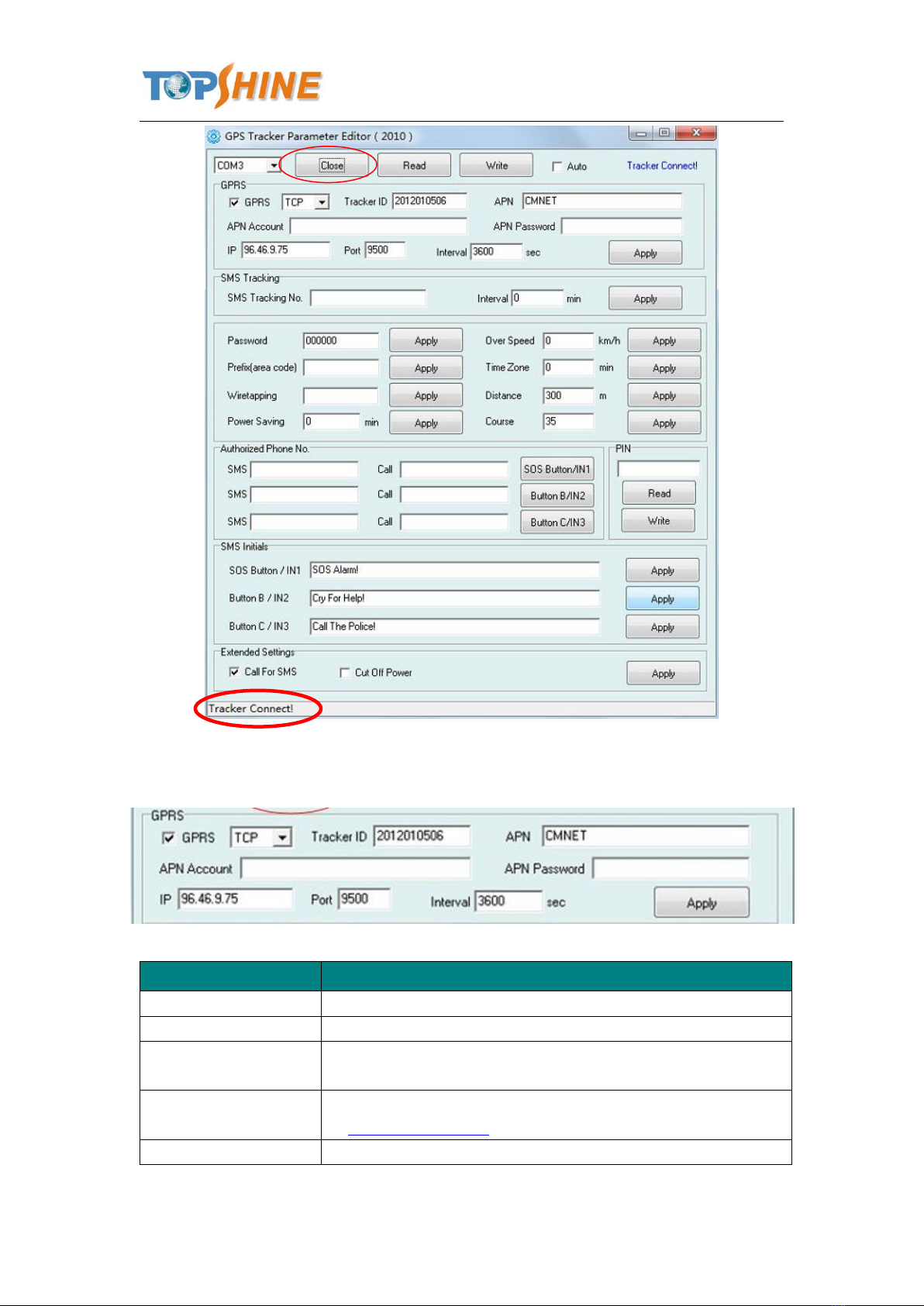
4. Click Start button to open the COM port,
5. Turn on MT01 and it will connect with the Editor automatic, As soon as they connect successful,
all the buttons are availability and the status bar will clue on’ Tracker Connect!’ , first click
“Read” to read the tracker’s parameter, when all the parameter read out, you can write the
parameter you need.
Note: “Read” button: when you click the Read button, it means Read the parameters of the tracker.
“Write” button: when you write the parameters to the Parameter Editor, then click the Write
button, the parameters will write into the tracker.

Guangzhou Topshine Information Technic Co., LTD
Address: RM 605, #52 SHUI YIN RD, YUE XIU DIST, GUANGZHOU, CHINA
User manual of tracker MT01
-10 -
Instruction of parameter settings:
Item
Description
GPRS
Tick to enable GPRS function, select TCP or UDP mode
Tracker ID
Should be unique, in number, maximum 14 digits
APN, APN Account,
APN Password
Put your local APN, APN username and password if necessary
IP, Port
Put online tracking server IP and port, our default is
IP:www.global-track.net port: 9500
Interval
Time interval, to put time interval to upload a data
Table des matières
Autres manuels Topshine GPS

Topshine
Topshine PT30 Manuel utilisateur

Topshine
Topshine MT06 Manuel utilisateur

Topshine
Topshine GT103 Manuel utilisateur

Topshine
Topshine VT310N Manuel utilisateur

Topshine
Topshine PT90 Manuel utilisateur

Topshine
Topshine PT30 Manuel utilisateur

Topshine
Topshine MT100 Manuel utilisateur

Topshine
Topshine MT08B Manuel utilisateur