
TOPMAQ LM175P Manuel utilisateur

C030500 VER20a
User Manual of the Waterproof Wired Keypad
Model: LM175P
1. Specifications:
⚫Operating voltage: 12-24VDC ±10%
⚫Operating current: < 100mA
⚫User Capacity: 1000 users
⚫Card type (alternative): EM(ID) card(IC card for options)
⚫Card reading distance: 1-15CM
⚫Working temperature: -20℃-+50℃
⚫Relay output: SPDT, 3A 120VAC/24VDC
2. Factory default settings:
⚫Programming Password: 123456
⚫Common Access Password: None
⚫Backlight: Auto (for options)
⚫Relay Unlock output: 5 Seconds
⚫W26 port: Input (for options)
⚫Security mode: OFF
⚫Open mode: Card or Access Password, Access Password include Private Access
Password (PIN) and CommonAccess Password
3. Light and Sound indicates:
Light: red and green
Light Description
Access control status
Red light flash every 1 sec (Slow flash)
Standby state
Red light is always ON
Programming state
Green light is always ON within Open
time
Unlocking state
Green light flash every 0.5sec (Fast flash)
Pending further action
Buzzer:
Description
Indicates
1 short buzz
Valid input
3 short buzz
Invalid input
1 long buzz
Programming success
Continuous long buzz
Restoring factory programming passwords
4. Definition of the output wires:
JP1 terminal:
JP2 terminal:
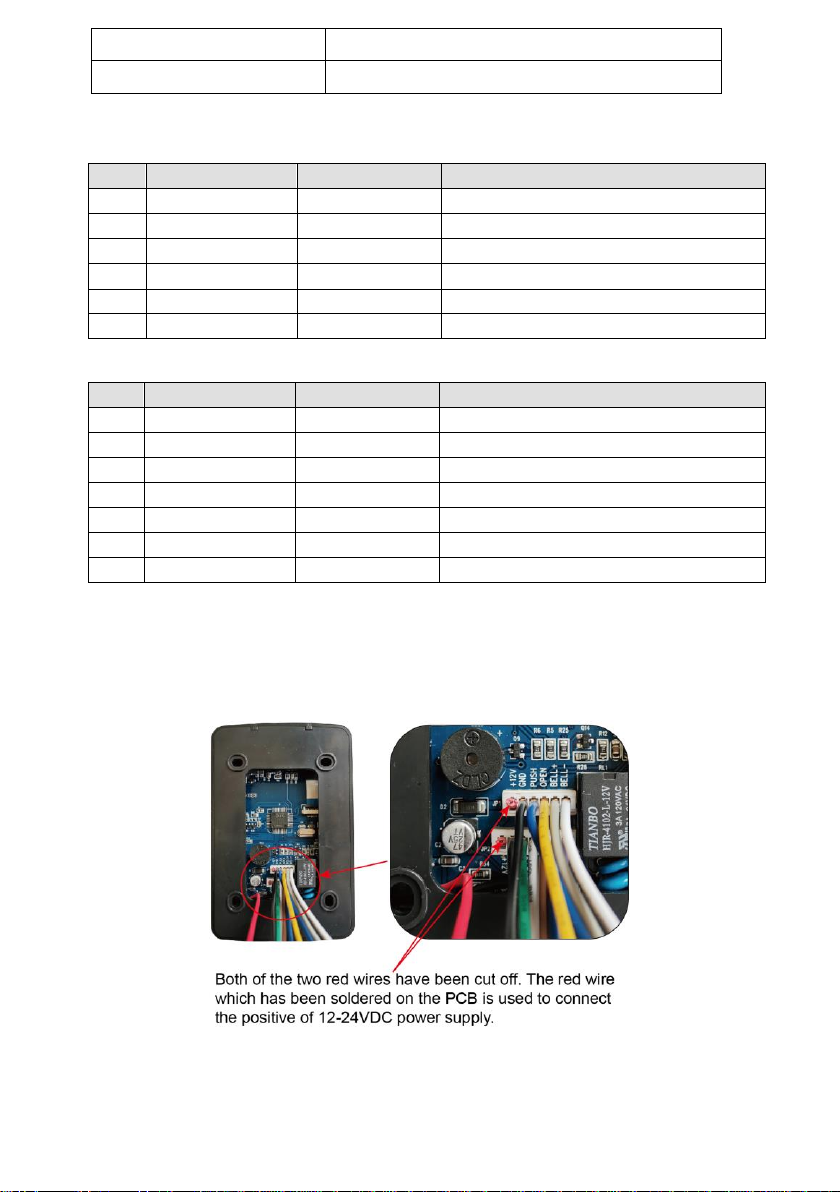
*NOTE: The red wire of the both 2 terminals has been cut off and it has been
soldered to the PCB of the keypad. Thus you can connect the 12-24VDC power
supply to the RED wire on the PCB and the BLACK wire of JP2 to power up the
keypad.
5. Wire connection of the keypad to the gate & door opener
NOTE: Below wiring diagram is a universal wiring diagram of the connection
between the keypad and the opener. You can refer to the user manual of the
TOPENS gate opener for detailed wiring diagram.
NO
Mark
Color
Function
1*
+12V
X
This wire has been cut off
2
GND
Black
Power-(12-24VDC negative)
3
DATA0
Green
WG DATA0
4
DATA1
White
WG DATA1
5
NC
Brown
Relay NC output
6
COM
Blue
Relay Com output
7
NO
Purple
Relay NO output
NO
Mark
Color
Function
1*
+12V
X
This wire has been cut off
2
GND
Black
Power-(12-24VDC negative)
3
PUSH
BLUE
Low level output
4
OPEN
Yellow
Door Release
5
BELL
Grey
BELL
6
BELL
White
BELL

5.1 Connect the keypad to the Gate/Door opener with power on the board, when
power from the board connected directly to TC175P.
5.2 Connect the keypad to the Gate/Door opener without power on the board,
when using external power supply for TC175P.
In this situation, you need an external 12-24VDC power source to make the
keypad to work with the gate & door opener.
6. Programming
⚫There are three kinds of passwords while programming: programming
password, access password, card password.
⚫User ID is auto-generating 4-digit number started at 0001. The number

increases with adding user one by one and ignores deleting user. Common
Access Password has no ID.
⚫All passwords can be 3-6 digits in length.
⚫Programming password is used for programming.
⚫Access password is used to activate the gate when the keypad has been set to
“password”or “password or card”mode.
⚫Card password is needed to enter after swipe the card when the keypad has
been set to “password + card”mode.
⚫Factory default program password is 123456.
6.1 How to Change the Programming Password
#Old Programming Password #0 New Programming Password #
6.2 How to Set Common Access Password
#Programming Password #21 new Common Access Password #
6.3 How to Add Private Access Password (PIN)
#Programming Password #22 (3-6 digits access password) #
NOTE: The quality of access passwords can be set up to 1000 sets. You can input
access password and then press # to activate the keypad.
6.4 How to Add User Card
#Programming Password #1read card #
NOTE: If add multi cards, read cards continuously.
6.5 How to Delete All Users
#Programming Password #40 0000 #
NOTE: Delete all cards and PIN except Common Access Password.
6.6 How to Delete User by Read Card
#Programming Password #41 read card #
NOTE: If delete multi cards, read cards continuously
6.7 How to Add Card by Input Card NO.
#Programming Password #23 input card NO. #
NOTE: Card No. is 10-digit or 8-digit, machine auto-identify.
6.8 How to Add Multi-card by Input Card NO. Zone
#Programming Password #24 input start card No. card Qty #
NOTE: Card Qty is 4-digit (If one-time add twenty cards, input 0020)
6.9 How to Add “card +PIN” User
#Programming Password #3read card PIN #
NOTE: You can change the PIN according to following instructions. After reading
card and input corresponding PIN to open the door, within 5 seconds, long press

# until the green lights flash fast. and then input new PIN # new PIN # ,
new PIN will be changed successfully with a long buzz.
6.10 How to Delete User by Input User ID NO.
#Programming Password #42 input User ID No. #
6.11 How to Delete User by Input Card NO.
#Programming Password #43 input card No. #
6.12 How to Delete User by Input Access Password (PIN)
#Programming Password #44 (3-6 digits access password) #
6.13 How to Delete All Access Password (PIN) Users
#Programming Password #45 1111 #
6.14 How to Change Open Time
#Programming Password #5XX #
NOTE: XX can be 2-digit, and the max. is 99. If input 00, the signal output time is
0.2 Second.
6.15 How to Set Open Mode
#Programming Password #6XX #
NOTE: XX can be 01(only card)/ 02(card or Access Password)/ 03(card+PIN)
6.16 Reader Setting (For options)
#Programming Password #604 #
NOTE: The machine can be used for reader(W26 output)
6.17 Security Function Setting, Anti-dismantle Alarm Setting (For options)
#Programming Password #7XX #
NOTE: XX can be 01/ 02( Security function OFF/ON) and 03/04(Anti-dismantle
alarm OFF/ON). Security Function ON means System would be locked for 5
Minutes if continue to read illegal card or input wrong Access Password for 10
times.
6.18 Backlight setting(For options)
#Programming Password #8XX #
NOTE: XX can be 01/02 (Normal ON / Normal OFF)
6.19 How to Reset Factory Default Setting
#Programming Password #899 #
NOTE: Except Programming Password.
7. Reset to Factory Programming Password(123456)
Step1: Power off the keypad and connect pin 2&3 of RST together.
Step2: Power on the keypad and buzzer will give 3 long buzz with green light flashes
fast.

Step3: Power off the keypad and disconnect pin2&3 and connect pin 1&2 of RST
together.
Step4: Turn on power again.
NOTE:
After wiring correct to PCB as per User`s Manual, Please check LM175P
operation steps as below:
1. If you only use card: Press # 123456 # 1, then read card and press #.
The Card was learned successfully.
Then you can read card directly to open or stop or close the gate.
2. If you use Password only, you need to set password first, LM175P do
not have factory default password, you need to set one yourself first.
Otherwise, the device can not work normally if you use password
mode. And please note that 123456 is not password. It is factory
default programming code.
Set password or change new password: Press # 123456 #21, then
enter new code(3-6 digitals) and press # to finish it. The new password
was set successfully.
Then you can enter the new code and press # to open or stop or close
the gate.
3. If you want to set card + password as double safety, you can get in
setting mode of card + password as below:
Press # 123456 # 3, then read card, then enter new code(3-6 digitals)
then press # to finish.
And you should set one more step as below if you use this card +
password mode.

Press # 123456 # 6, then press 03 and # to finish. After this step, you
can read card and enter new code as well to open or stop or close the
gate.
4. Set the open time: Press # 123456 # 5, then choose to enter time
(0-99 seconds=digitals) and press # to finish.
5. Delete the learned card: Press # 123456 # 41, then read the card
and press # to finish. The card was deleted successfully.
6. Back to factory default mode: Press # 123456 # 8, then press 99 and
# to finish.
Hope above are useful for you. If you still have problems, please
feedback to me for further support.
Table des matières


