TIE CESFD1L Manuel utilisateur

SHIFT RED User Manual
Ver. 3.0

ⓒ this is engineering Inc. All Rights Reserved.
Batteries must be charged before use.
When not in use, remove the battery from the aircraft.
For tips on how to use the product, check out the tutorial videos
on our website (www.thisiseng.com/support/videotutorials).
this is engineering Inc.

3
SHIFT RED User Manual
ⓒ this is engineering Inc. All Rights Reserved.
Read this User Manual carefully before using the SHIFT RED.
this is engineering Inc. shall not be included in any legal action or held liable
for any direct or indirect damage resulting from the use of the product.
All information in this user manual may be updated on our website
(www.thisiseng.com) without prior notice.
Please note that the contents may be dierent due to
dierence in applicable law in each country.

4ⓒ this is engineering Inc. All Rights Reserved.
contents
01_PRODUCT OVERVIEW
· About SHIFT RED
· Product Components
· Aircraft Parts and Specications
· Controller Parts and Specications
6
7
9
11
03_CONTROLLING THE DRONE
· Aircraft Powering On / Pairing with the Controller
· Controller Powering On / Pairing with the Aircraft
· Aircraft Powering O
· Controller Powering O
· Taking O
· Flight Control
· Flight Mode
19
21
20
23
24
27
33
· Landing
· Emergency Measures
34
35
02_PRECAUTIONS
· Precautions 13
13
13
14
15
16
18
18
05_HANDLING THE AIRCRAFT
· Attaching the Propellers
· Attaching the Protectors
· Mounting the Micro SD Card
· Charging
45
46
47
48
· Aircraft Status Indication 49
04_USING THE MOBILE APPLICATION
· Installation and Execution
· Using Lezero Pilot Modes
· Recording Preference Settings
· Sensor Calibration
- Age Recommendation
- Compliance with Relevant Laws
- Pre-ight Inspection
- Precautions During Flight
- Precautions on Managing Drone and Controller Batteries
- Unauthorized Disassembly Prohibited
- Legal Responsibility for Footage
37
39
43
44
06_HANDLING THE CONTROLLER
· Charging
· Preference Settings
· Controller Status Indication
50
51
· Firmware Updates to Aircraft
· Firmware Updates to Controller
58
59
54
60
07_FIRMWARE UPDATES
08_DECLARATIONS OF CONFORMITY
6509_WARRANTY AND SERVICE INFORMATION

5
SHIFT RED User Manual
ⓒ this is engineering Inc. All Rights Reserved.
contents
01_PRODUCT OVERVIEW
· About SHIFT RED
· Product Components
· Aircraft Parts and Specications
· Controller Parts and Specications
6
7
9
11
03_CONTROLLING THE DRONE
· Aircraft Powering On / Pairing with the Controller
· Controller Powering On / Pairing with the Aircraft
· Aircraft Powering O
· Controller Powering O
· Taking O
· Flight Control
· Flight Mode
19
21
20
23
24
27
33
· Landing
· Emergency Measures
34
35
02_PRECAUTIONS
· Precautions 13
13
13
14
15
16
18
18
05_HANDLING THE AIRCRAFT
· Attaching the Propellers
· Attaching the Protectors
· Mounting the Micro SD Card
· Charging
45
46
47
48
· Aircraft Status Indication 49
04_USING THE MOBILE APPLICATION
· Installation and Execution
· Using Lezero Pilot Modes
· Recording Preference Settings
· Sensor Calibration
- Age Recommendation
- Compliance with Relevant Laws
- Pre-ight Inspection
- Precautions During Flight
- Precautions on Managing Drone and Controller Batteries
- Unauthorized Disassembly Prohibited
- Legal Responsibility for Footage
37
39
43
44
06_HANDLING THE CONTROLLER
· Charging
· Preference Settings
· Controller Status Indication
50
51
· Firmware Updates to Aircraft
· Firmware Updates to Controller
58
59
54
60
07_FIRMWARE UPDATES
08_DECLARATIONS OF CONFORMITY
6509_WARRANTY AND SERVICE INFORMATION

6ⓒ this is engineering Inc. All Rights Reserved.
01
PRODUCT OVERVIEW
About SHIFT RED
Opening a New Era with Art of Flight
SHIFT RED the Perfect Small
SHIFT RED is a package consisting of the SHIFT drone and its controller.
This drone product is a portable and compact quadcopter equipped with
software gimbal, vision recognition, and hyper-sensor fusion technology.
Anti-shake FHD video shooting and real-time video transmission functionality
oer you a stable yet, dynamic drone ight.
One of the most important features of SHIFT RED is its controlling method.
The Near-Field Micro-Sensing technology oers you the most intuitive, precise
ight controlling experience as the world’s rst invented one-hand drone
control system.

7
SHIFT RED User Manual
ⓒ this is engineering Inc. All Rights Reserved.
Product Components
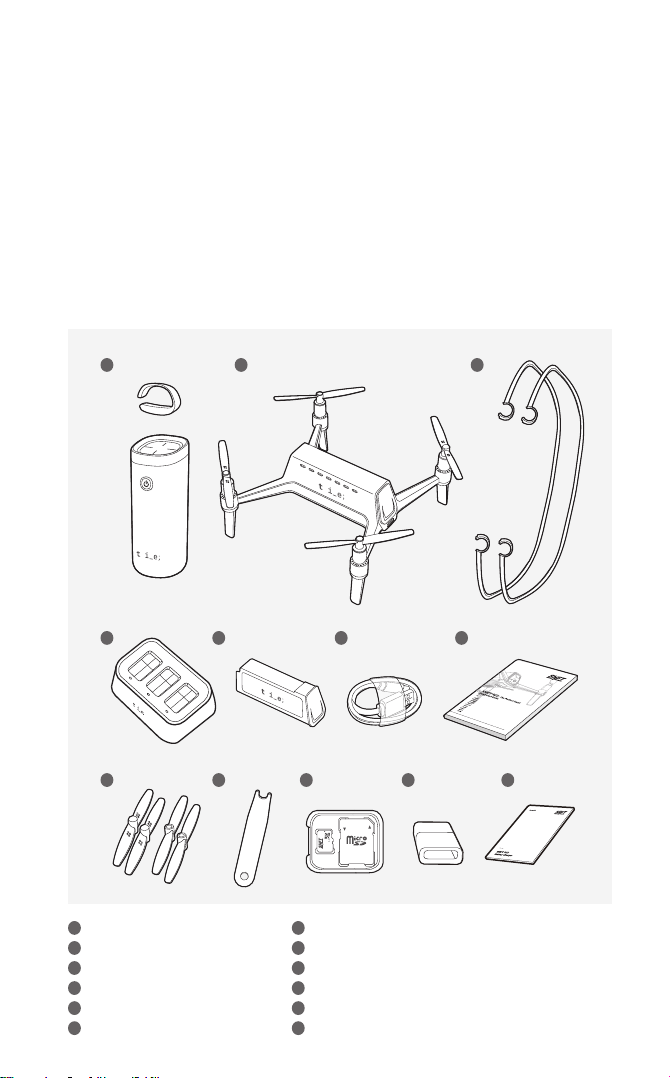
* The pictogram below is a list of accessories for the SHIFT RED. To nd out about
what's included in the HI-LITE and FLEX packages, go to 8p.
Controller with control Ring
Aircraft with propellers
Protectors
Charger
Battery
USB Type-C cable
1
2
3
4
5
6
10
7
8
9
11
12
Quick start guide
Spare propellers (CW type, CCW type)
Removal wrench
Micro SD card Micro SD card (including adapter)
Control ring fit-band
Charger user guide
Adapter
Lock
32 1
GB
I
2
45 6 7
13
8911 1210

8ⓒ this is engineering Inc. All Rights Reserved.
HI-LITE FLEX
Aircraft 1 pc 1 pc
Controller 1 pc 1 pc
Control Ring 1 pc 1 pc
Charger -1 pc
Battery 1 pc 3 pcs
Protectors - 1 set
Spare Propellers - CW / CCW 2 sets
Removal Wrench -1 pc
Micro SD Card -1 pc
Fit-Band -1 pc
USB Type-C Cable 1 pc 2 pcs
Quick Start Guide 1 pc 1 pc
Charger user guide -1 pc

9
SHIFT RED User Manual
ⓒ this is engineering Inc. All Rights Reserved.
Aircraft Parts
Protectors
Propellers (CCW)
Propellers (CW)
Motors
Motor housings
Arms
Vision camera
Front LED
Integrated 3D sensing system
Micro SD slot (inside)
Battery
USB port (Type-C)
Power button (LED)
Landing gears
1
2
3
4
5
6
7
8
9
10
11
12
13
14
1
2
3
4
5
6
14
7
8
9
10
11
12
13

10 ⓒ this is engineering Inc. All Rights Reserved.
Specications
Weight with Battery 93 g
Dimension (WxDxH)
without Propellers 115 X 115 X 57 mm
Dimension (WxDxH)
with Propellers & Protectors 194 X 188 X 59 mm
Radio Frequency 2.4 GHz, 5 GHz Dual Band
Max Distance 300 m
Max Altitude 25 m
Flight Time 13 min (Max)
Operating Temp. 0~40 ℃
Streaming Range 100 m (Max)
Video Streaming HD 720 p @ 30 fps (Max)
Video Recording FHD 1080 p @ 30 fps
Camera Sensor 5 M CMOS
Lens Shooting Range 40 cm to ∞
Photo Filename Extension JPG
Video Filename Extension MP4
Battery Li-Po, 3.7 V, 1100 mAh
DC Input 5 V, 1.2 A
Charging Type USB Type-C
Charging Time 60 min
The streaming range may vary with capabilities of your smartphone and surrounding signals.
The maximum flight time has been measured based on takeoff under windless conditions, and this may vary with
flight conditions and operations. The maximum flight time should be used only as a reference.
Ce manuel convient aux modèles suivants
1
Table des matières
Autres manuels TIE Drone