
THORLABS KDC101 Manuel utilisateur

KDC101
DC Servo Motor Driver
Kinesis User Guide
Original Instructions

2 HA0363T Rev Dk Jan 2017
Contents
Chapter 1 Safety ............................................................................................. 4
1.1 Safety Information .................................................................................. 4
1.2 General Warnings .................................................................................. 4
Chapter 2 Introduction and Overview ..........................................................5
2.1 Introduction ............................................................................................. 5
2.2 K-Cube Controller Hub ........................................................................... 6
2.3 Kinesis PC Software Overview ............................................................... 7
Chapter 3 Getting Started ............................................................................10
3.1 Install The Software .............................................................................. 10
3.2 Mechanical Installation ......................................................................... 11
3.3 Electrical Installation ............................................................................. 12
3.4 Connect The Hardware ........................................................................ 14
3.5 Verifying Software Operation ............................................................... 15
Chapter 4 Standalone Operation ................................................................16
4.1 Introduction ........................................................................................... 16
4.2 Control Panel ........................................................................................ 17
4.3 Velocity Wheel Operation ..................................................................... 18
4.4 Settings Menu ...................................................................................... 19
Chapter 5 PC Operation - Tutorial ............................................................. 26
5.1 Introduction ........................................................................................... 26
5.2 Using the Kinesis Software .................................................................. 26
5.3 Homing Motors ..................................................................................... 28
5.4 Changing Motor Parameters and Moving to an Absolute Position ....... 29
5.5 Jogging ................................................................................................. 30
5.6 Setting Move Sequences ..................................................................... 31
5.7 Changing and Saving Parameter Settings ........................................... 31
5.8 Stage/Axis Tab ..................................................................................... 32
Chapter 6 Software Reference .................................................................... 33
6.1 Introduction ........................................................................................... 33
6.2 GUI Panel ............................................................................................. 33
6.3 Settings Panel ...................................................................................... 36
Continued...

3
K-Cube Brushed DC Servo Motor Driver
Appendices
Appendix A Rear Panel Connector Pinout Detail ...................................... 50
Appendix B Preventive Maintenance ......................................................... 51
Appendix C Specifications and Associated Products .............................. 52
Appendix D DC Motor Operation - Background ........................................ 54
Appendix E Regulatory ................................................................................ 59
Appendix F Thorlabs Worldwide Contacts ................................................ 63

4
Chapter 1 Safety
1.1 Safety Information
For the continuing safety of the operators of this equipment, and the protection of the
equipment itself, the operator should take note of the Warnings, Cautions and Notes
throughout this handbook and, where visible, on the product itself.
The following safety symbols may be used throughout the ha ndbook and on the
equipment itself.
1.2 General Warnings
Shock Warning
Given when there is a risk of injury from electrical shock.
Warning
Given when there is a risk of injury to users.
Caution
Given when there is a risk of damage to the product.
Note
Clarification of an instruction or additional information.
Warnings
If this equipment is used in a manner not specified by the manufacturer, the
protection provided by the equipment may be impaired. In particular,
excessive moisture may impair operation.
Spillage of fluid, such as sample solutions, should be avoided. If spillage does
occur, clean up immediately using absorbant tissue. Do not allow spilled fluid
to enter the internal mechanism.
Caution
If your PC becomes unresponsive (e.g due to an operating system problem,
entering a sleep state condition, or screen saver operation) for a prolonged
period, this will interrupt communication between the Software and the
hardware, and a communications error may be generated. To minimize the
possibility of this happening it is strongly recommended that any such modes
that result in prolonged unresponsiveness be disabled before the software is
run. Please consult your system administrator or contact Thorlabs technical
support for more details.

5
Chapter 2 Introduction and Overview
2.1 Introduction
The K-Cube DC Servo Controll er (KDC101) is a new very co mpact single channel
controller/driver for e asy manual and automatic control of DC Servo motors. This
driver has been designed to o perate with a varie ty of low er powered DC brushed
motors (up to 15V/2.5W operation) equipped with encoder feedback. The KDC101
has been optimised for 'out of the box' operation with the T horlabs range of Z8 DC
motor equipped opto-mechanical products, however highly flexible software settings
and closed loop tuning also supports operation with a wide range of third party DC
Servo motors and associated stages/actuators.
Although compact in footprint, this unit offers a fully featured motion control capability
including velocity profile settings, limit switch handling, “on the fly” changes in motor
speed and direction, control o ver the closed loop PID p arameters and, for more
advanced operation, adjustment of settings such as lead screw pitch and gearbox
ratio, allowing support for many different actuator configurations.
For convenience the footprint of this unit has been kept to a minimum, measuring only
60 x 60 x 47mm (2.36" x 2.36" x 1.85") and with the facility to directly mount to the
optical table close to the motorised device - convenient when manually adjusting
motor positions using the top panel controls (vel ocity control wheel). Table top
operation also allows minimal drive cable lengths for easier cable management..
Fig. 2.1 K-Cube DC Servo Motor Driver
USB connectivity provides easy 'Plug and Play' PC controlled operation - mu ltiple
units can be connected to a single PC via standard USB hub technology or by using

6 HA0363T Rev Dk Jan 2017
Chapter 2
the new K-Cube Controller Hub (see over) for multi-axis motion control applications.
Coupling this with the very user friendly Kinesis software (supplied) allows the user to
very quickly get up and running with complex move sequences in a short space of
time – for exa mple all relevant operating parameters are set automatically by the
software for Thorlabs stage/actuator products. Advanced custom mo tion control
applications and sequences are al so possible using the extensive ActiveX®
programming environment also supplied. This programming library is compatible with
many development tools such as LabView, Visual Basic, Visual C++, C++ Builder,
LabWindows/CVI, Matlab and Delphi.
In the remainder of th is handbook, operation of the unit is described for both front
panel and PC operation. Tutorial sections (Chapter 4 and Chapter 5) provide a good
initial understanding on using the unit and reference section (Chapter 6) covers all
operating modes and parameters in detail.
2.2 Power Supply Options
For power, a single way wall plug supply (KPS101) is available for powering a single
K-Cube Driver.
As a further level of convenience when using the new K-Cube Controllers Thorlabs
also offers th e 3-channel and 6 -channel K-Cube Controller Hubs (KCH301 and
KCH601). These products have been designed specifically with multipl e K-Cube
operation in mind in orde r to simplify issues such as cabl e management, power
supply routing, multiple USB device communications and different op tical table
mounting scenarios.
The K-Cube Controller Hub comprises a slim base-plate type carrier with electrical
connections located on the upper surface to accept the K-Cubes.
Internally the Controller Hub contains a fully compliant USB 2.0 hub circuit to provide
communications for all K-Cubes – a single USB connection to the Controller Hub is
all that is required for PC control. The Controller Hub also provides power distribution
for the K-Cubes, requiring only a single power connection.

7
K-Cube Brushed DC Servo Motor Driver
2.3 Kinesis PC Software Overview
2.3.1 Introduction
The K-Cube range of controllers share many of the benefits. These include USB
connectivity (allowing multiple units to be used together on a single PC), fully featured
Graphical User Interface (GUI) panels, and extensive software function libraries for
custom application development.
The Kinesis software suite provides a flexible and powerful PC based control system
both for users of the equipment, and software programmers aiming to automate its
operation.
The User Interface allows full control of all settings and operating modes enabling
complete ‘out-of-box’ operation without the need to de velop any further custom
software. It provides all of the necessary system software services such as generation
of GUI panels, communications handling for multiple USB units, and logging of all
system activity to assist in hardware trouble shooting. It is this Kinesis server ‘engine’
that is used by software d evelopers to allow the creation of advanced automated
positioning applications very rapid ly and wi th great ease. The Kinesis server is
described in more detail in Section 2.3.2.
Caution
On start up, wait until the top panel display has stopped flashing before
running the Kinesis software.

8 HA0363T Rev Dk Jan 2017
Chapter 2
2.3.2 Kinesis Server
Kinesis controls are re-usable compiled software components that supply both a
graphical user interface and a pro grammable interface. Many such Co ntrols are
available for Windows applications development, providing a large range of re-usable
functionality. For example, there are Controls available that can be used to
manipulate image files, connect to the intern et or simply pro vide user in terface
components such as buttons and list boxes.
With the Kinesis system, .Net Controls are deployed to allow direct control over (and
also reflect the status of) the range of electronic controller units, including the Stepper
Driver K-Cube. Software applications that use .Net Controls are often referred to a s
'client applications'. A .Net Control is a language independent software component.
Consequently the controls can b e incorporated into a w ide range of software
development environments for u se by client application developers. Development
environments supported include Visual Basic, Labview, Visual C++, C++ Builder,
HPVEE, Matlab, VB.NET, C#.NET
and, via VBA, Microsoft Office applications such as
Excel and Word.
Consider the .Net Control supplied for the K-Cube DC driver unit.
This Control provides a complete user graphical instrument panel to allow the motor
unit to be manually operated, as well as a complete set of software functions (often
called methods) to allow all parameters to be set a nd motor operations to be
automated by a client application. The instrument panel reflects the current operating
state of the controller unit to which it is associated (e.g. such as motor position).
Updates to the p anel take place automatically when a user (client) application is
making software calls into the sa me Control. For example, if a client application
instructs the associated stepper motor Control to move a motor, the progress of that
move is reflected automatical ly by changing position readouts on the graphical
interface, without the need for further programming intervention.
9
K-Cube Brushed DC Servo Motor Driver
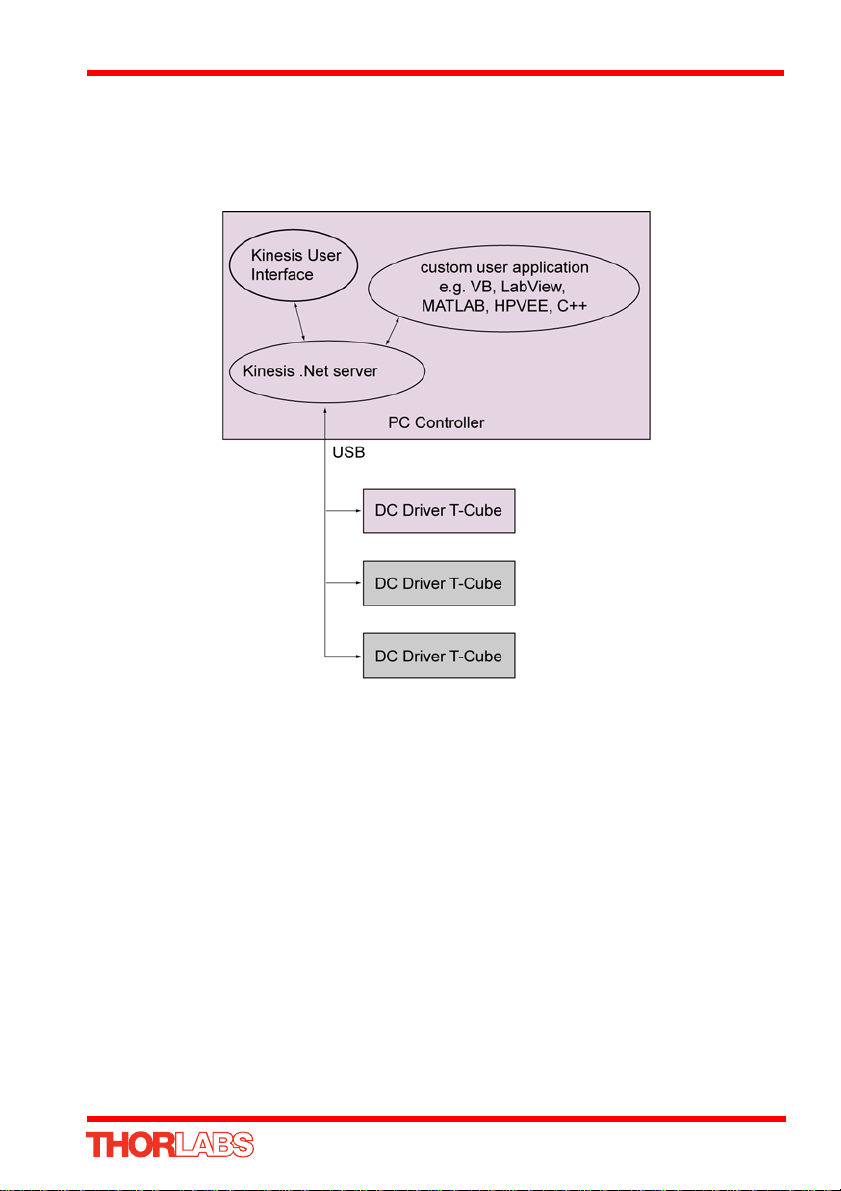
The Kinesis Controls coll ection provides a rich set of graphical user panels and
programmable interfaces allowing users and client application developers to interact
seamlessly with the Kinesis hardware. Each of th e Kinesis controllers has an
associated .Net Control and these are described fully in syste m online help or the
handbooks associated with the controllers..
Fig. 2.2 System Architecture Diagram
Refer to the main Kinesis Software online help file, for a complete programmers guide
and reference material on using the Ki nesis Controls collection. This is available
either by pressing the F1 key when running the Kinesis server, or via the Start menu,
Start\Programs\Thorlabs\Kinesis\Kinesis Help.
2.3.3 Software Upgrades
Thorlabs operate a policy of continuous product development and may issue software
upgrades as necessary.

10
Chapter 3 Getting Started
3.1 Install The Software
DO NOT CONNECT THE STAGE TO YOUR PC YET
1) Download the software from www.thorlabs.com.
2) Locate the downloaded setup.exe file and move to a suitable file location.
3) Double-click the setup.exe file and follow the on-screen instructions.
Caution
If your PC becomes unresponsive (e.g due to an operating system problem,
entering a sleep state condition, or screen saver operation) for a prolonged
period, this will interrupt communication between the Kinesis Software and
the hardware, and a communications error may be generated. To minimize the
possibility of this happening it is strongly recommended that any such modes
that result in prolonged unresponsiveness be disabled before the Kinesis
software is run. Please consult your system administrator or contact Thorlabs
technical support for more details.
Caution
Some PCs may have been configured to restrict the users ability to load
software, and on these systems the software may not install/run. If you
are in any doubt about your rights to install/run software, please consult
your system administrator before attempting to install. If you experience
any problems when installing software, contact Thorlabs on +44 (0)1353
654440 and ask for Technical Support.
Autres manuels pour KDC101
1
Table des matières
Autres manuels THORLABS Entraînement CC


Manuels Entraînement CC populaires d'autres marques

Vincent Associates
Vincent Associates UNIBLITZ ED12DSS Manuel utilisateur

EKSMA OPTICS
EKSMA OPTICS DQ-100-4 Manuel de la liste des pièces

Chamberlain Garog
Chamberlain Garog D Series Manuel utilisateur

Parker
Parker PDS Series Manuel utilisateur

Festo
Festo DGC G Series Guide de configuration

Binks
Binks QS-5012-1-CE Manuel utilisateur


