
TERABEAM Marquee Series Manuel utilisateur

Marquee Series
User Guide
Contact Terabeam
http://www.terabeam.com
8000 Lee Highway
Falls Church, VA 22042
Office: 703-205-0600
Fax: 703-205-0610
Sales: 1-888-297-9090
MNL-500268-001
Version 1.0
September 2004

Marquee™ Series User Guide
Version 1.0 Page i September 2004
LIMITED WARRANTY
Terabeam Wireless (Terabeam) warrants that your device is free of defects in material
and workmanship for a period of one year after initial purchase. Terabeam will, in this
period of time, repair or replace, any Terabeam product returned to the factory, freight
prepaid.
The Terabeam warranty covers repairs or replacement (at Terabeam’s option) of the
product only. Terabeam is not responsible for the cost of removal, reinstallation, or
shipping to the place of repair. Terabeam does not extend or modify its warranty period
as a result of repair or replacement.
Terabeam reserves the right to void a warranty and/or make reasonable charges for
repair of a unit if the warranty seal is broken or the unit displays evidence of misuse,
abuse, or tampering.
Terabeam is not responsible for damage to any other equipment or property, or any other
consequential or incidental damages of any kind, whether based on contract, negligence,
or strict liability. Maximum liability shall not in any case exceed the purchase price of the
unit.
Warranties give you (the buyer) specific legal rights. You may also have other rights that
vary from state to state. This warranty is only extended to purchases made in the United
States of America or its possessions.
SPECIAL WARRANTY NOTICE
The warranty is null and void if any of the following occurs:
1. The product enclosure is opened.
2. The connections are not properly waterproofed.
3. The device is installed improperly or with incorrect connectors.
4. The round connector of the outdoor Ethernet cable provided is improperly plugged
into the rear jack of the enclosure.
5. The device or DC Power Injector are physically damaged.
6. The device is operated outside the recommended DC power specifications.
7. The device is damaged by extreme forces of nature, lightning, or ‘Acts of God.’
FCC NOTICE
This device complies with part 15 of the FCC rules. Operation is subject to the following two
conditions:
1. This device may not cause harmful interference, and
2. This device must accept any interference received, including interference that may cause
undesired operation.
* Note: The manufacturer is not responsible for any radio or TV interference caused by
unauthorized modifications to this equipment. Such modifications could void the user's
authority to operate the equipment.
These products are labeled with one of the following FCC ID numbers:
FCC ID: NM5-MB-HP

Marquee™ Series User Guide
Version 1.0 Page ii September 2004
TABLE OF CONTENTS
Section 1 Overview 1
1.1 Description ....................................................................................................................................1
1.2 Marquee Kit Contents ...................................................................................................................2
Section 2 Installation 3
2.1 Introduction ...................................................................................................................................3
2.2 DC Power Injector .........................................................................................................................3
2.3 Power Supply ................................................................................................................................3
2.4 LEDs..............................................................................................................................................3
2.5 Hardware Installation – FP Enclosure...........................................................................................4
2.6 Hardware Installation – EX Enclosure ..........................................................................................6
2.7 Cabling the Marquee (All Enclosures) .......................................................................................... 8
2.8 Antenna Alignment......................................................................................................................10
Section 3 Configuration 15
3.1 Installing the Management Software...........................................................................................15
3.2 Using the Configurator ................................................................................................................15
3.3 Configuring the Marquee.............................................................................................................16
Appendix A – Marquee Technical Specifications 19
© 2004 Terabeam Wireless. All Rights Reserved. No part or parts of this document may be
reproduced, translated, stored in any electronic retrieval system or transmitted, in any form or by any
means, electronic, mechanical, photocopied, recorded or otherwise, without the prior written
p
ermission of Terabeam Wireless.

Marquee™ Series User Guide
Version 1.0 Page 1 September 2004
Section 1
Overview
1.1 Description
The Marquee™ Series is a powerful answer for customers seeking a reliable high-speed wireless
connectivity solution. It provides the best features and wireless reach in the field by combining industry
leading outdoor point-to-point (P-P) and point-to-multipoint (P-MP) optimized software with its patented
amplifier technology. Unlike other single band products, Marquee gives you the choice of installing a
license-free 2.4 GHz or 5.8 GHz, or a licensed 4.9 GHz network. If your needs change in the future,
Marquee can change with you.
The Marquee Series is comprised of the following components:
• Marquee Bridges for P-P solutions
• Marquee Base Stations and Marquee Client / Customer Premise Equipment (CPE) for P-MP
solutions
The Marquee is available in two types of enclosures: a flat panel (FP) and a ruggedized (EX) enclosure
(see Figures 1.1a and b). The FP enclosure features a 23 dBi integrated antenna. The EX enclosure
comes either with a 23 dBi flat panel antenna attached to the top of the unit, or it has an N-type connector
on the rear to plug an external antenna. Table 1.1 shows the possible combinations of Marquee products,
solutions and antennas that are offered. Refer to Appendix A for Marquee technical specifications.
Table 1.1 – Marquee Series and Antenna Combinations
Model No. Solution Type of
Marquee Enclosure Type of Antenna
MPP58HFP23I Point-to-Point Bridge Flat Panel (FP) FP Integrated (23 dBi)
MPP58HEX23A Point-to-Point Bridge Ruggedized (EX) FP Attached (23 dBi)
MPP58HEX28D Point-to-Point Bridge Ruggedized (EX) Dish 2' (28 dBi)
MPP58HEX31D Point-to-Point Bridge Ruggedized (EX) Dish 2.5' (31 dBi)
MPP58HEX34D Point-to-Point Bridge Ruggedized (EX) Dish 4' (34 dBi)
MBS58HEXN Point-to-Multipoint Base Ruggedized (EX)
No Antenna (provided by
customer)
MBS58HEX12O Point-to-Multipoint Base Ruggedized (EX) Omnidirectional (12 dBi)
MBS58HEX16S Point-to-Multipoint Base Ruggedized (EX) Sector (16 dBi)
MCL58HFP23I Point-to-Multipoint CPE/Client Flat Panel (FP) FP Integrated (23 dBi)
MCL58HEX23A Point-to-Multipoint CPE/Client Ruggedized (EX) FP Attached (23 dBi)

Marquee™ Series User Guide
Version 1.0 Page 2 September 2004
1.2 Marquee Kit Contents
Each Marquee kit includes the following (refer to Figures 1.1a and b):
• Outdoor radio with mounting hardware (two each for a Marquee Bridge P-P)
• Cat 5 DC Power Injector (two each for a Marquee Bridge P-P) (surge protected power injectors
are available as an option)
• 110/240 VAC to 48 VDC power supply (two each for a Marquee Bridge P-P)
• CD-ROM with Windows-based Configurator software
• User’s Manual
A Terabeam outdoor Ethernet cable must be ordered separately per unit. Available lengths are 50, 100,
200, or 300 feet.
Figure 1.1a – Components of Marquee FP Enclosure
(Two Each for a Marquee Bridge P-P Configuration)
Figure 1.1b – Components of Marquee EX Enclosure
(Two Each for a Marquee Bridge P-P Configuration

Marquee™ Series User Guide
Version 1.0 Page 3 September 2004
Section 2
Installation
2.1 Introduction
The Marquee is intended for professional installation only. Please review the entire manual before
powering up or deploying these units.
NOTE: It is strongly recommended that you configure and test the units prior to deploying them in the
field. Set up a “mini-network” that resembles your actual configuration as close as possible.
By using such a mock-up, troubleshooting potential problems will be much easier than if you
already installed the equipment in the field. Read through this entire Section 2 to understand
how to install the hardware. To configure the Marquee, read Section 3.
2.2 DC Power Injector
The Cat 5 DC Power Injector is not in a waterproof enclosure and must be protected from the weather. It
can be permanently mounted to a surface using the double stick tape found on the back of it.
2.3 Power Supply
The Marquee kit comes with a 110/220 VAC to 48 VDC power supply that has a standard barrel plug
[center pin positive (+) tip and outer ring negative (-)].
2.4 LEDs
One red and two green LEDs are present on the back of the Marquee (see Figures 2.1a and b):
• The red Power LED stays on when the unit is plugged and operating correctly
• The green Wireless Link LED flashes when there is traffic over the wireless medium
• The green Ethernet Link LED flashes when there is traffic over the Ethernet port
Safety Warning
This equipment complies with FCC radiation exposure limits set forth for
an uncontrolled environment when installed as directed. The equipment
should be installed and operated with fix-mounted antennas such that
there will be a minimum of 2 meters of separation distance between the
antenna and all persons during normal operation. This includes
integrated, attached and external antenna versions of equipment. If you
are using 4 ft dish antennas, the minimum separation distance must be
2.56 meters.
CAUTION

Marquee™ Series User Guide
Version 1.0 Page 4 September 2004
Figure 2.1 – Marquee LEDs
(a) Flat Panel (FP) Version (b) Ruggedized (EX) Version
2.5 Hardware Installation – FP Enclosure
NOTE: All connectors must be properly water-proofed with all-weather electrical tape, Permagum, or
equivalent. Do not use Silicon glue.
The Marquee FP unit is installed by using a pole mounting bracket (A) that is secured to the pole with a
pivot adaptor bracket (B), a pole clamp (C), and a U-bolt (D). Figure 2.2 shows the hardware provided to
mount the Marquee FP unit.
Figure 2.2 – Marquee FP Mounting Hardware
The integrated antenna can be mounted either vertically or horizontally polarized. The label located on
the back of the unit contains an arrow indicating the antenna’s polarization (see Figures 2.3a and b).
Please note that both ends of the link must use the same polarization. Be aware that most omni
antennas are vertically polarized and if the Marquee FP is aimed at one, it must be installed vertically
polarized, i.e., with the polarization arrow up and down.
Pivot Adaptor
Bracket (B)
Pole Mounting
Bracket (A)
Pole
Clamp (C)
U-Bolt (D)
N-Type
Connector
for External
Antenna

Marquee™ Series User Guide
Version 1.0 Page 5 September 2004
Figure 2.3 – Marquee FP Orientation
(a) For Vertical Polarization (b) For Horizontal Polarization
1. Fit the pole mounting bracket (A) to the two studs protruding from the back of the Marquee FP unit
according to the desired polarization, as shown in Figures 2.3a and b. Position the bracket so that the
side that has the circular tab is pointing towards the center of the unit. Secure to the unit by threading
two nuts and tighten them firmly with an appropriate wrench.
2. Attach the pivot adaptor bracket (B) to the pole mounting bracket (A) by using bolt and nut, as shown
in Fig 2.4. Tighten hardware (one place). IMPORTANT: Ensure that convex edge of the pivot adaptor
bracket (B) is facing concave edge of the pole mounting bracket (A).
Figure 2.4 –Assembly of Pivot Adaptor Bracket (B) to Pole Mounting Bracket (A)
(A)
(B)
Polarization
Arrow Polarization
Arrow
Circula
r
Tab
(A) (A)

Marquee™ Series User Guide
Version 1.0 Page 6 September 2004
3. Turn the pivot adaptor bracket (B) so that the rectangular part is parallel with the surface of the
Marquee FP. Fasten the Marquee unit to the pole using pole clamp (C), U-bolt (D), and two nuts, as
shown in Fig 2.4. Tighten hardware (two places). The pole clamp (C) and U-bolt (D) will accept pole
diameters between 0.75” to 1.5” OD.
Figure 2.4 – Attaching the Marquee FP Unit to the Pole
Proceed to Section 2.7 – Cabling the Marquee (All Enclosures).
2.6 Hardware Installation – EX Enclosure
NOTE: All connectors must be properly water-proofed with all-weather electrical tape, Permagum, or
equivalent. Do not use Silicon glue.
The Marquee EX unit is installed by using an “X”-shaped adaptor bracket (A) that is secured to the pole
with a pole mounting bracket (B), and a pole clamp (C). Figure 2.5 shows the hardware provided to mount
the Marquee EX unit.
Figure 2.5 – Marquee EX Mounting Hardware
The antenna can be mounted either vertically or horizontally polarized. If you are using a Marquee with a
23 dBi FP attached antenna, the label located on the back of the unit shows an arrow indicating the
“X”-Shaped
A
da
p
tor Bracket
(
A
)
Pole Clamp (C)
Pole Mounting
Bracket
(
B
)
(A)
(B)
(C)
(D)
Max 1.5”
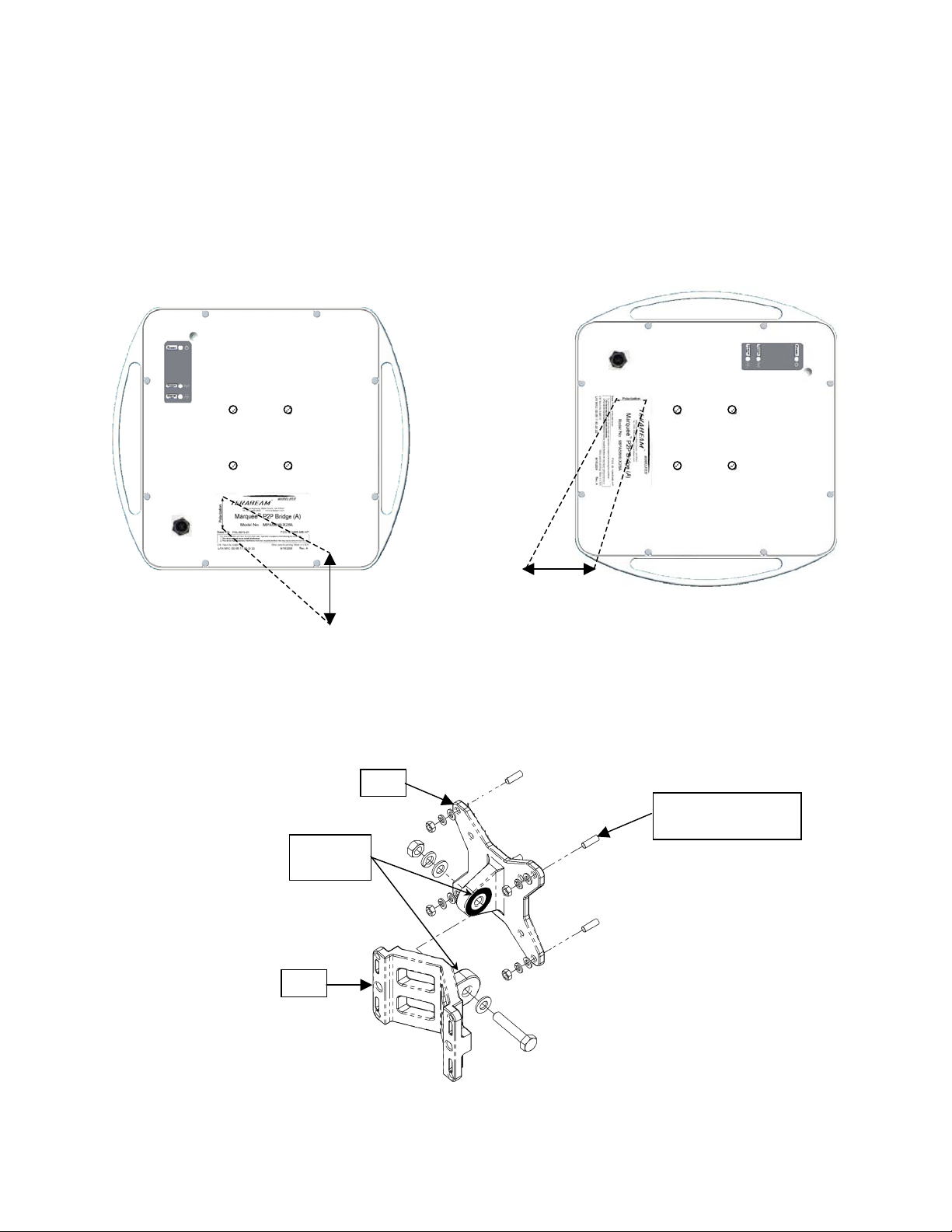
Min 0.75”
Marquee™ Series User Guide
Version 1.0 Page 7 September 2004
antenna’s polarization (see Figures 2.6a and b). Please note that both ends of the link must use the
same polarization. Be aware that most omni antennas are vertically polarized and if the Marquee EX is
aimed at one, it must be installed vertically polarized, i.e., with the polarization arrow up and down. If you
are using a Marquee with an external antenna, there is no arrow on the label located on the back of the
unit and an additional N-type connector is present to connect a short coax cable to the antenna (see
Figure 2.1b). All previous considerations regarding polarization are applicable to the external antenna.
Figure 2.6 – Marquee EX With Attached Antenna Orientation
(a) For Vertical Polarization (b) For Horizontal Polarization
1. Fit the adaptor bracket (A) to the four studs protruding from the back of the Marquee EX unit, by
aligning the four adaptor bracket holes with the mounting studs on the back of the unit and securing to
the unit using four nuts, flat washers, and lock washers, as shown in Figure 2.7. Tighten hardware
(four places). IMPORTANT: Note the position of the serrated edge of bracket (A).
Figure 2.7 – Detail Showing Assembly of Pole Mounting Bracket to Marquee EX
A
B
Serrated
Edges
Stud on the Back
of Marquee (x4)
Polarization
Arrow Polarization
Arrow
Ce manuel convient aux modèles suivants
10
Table des matières
Autres manuels TERABEAM Matériel réseau

Manuels Matériel réseau populaires d'autres marques

Matrix Switch Corporation
Matrix Switch Corporation MSC-HD161DEL Manuel utilisateur

B&B Electronics
B&B Electronics ZXT9-IO-222R2 Manuel utilisateur

Yudor
Yudor YDS-16 Manuel utilisateur

D-Link
D-Link ShareCenter DNS-320L Manuel utilisateur

Samsung
Samsung ES1642dc Instructions d'utilisation

Honeywell Home
Honeywell Home LTEM-PV Instructions de montage


