Telect 125DM08 Manuel utilisateur

© Telect, Inc., All Rights Reserved, 139695-3 A0
1.509.926.6000 :: telect.com
Demarcation Fuse/Circuit Breaker Alarm Panel
Power :: 125DM08
Installation Guide
Applies to : 125DM08

© Telect, Inc., All Rights Reserved, 139695-3 A0
1.509.926.6000 :: telect.com
ii
Demarcation Fuse/Circuit Breaker Alarm Panel
Power :: Model 125DM08
1.1 Overview.........................................................................................................................4
1.2 Specications..................................................................................................................5
1.3 Inspection .......................................................................................................................5
1.4 Installation.......................................................................................................................6
1.4.1 Important Installation Guidelines.............................................................................6
1.4.2 Installation Procedure .............................................................................................7
1.5 Replacing Alarm Cards .................................................................................................14
1.6 Accessories...................................................................................................................15
1.7 Compression Lugs........................................................................................................ 16
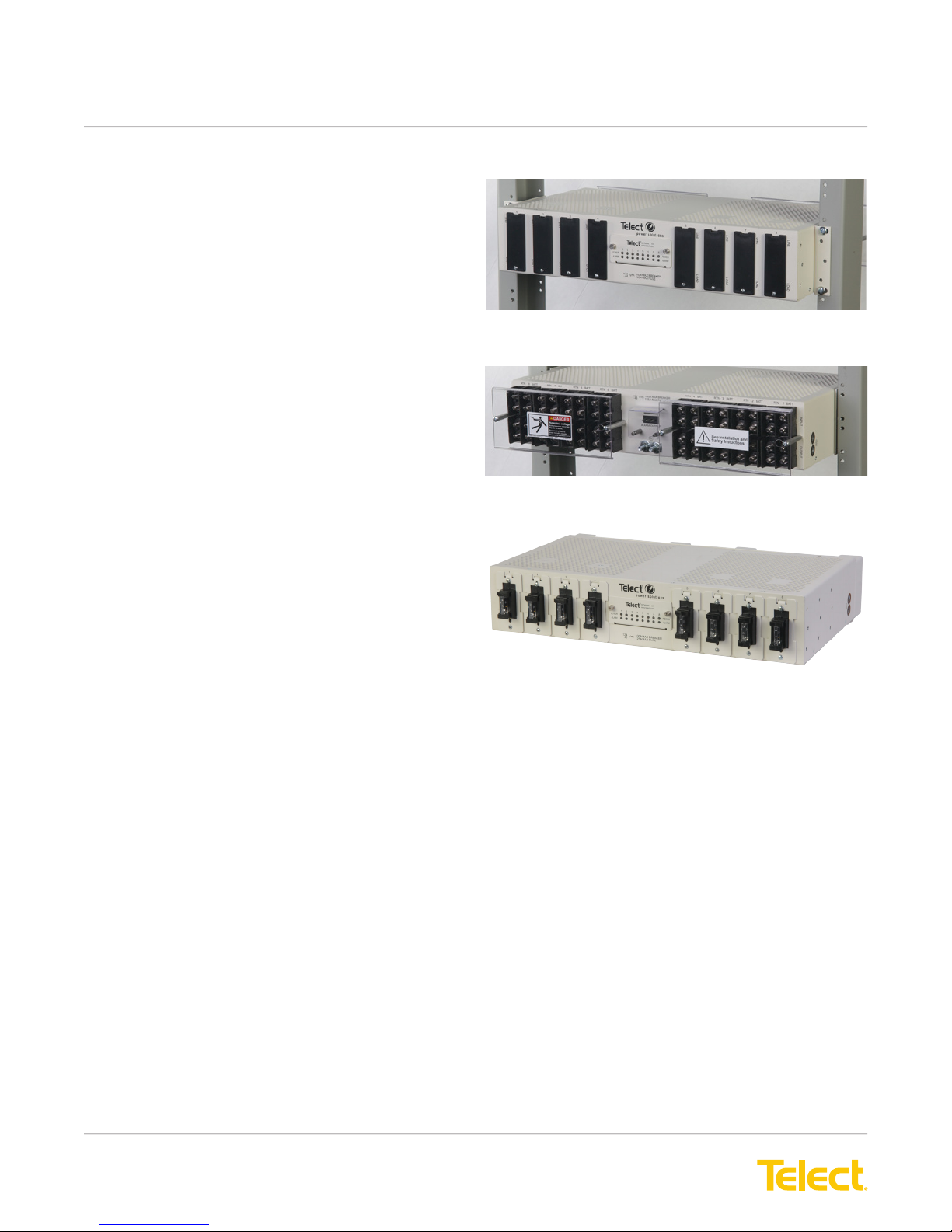
Figure 1 - Model 125DM08 (UL Listed, File E139903) ......................................................... 4
Figure 2 - 125DM08 - TFD....................................................................................................4
Figure 3 - Bracket Orientation...............................................................................................8
Figure 4 - Rack Mounting ..................................................................................................... 8
Figure 5 - Ground Terminal Harware ....................................................................................9
Figure 6 - Ground Terminal Hardware ..................................................................................9
Figure 7 - Input & Output Lug Connections ..........................................................................9
Figure 8 - LEDs on Front Panel ..........................................................................................10
Figure 9 - Removing Blank Covers.....................................................................................10
Figure 10 - Installing Circuit Breaker .................................................................................. 11
Figure 11 - Installing Circuit Breaker................................................................................... 11
Figure 12 - Installing TFD Fuse Holders............................................................................. 11
Figure 13 - Installing TPS/TLS Fuses................................................................................. 12
Figure 14 - Alarm Relay Terminals on Rear of Panel..........................................................13
Figure 15 - Alarm Card in Place..........................................................................................14
Figure 16 - Alarm Card Removed .......................................................................................14
Figure 17 - Typical 125DM08 Circuit .................................................................................. 17
Table of Contents
Figures

© Telect, Inc., All Rights Reserved, 139695-3 A0
1.509.926.6000 :: telect.com 1
Demarcation Fuse/Circuit Breaker Alarm Panel
Power :: Model 125DM08
1.1 Overview
Telect’s Demarcation Fuse/ Circuit Breaker Panel with
Alarms provides TPS/TLS fuse or circuit breaker
protection at the equipment interface. The 2RU, white
panel supports
Figure 2 - 125DM08 - TFD
Front
Rear
Figure 1 - Model 125DM08 (UL Listed, File E139903)
• eight TFD fuse holders
or
• bullet-style, standard-trip circuit breakers with
rear access terminals
and
• a replaceable alarm card containing power and
alarm LEDs, with rear-access, wire-wrap alarm
relay contacts
Each fuse holder or circuit breaker position has
separate BATT/RTN inputs and outputs rated up to
125A for either +\-24Vdc or -48Vdc applications.
Hardware is included for either ush or extended
mounting in a 19-in. or 23-in. relay rack. Visit our
website (www.telect.com) to order accessories and
replaceable parts: fuses (up to 125A),TFD fuse holder,
circuit breakers (up to 100A), ETSI mounting brackets,
and more.
NOTE: The 125DM08-TFD includes eight TFD
holders installed.

© Telect, Inc., All Rights Reserved, 139695-3 A0
1.509.926.6000 :: telect.com
2
Demarcation Fuse/Circuit Breaker Alarm Panel
Power :: Model 125DM08
1.2 Specications
Inputs/Outputs: Specication:
Max. Rating Single-Pole, Circuit Breaker (each) 100A
Max. Rating TFD Holder, Schematic C 125A (TLS Fuse); 70A (TPS Fuse)
Max. Continuous Output Load (each) 80% of rated
Max. Total Load Rating of Panel 800A continuous
Voltage Range ±20 to ±28 Vdc
-40 to -60 Vdc
BATT & RTN Wire Size #8 to #1 AWG
Ground Wire Size #10 to #2 AWG (depends on input fuse)
Terminal Stud Sizes
(Input, Output, and Earth Ground)
¼-20 dual studs on 5/8” centers
¼-20 dual PEMs on 5/8” centers (side ground)
Power Dissipation 17W per I/O
Short-Circuit Withstand Rating 5000A
Alarms: Specication:
Alarm Relay Contacts 0.6A @ 60 Vdc
Alarm Card Power Rating 1W
Alarm Wire Size Solid: #26 to #22 AWG
Weight: Specication:
Weight, Shipping ~20 lb (~9 kg) - 125DM08
~22 lb (~10 kg) - 125DM08-TFD
Dimensions: Specication:
Nominal, without brackets:
Width
Height
Depth
17.25 in (43.8 cm)
3.5 in (8.9 cm)
10.84 in. (27.6 cm)
Environment: Specication:
Operating Temperature -5°C (23°F) to 50°C (131°F)
1.3 Inspection
Please read these instructions carefully before beginning installation. If you need assistance, call Technical
Support at 1.888.821.4856 (domestic calls), or 509.921.6161 (Option 2), or email us at [email protected].
Inspect equipment after unpacking and compare it to the packing list. Immediately report any shipping damage,
defects, or missing parts to Telect at 1.800.551.4567. Keep all documentation that comes with your shipment.

© Telect, Inc., All Rights Reserved, 139695-3 A0
1.509.926.6000 :: telect.com 3
Demarcation Fuse/Circuit Breaker Alarm Panel
Power :: Model 125DM08
Telect is not liable for shipping damage. If the product is damaged, notify the carrier and call Telect’s Customer
Service Department at 1.800.551.4567 (domestic only) or 1.509.926.6000 for further recourse.
NOTE: For service or warranty information, please visit the telect.com website, or email inquiries to getinfo@
Telect.com and click on the “Support” tab, or phone us at 800.551.4567 (domestic only) or 509.926.6000.
ALERT
!
ALERT! Verify that all connections meet requirements specied in local electric codes or operating
company guidelines before supplying power. Protect this equipment with a fuse or breaker
sufcient to interrupt power levels specied on the preceding pages.
INSTALL THIS PRODUCT WITHIN A RESTRICTED ACCESS LOCATION WHERE ACCESS IS THROUGH
THE USE OF A TOOL, LOCK AND KEY, OR OTHER MEANS OF SECURITY AND IS CONTROLLED BY THE
AUTHORITY RESPONSIBLE FOR THE LOCATION. ONLY QUALIFIED TECHNICIANS MAY INSTALL AND
MAINTAIN THIS PRODUCT.
1.4 Installation
NOTES:
• Fuse holders, fuses, and circuit breakers are sold separately. See “1.6 Accessories” on page 12 for
part numbers.
• Do not remove terminal protection brackets, until panel is installed in a rack. If the panel is transported outside
of the shipping container, make sure the terminal protection brackets are installed.
1.4.1 Important Installation Guidelines
• Elevated Operating Ambient - If you install this product in a closed or multi-unit rack assembly, the
operating ambient temperature of the rack environment may be greater than room ambient. Therefore,
consider installing the equipment in an environment compatible with the maximum ambient temperature
(Tma) specied by the manufacturer.
• Reduced Air Flow - When you install this equipment in a rack, make sure you do not compromise the amount
of air ow required for safe operation of the equipment.
• Mechanical Loading - When you mount the equipment in the rack, make sure to keep the mechanical load
balanced to prevent a hazardous condition.
• Circuit Overloading - Pay attention to the connection of the equipment to the supply circuit and the effect
that overloading of the circuits might have on overcurrent protection and supply wiring. Appropriately consider
equipment nameplate ratings when addressing this concern.
• Reliable Earthing - Maintain reliable earthing of rack-mounted equipment. Pay particular attention to supply
connections other than direct connections to the branch circuit (e.g., use of power strips).
• Disconnect Device - Incorporate a readily available disconnect device into the building installation wiring.

© Telect, Inc., All Rights Reserved, 139695-3 A0
1.509.926.6000 :: telect.com
4
Demarcation Fuse/Circuit Breaker Alarm Panel
Power :: Model 125DM08
1.4.2 Installation Procedure
NOTE: Panel brackets are available for ush mounting in a 19-in. rack. A pair of 23-in. rack brackets are also
included. Either pair of brackets can be moved or installed to extend front of panel beyond the face of the rack in
1-in. (2.54 cm) increments.
WARNING
!
WARNING
!
WARNING! Failure to properly ground this equipment can create hazardous conditions to installation
personnel and to the equipment.
NOTE: Input and output wire size for this panel must be rated for the corresponding breaker/fuse size at the
power distribution unit (PDU). The input wiring to this panel may be a greater size to accommodate a voltage drop
from the primary power source.
WARNING! Before connecting input power cables, make sure input power to panel is turned off.
NOTE: Always follow operating company guidelines when connecting input wiring to the primary power source.
CAUTION
!
CAUTION!
Make sure the alarm connector on the fuse holder is straight before
inserting into the panel.
A bent alarm bayonet on a fuse holder can either cause internal damage to the
panel or fail to make electrical contact with the alarm wiring within the panel.
LIN E & LO A D desig n ations are on
b o ttom o f T P C fuse h o ld e rs o n
T H IS s ide o f the p an e l.
B e z el
LIN E & LO A D desig n ations are on
top o f TF D fus e h o lders o n TH IS
sid e o f th e pan el.
B e z el s
LINE
LOAD
LINE
LOAD
TFD Fuse Holder
TPC Fuse Holder
M A K E S U R E A L A R M
C O N N E C T O R O N F U S E H O L D E R
IS S T R A IT B E F O R E IN S E R T IN G
IN T O T H E P A N E L
A be nt a larm ba yo ne t on a fuse
ho lde r can e ithe r ca use in terna l
da m a ge to the p an el or fa il to m a ke
e le ct ric a l c on ta ct w ith a la rm w ir in g
w ithin the p an el.
CAUTION !

© Telect, Inc., All Rights Reserved, 139695-3 A0
1.509.926.6000 :: telect.com 5
Demarcation Fuse/Circuit Breaker Alarm Panel
Power :: Model 125DM08
1. If necessary, to move or replace the 19-in. brackets, remove the three screws on the sides of the breaker
panel, as shown in Figure 2.
2. Install 19-in. or 23-in. brackets for ush or extended panel presentation on rack.
3. Locate an unused rack position and mount panel using the four thread-cutting screws provided, as shown
in Figure 3.
4. Tighten the screws to 35 in.-lb (4.29 N•m).
5. Use a UL/NRTL-approved crimping tool to attach a UL/NRTL-approved, 2-hole compression lug (t 1/4-20
dual studs on 5/8 in. centers) onto a #10 to #2 AWG ground wire. (The size of the ground wire depends on
size of input BATT wires.)
6. Attach the opposite end of the ground wire to the relay rack, per local practices.
Figure 3 - Bracket Orientation
Figure 4 - Rack Mounting

© Telect, Inc., All Rights Reserved, 139695-3 A0
1.509.926.6000 :: telect.com
6
Demarcation Fuse/Circuit Breaker Alarm Panel
Power :: Model 125DM08
NOTE: The 125DM08 is DC-I, and can be grounded in both CBN and IBN networks. All eight ports have isolated
returns, and the chassis grounds are isolated from all returns. The 125DM08 is suitable for installation in network
telecommunication facilities and in locations where the NEC applies.
7. If required, lightly coat antioxidant on lug, grounding terminal, and contacting surface.
8. Remove the hardware over the terminals on the side of the panel. See Figure 4.
9. Connect the lug to the terminal using the nuts and washers removed in step 8, as shown in Figure 5.
10. Tighten the nut to 20 in.-lb (2.27 N•m).
11. Make sure the input power is OFF.
12. For input wiring — wiring used as inputs to this
demarcation panel — crimp straight, 2- hole
compression lugs (t 1/4-20 dual studs on 5/8 in.
centers) onto #8 to #1 copper wires. Insulate lug
barrels with UL94 V-0 rated heat shrink tubing.
13. Clean the terminals with a nonabrasive,
nonmetallic pad.
14. If required, lightly coat anti-oxidant on lugs and
input terminals, and then connect lugs to input
terminals on back of panel, as shown in
Figure 7. Tighten lugs to 50 in.-lb (5.5 N•m).
Figure 5 - Ground Terminal Hardware
Figure 6 - Ground Terminal Hardware
Figure 7 - Input & Output Lug Connections

© Telect, Inc., All Rights Reserved, 139695-3 A0
1.509.926.6000 :: telect.com 7
Demarcation Fuse/Circuit Breaker Alarm Panel
Power :: Model 125DM08
15. Before installing breakers or fuse holders and
output wiring, turn power on to verify input power
and indicators:
• Verify input voltage and polarity.
• Whenever power is supplied, expect the
corresponding PWR ON LED to light.
16. For output wiring, repeat Steps 7 through 12 for
BATT and RTN outputs (crimp output wires to
lugs, clean output terminals, and attach lugs to
output terminals).
17. Heat shrink the insulation onto the lug barrels.
18. Record the circuit assignments on the pull-out
designation card below the alarm display.
19. Install plastic covers over the terminals
20. Make sure output devices — devices fed from the
outputs of this demarcation panel — are disabled.
21. As shown in Figure 8, remove the blank cover(s)
from the position(s) you plan to use by unscrewing
and removing the small Phillips screw at the bottom.
Keep the hardware for later use.
NOTE: For safety, leave blank covers over all
unused positions.
22. With input power off, rmly install the circuit breakers
or fuse holders in the panel. Make sure the alarm
connectors on the rear of the breakers or holders
are straight before installation. See Figures 8
through 10.
Figure 8 - LEDs on Front Panel
CAUTION
!
CAUTION! Telect recommends that the individual
circuit load not exceed 80% of fuse capacity
(for example, 100A fuse x .80 = 80A max. load).
Figure 9 - Removing Blank Covers

© Telect, Inc., All Rights Reserved, 139695-3 A0
1.509.926.6000 :: telect.com
8
Demarcation Fuse/Circuit Breaker Alarm Panel
Power :: Model 125DM08
23. See Figures 9 and 10 for installing circuit breakers.
24. See Figures 11 and 12 for installing TFD holders and fuses. Fuse holders are designed so that you can install
them in only one way.
Figure 11 - Installing Circuit Breaker
Figure 10 - Installing Circuit Breaker
Figure 12 - Installing TFD Fuse Holders
Table des matières