
Tekxon Technology X51 Manuel utilisateur

0

1
Table of Contents
1. Camera Precautions…………………………………4
2. Preparation…………………………………………...7
zStandard Accessories………………………... 7
zParts Names…………………………………...8
zCharging the Battery …….…..…………….... 9
zLoading the SD card………..…………………11
zAttaching the Strap………..………………….. 12
3. Quick Start…………………………………………….13
zPowering the camera On/ Off……………….. 13
zTaking Picture…………………………………. 14
Holding the camera correctly…………….. 14
Capturing Still Images…………………….. 15
Recording Video Clips....…………………..15
zBasic Shooting Functions……………………. 16
Using the Zoom……………………………. 16
Flash Setting………………………………..16
Menu Mode………………………………… 17
4. Advance Mode………………………………………. 18
zStill Mode……………………………………….18
Picture Quality….………………………….. 18
Exposure Value….………………………….19
White Balance……………………………… 19
BurstSnapshot……………………………...20
Self-timer…………………………………….20
zVideo Mode…………………………………….21
Video Resolution…..………………………. 21
Exposure Value...………………………….. 22
White Balance……………………………… 22

2
Table of Contents
zPlayback Mode……………………………….. 22
Pictures/ Video Clips Playback………...…22
Single Video Clip Playback Delete…..….. 23
Thumbnail……..…….…………………..... 23
Slide Show………….……………………… 24
Delete Current Picture or Video Clip……. 24
Delete All……………..………………….….25
Protect…………………………………….…25
Print……………………………………….... 26
PlaybackZooming…………………………27
zVoice Mode……………..………………….…..28
Voice Message Recording……………...…28
Voice Message Playback………………….28
DeleteVoice Message..……………….…..29
Delete All…..……….…………………….…30
Protect……………………………………….30
Auto Repeat..………..………………….…. 31
Auto Next……………………………………31
5. Setting…………………………………………………32
zLanguage……….……….…………………….. 32
zFormat Storage....…………………………….. 33
zTV Output……………………………………… 33
zAuto Power Off..……………………………….34
zLight Frequency………………………………..34
zDefault Setting..………………………………..35
zSystem Information……………………………35

3
Table of Contents
6. Making Connections ………………....................... 36
zInstall PhotoImpression……………………….36
zInstall VideoImpression……………………….37
zConnecting to PC……………….……………. 42
zDownload Pictures, Movies…………………..43
7. Appendix…………………………………………….. 44
zSpecifications…………………………………. 44
zComputer System Requirement……………. 45
zIcons & Indicators…………………………….. 46
zStandard Number ofAvailable Pictures/
Recording Reference Table…………………. 47

4
Welcome
Thank you for choosing the Camera to pursue your DSC.
Whether you are creating memories of your friends and
family or exploring the great outdoors to get the utmost
satisfaction from your DSC, please take a moment to read
through this manual. Its contents will send you on an
educational journey into your camera's multiple
capabilities.
1. CameraPrecaution
Before using the camera, please ensure that you read
and understand the safety precautions described below.
Always ensure that the camera is operated correctly.
•Never operate the camera inside of an aircraft or
anywhere else where operation of such devices is
restricted. Improper use creates the risk of serious
accident.
•Do not aim the camera directly into the sun or other
intense light sources which could damage your
eyesight.
•Do not try to open the case of the camera or attempt
to modify this camera in any way. High-voltage
internal components create the risk of electric shock
when exposed. Maintenance and repairs should be
carried out only by authorized service providers.
•Do not fire the flash too close to the eyes of animals
or people, especially for young children. Eye
damage may result. In particular, remain at least
one meter away from infants when using flash.

5
•Keep the camera away from water and other liquids.
Do not use the camera with wet hands. Never use
the camera in the rain or snow. Moisture creates the
danger of fire and electric shock.
•Keep the camera and its accessories out of the
reach of children and animals to prevent accidents
or damage to the camera.
•If you notice smoke or a strange odor coming from
the camera, turn the power off immediately. Take
the camera to the nearest authorized service center
for repair. Never attempt to repair the camera on
your own.
•Use only the recommended power accessories. Use
of power sources not expressly recommended for
this equipment may lead to overheating, distortion of
the equipment, fire, electrical shock or other
hazards.
•Never apply too much force when cleaning the
surface of the lens. Doing so can scratch the lens
surface and cause malfunction?
•The camera may become slightly warm during use.
This does not indicate malfunction.
•If the exterior of the camera needs cleaning, wipe it
with a soft, dry cloth.

6
FCC Notice
This equipment has been tested and found to comply with
the limits for a Class B digital device, pursuant to Part 15
of the FCC Rules. These limits are designed to provide
reasonable protection against harmful interference in a
residential installation. This equipment generates, uses
and can radiate radio frequency energy. If not installed
and used in accordance with the instruction, it may cause
harmful interference to radio communication. However,
there is no guarantee that interference will not occur in a
particular installation. If this equipment does cause
harmful interference to radio or television reception, which
can be determined by turning the equipment on the off,
the user is encouraged to try to correct the interference by
one or more the following suggestion.
zReorient or relocate the receiving antenna.
zIncrease the distance between the equipment and
the receiver.
zConnect the equipment to a different power outlet
other than the one where the receiver is connected.
zConsult an experienced television or radio
technician for help.
CAUTION
To comply with the limits for a Class B digital device,
pursuant to Part 15 of the FCC Rules, this device must
only be installed on computer equipment certified to
comply with the Class B limits.

7
2. Preparation
Standard Accessories
Camera Manual CD
Carry Bag Strap
USB cable TV cable

8
Part Names
Front View
Back View
9
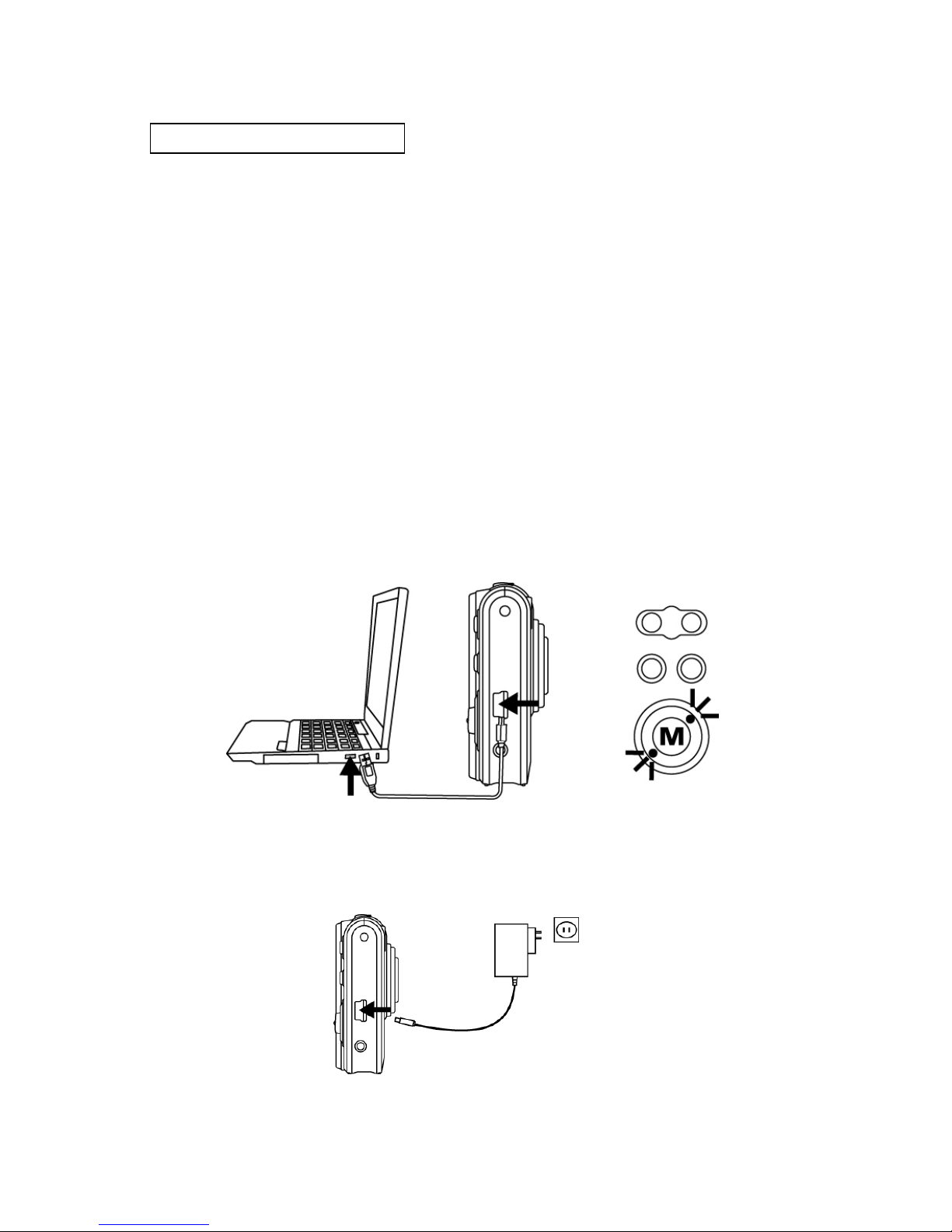
Charging the Battery
Long battery life is one of the key benefits of this product
compared to others. Your camera battery has already
been charged prior to shipment, however, to be safe,
please charge the battery at least 4 hours when your
first use. You may want to follow the instructions below to
make sure that your camera is fully charged.
The lithium-ion battery used in the camera recharges
automatically when the camera is plugged into a PC via
the USB cable. In order to charge the battery the first time,
first install into your computer using the provided USB
cable. When the battery is charging, the red LED will light
up. When charging is complete, the red LED will be off.
Or you could charge the battery by AC adaptor (optional
accessory) to a power outlet.
Ce manuel convient aux modèles suivants
1
Table des matières
Autres manuels Tekxon Technology Appareil photo numérique


