
tedee TBV1.0 Instructions de montage

tedee bridge | page 1www.tedee.com
INSTALLATION GUIDE
AND USER MANUAL
tedee bridge TBV1.0
Read installation guide and user manual
and learn how to use your device in a safe and proper manner.
EN

page 2 | tedee bridge www.tedee.com
table of contents
table of contents
quick start with tedee bridge
safety information
safety guidelines / warnings
charging and maintenance guidelines / warnings
set of items – what’s in the box?
distance / range requirement
activation code
setup - 3 easy steps
step 1: download tedee app, create new account, and log in
step 2: power up your tedee bridge
step 3: use tedee app to activate your tedee bridge
factory reset
technical information
technical specications
radio frequency
USB charger
power supply
software
LED signals
compliance and warranty information
legal / environmental notes
warranty
technical support
your activation code (AC)
Page 2
Page 3
Page 4
Page 4
Page 5
Page 6
Page 6
Page 7
Page 8
Page 8
Page 9
Page 12
Page 13
Page 13
Page 13
Page 14
Page 15
Page 15
Page 16
Page 17
Page 18
Page 18
Page 19
Page 19
Page 20

tedee bridge | page 3www.tedee.com
quick start with tedee bridge
tedee bridge setup - go to page 8
3 easy steps
Tedee bridge is a wireless router which
works as a hub, connecting your smart-
phone with tedee lock and other tedee
smart home devices.
This booklet will give you an overview of
the basic features of tedee bridge and will
help you walk through the setup in three
easy steps.
GET tedee
application
ACTIVATE
it
POWER UP
your bridge
1 2 3
Page 2
Page 3
Page 4
Page 4
Page 5
Page 6
Page 6
Page 7
Page 8
Page 8
Page 9
Page 12
Page 13
Page 13
Page 13
Page 14
Page 15
Page 15
Page 16
Page 17
Page 18
Page 18
Page 19
Page 19
Page 20

page 4 | tedee bridge www.tedee.com
safety information
safety guidelines / warnings
Do not
Do not open, modify or disassemble your device.
Do not self-service any part of the device.
Do not immerse device in any liquid or expose it to moisture.
Do not use the device near extreme heat source or open re.
Do not use the device in an environment of a high humidity or dust levels, as well as pollution
degree 2.
Do not insert any conductive objects in device openings and gaps.
The device should not be used by children without adult supervision.
Do
If repairs are required, please contact tedee technical support.
Use only power supply devices provided or recommended by tedee.
Read installation guide in order to learn how to start working with your device and how to
pair it with your tedee app and other tedee devices. You can also follow the link:
www.tedee.com/installation-guide
Other information
This device is safe to use under normal and reasonably foreseeable misuse operating code of
conduct. If you notice any signs of errors or hardware malfunction, contact tedee technical sup-
port for help. In such case this device should be returned to tedee for necessary repairs under the
warranty conditions. Any changes or modications to the device’s hardware or software which
are not approved, recommended, or provided by tedee may void your warranty.
WARNING: Read all safety guidelines and warnings. Failure to follow the guidelines and warnings
may result in electric shock, re, and / or serious injury.

tedee bridge | page 5www.tedee.com
charging and maintenance guidelines / warnings
Charging and maintenance
Please read all precautions before use.
Do not insert any conductive objects into the device openings or gaps - this may cause a short
circuit.
Charge your device only with the provided approved accessories designated for this product.
Unplug the product before cleaning. Wipe it only with a dry cloth.
Do not use chargers with an output voltage greater than 5V and 2A.
When disconnecting the power cord or any other accessory, grasp and pull the plug, not the
cord. Never use a charger that is damaged.
Do not attempt to disassemble the charger or cord, as it may expose you to electric shock.
Other information
Dispose the devices in accordance with your local regulations. If possible, recycle.
Do not dispose the device as a household waste and do not burn it.
Neither Tedee Sp. z o.o., nor our retailers are responsible for failure to comply with the above
warnings and safety guidelines. By purchasing this device, the buyer acknowledges all risks
associated with the use of tedee equipment. If you do not agree to these terms, return the
device to the manufacturer or distributor before use.
page 6 | tedee bridge www.tedee.com
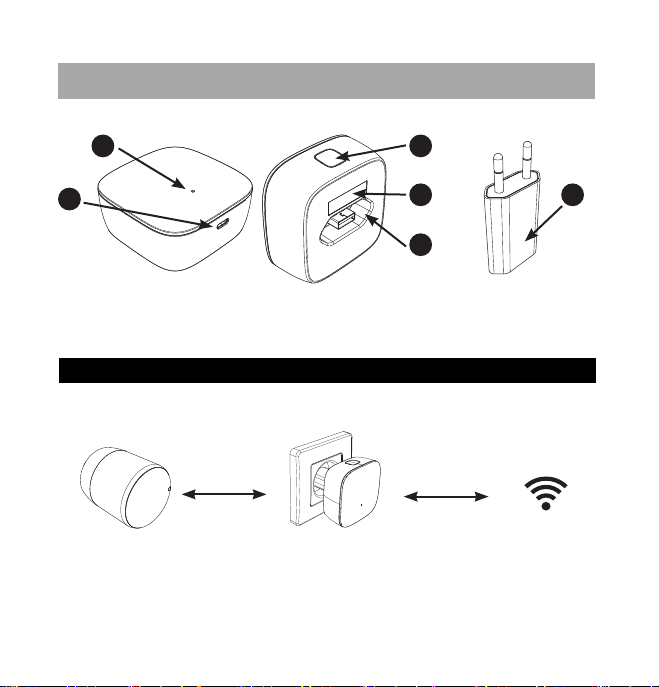
set of items – what’s in the box?
distance / range requirement
1
2
3
4
5
6
Recommended distance
between tedee bridge, tedee lock, and a local Wi-Fi network
* physical obstacles such as walls, doors, and furniture may weaken the radio signal
and affect some of the functionalities of tedee devices.
tedee bridge USB charger
up to 2m*
1. LED
2. Micro USB port
3. The button
4. Activation code (QR)
5. USB port
6. USB charger
up to 10m*
local Wi-Fi router
(in range)(recommended)
tedee bridgetedee lock

tedee bridge | page 7www.tedee.com
REAR SIDE
OF TEDEE BRIDGE
2
Activation code (AC) of your tedee bridge
is printed on:
last page of this installation guide (1)
rear side of your device (2)
While adding your device to tedee app you
can either:
scan the QR Code
type in the AC manually (14 characters)
Helpful tip
Before plugging tedee bridge
into a power outlet, take a photo
of your activation code and
keep it.
Location of a unique activation code (AC) of your tedee bridge
ACTIVATION CODE:
184800aabbCCDd
activation code
LAST PAGE
OF THIS GUIDE
1
ACTIVATION
CODE

page 8 | tedee bridge www.tedee.com
setup - 3 easy steps
step 1: download tedee app, create new account, and log in
(skip this step if you already have an account)
Version
Connection
6.0
or higher
Android
DOWNLOAD
select
Create new
account
The registration page will open
WELCOME
Internet and
Bluetooth® 4.0
or higher
Internet and
Bluetooth® 4.0
or higher
11.2
or higher
iOS
1 2
Download tedee application. Create an account and log in.

tedee bridge | page 9www.tedee.com
step 2 (option A): power up your tedee bridge
USB port + USB charger
Connect USB charger to tedee bridge.
Plug tedee bridge into a power outlet.
1
2
OK
OK
plug in
connect
230V

page 10 | tedee bridge www.tedee.com
step 2 (option B): power up your tedee bridge
micro USB port + cable
Connect micro USB cable with tedee bridge.
Connect micro USB cable with a power supply.
1
2
USB charger
Power bank
PC / laptop
OK
OK
connect
plug in
Table des matières
Manuels Matériel réseau populaires d'autres marques

Matrix Switch Corporation
Matrix Switch Corporation MSC-HD161DEL Manuel utilisateur

B&B Electronics
B&B Electronics ZXT9-IO-222R2 Manuel utilisateur

Yudor
Yudor YDS-16 Manuel utilisateur

D-Link
D-Link ShareCenter DNS-320L Manuel utilisateur

Samsung
Samsung ES1642dc Instructions d'utilisation

Honeywell Home
Honeywell Home LTEM-PV Instructions de montage


