
Targus DEFCON CL Manuel utilisateur

User Guide
410-1785-203A / PA410E1 EU
©2009 Manufactured or imported by Targus Europe
Ltd., Hounslow, Middlesex, TW4 5DZ, UK. All rights
reserved. Targus is either a registered trademark or
trademark of Targus Group International, Inc. in the
United States and/or other countries. Features and
specifications are subject to change without notice. All
trademarks and registered trademarks are the property
of their respective owners.
NOTEBOOK SECURITY
DEFCON®CL
COMBINATION CABLE LOCK

Targus Notebook Security DEFCON®CL Combination Cable Lock
2
Targus Notebook Security DEFCON®CL Combination Cable Lock
3
Table of Contents
GB – English
TARGUS NOTEBOOK SECURITY DEFCON®CL COMBINATION CABLE
LOCK .................................................................................................................6
BG –
...........................................17
CZ – Ceština
KABELOVÝ ZÁMEK ............................................................................................28
DE – Deutsch
Targus-Notebook-Sicherheit: Kombinations-Kabelschloss DEFCON®CL ...39
DK – Dansk
TARGUS SIKKERHEDS DEFCON®CL KOMBINATIONSKABELLÅS
TIL BÆRBAR COMPUTER ........................................................................50
EE – Eesti
TARGUS SÜLEARVUTI TURVALISUSE DEFCON®CL KOMBINATSIOONIGA
KAABELLUKK ......................................................................................................61
ES – Español
Cerradura con cable Targus Notebook Security DEFCON®CL
Combinación ...................................................................................................72
FI – Suomi
TARGUS DEFCON®CL KANNETTAVAN TIETOKONEEN
YHDISTELMÄTURVAVAIJERI ..............................................................................83
FR – Français
Câble antivol à combinaison DEFCON® CL de Targus pour ordina teur portable
...........................................................................................................94
GR –
®
.......105
HR – Hrvatski
TARGUS DEFCON®CL KOMBINACIJSKI KABEL ZA
..........116
HU – Magyar
TARGUS NOTEBOOK SECURITY DEFCON® CL KOMBINÁCIÓS
KÁBELZÁR .......................................................................................................127
IT – Italiano
Sistema di sicurezza per notebook Targus DEFCON® CL cavo con
lucchetto a combinazione ...................................................................................138
LT – Lietuviškai
Targus nešiojamojo kompiuterio apsauginis DEFCON® CL kombinacinis
.................................................................................................149
LV – Latviešu
...........................................................................................................160

Targus Notebook Security DEFCON®CL Combination Cable Lock
4
Targus Notebook Security DEFCON®CL Combination Cable Lock
5
NL – Nederlands
Targus DEFCON®CL combinatiekabelslot voor notebook-beveiliging
...................................................................................................171
NO – Norsk
TARGUS KABELKOMBINASJONSLÅS DEFCON®CL FOR NOTEBOOK-
SIKKERHET ..................................................................................................182
PL – Polski
®
CL .................................................................................................................193
PT – Português
Cabo de segurança Combo DEFCON®CL da Targus para proteger
computadores portáteis ..............................................................................204
RO – Român
ULUI DEFCON®CL ...........................................................................................215
RU –
®
.................................................226
SE – Svenska
TARGUS SÄKERHET FÖR BÄRBARA DATORER DEFCON®CL
KOMBINATIONSLÅS MED KABEL .................................................237
SI – Slovensko
®Cl TARGUS
.....................................248
SK –
...................................259
TR – Türkçe
..........................................................................................270
AR –
DEFCON® CL281
TARGUS

Targus Notebook Security DEFCON®CL Combination Cable Lock
6
Targus Notebook Security DEFCON®CL Combination Cable Lock
7
GB – Introduction
Thank you for purchasing the Targus Notebook Security DEFCON®
CL Combination Cable Lock. The DEFCON CL helps protect your
valuable notebook computer from theft using a resettable four-
digit combination lock. The resettable combination lock eliminates
the need for keys and enables you to change your combination
periodically for increased security.
In addition to this user’s guide, this package contains:
• DEFCON CL
• DEFCON SecureSpacers
• DEFCON Security Base Plate
WARNING: TO USE THE DEFCON CL OR RESET THE COMBINATION YOU MUST SET THE
LOCK TO THE CURRENT COMBINATION.
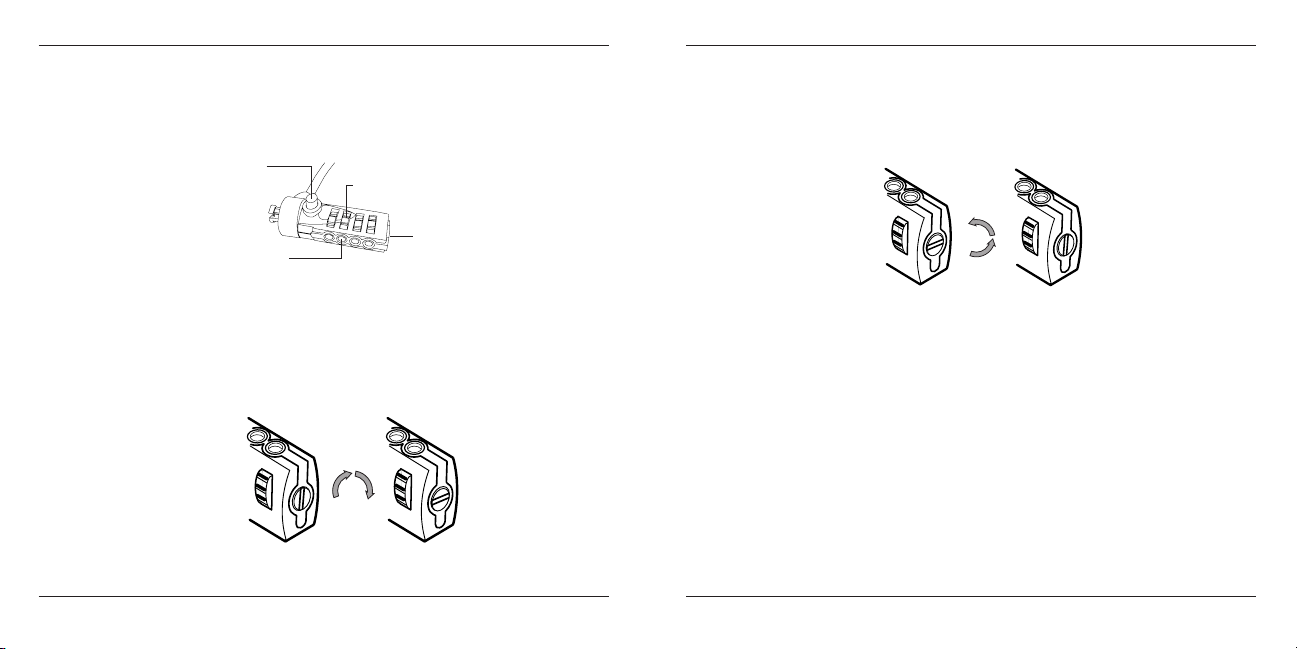
Setting the Combination
2 Using the dials, enter the current combination. If you are setting the
combination for the first time, enter the preset combination 0000. The
combination appears in the windows.
3 Using a small flat-head screwdriver or similar object, push in and rotate
the reset screw 90 degrees clockwise so that the screw’s groove appears
horizontal.
Locking button
Combination dials
Reset screw
Combination windows
DEFCON CL
Unlocking the combination lock
1 Locate the combination dials and windows on the lock.

Targus Notebook Security DEFCON®CL Combination Cable Lock
8
Targus Notebook Security DEFCON®CL Combination Cable Lock
9
6 Record the combination in either the space provided at the end of this
guide or another secure, easy-to-find place.
4 Using the dials, enter the new combination.
5 Rotate the reset screw 90 degrees counterclockwise, back to its original
vertical position, to save the new combination.
Locking the combination lock
Testing the Combination
Before attaching the lock to your notebook computer:
1 Turn the dials to disguise the combination.
2 Return to the combination you set.
3 Check that the locking button depresses completely.
Securing the DEFCON CL
Select an object in the room to which you will secure your notebook computer
with the DEFCON CL. Choose a large, heavy piece of furniture such as a
table or desk, or an immovable fixture such as a closet hanging bar.
1 Take the looped end of the cable and wrap it around the selected object.
NOTE: WRAP THE CABLE AROUND A PART OF THE OBJECT THAT WILL DETER AN
INTRUDER FROM SLIPPING THE CABLE OFF (FOR EXAMPLE, A TABLE OR DESK LEG
WITH A CROSS BAR OR A DRAWER HANDLE).
2 Feed the lock through the looped end of the cable as shown.
Securing the DEFCON CL to an object

Targus Notebook Security DEFCON®CL Combination Cable Lock
10
Targus Notebook Security DEFCON®CL Combination Cable Lock
11
Locking the DEFCON CL to your
Notebook Computer
NOTE: HOLD THE DEFCON CL WITH BOTH HANDS FOR ADDITIONAL STABILITY
WHILE INSERTING OR REMOVING THE LOCK.
1 Using the dials, enter the correct combination. The combination appears
in the windows.
Secure Spacer
Locking button Locking teeth
DEFCON CL
2 Press and hold the locking button to align the locking teeth.
NOTE: FOR THE LOCKING BUTTON TO DEPRESS COMPLETELY YOU MUST ENTER
THE CORRECT COMBINATION.
NOTE: DUE TO THE VARIATION IN THE SIZE OF THE SECURITY SLOTS ON VARIOUS
NOTEBOOK MODELS, YOU MAY FIND THAT THERE IS SOME SLACK BETWEEN THE
LOCK AND THE COMPUTER. THE SUPPLIED DEFCON SECURESPACERS ARE THE
BEST SOLUTION FOR OPTIMAL FIT AND SECURITY.
3 Insert the DEFCON CL into your notebook computer’s lock slot and
release the locking button.
4 Turn the dials to conceal your combination. Due to differences in the
size of the security slots on various notebook computers, you may find
that there is some slack between the DEFCON locking device and the
computer. The DEFCON SecureSpacers provide optimal fit and security.
Using the DEFCON
SecureSpacers
1 Insert your DEFCON locking device into the computer’s lock slot.

Targus Notebook Security DEFCON®CL Combination Cable Lock
12
Targus Notebook Security DEFCON®CL Combination Cable Lock
13
2 Pull the DEFCON locking device away from the computer and check
whether the gap is excessive.
3 If so, try each of the SecureSpacers to determine which one fits the gap.
The SecureSpacers come in three sizes: 1.6 mm, 0.8 mm, and 0.4 mm.
NOTE: DO NOT REMOVE THE ADHESIVE STRIP FROM ANY OF THE SECURESPACERS
UNTIL YOU DECIDE WHICH ONE TO USE.
4 Once you know which SecureSpacer you are going to use, remove the
locking device from the computer. Then remove the adhesive strip from
the back of the SecureSpacer and attach the spacer to the DEFCON
lock.
Unlocking the DEFCON CL
WARNING: DO NOT ATTEMPT TO REMOVE THE DEFCON CL WITHOUT USING THE
COMBINATION. TO DO SO WILL PHYSICALLY DAMAGE YOUR NOTEBOOK COM-
PUTER.
1 Using the dials, enter the correct combination.
2 The combination appears in the windows.
3 Press and hold the locking button to realign the locking teeth.
4 Remove the DEFCON CL from your notebook computer’s lock slot.
DEFCON Security Base Plate
Included with your DEFCON CL Combination Cable Lock is the Security
Base Plate for the security of desktop computers.
Using the DEFCON Security Base
Plate
1 Choose a solid location to attach the DEFCON Security Base Plate: a
piece of furniture, or metal cabinet. If you plan to use the two screws,
you can use the base plate as a template to pre-drill the holes.

Targus Notebook Security DEFCON®CL Combination Cable Lock
14
Targus Notebook Security DEFCON®CL Combination Cable Lock
15
2 Use the abrasive pad, then the alcohol wipe to prepare the area when
you will attach the DEFCON Security Base Plate.
3 After the alcohol dries, remove the backing on the base plate to expose
the adhesive and place it on the prepared location. If desired, secure the
base with the two screws.
NOTE: WHEN USING THE ADHESIVE BACKING, APPLY AT ROOM TEMPERATURE
-60°F (16°C), AND ALLOW IT TO BOND FOR MORE THAN 24 HOURS. NOT REC-
OMMEND TO USE IN OUTDOOR OR HIGH HUMIDITY ENVIRONMENT. BONDING TO
GLASS, CERAMIC TILE, WATER-ABSORBENT MATERIALS, COPPER, BRASS, OR
PLASTICIZED VINYL WITHOUT PRIMER SURFACE ARE NOT RECOMMENDED. TAR-
GUS RECOMMENDS USING BOTH ADHESIVE AND SCREW TO PROVIDE MAXIMUM
SECURITY. USING ONLY THE ADHESIVE PROVIDES MARGINAL SECURITY.
4 Place the DEFCON Security Base Plate cover as shown and slide it to the
left or right to secure it in place.
5 Insert your DEFCON cable lock.

Targus Notebook Security DEFCON®CL Combination Cable Lock
16
Targus Notebook Security DEFCON®CL Combination Cable Lock
17
Recording Your Combination
For your convenience, record your combination in the space provided.
When recording the combination, read from top to bottom using the
number closest to the locking button as the starting point.
Targus assumes no responsibility for lost, misplaced or forgotten
combinations.
Top combination
window
Locking
button
Bottom
combination Window
• DEFCON CL
•
BG
Targus Notebook Security DEFCON®CL Combination Cable Lock
18
Targus Notebook Security DEFCON®CL Combination Cable Lock
19
Бутон за
блокиране Скали за комбинация
Винт за нулиране
Прозорци за
комбинация
DEFCON CL
Autres manuels pour DEFCON CL
2
Table des matières
Langues :
Autres manuels Targus Verrouillage

Targus
Targus universal security DEFCON VPCL Manuel utilisateur

Targus
Targus Defcon NSCL Manuel utilisateur

Targus
Targus DEFCON KL Manuel utilisateur

Targus
Targus DEFCON CL Ultra Max ASP02AP Manuel utilisateur

Targus
Targus DEFCON VPCL Manuel utilisateur

Targus
Targus DEFCON TL Manuel utilisateur

Targus
Targus ASP07 Manuel utilisateur

Targus
Targus DEFCON N-KL Manuel utilisateur
Targus
Targus ASP01EU Manuel utilisateur

Targus
Targus DEFCON ASP04EUX Manuel utilisateur


