
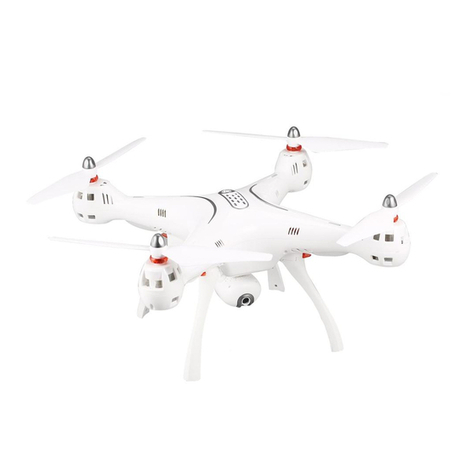
SYMA X400 Manuel utilisateur

14+
INSTRUCTIONS FOR USE
X400
MAIN FEATURES
4-CHANNEL HEIGHT HOLD HOVER TRANSMITTER DRONE
● Special 4-axis structure-fast and agile. Suitable for flying in spacious
indoor areas.
● Built-in 6-axis gyroscope ensures accurate position hold.
● Modular design for easy upgrades and maintenance.
● Capable of doing 360 degrees stunts.
● Headless mode for easy recall of the drone.
● Improved height hold stability.
● Improved auto take-off/landing function.
+1(718)312-0558(USA)
+49 335-4551-9201(Germany)
http://www.symatoys.com
Notice: The company will not be held responsibly for any printing
inconsistencies and may or not inform end users regarding any new
potential updates.For further information, please visit the syma website.

-1-
Safety Guide
English
1.Please store the smaller-sized drone accessories in places that are out of
reach of children.
2.This drone is very powerful. For all first-time flights, the left joystick must be
slowly pushed up in order to prevent the drone from ascending too fast to
avoid unnecessary collision and possible damage and injury.
3.Firstly turn off the power of the remote control when the flight ended.
4.Avoid placing the batteries in places with high temperatures and exposure
to heat.
5.Take extra precaution to ensure that the drone is at a minimum distance of
15 feet from the pilot, other people, and animals in order to prevent bodily
injury during flight operation. A minimum separation distance of 20 cm must
be maintained between the user’s body and the device under normal use
condition.
6.This drone is for people ages 12+. It must be flown always within the line of
sight of the pilot(or instructor) and flown safely.
7.Non-rechargeable batteries are not to be recharged; Batteries are to be
inserted with the correct polarity; Different types of batteries or new and
used batteries are not be mixed.
8.When the drone is not in use, please remove the batteries in the remote
control.
9.The supply terminals are not be short-circuited.
10.Discharge the battery to 40%-50% (On a full charge, fly for half of the total
flight time) if it will not be used for 10 days or more, this can greatly extend
the battery life.
11.Please keep a safe distance from the spinning propellers to avoid injury.
12.To ensure the electromagnetic environment requirement of the aviation
radio (station), using remote controls in the zone, which is in a radius of
about 5000m zone from the circle center of the airport runway, is forbidden.
All users should also abide by the regulation of the radio set forth by
government and regulatory agencies including the duration and area.
13.Only uses the recommended transformer for the model, and the transformer
is not a model. Disconnect the transformer from the model which is available
cleaning with liquids before cleaning. Check the cord, plug, enclosure and
other parts of the transformer regularly. If any damages have been
discovered, please immediately stop using it, until it was completely repaired.
14.Never look steadily at the laser beam since the laser radiation.
15.Please attention that the drone assembly under adult supervision.
16.The pilot is responsible for the safe operation and safe distance from
uninvolved persons and property on the ground and from other airspace
users and shall never fly the drone above crowds (> 12 persons).
17.Open the battery cover of the toy with screwdriver.
18.The packing has to be kept since it contains important information.
19.Do not touch the rotating rotor, avoid loose clothing or hair that could be
caught in the rotor, do not fly near the face.
20.Advice to keep the instructions for use.
-1-

③ Phone mount
④ Right joystick Press and hold to enter/
exit headless mode.
Press to change high/low speed.
⑤ 360°Stunt flip
⑥ Auto take-off and landing
Aircraft components
Understanding your remote control
Repair and maintenance
1.Use dry and soft cloth to clean this product.
2.Avoid exposing this product to heat.
3.Do not immerse this product in water, otherwise, the electronic parts will be
damaged.
4.Transformers used with the toy are to be regularly examined for damage to the
cord,plug, enclosure and other parts,and that,in the event of such damage,the toys
must be used with this transformer until the damage has been repaired.
①
① Power switch
② Left joystick Keep pushing in until
trimming control finished.
To clear all the trimming setting,
keep pushing and press the
power button at the same time.
②
③
④
⑤
⑥
English
①① Propeller protector
② Motor
③ Power switch
④ Propeller blades
⑤ Battery
⑥ camera
②
③
④
⑥
⑤
-2-

Protective Gear’s Installation Methods
Package description
●Drone
●Remote Control
●User Manual
●4 Blades
●Charging Cable
●4 Protective Gears
●Mobile Phone Retaining Clip
The following items can be found in this product package:
Remove the
screws Re-installing
the blades
Battery
Screwdriver
●
●
Re-installing the blades
2
2
English
1. Remove the light cover on the drone.
2. Attach the propeller protector to the chassis and replace the light cover.
1
1
* A labeled blades fit on the A labele motors. Blabeled blades fit on the B labeled motors.
Use the screws to tighten the blades. Refer to the image.
-3-

Press the battery cover and open it down,
then remove the battery.
Charge the battery
After charging completed, replace the
battery into the drone.
Precautions as follows during charging of battery:
- Avoid placing the active batteries in places with direct exposure,
sunlight and high temperatures. For example, naked light or electrical
equipment installations; otherwise it may cause damages or explosions.
- Avoid immersing the batteries in the water. The batteries shall be stored
in a cool and dry place.
- Avoid disassembling the battery.
- During the charging of battery, avoid leaving the charging place.
- Rechargeable batteries are to be removed from the toy before being
charged.
- Rechargeable batteries are only to be charged under adult supervision.
- Exhausted batteries are to be removed from the toy.
- Caution:Risk of explosion if battery replaced by an incorrect type,dispose
of used batteries according to the instructions.
The charging time is about 90 minutes; Hover flight time is approximately 6.5 minutes.
Battery Changing and Charging Methods for Drone
USB
12 3
5V2A
Attaching the phone holder
123
English
-4-

Battery Cover 4 x AA Batteries
Inserting the remote control batteries
!
12
3
* When installing the batteries, ensure that you match the + and – ends
of the battery with the + and – signs on the controller.
* During the battery installation, it must be ensured that the polarities
of the batteries are matched with that of the battery box. No battery
shall be installed with the opposite polarity.
* Please do not use new and old batteries together.
* Please do not use different types of batteries together.
* Do not use rechargeable batteries.
Flight preparation and turning the aircraft on/off
Pairing the remote control with the aircraft
Indicator stays constant when
pairing is complete.
3
4
Remote control
indicator flashes
rapidly
Switch on the remote
control Indicator flashes
rapidly
12
Turning the aircraft on
One-touch take-
off/landing
Method one Method two Method three
Push the left and right
joysticks downwards in
a V shape for 1 second.
Move the left stick
(throttle) fullyup, after let it
come back to the
middle and the motors will
start spinning.
English
-5-

!
Turning the aircraft off
Method one Method two Method three
Push the left joystick
downwards for 2-3
seconds.
Push the left and right
joysticks downwards
in a V shape for 2
seconds.
Press the take-off/land-
ing button to make the
aircraft land
automatically and
switch off.
Using the remote control
Ascend
Descend
Move forwards
Move backwards
Rotate left
Tilt left Tilt right
Rotate right
Front
Rear
Front
Rear
English
1. If the drone flies out of control range, the drone indicator lights will
start flashing slowly and after the drone will slowly descend.
2. If the transmitter turns off or the transmitter battery runs low, the
drone will slowly descend. Turn on the transmitter again, re-pair the
unit and continue to fly.
-6-

1
2
2
1
Forward and backward trim control
If the drone automatically flies
forward/backward while hovering, press
in the left joystick and at the same time
push the right joystick backward/forward
slightly to fine tune the direction. Don’t
release the left joystick until the drone is
flying in a stable state.
If the drone automatically flies towards
the left/right side while hovering, press in
the left joystick and at the same time
push the right joystick right/left slightly to
fine tune the direction. Don’t release the
left joystick until the drone is flying in a
stable state.
Left/right side flight trim control
Trimming operation
Product Features
Low battery
1. Low-Voltage Protection:
When the four indicator lights at the bottom of drone
start flashing, it means that the drone's battery power is
low. At this time, please control the drone return.
2.Over-Current Protection:
When the drone encounters direct impact from a
foreign object, or is obstructed, or the blades are not
rotating, the drone will go into the over-current
protection mode.
English
-7-

Level calibration
High/low speed mode
* The aircraft cannot be calibrated if the angle of inclination is greater than 10
degrees.
Place the aircraft on a level surface
and move the left and right joysticks
to the lower right corner for
approximately 3 seconds. The
indicator will flash rapidly and then
stay constant to indicate that the
calibration process is complete.
Briefly press the right joystick to switch
between high and low speed mode.
1. Low speed mode is enabled by
default when the aircraft is switched
on.
2. The remote control beeps twice when
high speed mode is enabled and
once when low speed mode is
enabled.
3.Level Calibration Function:
4.High/Low Speed Function:
5.360°Stunt Flip Function:
When you are familiar with the basic actions, you can
proceed to explore even more exciting stunt actions. Fly
the drone to a height of above 3 m above the ground,
press the upper right corner button (Stunt Flip Button)
on the remote control and simultaneously push the right
joystick to the farthest position of Front/Back/Left/Right,
the drone will now execute the Front/Back/ Left/ Right
stunt flip function.
Note: The drone will have the best stunt flip action when the batteries are fully charged.
3m
6.Height Hold:
English
Use the left stick (throttle) to achieve
the desired height and after allow the
left stick to fall back to its default middle
position.
-8-

7. Headless Function:
Front
Back
Left Right
①.Defining forward direction:
●Press on the power button of the remote control.
●Press the power button of the drone, and adjust the
specified direction of the drone’s head under the
headless mode as the new forward direction.
●Push the left joystick (throttle) on the remote control
up to the farthest position and then pull down to the
farthest position. When the remote control issues a
long “beep” sound, it means the frequency and
defining forward direction functions are completed.
Front
Back
Left Right
Front
Back
Left Right
②.Toggling between headless function and normal function:
● After the drone is matched with the corresponding
frequency, the drone would be in normal pattern by
default. At this time the indicator light on the drone would
be in a state of on for a long time. After pressing in on
the right joystick of the remote control for 2 seconds, the
remote control would make a sound of “beep, beep,
beep” to show that it has entered into a state of headless
mode. Press in the right joystick for 2 seconds then a
long sound of “beep” would be heard to show an exit
status. (When under the state of headless mode, four
indicator lights on the drone flash slowly once every four
seconds).
● Under the headless mode, the operator does
not need to differentiate the head position of the
drone, and only needs to control the drone’s
direction front / back / left / right by using the
right joystick direction on the remote control.
English
-9-
Table des matières
Autres manuels SYMA Drone

SYMA
SYMA LOG1612-JR Manuel utilisateur

SYMA
SYMA GC88752-28 Manuel utilisateur

SYMA
SYMA X200W Manuel utilisateur

SYMA
SYMA X8C Manuel utilisateur

SYMA
SYMA X1 Manuel

SYMA
SYMA GYRO REMOTE CONTROL SERIES Manuel utilisateur

SYMA
SYMA X800W Manuel utilisateur

SYMA
SYMA LOG1710 Manuel utilisateur

SYMA
SYMA LOG1628-R2 Manuel utilisateur

SYMA
SYMA X11 Mode d’emploi

SYMA
SYMA X5UW(720P) Manuel utilisateur

SYMA
SYMA X2 Gyro Manuel utilisateur

SYMA
SYMA GYRO REMOTE CONTROL SERIES Manuel utilisateur

SYMA
SYMA X25W Manuel utilisateur

SYMA
SYMA X5HW Manuel utilisateur
SYMA
SYMA X8PRO Manuel utilisateur

SYMA
SYMA D1650WH Manuel utilisateur

SYMA
SYMA X200 Manuel utilisateur

SYMA
SYMA GC88752-13 Manuel utilisateur

SYMA
SYMA X5C Manuel utilisateur


