
STT Pro 360 Manuel utilisateur

PRO 360
Owner's Manual

2
Introduction
The Pro 360 Digital Protractor is a
revolutionary measuring tool that
provides an immediate, digital reading
of all angles in a 360° circle. The
machined aluminum frame is a rigid,
light weight, ultra-precise platform that
allows the state-of-the-art sensor and
its microprocessor circuit to provide
unsurpassed accuracy throughout the
Protractor's 360° range.
The Pro 360 uses an innovative liquid filled angle sensor. As the protractor is moved, the
liquid seeks a new position, resulting in changes in the electrical properties of the sensor.
A microprocessor analyzes the changes and calculates the numbers seen on the display.
sensor

Feature Overview
The Pro 360 operates normally in a standard reference mode where level is displayed as 0.0°.
However, a new reference point for 0.0° can easily be established by pushing the ALT ZERO
button. You can also "freeze" any displayed angle on the LCD by pushing the HOLD button.
The 360° range of the unit is organized into four 90° quadrants for display purposes. In each,
the Pro 360 achieves an accuracy of + 0.1° at level and plumb with a maximum error of +
0.2° in between.
And the Pro 360 does not need to be returned to the manufacturer or dealer for recalibration.
By following the Superset®instructions in this booklet,you can test and recalibrate the Pro
360 in just a couple of minutes on site and without any special fixtures.
ON/OFF button
Liquid-crystal display (LCD)
Directional arrows
for level/vertical
ALT ZERO
annunciator
HOLD button HOLD annunciator
ALT ZERO button
(alternate reference)
3

4
Operating Instructions - Battery
The Pro 360 is powered by a 9-volt battery. A new alkaline battery will provide 500 hours of
use. A 9-volt lithium battery can be used for even longer life.
To extend battery life, the Pro 360 shuts off automatically when left undisturbed for five
minutes (to reactivate, push the ON/OFF button). The Pro 360 also indicates when the battery
is low. Change the battery when the display alternately flashes "LO bAt" with angle measure-
ments. (NOTE: The Pro 360 does not display inaccurate angles due to a weak battery.)
To install/replace the battery
•Unscrew the battery compartment cover screw.
•Remove the cover.
•Install or replace the battery.
•Replace the cover and tighten the screw.
Do Not Overtighten

5
Operating Instructions - Angle Measuring
First, you must make sure your unit is reading accurately by using the test on pages 8-9. If the
unit fails this simple test, you must recalibrate it using Superset®(pages 10-12).
To operate your Pro 360, simply push the ON/OFF button; it will begin displaying angle
readings immediately. Set the Pro 360 on the surface to be measured and read the angle. (To
get the most accurate reading, allow the unit to settle for 5 seconds before noting the angle.)
When the unit is first turned on, the displayed angles will be in standard reference mode -
level (true horizontal) is displayed as 0.0° and plumb (true vertical) is displayed as 90.0°. (An
alternate reference point can be set easily if desired - see ALT ZERO.)
An arrow on the left side of the display will indicate
which way to move the Pro 360 to achieve level or
plumb.
Between 0° and 44.9°, the arrow will point towards
level. Between 45° and 89.9°, the arrow will point
toward vertical (plumb).
If you continue to rotate the Pro 360, the numbers on the Pro 360 display "flip over" when the
unit is upside-down, allowing for easy reading in any position.
directional arrows

6
HOLD (temporarily "freezing" a reading on the display)
If you need to take a measurement with the Pro 360 in an unreadable position, or if you need
to temporarily lock in a reading while you record it, simply press the Hold button while
measuring the angle. (Make sure the unit has been in position and still for 5 seconds.)
The readout will freeze and a flashing ■ will appear in the right upper hand corner of the
display. An arrow on the left side of the LCD will also flash.
To release, press the Hold button again.
Note: The Pro 360 cannot be recalibrated
(Superset®) nor can a new reference point be
established (ALT ZERO) when the HOLD feature is
engaged. The HOLD feature is disengaged auto-
matically when the unit shuts off or is turned off.
These flash in Hold Mode
7
ALT ZERO (Setting an alternate reference point)
ALT ZERO allows you to set any angle as a 0.0° reference point from which to take
measurements. For example, you may want a surface that is actually 3° off horizontal
displayed as 0° so you can measure all other angles from that benchmark.
To set an alternate reference point, place the Pro 360 on the new surface and wait 5
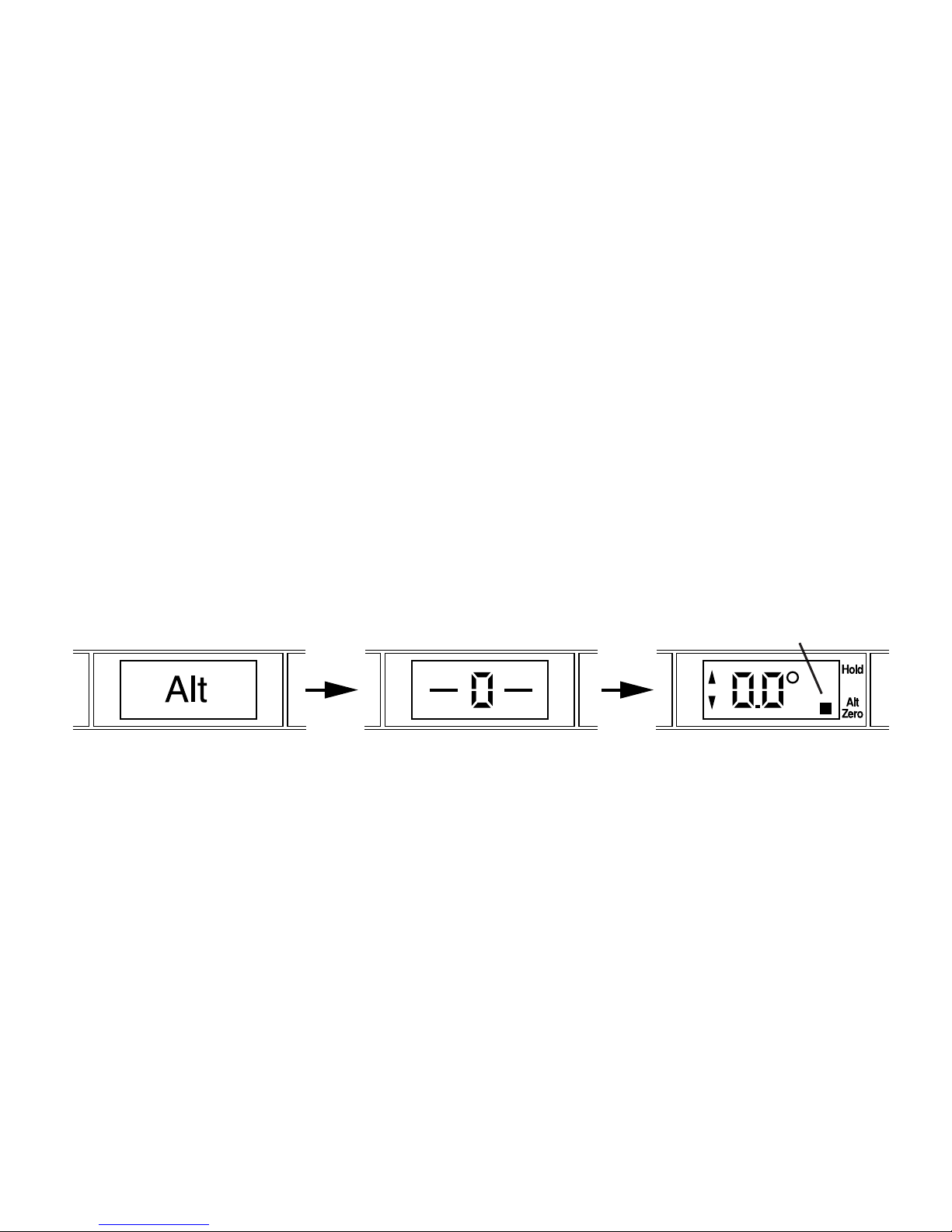
seconds. Press the ALT ZERO button once. "Alt "will appear on the display, followed
by "-0-". The Pro 360 will then display angles using the new reference. A flashing ■
will appear in the lower right hand corner of the display as long as the Pro 360 is in ALT
ZERO mode.
Press ALT ZERO again to return to standard reference mode. The Pro 360 also returns to
standard reference when it is turned off or shuts off automatically.
NOTE: You cannot activate the ALT ZERO button when the Pro 360 display is in HOLD.
Annunciator flashes in ALT ZERO mode

Recalibration
Like all measurement instruments the Pro 360 must periodically be monitored for accuracy.
The Pro 360 should be tested daily with the simple procedure outlined below. If it is found to
be out of calibration, it is easily recalibrated on site using Superset®- an eight-step procedure
that realigns the unit through its entire 360° range and takes just a couple of minutes to
perform. And Superset®doesn't require any special fixtures, tools, or expertise.
Accuracy Test
Perform this simple test each day before using the Pro 360. Also perform it anytime the
Pro 360 has been dropped or is being used in an environment that varies more than 5°
C (9° F) from the environment in which it was last calibrated. If your Pro 360 fails this
test, you must recalibrate it using Superset®before using the unit further to measure angles.
•Position the Pro 360 with the display
facing you on a clean, flat horizontal
surface. It doesn't have to be exactly
level. Wait 10 seconds so the unit is
completely settled and note the angle
on the display.
8

9
•Rotate the unit end-for-end so the display is
facing away from you. Be sure to set the
Pro 360 in exactly the same spot, and wait
10 seconds before reading the angle that's
displayed.
•Now roll the unit toward you so that the
display is facing you, but the lettering on the
face of the unit is upside down. Wait 10
seconds, and note the angle on the display.
•Finally, rotate the unit end-for-end so the
display is facing away from you (the
lettering should still be upside-down). Wait
10 seconds and note the angle on the
display.
•If any of the four measurements varies from any other by more than 0.1°,
you must recalibrate (Superset®) your unit before using it further.

10
Superset®
Superset®recalibrates the Pro 360 through its entire 360° range by electronically recording
four horizontal and four vertical settings. It should be performed whenever the accuracy test
shows a discrepancy of 0.1° or more.
How to Perform Superset®
Turn on the Pro 360 and place it on a flat surface. You can use any horizontal surface within
10° of level and any vertical surface within 10° of plumb to perform Superset®. You must
use the same surfaces throughout the entire process.
Note: Each time you reposition the Pro 360 during Superset®, wait a minimum of 10 seconds
before pressing the HOLD button to advance to the next step.
Starting Superset®
• Press and hold the HOLD and ALT ZERO buttons simultaneously. Keep them depressed
for approximately three seconds.
• Release the buttons when the symbol "SUP" appears. A "0"
within flashing brackets will then appear. These brackets are
composed of four horizontal and four vertical segments.
Note that as you proceed through the eight steps of Superset®,
a new segment will hold steady after you complete each step. "0" within flashing brackets
Table des matières
Autres manuels STT Instrument de mesure
Manuels Instrument de mesure populaires d'autres marques


Endress+Hauser
Endress+Hauser Proline Promag 50 Caractéristiques techniques

Siemens
Siemens SITRANS F Coriolis FCT030 Manuel de la liste des pièces

KLINGER
KLINGER CMF V Series Manuel utilisateur

EXFO
EXFO FTB-2 Manuel d'exploitation et d'entretien

Keysight
Keysight M8290A Manuel utilisateur

ADTEK
ADTEK MW-5 Manuel utilisateur