Stark 53500 Manuel d'instructions d'origine

16 SPEED DRILL PRESS
SAVE THIS MANUAL: KEEP THIS MANUAL FOR SAFETY WARNINGS, PRECAUTIONS, ASSEMBLY,
OPERATING, INSPECTION, MAINTENANCE AND CLEANING PROCEDURES. WRITE THE PRODUCT’S
SERIAL NUMBER ON THE BACK OF THE MANUAL NEAR THE ASSEMBLY DIAGRAM (OR MONTH
AND YEAR OF PURCHASE IF PRODUCT HAS NO NUMBER).
OWNER’S MANUAL AND SAFETY INSTRUCTIONS
ITEM: 53500
FOR QUESTIONS PLEASE CALL OUR CUSTOMER SUPPORT: (909) 628 4900 MON-FRI 9AM TO 3PM PSTFOR QUESTIONS PLEASE CALL OUR CUSTOMER SUPPORT: (909) 628 4900 MON-FRI 9AM TO 3PM PST
227541

GENERAL SAFETY WARNINGS
Read all safety warnings and instructions. Failure to follow the warnings and instructions
may result in electric shock, re and/or serious injury. Save all warnings and instructions for
future reference.
SAFETY
The warnings, precautions, and instructions discussed in this instruction manual cannot cover all
possible conditions and situations that may occur. It must be understood by the operator that common
sense and caution are factors which cannot be built into this product, but must be supplied by
the operator. Read carefully and understand all ASSEMBLY AND OPERATIONC INSTRUCTIONS
before operating. Failure to follow the safety rules and other basic safety precautions may result in
serious personal injury.
Stay alert, watch what you are doing, and use common sense when operating the tool. DO NOT use
the tool while you are tired or under the inuence of drugs, alcohol, or medication.
Wear the proper personal protective equipment when necessary. Use ANSI Z87.1 compliant safety
goggles (not safety glasses) with side shields. Leather leggings, re resistant shoes or boots should be
worn when using this product This applies to all persons in the work area. Keep clothing free of grease,
oil, solvents, or any ammable substances Wear dry, insulating gloves and protective clothing.
1
DO NOT allow persons to operate or assemble the product until they have read this manual and have
developed a thorough understanding of how it works.
DO NOT modify this product in any way. Unauthorized modication may impair the function and/or
safety and could affect the life of the product. There are specic applications for which the product
was designed.
Use the right tool for the job. DO NOT attempt to force small equipment to do the work of larger
industrial equipment. There are certain applications for which this equipment was designed. This
product will be safer and do a better job at the capacity for which it was intended. DO NOT use
this equipment for a purpose for which it was not intended.
Inspect the work area before each use. Keep work area clean, dry, free of clutter, and well-lit.
Cluttered, wet, or dark work areas can result in injury.
Keep children and bystanders away from the work area while operating this product. DO NOT
allow children to handle the product.
Check for damaged parts before each use. Carefully check that the product will operate properly and
perform its intended function. Replace damaged or worn parts immediately. Never operate the
product with a damaged part.
ALWAYS keep guards in position, in good working order, correctly adjusted and aligned. Never attempt
to use a power tool without any guard supplied with it.
IMPORTANT SAFETY INFORMATION
SECURE WORK. Use clamps or a vise to hold work when practical. It’s safer than using your hand and
it frees both hands to operate tool.

2
IMPORTANT SAFETY INFORMATION IMPORTANT SAFETY INFORMATION
USE PROPER EXTENSION CORD. Make sure your extension cord is in good condition. When using
an extension cord, be sure to use one heavy enough to carry the current your product will draw. An
undersized cord will cause a drop in line voltage resulting in loss of power and overheating. Table 1
shows the correct size to use depending on cord length and nameplate ampere rating. If in doubt, use
the next heavier gauge. The smaller the gauge number, the heavier the cord.
MAINTAIN TOOLS WITH CARE. Keep tools sharp and clean for best and safest performance. Follow
instructions for lubricating and changing accessories.
DISCONNECT TOOLS before servicing: when changing accessories, such as blades, bits, cutters, and
the like.
REDUCE THE RISK OF UNINTENTIONAL STARTING. Make sure switch is in off position before
plugging in.
USE RECOMMENDED ACCESSORIES. Consult the owner’s manual for recommended accessories.
The use of improper accessories may cause risk of injury to persons.
DIRECTION OF FEED. Feed work into a blade or cutter against the direction of rotation of the blade or
cutter only.
NEVER LEAVE TOOL RUNNING UNATTENDED. TURN POWER OFF. Don’t leave tool until it comes
to a complete stop.
When Installing or Moving The Drill Press
To reduce the risk of injury from unexpected drill press movement. If there is any tendency of the drill
press to tilt or move during any use, bolt it to the oor. Make sure and leave adequate room to fully open
the belt guard. If the workpiece is too large to easily support with one hand, provide an auxiliary support.
To reduce the risk of injury from electrical shock, make sure your ngers do not touch the plug’s metal
prongs when plugging in or unplugging the drill press.
NEVER Stand On Tool. Serious injury could occur if the tool tips or you accidentally hit the cutting tool.
Do not store anything above or near the tool where anyone might stand on the tool to reach them.
Before Each Use
To reduce the risk of injury from accidental starting, turn the switch off, unplug the drill press, and remove
the switch key before raising the guard, changing the cutting tool, changing the setup, or adjusting
anything. Make sure switch is in OFF position before plugging in.
Check for alignment of moving parts, binding of moving parts, breakage of parts, drill press stability, and
any other conditions that may affect the way the drill press works.
If any part is missing, bent or broken in any way, or any electrical part does not work properly, turn the
drill press off and unplug the drill press.
Replace damaged or missing parts before using the drill press again
Remove adjusting keys and wrenches. Form a habit of checking for and removing keys and adjusting
wrenches from table top before turning drill press on.
Make sure all clamps and locks are tight and no parts have excessive play.

3
IMPORTANT SAFETY INFORMATION
Use Only Accessories Designed For This Drill Press To Reduce The Risk
of Serious Injury From Thrown Broken Parts Or Work Pieces
When cutting large diameter holes:
- Clamp the workpiece rmly to the table. Otherwise the cutting may grab and spin it at high speed.
- Use only one piece, cup-type, hole cutters.
-DO NOT use y cutters or multi-part hole cutters as they can come apart or become unbalance in use.
- Keep speed below 1500rpm.
Drum sanders must never be operated on this drill press at a speed greater than 1800rpm.
DO NOT install or use any drill that exceed 7” in length or extends 6” below the chuck jaws. They can
suddenly bend outward or break.
Do not use wire wheels, router bits, shaper cutters, circle (y) cutters or rotary planers on this drill press.
Kickback
Kickback is the grabbing of the workpiece by the rotating tool. The workpiece can be thrown at a very
high speed in the direction of rotation. This Can Cause Serious Injury. To reduce the possibility of injury
from kickback:
- Clamp the workpiece rmly to the table whenever possible.
- Bufng or sanding wheels or drums should be contacted on the side moving away from you, not the
side moving toward you.
- Use only recommended accessories and follow the instructions supplied with the accessory.
This drill press has 16 speeds
See inside of guard for specic placement of
belt on pulleys
If any part of your drill press is missing, malfunctioning, has been damaged or broken…such as the motor
switch, or other operating control, a safety device or the power cord, turn the drill press off and unplug it
until the particular part is properly repaired or replaced.
NEVER place your ngers in a position where they could contact the drill or other cutting tool if the workpiece
should unexpectedly shift or your hand should slip.
To reduce the risk of injury from parts thrown by the spring, follow instructions exactly as given and shown
in adjusting spring tension of quill.
Turn the motor switch off and put away the switch key when leaving the drill press.
To reduce the risk of injury from thrown work or tool contact, do not perform layout, assembly or setup work
on the table while the cutting tool is rotating.
Any power tool can throw foreign objects into the eyes. This can result in permanent eye damage. Everyday
eyeglasses have only impact resistant lenses. They art not safety glasses.
WARNING: Don’t allow familiarity (gained from frequent use of your drill press) to cause a careless mistake.
Always remember that a careless fraction of a second is enough to cause a severe injury.
Noise levels vary widely. To reduce the risk of possible hearing damage, wear ear plugs or muffs when
using drill press for hours at a time.

4
IMPORTANT SAFETY INFORMATION
To prevent the workpiece from being torn from your hands, spinning of the tool, shattering the tool
or being thrown, always properly support your work so it won’t shift or bind on the tool:
- ALWAYS position backup material (use beneath the workpiece) to contact the left side of the column.
- Whenever possible, position the workpiece to contact the left side of the column – If it is too short to the
table. Use table slots or clamping ledge around the outside edge of the table.
- When using a drill press vise, always fasten it to a table.
- NEVER do any work “Freehand” (hand holding workpiece rather than supporting it on the table), except
when polishing.
- Securely lock head to column, table support to column and table to table support before operating drill
press.
- NEVER move the head or table while the tool is running.
- Before starting the operation, jog the motor switch to make sure the drill or other cutting tool does not
wobble or cause vibration.
Before Leaving The Drill Press
Turn the drill press off.
Wait for tool bit to stop spinning.
Unplug the drill press.
Make workshop child-proof. Lock the shop. Disconnect master switches. Remove the yellow switch key.
Store it away from children and others not qualied to use the tool.
Electrical Requirements
General Electrical Connections
DANGER: To reduce the risk of electrocution:
1. Use only identical replacement parts when servicing. Servicing should be performed by a qualied service
technician.
2. DO NOT use in rain or where oor is wet.This tool is intended for indoor residential use only.
WARNING: DO NOT permit ngers to touch the terminals of plug when installing or removing the plug to
or from the outlet.
110-120 Volt, 60Hz. Tool Information
NOTE: The plug supplied on your tool may not t into the outlet you are planning to use. Your local electrical
code may require slightly different power cord plug connections. If these differences exist refer to and make
the proper adjustments per your local code before your tool is plugged in and turned on. In the event of a
malfunction or breakdown, grounding provides a path of least resistance for electric current to reduce the
risk of electric shock. This tool is equipped with an electric cord having an equipment grounding conductor
and a grounding plug, as shown. The plug must be plugged into a matching outlet that is properly installed
and grounded in accordance with all local codes and ordinances. Do not modify the plug provided. If it will
not t the outlet, have the proper outlet installed by a qualied electrician. A temporary adapter may be used
to connect this plug to a 2-prong outlet, as shown, if a properly grounded three prong outlet is not available.
This temporary adapter should be used only until properly grounded three prong outlet can be installed by
a qualied electrician. The green colored rigid ear, lug and the like, extending from the adapter must be
connected to a permanent ground such as a properly grounded outlet box.
WARNING: If not properly grounded, this tool can cause an electrical shock, particularly when
used in damp locations, in proximity to plumbing, or out of doors. If an electrical shock occurs
there is the potential of a secondary hazard, such as your hands to hit the cutting tool.

4
ELECTRICAL SAFETY INFORMATION
NOTE: The adapter illustrated is for use only if you
already have a properly grounded 2-prong outlet.
NOTE: In Canada the use of a temporary adapter is not
permitted by the Canadian Electrical Code
WIRE SIZES
NOTE: Make sure the proper extension cord is used and
is in good condition. The use of any extension cord will
cause some loss of power. To keep this to a minimum and
to prevent overheating and motor burnout, use the table
as below to determine the minimum wire size (A.W.G.)
extension cord.

5
PARTS DIAGRAM

PARTS LIST
4

ASSEMBLY
5
WARNING: For your own safety, never connect plug to power source until all assembly steps are completed.
TOOLS NEEDED TO ASSEMBLE
6” or 8” adjustable wrench, #2 Phillips stubby screwdriver, 16 oz rubber mallet and combination square.
ASSEMBLY OF BASE/COLUMN
1. Locate base (#4), column support ange (#5) and column (#2). Remove protective covering paper and
discard.
2. Position base on the oor.
3. Place column support ange on the base and align holes in the support ange with holes in the base.
(Fig. 1)
4. Locate four (4) hex bolts, four (4) washers among loose parts in bag.
5. Install a bolt, washer and lock washer in each hole through the support ange and base and tighten with
adjustable wrench. (Fig. 2)
6. Slide the column into the column support ange and tighten the set screw furnished on the ange with
hex key wrench
INSTALLATION OF BRACKET ASSEMBLY
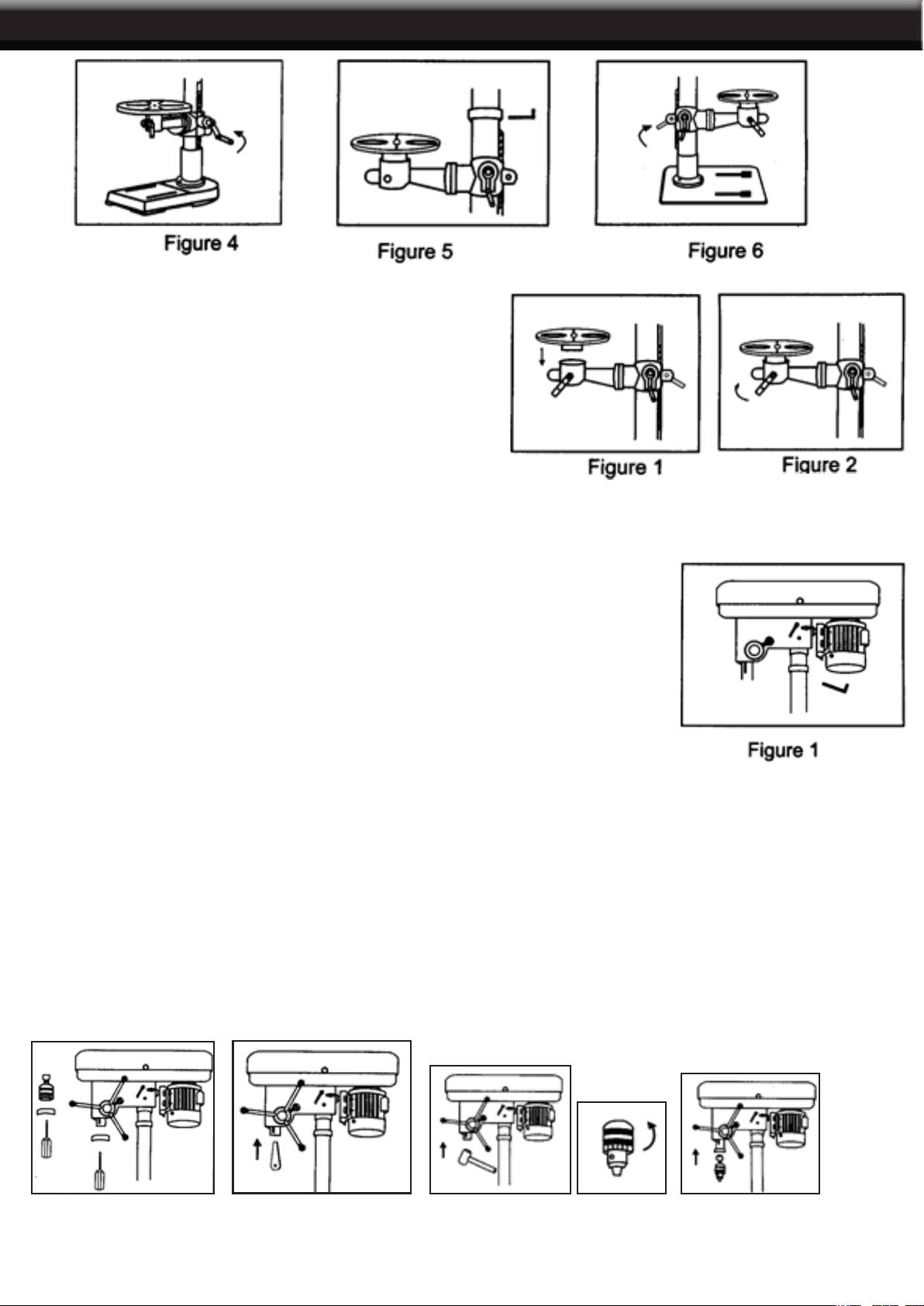
1. Locate bracket assembly (#3), crane handle (#2) and rack (#6).
2. Put bracket assembly over the column, align the hole of table bracket with column and then insert rack
with teeth face outside half way through the hole between bracket and column. (Fig. 1).
3. Slide the bracket assembly into the rack and column to the position you want. (Fig 2).
4. Install crane handle to the shaft and tighten with hex key wrench. (Fig. 3).
5. Adjusting the rack to proper position by turning crane handle until the bottom of rack reach the column
support ange edge. (Fig. 4)
6. Secure the rack by installing rack ring. (Fig. 5)
7. Secure the bracket assembly to the column by tightening lock handle. (Fig 6)

ASSEMBLY
4
INSTALLING THE TABLE
1. Locate table (#11) and remove the protective paper.
2. Place the table on the arm of bracket assembly (Fig. 1).
3. Align the table to base.
4. Secure table to arm by tightening clamp bolt. (Fig. 2)
INSTALLING THE HEAD ASSEMBLY
1. Locate head assembly (#1).
2. Put head assembly over column and align the hole on the bottom of the head
assembly to the column and slide the head assembly down the column.
3. Align the head frame with the table and base.
4. Secure the head assembly to the column by set screws on left side of the
head.
5. Tighten with hex key wrench. (Fig 1)
INSTALLING THE FEED HANDLES
1. Locate arbor (#10), chuck (#9) and chuck key among parts bag.
2. Remove the protective polylm from these and discard.
3. Clean out the tapered hole in the chuck and arbor (Fig. 1)
4. Insert arbor into spindle and turn the arbor around to make it all the way in the spindle. Firmly tap the arbor
nose with rubber mallet or a piece of wood (Fig. 2)
5. Open chuck jaws completely by turning chuck sleeve counter-clockwise to the end. (Fig 4)
6. Push the chuck up on the arbor nose as far as it will go (Fig 5).
7. Firmly tap the nose of chuck with rubber mallet or a piece of wood to insure proper seating of the chuck
on the spindle.
Table des matières
Autres manuels Stark Outils électriques

Stark
Stark red line HG 2002D Manuel utilisateur

Stark
Stark 61012 Manuel utilisateur

Stark
Stark 61014 Manuel d'instructions d'origine

Stark
Stark 61006 Manuel utilisateur

Stark
Stark RH 1800DB Manuel utilisateur

Stark
Stark 53501 Manuel d'instructions d'origine

Stark
Stark 61006 Manuel d'instructions d'origine

Stark
Stark red line JS 750 Manuel utilisateur

Stark
Stark 56030 Manuel d'instructions d'origine