Spectronik PROTIUM-1000 Manuel utilisateur

PROTIUM-1000
FUEL CELL SYSTEM
USER GUIDE
VERSION 2.2 DECEMBER 2021

© 2021 Spectronik Pte. Ltd., All Rights Reserved.
Spectronik, the ‘S’ logo, and PROTIUM are registered trademarks of Spectronik Pte. Ltd.
SAFETY, HANDLING & SUPPORT
WARNING:Failure to follow these safety instructions could result in fire, electric shock, or
other injuries, or damage to PROTIUM-1000 Fuel Cell System (PROTIUM-1000)or other property.
Read all the safety information below before using PROTIUM-1000.
Handling Handle PROTIUM-1000 with care.Itis made of thin sheet metal, graphite, and plastic and has sensitive
electrochemical membrane and components inside.PROTIUM-1000 is not designed for extreme conditions,
rough handling, vibration, shock or drop.Keep PROTIUM-1000 away from heat, flame, strong sunlight, water,
dust, soil or mud.Do not use adamaged PROTIUM-1000.
Repairing PROTIUM-1000 is assembled under high compression.Do not disassemble or tamper with PROTIUM-
1000.Do not troubleshoot, repair or replace any component by yourself.
Hydrogen Use only high purity (99.999%) dry Hydrogen gas with PROTIUM-1000.Hydrogen is acolorless,
odorless and highly flammable gas. It is non-toxic but can cause asphyxiation.Follow all local rules and regulations
for safe handling, storage and usage of Hydrogen gas.Do not smoke when operating PROTIUM-1000.
Ventilation Operate PROTIUM-1000 in awell ventilated environment.Fresh air intake for the fuel cell oxidant
blower, cooling air entry from the front of the protective mask, and hot air exit from the cooling fans shall not be
obstructed or restricted.
Purging PROTIUM-1000 periodically flushes its anode during operation, releasing Hydrogen gas and water from
the Hydrogen gas outlet.Do not block the Hydrogen gas outlet.Do not bring flame or electric spark close to the
Hydrogen gas outlet. It is advisable to attach alonger gas tubing to the Hydrogen gas outlet connector and safely
guide the purge exhaust far away from the fuel cell.
CAUTION:
Always put the Hydrogen gas outlet tubing behind the cooling fan and never in front of
the fuel cell stack or oxidant blower inlet.Purged Hydrogen mixed with air intake into the fuel cell’s
cathode channels may cause fire and irreversible damage to the fuel cell.
Connectors, ports and buttons Never force aconnector into aport or apply excessive pressure to abutton.If
the connector and port do not join with reasonable ease, they probably do not match.Check for obstructions and
ensure that the connector matches the correct port.
Disposal and recycling As PROTIUM-1000 contains electronic components, it must be disposed of separately
from household waste.When PROTIUM-1000 reaches its end of life, follow local laws and regulations for proper
disposal and recycling options.
High-consequence activities PROTIUM-1000 is acustomized system with pending safety tests and certifications.
It is not intended for use where the failure of the system could lead to death, personal injury or severe
environmental damage.
Disclaimer Every effort has been made to ensure that the information in this manual is accurate.This manual
serves to adequately recommend safe operating procedures, but shall not be treated as comprehensive.Do not
use PROTIUM-1000 in any other way than the one recommended in this manual.Spectronik reserves the right to
change system specifications, appearance or discontinue the product at any time.
Warranty Spectronik warrants the included hardware product and accessories against defects in materials and
workmanship for the first 30 days after delivery.Spectronik does not warrant against normal wear and tear, nor
damage caused by accident or abuse.
To obtain service, contact support@spectronik.com

1
2
3
5
4
6
Figure 1.1.1 Front view of PROTIUM-1000
CHAPTER 1 | OVERVIEW
1OVERVIEW
1.1 PROTIUM-1000 SYSTEM OVERVIEW

ITEM DESCRIPTION
1. Programming port 9. H2gas outlet connector
2. Fuel cell electronic controller 10. Cooling fan x2
3. Radio telemetry transmitter 11. User mounting plate (Bottom)
4. Oxidant flow manifold 12. Load power connector (XT-90 female)
5. Oxidant blower 13. External power supply receptacle
6. Protective mask 14. Balance-of-plant (BOP) switch
7. Status LED 15. User mounting plate (Top)
8. ON/OFF push button 16. H2gas inlet connector
7
8
9
10
11
12 13
14
15
16
Figure 1.1.2 Bottom and Top views of PROTIUM-1000
CHAPTER 1 | OVERVIEW

CHAPTER 1 | OVERVIEW
1.2 MECHANICAL DIMENSION
D
8
R3.25
E
C
B (Centre to Centre)
A

All dimensions in mm
A323.60 E40.00
B283.60 F395.50
C215.00 G164.50
D100.50
CHAPTER 1 | OVERVIEW
F
G

PROTIUM-1000
cannot
be mounted in any orientation due to internal routings of the gas streams within the fuel
cell stack.
The fuel inlet must always be higher than the fuel outlet.The stack should also be level to ensure water does not
get trapped in the Cathode channels, obstructing the oxidant flow and causing potential performance drop and
cell damage.
Mount PROTIUM-1000 in one of the two recommended configurations above.
For optimal oxidant and cooling airflows, it is also recommended that there is at least 15cm unobstructed
clearance in front of the protective mask and oxidant blower inlet, and 30cm unobstructed clearance behind the
cooling fans’ outlet.
Figure 1.3.1 Recommended configuration #1 (Top) and #2 (Bottom)
1.3 Mounting orientation and air clearance
CHAPTER 1 | OVERVIEW

Fuel Cell PROTIUM-1000
Type PEM
No. of cells 30
Architecture Closed cathode
Coolant Air cooled
Rated/gross power 1000/1200W
Rated/gross current 55.5/66.6A
Voltage output 18-27VDC
Start-up time 30s
Operating ambient temperature [-10,45]oC
Operating altitude without power derating 1500m AGL
System weight 4,800g
Max dimension 396 x 165 x 324mm
Fuel Supply
Hydrogen gas Dry, 99.999% purity
Delivery pressure 0.7bar (10 psig)
Fuel consumption @ rated power 12.5L/min
Gas tubing PU, 8 x 5.5
Supply & purge control Solenoid valves with integrated pressure sensor
Stack leakage checks Automated via integrated pressure sensors
Electronic Controller
Processor board FEATHER V1.2
External power supply requirement 15-90V, 150W max
Weight (including casing) 680g
Output connector XT-90
Warning & protections Low voltage, high/low temperature, high/low
pressure, low battery, stack leakage
Communication 868MHz ultra long range radio modem
Data acquisition (DAQ) software GUI PC/Android app
Remote control Fan speed, blower speed, manual purge, remote on-
off
CHAPTER 2 | SPECIFICATIONS
2SPECIFICATIONS
2.1 PROTIUM-1000 TECHNICAL DATA SHEET

Figure 2.2.1 Nominal polarization curve for a fully conditioned PROTIUM-1000 at its Beginning-of-Life (BOL).
•Ambient temperature: 24oC
•Relative humidity: 60%
•H2supply pressure: 10psig
•Dead-ended operation
•Balance-of-plant (BOP) powered by fuel cell
•Tcell at 1000W: 66oC
CHAPTER 2 | SPECIFICATIONS
2.2 VI CURVE
TEST CONDITIONS

CHAPTER 2 | SPECIFICATIONS
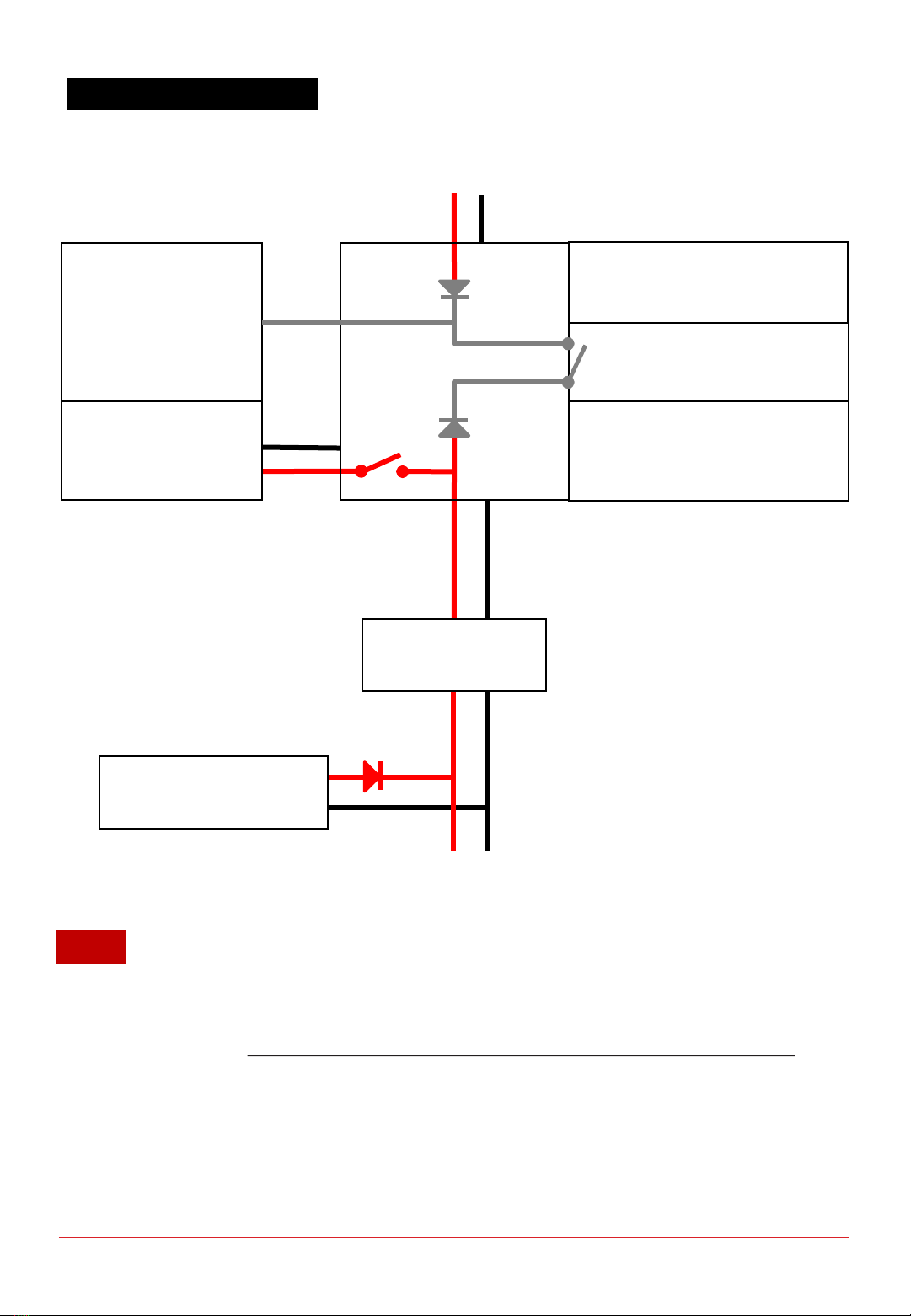
2.3 SYSTEM BLOCK DIAGRAM
1. An external power supply is required to initially turn on the electronic controller.
2. By default, the BOP Switch is set to 1. When the system enters “Running Phase” the fuel cell will be able
to power its own BOP, if Fuel cell power OUT voltage is higher than External Power Supply voltage.
3. By setting the BOP Switch to 0, the External Power Supply will power the BOP at all times including
“Running Phase”.
Fuel cell
power IN
Power output
to LOAD
User Interface
•ON/OFF push button
•Status LED & Buzzer
Communication
•USB or
•Radio telemetry transmitter
External Power Supply
(15 to 90V, 150W)
Fuel cell
power OUT
18-27V
Hybrid Output Source
(optional)
DC-DC converter
(optional)
NOTE
PROTIUM-1000
fuel cell stack
Balance of Plant (BOP)
•Cooling System
•Oxidant System
•Valves
•Sensors
•Communications BOP Switch 1/0
Electronic
Controller
Table des matières
Autres manuels Spectronik Accessoires pour appareils photo