
Sony UYA-S90SF Manuel utilisateur
AUTO SLIDE FEEDER
UYA-S90SF
SERVICE MANUAL
1st Edition
UYA-S90SF
!WARNING
This manual is intended for qualified service personnel only.
To reduce the risk of electric shock, fire or injury, do not perform any servicing other than that
contained in the operating instructions unless you are qualified to do so.Refer all servicing to
qualified service personnel.
!WARNUNG
Die Anleitung ist nur für qualifiziertes Fachpersonal bestimmt.
Alle Wartungsarbeiten dürfen nur von qualifiziertem Fachpersonal ausgeführt werden.Um die
Gefahr eines elektrischen Schlages, Feuergefahr und Verletzungen zu vermeiden, sind bei
Wartungsarbeiten strikt die Angaben in der Anleitung zu befolgen. Andere als die angegeben
Wartungsarbeiten dürfen nur von Personen ausgeführt werden, die eine spezielle Befähigung
dazu besitzen.
!AVERTISSEMENT
Ce manual est destiné uniquement aux personnes compétentes en charge de l’entretien.Afin
de réduire les risques de décharge électrique, d’incendie ou de blessure n’effectuer que les
réparations indiquées dans le mode d’emploi à moins d’être qualifié pour en effectuer d’autres.
Pour toute réparation faire appel à une personne compétente uniquement.

1 (E)
UYA-S90SF
Table of Contents
Manual Structure
Purpose of this manual ........................................................................................ 3 (E)
Related manual .................................................................................................... 3 (E)
1. Operating Instructions
2. Service Information
2-1. Feeder Assembly ...................................................................................2-1 (E)
2-1-1. Main Parts Location .............................................................2-1 (E)
2-1-2. Removal and Installation of Cabinet....................................2-1 (E)
2-1-3. Replacement of Main Parts ..................................................2-2 (E)
2-1-4. Cleaning/Replacement of Main Roller.................................2-5 (E)
2-2. Carrier Assembly ..................................................................................2-5 (E)
2-2-1. Main Parts Location .............................................................2-5 (E)
2-2-2. Replacement of Main Parts ..................................................2-5 (E)
2-3. Tools......................................................................................................2-7 (E)
3. Mechanical Operation Description
4. Semiconductor Pin Assignments
5. Spare Parts
5-1. Notes on Repair Parts..................................................................................5-1
5-2. Exploded Views ..........................................................................................5-2
5-3. Electrical Parts List for Boards ...................................................................5-6
5-4. Parts List for Frame.....................................................................................5-8
5-5. Packing Materials........................................................................................5-9

2 (E) UYA-S90SF
6. Block Diagram
6-1. Circuit Description ................................................................................6-1 (E)
6-1-1. CN-2083 Board ....................................................................6-1 (E)
6-1-2. MEC-13 Board .....................................................................6-1 (E)
6-1-3. LE-238 Board.......................................................................6-1 (E)
6-1-4. SE-564 Board .......................................................................6-1 (E)
6-1-5. SE-611 Board .......................................................................6-1 (E)
6-1-6. SU-59 Board.........................................................................6-1 (E)
6-1-7. SU-60 Board.........................................................................6-1 (E)
6-2. Overall Block Diagram ...............................................................................6-3
7. Schematic Diagrams and Board Layouts
Schematic Diagrams
MEC-13 ....................................................................................................7-1
CN-1959....................................................................................................7-2
CN-2083....................................................................................................7-2
LE-238 ....................................................................................................7-2
SE-561 ....................................................................................................7-2
SE-562 ....................................................................................................7-2
SE-563 ....................................................................................................7-2
SE-564 ....................................................................................................7-3
SE-611 ....................................................................................................7-3
SU-59 ....................................................................................................7-3
SU-60 ....................................................................................................7-3
Frame ....................................................................................................7-4
Board Layouts
MEC-13 ....................................................................................................7-6
CN-2083....................................................................................................7-6
LE-238 ....................................................................................................7-7
SE-564 ....................................................................................................7-7
SE-611 ....................................................................................................7-7
SU-59 ....................................................................................................7-7
SU-60 ....................................................................................................7-7
3 (E)
UYA-S90SF
Manual Structure
Purpose of this manual This manual is the service manual of the Auto Slide Feeder UYA-S90SF (feeder and
carrier assembly).
This manual is intended for use by trained system and service engineers, and
describes the information for maintenance and detailed service.
Related manual In addition to this “Service Manual”, this unit is provided with the manual below.
..
..
.Operating Instructions (Supplied for product.)
Part No.: 3-204-878-01
This manual describes the information required for the actual management and
operation of this unit.
..
..
.“Semiconductor Pin Assignments” CD-ROM (Available on request)
This “Semiconductor Pin Assignments” CD-ROM allows you to search for
semiconductors used in Communication System Solutions Network Company
equipment.
Semiconductors that cannot be searched for on this CD-ROM are listed in the
service manual for the corresponding unit. The service manual contains a com-
plete list of all semiconductors and their ID Nos., and thus should be used together
with the CD-ROM.
Part number: 9-968-546-XX
http://getMANUAL.com

1-1 (E)
UYA-S90SF
Section 1
Operating Instructions Reprinted from the
operating instructions
UYA-S90SF
2000 Sony Corporation
3-204-878-01(1)
Auto Slide Feeder
Operating Instructions GB

1-2 (E) UYA-S90SF
2
(GB)
English
For the customers in the USA
This equipment has been tested and found to comply with
the limits for a Class A digital device, pursuant to Part 15 of
the FCC Rules. These limits are designed to provide
reasonable protection against harmful interference when the
equipment is operated in a commercial environment. This
equipment generates, uses, and can radiate radio frequency
energy and, if not installed and used in accordance with the
instruction manual, may cause harmful interference to radio
communications. Operation of this equipment in a residential
area is likely to cause harmful interference in which case the
user will be required to correct the interference at his own
expense.
You are cautioned that any changes or modifications not
expressly approved in this manual could void your authority
to operate this equipment.
For the customers in Canada
This Class A digital apparatus complies with Canadian ICES-
003.
3
(GB)
Table of Contents
Features .......................................................................4
(GB)
Checking the Package ................................................4
(GB)
Mounting the Slide Carrier to the Film Scanner.......5
(GB)
Mounting the Auto Slide Feeder on the Film
Scanner................................................................... 6
(GB)
Prescanning/Scanning the Slides Continuously .....8
(GB)
Setting on Feeder Window ......................................... 8
(GB)
Prescanning/Scanning ................................................ 9
(GB)
Prescanning/Scanning One Slide only ...................11
(GB)
Attaching the Slide Attachment to the Slide
Carrier ................................................................. 11
(GB)
Loading a Slide into the Carrier ............................... 11
(GB)
Maintenance ..............................................................12
(GB)
Cleaning and Replacing the Rubber Roller of
the Auto Slide Feeder.......................................... 12
(GB)
Cleaning inside the Slide Carrier.............................. 13
(GB)
Cleaning the Cabinet ................................................ 13
(GB)
Precautions................................................................14
(GB)
Specifications............................................................14
(GB)
English
GB
1-3 (E)
UYA-S90SF
4
(GB)
Features
The UYA-S90SF consists of the Slide Carrier to scan slides, mounted 135
film or IX240 film, with the UY-S90 film scanner, and the Auto Slide
Feeder to automatically load multiple slides one by one to the Slide
Carrier.
Using the Auto Slide Feeder, you can prescan and scan up to 50 slides
continuously.
Note
For details on the operation of the film scanner, refer to the Operating
Instructions and Software Manual supplied with the film scanner.
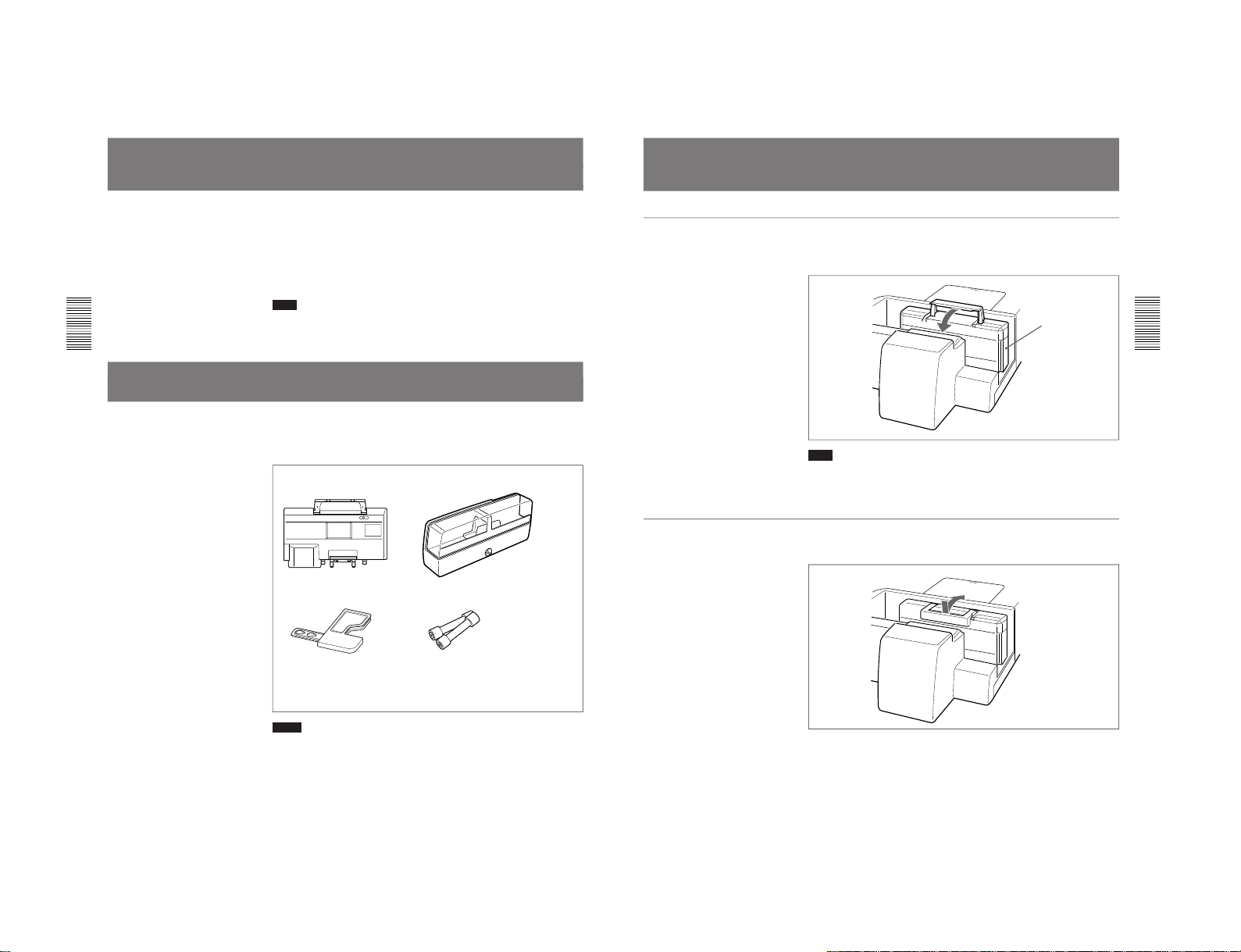
Checking the Package
This product consists of the following parts. Check that nothing is missing
from your package.
Notes
•Retain the original carton and packing materials in case you have to
transport the parts in the future.
•Remove the slide carrier and the auto slide feeder when transporting the
film scanner.
Slide carrier (1) Auto slide feeder (1)
Slide attachment (1) Replacement rubber rollers (2)
CD-ROM (1)
Operating Instructions (1)
Software Licence Agreement (1)
Warranty booklet (1)
5
(GB)
Mounting the Slide Carrier to the Film Scanner
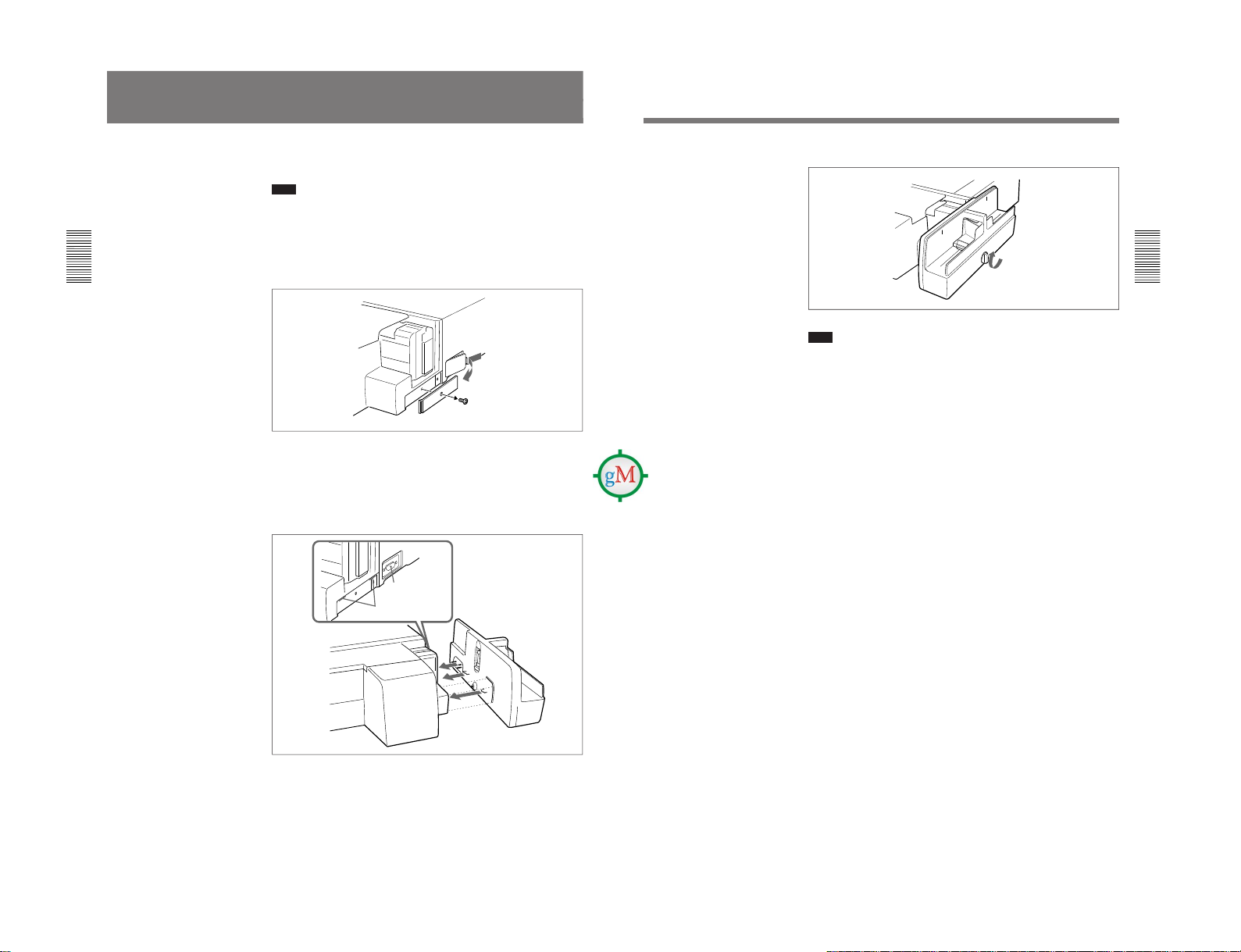
Mounting the carrier
Insert the slide carrier into the film scanner as shown in the figure, and fold
down the handle to lock. Then close the carrier cover.
Note
Be sure to close the carrier cover and lamp cover of the film scanner. If
either cover is open, previewing and scanning cannot be performed. Also,
opening the cover during previewing or scanning stops the operation.
Removing the carrier
Press the handle to unlock and lift the carrier.
Slide carrier
1-4 (E) UYA-S90SF
6
(GB)
Mounting the Auto Slide Feeder on the Film
Scanner
When you want to prescan/scan multiple slides continuously, mount the
supplied auto slide feeder on the film scanner.
Note
The mounting should be performed on a rigid, flat surface such as on a
desk, as the screw on the auto slide feeder cannot support the weight of the
auto slide feeder.
Install the film scanner on a base which covers the auto slide feeder.
1
Remove the side panel of the film scanner and the cover of the slide
feeder connector.
2
Mount the auto slide feeder on the film scanner.
Insert the two projections on the rear of the auto slide feeder into the
slits on the film scanner, and the connector to the slide feeder
connector.
For easier positioning, place the auto slide feeder parallel to the side of
the film scanner, then fit the square projected part of the auto slide
feeder to the film scanner as illustrated.
Insert the projections.
Insert the
connector.
7
(GB)
3
Tighten the screw to secure the auto slide feeder.
Note
To avoid damaging the screw of the auto slide feeder, do not tighten it
excessively.
Table des matières
Manuels Dévidoir de fil populaires d'autres marques


Lincoln Electric
Lincoln Electric LN-25X Manuel utilisateur

Matrix
Matrix OmniFlow 330 Fiche technique

EWM
EWM drive 4X IC D EX Manuel utilisateur

Lincoln Electric
Lincoln Electric 12442 Manuel utilisateur

Aim
Aim AIVE Guide d'installation

Lincoln Electric
Lincoln Electric Power Feed 10 Robotic K1780-2 Manuel utilisateur

Miller
Miller XR-AlumaFeed Suitcase Manuel utilisateur

Lincoln Electric
Lincoln Electric Activ8X Manuel utilisateur

Abicor Binzel
Abicor Binzel iROB Feed HA Manuel utilisateur

EWM
EWM drive 4X IC D EX Manuel utilisateur

Lincoln Electric
Lincoln Electric LF-72 Manuel utilisateur

Hakko Electronics
Hakko Electronics 373 Manuel utilisateur