Measurement interface switching process description:
4
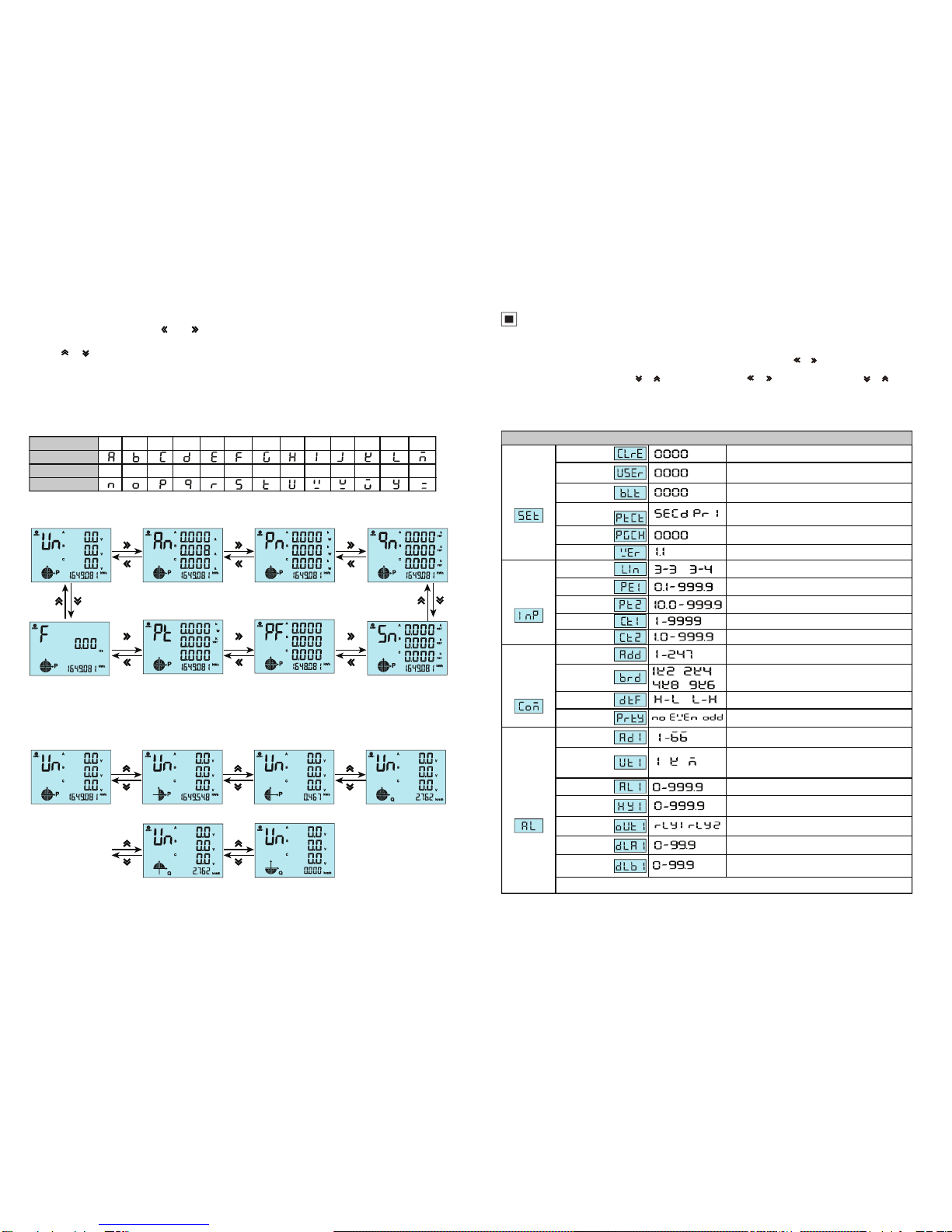
An example of the power interface switching process:
Total Kwh Forward Kwh Backward Kwh Total Kvarh
Forward Kvarh Backward Kvarh
3 phase phase voltage
3 phase power factor
Total power
Frequency
3 phase current 3 phase active power 3 phase reactive powe
3 phase reactive
power
Note: 26 English letters are represented by digital tubes
English alphabet
Digital tube display
English alphabet
Digital tube display
A B CDEFGH I J K LM
N O P QR S T U VW X YZ
Measurement display interface description:
1. Under measurement status, press “ ”/ “ ”to switch display of 3 phase phase voltage, 3 phase current, 3 phase
active power, 3 phase reactive power, 3 phase appearance power, 3 phase power factor, total power, frequency etc
2. Press “ ”/ “ ” increase or decrease key to switch display of total active power, forward active power, backward active
power, total reactive power, forward reactive power, backward reactive power.
3. DO1, DO2 are used as the alarm output status indication in the alarm mode, and the switch output status indication is
made in the "remote" mode of the switch quantity.
4. COM flashing means communicate is acting.
5. P(Kwh) means Total Active Energy (algebraic sum of forward active energy and backward active energy); Q(Kvarh)
means Total Reactive Energy (algebraic sum of forward reactive energy and backward reactive energy).
5
Menu Modification Illustration
Menu Structure and Function Description
Alarm mode
Alarm value
Alarm hysteresis
value
Alarm value unit
Alarm action
delay
Alarm end time
The second way alarm related parameter setting method refers to the first way
When value is DO, it is remote control mode, otherwise
it is alarm mode, please refer to Table 1 as below
1st alarm value setting (unit is standard display unit)
Alarm action delay time, unit: second
Alarm action reset time, unit: second
Alarm Setting
/ /
1st level
2nd level
3rd level Description
When input 1111, user can clear energy ; When
input 1234, the menu can be reset to default setting
Modify password, factory default setting 0000, no
password
Backlight lighting delay time, unit “second”. When value
is “0” , it will keep on lighting all the time
Software version, read only
System Setting
Clear Energy
Signal Setting
Set power net input mode, 3 phase 3 wire or 3 phase
4 wire
Primary voltage, unit KV
Network
Voltage transform
Current transform
Voltage transform
Current transform
Communication
Setting
Meter address range
Baud Rate 1k2 means 1200, 2k4 means 2400,
4k8 means 4800 9k6 means 9600
High register is in front or low register is in front
Address
Baud rate
Data sequence
User Password
Backlight time
Software Version
The page turning time is measured in seconds. No page
turning when the value is "0"
Page Turning
Time
/
/
/
/
/ /
Parity Bit No parity/even parity/odd parity
/ /
Alarm relay
selection /
The value is“SECD”:display 2times measurement
The value is “PRI”: display 1 time measurement
Primary and secondary
selection
1: means international standard unit, K: 1000 times of
international standard unit, M: 1000000 times of
international standard unit
1st alarm hysteresis value setting ( unit is standard
display unit)
1st alarm replay output selection
Secondary voltage, unit KV
Primary current, unit A
Secondary current, unit A
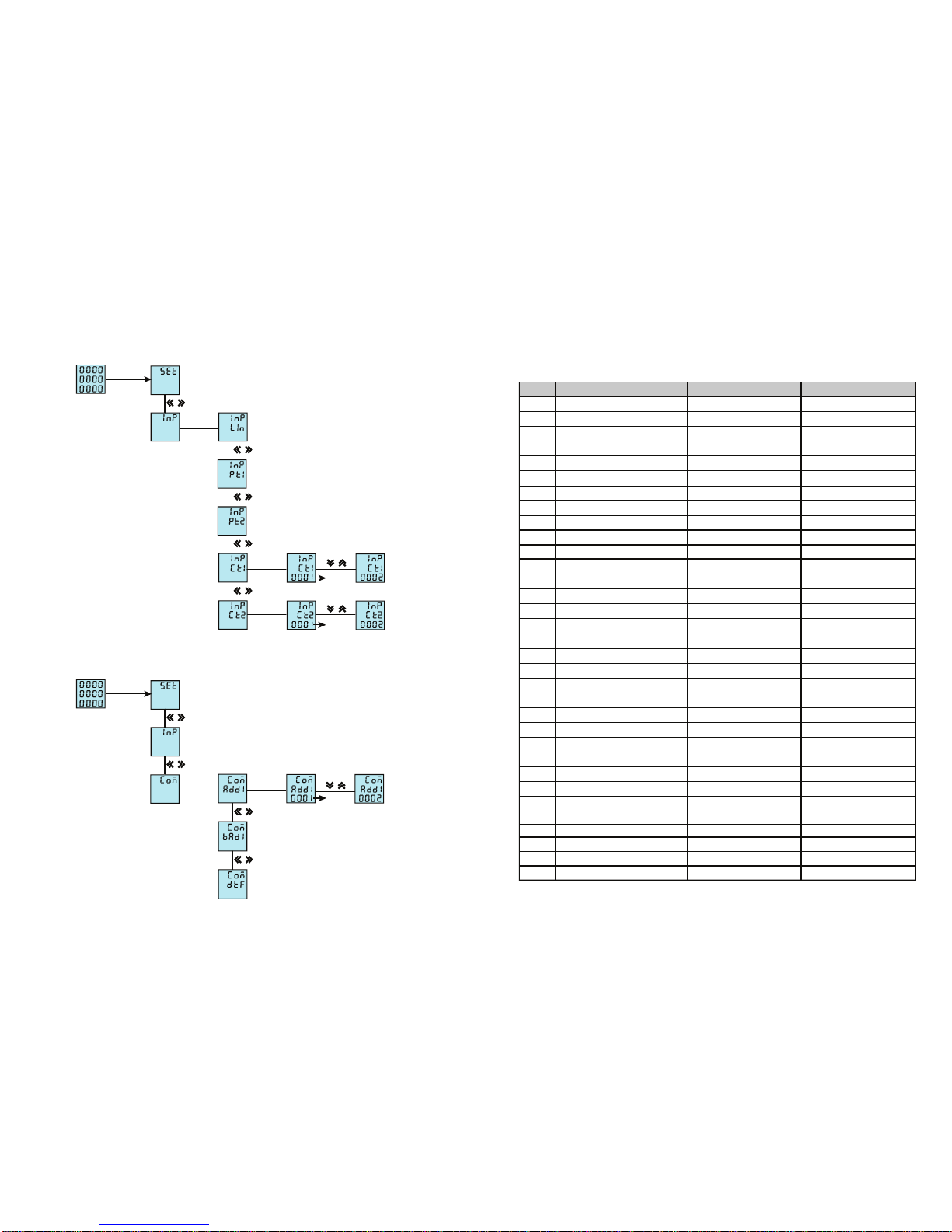
Under User Menu Status
1
.
Press SET Key more than 5 seconds, if setting password, it will pop up a dialog box, input the correct password to enter
into user menu, to modify parameter.
2
.
If the present display is 1st level
,
press SET
Key enter into next level
display
,
press
“ ” “ ”
key to change menu subitems.
3
.
If the present display is 2nd or 3rd level, press ESC Key, return to previous display.
4
.
If present display is 3rd level, press “ ”, “ ” to flash the digit, press“ ”, “ ” to move position , press“ ”, “ ” Key to
modify value; press SET Key to save setting value when flashing; if press ESC Key, setting value will not be saved and
return to the 2nd level display.
5
.
After modifying the parameters, press SET Key more than 5 seconds or press ESC Key to exit user menu and enter into
measuring status.