
Snap Appliance Snap Server 4200 Manuel utilisateur
Field Service Documentation 1
Snap Server 4200/4500
Copyright © 2004, Snap Appliance, Inc. All rights reserved. Information in this document is subject to change without notice and does not
represent a commitment on the part of Snap Appliance or any of its subsidiaries.
Replacing a Power Supply Assembly
Shutting Down the Server
Caution Shut down the server before you make any repairs. Improper shutdown may
lead to loss of data or physical harm.
When replacing the power supply on an expansion array, shut down the Snap
Server to which the array is attached.
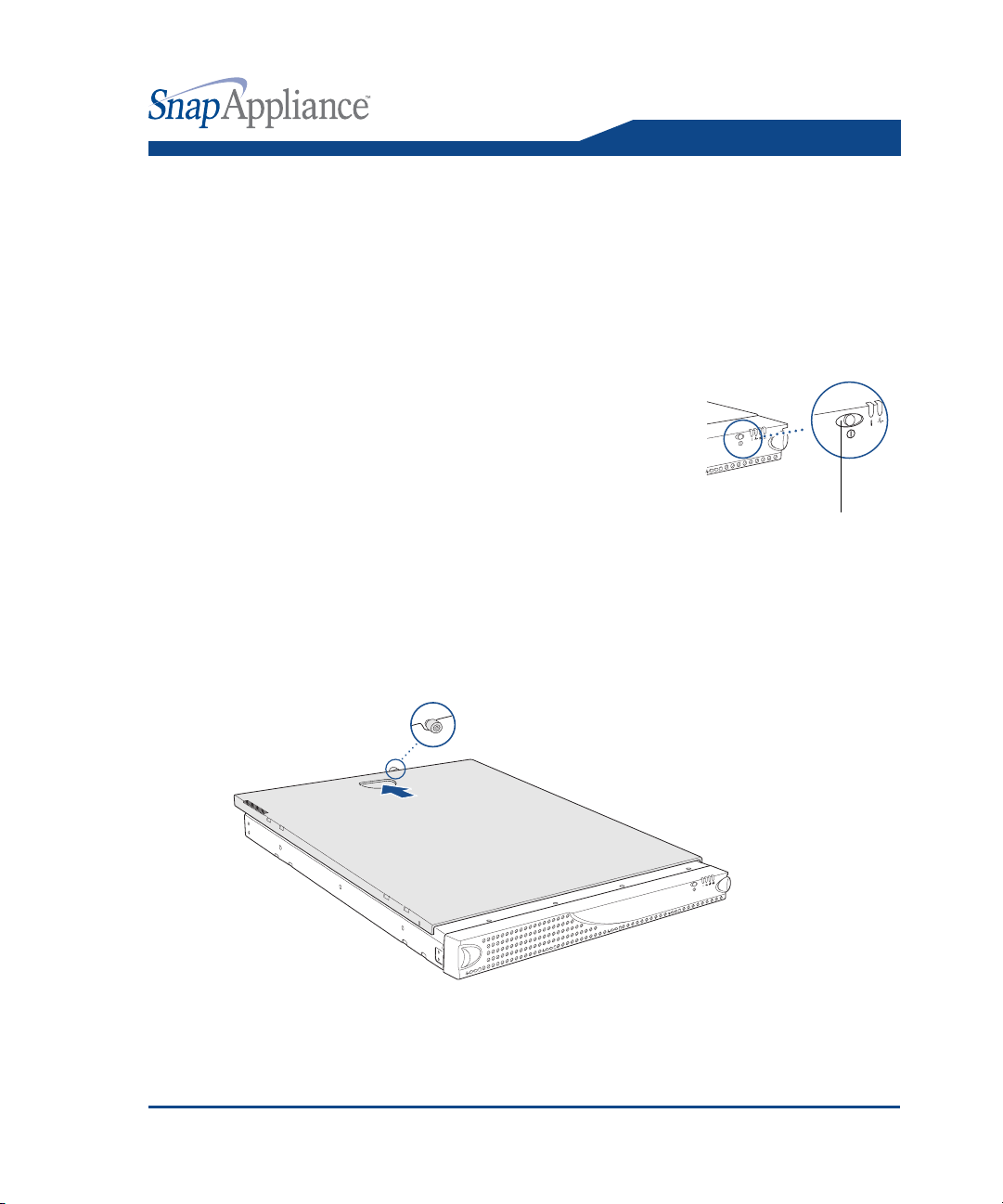
1To start the shutdown process, press the power
button on the front of the server.
The green power LED remains lit until the shutdown
process is complete. Do not disconnect the AC power
cord while the LED remains lit.
2After the power LED is off, disconnect the AC power
cord and all other cables from the back of the server.
3The server is heavy. With the help of an assistant, remove the server from the
rack to a clean surface with ample room to the front and rear.
Removing the Top Cover
1To release the cover, turn the screw at the rear of the server counterclockwise.
2The cover is seated tightly on the chassis. Standing in front of the server, press
down firmly on the cover with both hands, and push the cover loose with a short,
forceful thrust.
Power button
Replacing a Power Supply Assembly Snap Server 4200/4500
2Field Service Documentation
Copyright © 2004, Snap Appliance, Inc. All rights reserved. Information in this document is subject to change without notice and does not
represent a commitment on the part of Snap Appliance or any of its subsidiaries.
3Slide the cover off the rear of the server and set it aside.
Caution There are static-sensitive electronics inside the server. Before you handle
any parts, make sure you are working at a static-controlled workstation and that
you are properly grounded.
Replacing a Power Supply Enclosure
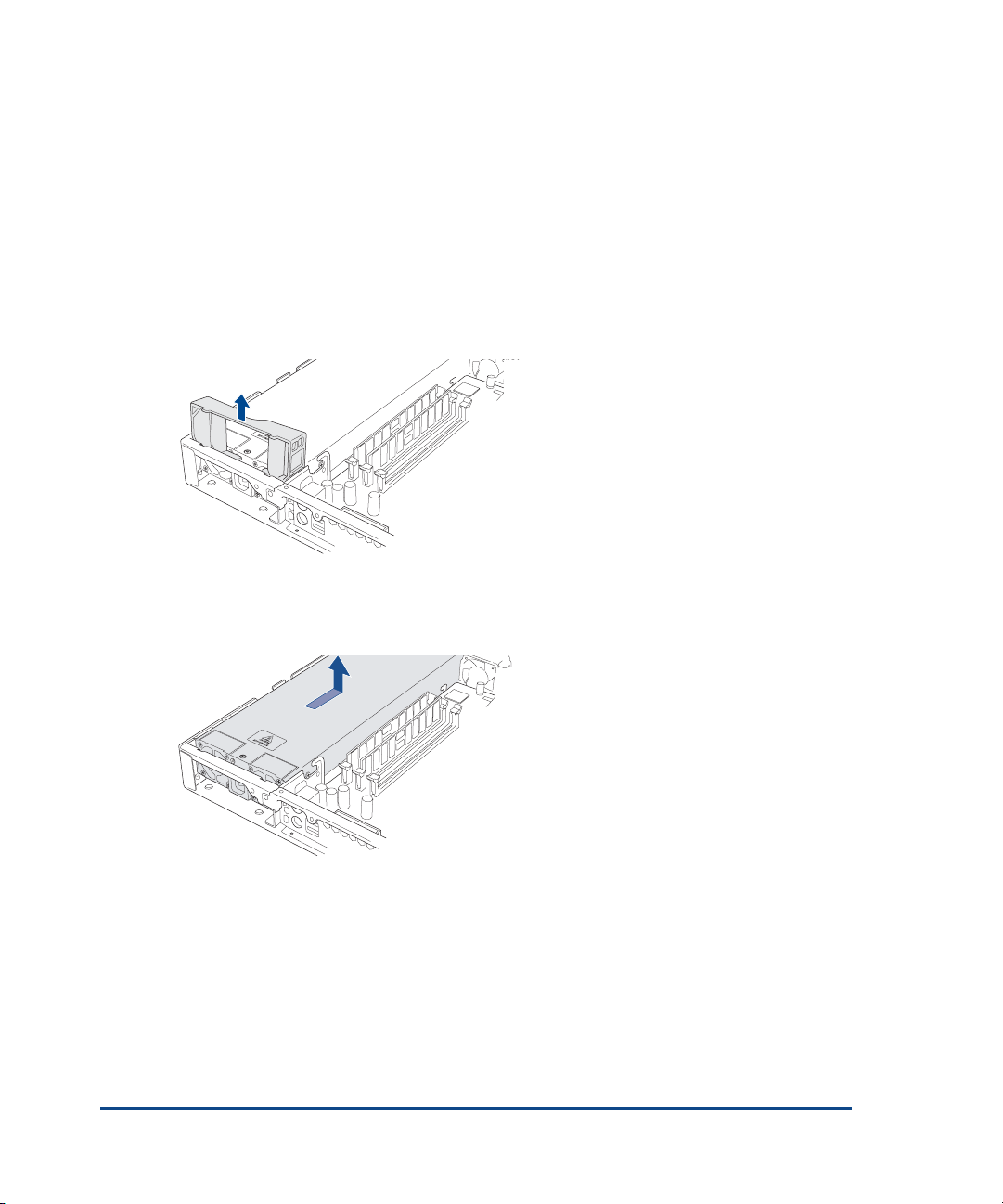
1Remove the power supply clip.
Grasp the plastic clip with your index finger and lift it out of the server.
2Remove the old power supply.
3Grasp the top of the power supply and pull it toward the rear of the server. Lift
the power supply out of the server and set it aside.
4Insert the new power supply
Insert the replacement power supply into the server chassis and slide it forward
into place.

Field Service Documentation 3
Copyright © 2004, Snap Appliance, Inc. All rights reserved. Information in this document is subject to change without notice and does not
represent a commitment on the part of Snap Appliance or any of its subsidiaries.
Snap Server 4200/4500
5Replace the power supply clip.
Insert the clip into the chassis (with the tabs on top) and press down firmly until
it snaps into place.
Replacing the Top Cover
Be sure to replace the top cover. Do not operate the server without the top cover in
place.
1Lower the top cover onto the server.
2From the rear of the server, push the cover forward until it is firmly seated.
3To secure the cover, tighten the screw at the rear of the server.
Restoring Power to the Server
1If you removed the server from the rack, replace it now with the help of an
assistant.
2Reattach all cables to the rear of the server.
3Press the power button on the front of the server.
Ce manuel convient aux modèles suivants
1
Table des matières
Autres manuels Snap Appliance Serveur
Snap Appliance
Snap Appliance Snap Disk 10 Manuel utilisateur
Snap Appliance
Snap Appliance Snap Server 510 Manuel utilisateur

Snap Appliance
Snap Appliance Snap Server 4200 Manuel utilisateur

Snap Appliance
Snap Appliance Snap Server 4400 Manuel utilisateur

Snap Appliance
Snap Appliance 4200 Manuel de l'opérateur

Snap Appliance
Snap Appliance Snap Server 4500 Manuel utilisateur


