SmartPro Aura Manuel du propriétaire

AURA
USER MANUAL BOOK
USER MANUAL BOOK
www.smartproinstrument.com
AURA

I. DISCLAIMER, EXCLUSIONS, AND LIMITATIONS OF LIABILITY
Please read and note SmartPro WARRANTY TERMS AND CONDITIONS as stated in
the warranty card. SmartPro warranty for its subject to proper use by its user in
accordance with all the terms and conditions as stated in the relevant user manual
and shall cover only manufacturing defects.
Due to continued product improvement, SmartPro reserves the right to revise all
documents including the right to make changes to the user manual without notice
and without obligation to notify any person of such revisions or changes. Users are
advised to check SmartPro’s website http://www.smartproinstrument.com.
SmartPro shall not be responsible for any damage or loss resulting from the use of
the product or user manual, and under no circumstances shall SmartPro, its manu-
facturer or any of its subsidiaries, licensors, distributors, resellers, servants and/or
agents be liable for any direct or indirect damages resulting from the use of this
product.
To the maximum extent permitted by applicable law, under no circumstances shall
SmartPro, its manufacturer or any of its subsidiaries, licensors, distributors,
resellers, servants and/or agents be liable for any special, incidental, consequential
or indirect damages howsoever caused.
Smartpro Aura referred to in this user manual is provided and/or sold on “as is”
basis. Except as required by applicable law, no warranties of any kind, expressed or
implied, including, but not limited to, the implied warranties of merchantability
and fitness for a particular purpose.
II. ABOUT SMARTPRO AURA
Congratulations for having our SmartPro Aura (SPAura). The first Synthetic
Diamond Screener that has the ability to screen automatically for mounted jewelry
but can also be used to test loose stones with various test results such as Natural
Diamond, CVD Synthetic Diamond, HPHT Synthetic Diamond, and Cubic zirconia
(CZ). This smartest Screener has unique features to show the estimated diameter
size (mm) and counting of each loose stones being tested, plus auto-generating
test certificate results.
USER’S MANUAL v1.4.1
SmartPro Aura
Synthetic Diamond Scanner
CONTENTS
I. DISCLAMERS, EXCLUSIONS AND LIMITATIONS
OF LIABILITY
II. ABOUT SMARTPRO AURA
III. FEATURES AND ADVANTAGES
IV. PRODUCT SPECIFICATIONS
V. TESTER OVERVIEW
VI. ACCESSORIES
VII. POWERING DEVICE
VIII. TESTER LIGHT INDICATORS
IX. CONTROL SETTINGS
X. TESTING / DETECTION
XI. TEST RESULT VIEW MODE
XII. TEST CERTIFICATE
XIII. SHARING IMAGES / TEST CERTIFICATE
XIV. PRINTING IMAGES / TEST CERTIFICATE
XV. IMAGE / FOLDER GALLERY
XVI. MAIN SETTINGS
XVII. SAFE HANDLING / MAINTENANCE
XVIII. TROUBLESHOOTING / FAQs
05
05
06
08
09
10
11
12
14
18
20
20
21
24
24
25
04
04

I. DISCLAIMER, EXCLUSIONS, AND LIMITATIONS OF LIABILITY
Please read and note SmartPro WARRANTY TERMS AND CONDITIONS as stated in
the warranty card. SmartPro warranty for its subject to proper use by its user in
accordance with all the terms and conditions as stated in the relevant user manual
and shall cover only manufacturing defects.
Due to continued product improvement, SmartPro reserves the right to revise all
documents including the right to make changes to the user manual without notice
and without obligation to notify any person of such revisions or changes. Users are
advised to check SmartPro’s website http://www.smartproinstrument.com.
SmartPro shall not be responsible for any damage or loss resulting from the use of
the product or user manual, and under no circumstances shall SmartPro, its manu-
facturer or any of its subsidiaries, licensors, distributors, resellers, servants and/or
agents be liable for any direct or indirect damages resulting from the use of this
product.
To the maximum extent permitted by applicable law, under no circumstances shall
SmartPro, its manufacturer or any of its subsidiaries, licensors, distributors,
resellers, servants and/or agents be liable for any special, incidental, consequential
or indirect damages howsoever caused.
Smartpro Aura referred to in this user manual is provided and/or sold on “as is”
basis. Except as required by applicable law, no warranties of any kind, expressed or
implied, including, but not limited to, the implied warranties of merchantability
and fitness for a particular purpose.
II. ABOUT SMARTPRO AURA
Congratulations for having our SmartPro Aura (SPAura). The first Synthetic
Diamond Screener that has the ability to screen automatically for mounted jewelry
but can also be used to test loose stones with various test results such as Natural
Diamond, CVD Synthetic Diamond, HPHT Synthetic Diamond, and Cubic zirconia
(CZ). This smartest Screener has unique features to show the estimated diameter
size (mm) and counting of each loose stones being tested, plus auto-generating
test certificate results.
4

5
III. FEATURES AND ADVANTAGES
1. FEATURES
Able to test Mounted Jewelry and loose stones
Able to Detect as small as 0.05mm stones
Built-in high-end Smartphone with high camera Resolution
Low current consumption
360-degree view for Rings and Jewelry
Test Result Sharing
Manual Mode View
Auto Detection Mode View
2. ADVANTAGES
Automated test results
2-Modes for Loose Detection (Separated and Bulk Stones)
2-Modes for Jewelry Detection (On Tray and 360 degrees)
Auto-generated test result certification
Stone Auto counting (for loose)
Stone diameter measurement (in mm)
Testing Results Natural Diamond, CVD Synthetic Diamond,
HPHT Synthetic Diamond,
Cubic zirconia (CZ),
*for Synthetic Moissanite will
show undefined
Stone Colors (capable to detect) Colorless to near Colorless (D-K)
Stone Size (capable to detect) 0.002 carat and above
IV. PRODUCT SPECIFICATIONS

Estimated Maximum Count of Stones per test: 520 loose stones (5 pcs. per block)
Time Duration per test Approximately 18 secs. (loose detection)
Loose Stone Tray Size (camera view) 64 x 104 mm
Tester Body Dimensions 230 x 301.5 mm
Weight prox. 5.0 Kg
Power Supply 100-240 VAC, 1.4A
Power Fuse 3A
Power Cable Type IEC C13
Screen Device Samsung S9+
Lamp Life Approximately 675,000 tests
Operating System Android
Screen Size 6.2 Inches (157.48mm)
Screen Resolution 1440 x 2960
Device Memory 6GB RAM, 64GB
Mobile Battery Auto-charging
Ventilation Requirements Do not obstruct the ventilation holes
Body Color Red with Black
V. TESTER OVERVIEW
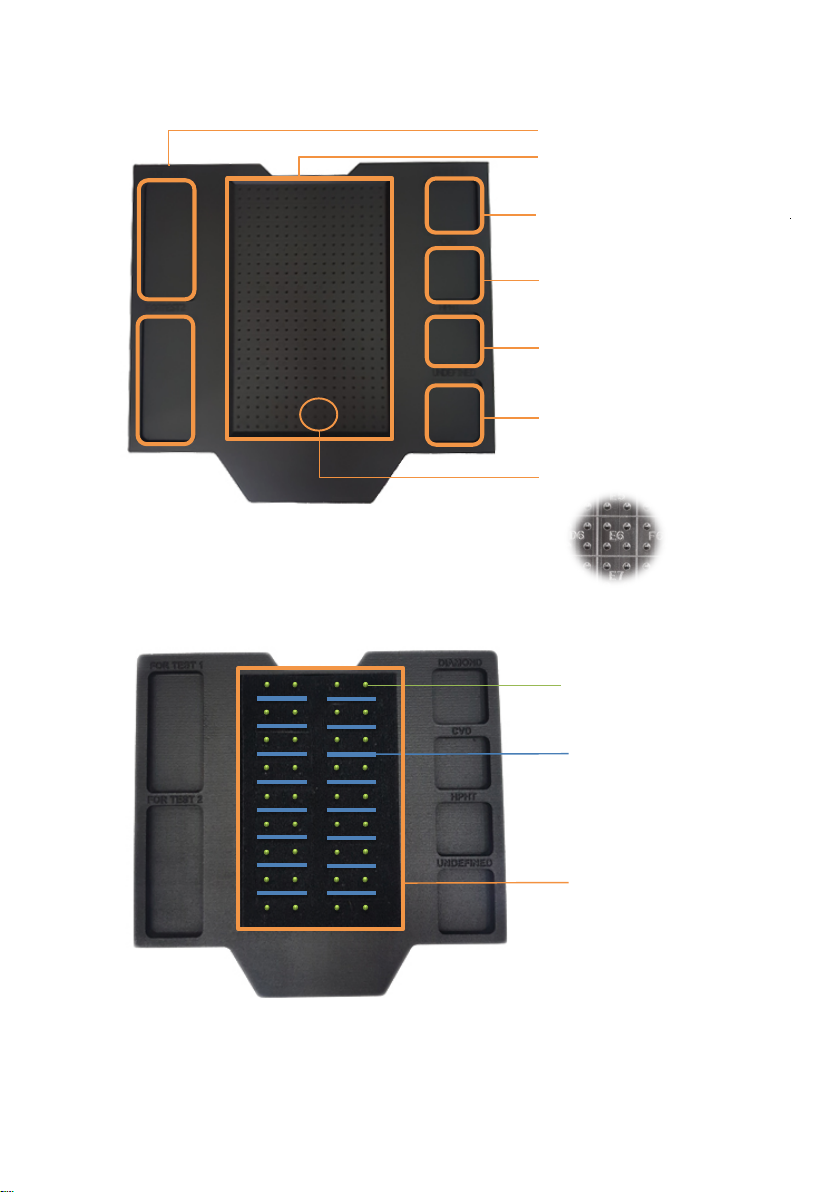
1. TESTER BOX OVERVIEW.
Power Switch
UV Lamp, Door and
Power Indicators
Mobile Switch
Built-in Mobile
Door
6

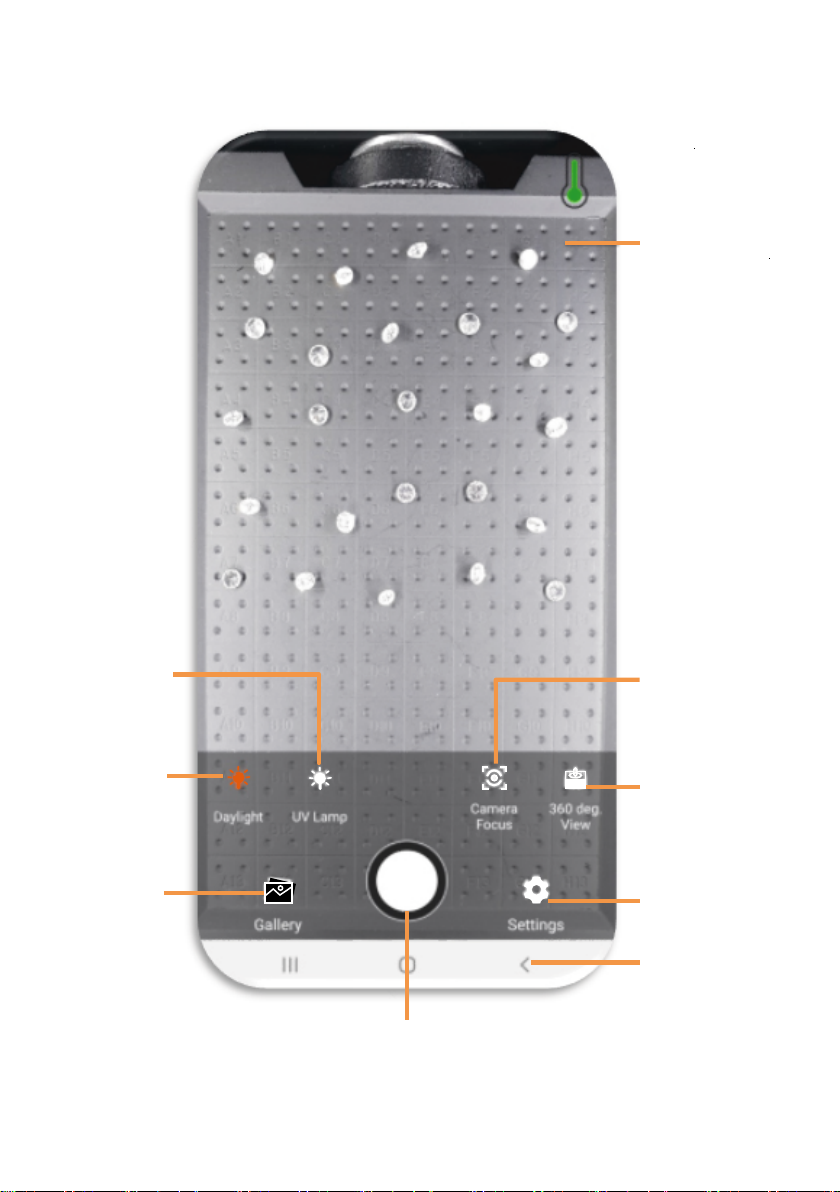
2. MOBILE SCREEN OVERVIEW
7
UV Lamp
Control
Menu Settings
Back Button
Daylight
Control
Pictrue
Gallery
360-degree
ManualControl
Camera Focus
Control
Mobile
Temperature
Indicator
Test/Capture
Button

8
CVD
DIAMOND
HPHT
OTHER
Label guide on the tray
Waiting for test slots
Testing slots (camera view)
Tested Diamond Slot
Tested CVD Slot
Tested HPHT Slot
Tested other stone Slot
1. LOOSE STONE TRAY - VIEW SIZE: 64 x 104 MM
Earing slots
Ring slots
Camera view
2. RING/JEWELRY - 36 SLOTS FOR EARRING AND 16 SLOT FOR RING
ACCESSORIES
VI.
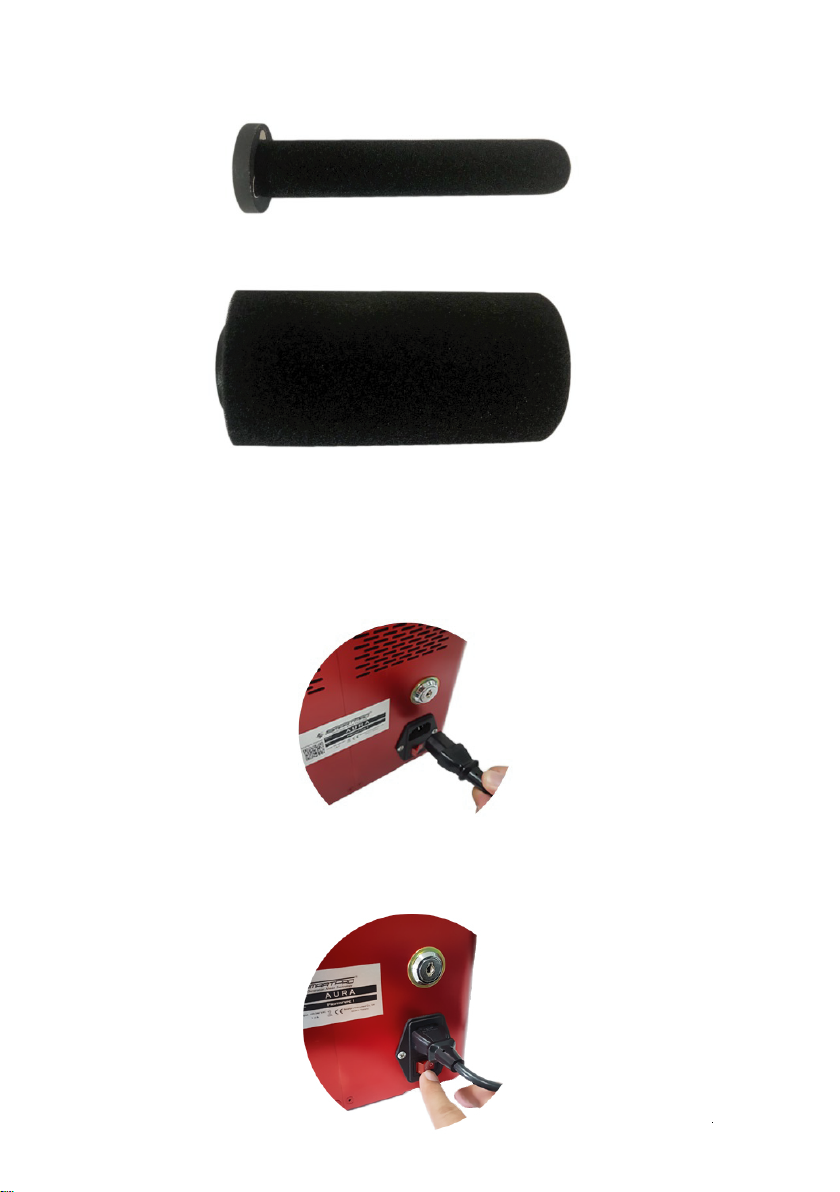
3. JEWELRY ATTACHMENT (FOR 360 VIEW)
3.1 Ring attachment
FOR TEST
FOR TEST

9
VII. POWERING DEVICE
1. Turning ON the AURA Box.
3.2 Bracelet attachment
3. JEWELRY ATTACHMENT (FOR 360 VIEW)
3.1 Ring attachment
1.1 Connect the Power Cable into the Inlet Power Socket at back side of
AURA then the other side to the power Outlet.
1.2 Switch ON the Inlet Power Switch.
2. Turning ON the built-in mobile.

10
VIII. TESTER LIGHT INDICATORS
2. Turning ON the built-in mobile.
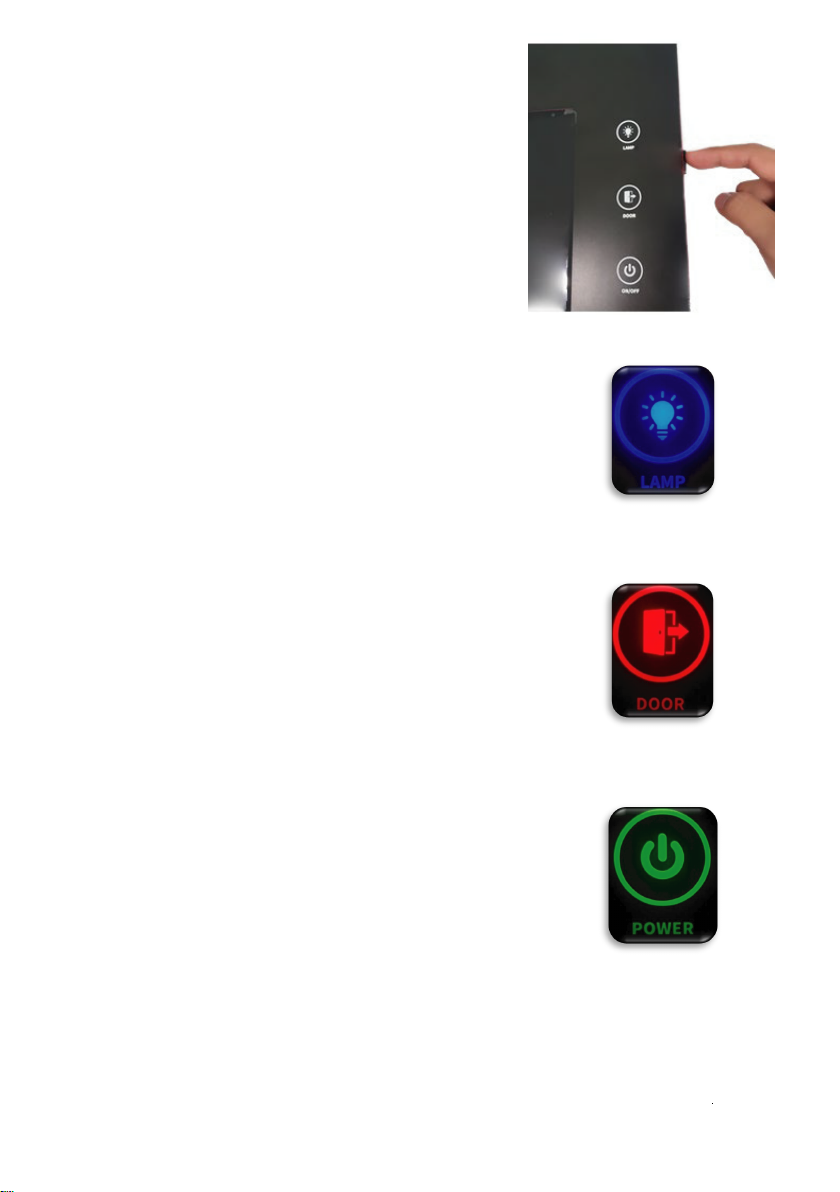
1.1 No light – indicates that the UV Lamp is turned
OFF.Blue light – indicates that the UV Lamp is turned
ON.
Note: if the UV lamp is turned ON then suddenly the
Door opens, Lamp will automatically will turned OFF.
2.1 No light – indicates that the door of the AURA box
is fully closed.
2.2 Red light – indicates that the door of the AURA
box is opened.
3.1 No light – indicates that the AURA box is switched
OFF.
3.2 Blinking Green light – indicates that the AURA box
is turned ON but it is not yet connected to the mobile
phone.
3.3 Stable Green light – indicates the AURA box is
turned ON and ready to use.
1. UV Lamp Indicator
3. Power Indicator
2. Door Indicator
Click and hold the Mobile Switch at the right
side of AURA until the mobile screen opens.
Note : Mobile is blocked to other
applications so that the Smartpro Application
will run smoothly without any error / bugs.

11
IX. CONTROL SETTINGS
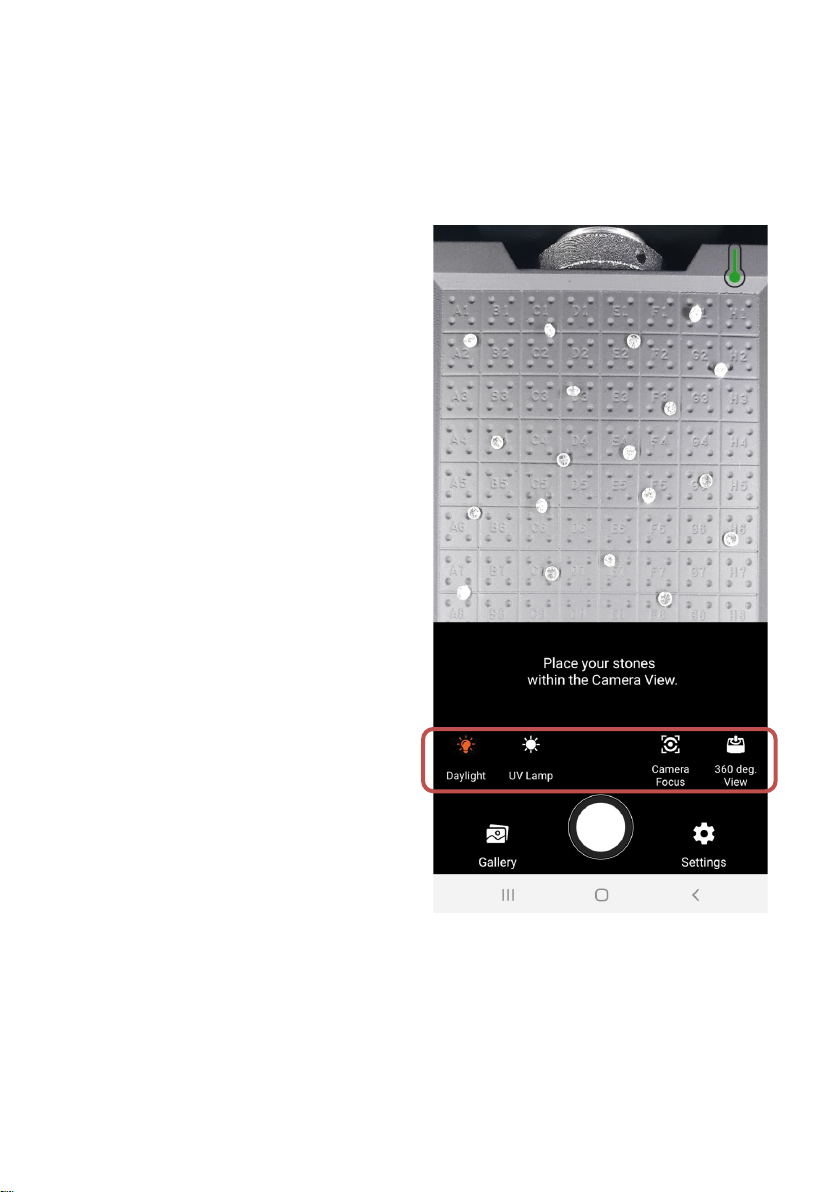
User may control light source for capturing images such as Daylight and fluores-
cent image of stones. To have a better quality of images, user may adjust the
following controls:
1. Daylight Icon – controls the Daylight LED source ON/OFF.
2. UV Lamp Icon – controls the UV Lamp
ON/OFF.
Note: UV Lamp is automatically
turns OFF after 9 sec. and turns ON
again after 2 secs. for maintaining the
Lamp’s standard operating tempera-
ture.
3. Camera Focus Icon – able to adjust
automatically or manually to get the
best quality image.
4. Stepper Motor Movement Icon – used
to control the rotation of the ring and
mounted jewelry holders and to have a
360 degree view while the Daylight or
UV Lamp is ON.
Autres manuels pour Aura
2
Table des matières
Autres manuels SmartPro Scanner