Alternate Wiring
If you are mounting your SL1600 controller outdoors or local electrical
codes require hard wiring, proceed with the following steps.
Warning: Connecting the SL1600 controller to the primary power
should be done by a licensed electrician following all local codes.
To prevent electrical shock, make sure all supply power is turned
OFF at the breaker before connecting these wires. Electrical shock
can cause severe injury or death. This controller is not intended for
use by children. Do not allow children to play with the controller.
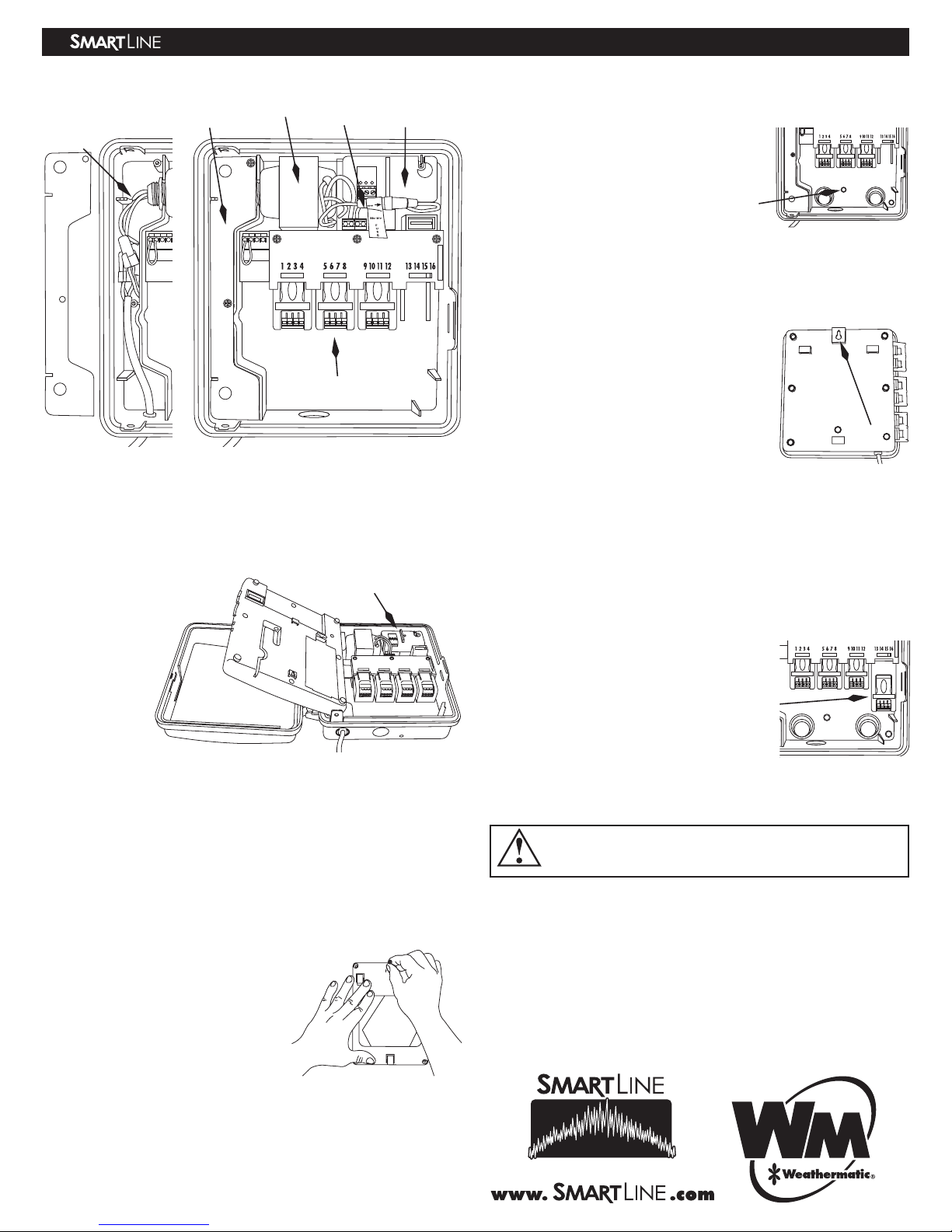
• Remove the screws that secure the AC Wiring Cavity Panel. This will
allow access to the transformer wiring.
• Disconnect the existing line cord connected to the transformer wires.
• For use with conduit, simply remove the line cord knockout. To do this,
use a small, flat screwdriver blade in the slot of the knockout on the
underside of the controller housing. Tap out the knockout with a ham-
mer. Install the conduit and wiring. Discard the line cord.
• For 120VAC operation, using wire nuts, make the wire connections indi-
cated in the chart below.
• For 230VAC operation, using wire nuts, make the wire connections indi-
cated in the chart below.
• Replace the AC Wire Cavity Panel and secure with the screws.
• Return to the breaker box and turn on the circuit breaker. Verify that
the controller no longer displays “no AC.” This indicates that the AC
power is on.
5. 24VAC Valve Wiring
WARNING: Never mix 24VAC and high voltage wiring in the same
conduit.
• For solid wires, simply push to
insert the stripped end of valve wire
into the module connector.
• For stranded wires, use a small
screwdriver blade to push back the
orange slide lock trigger first, then insert the stranded wire while holding
the trigger in the open position. When you release the orange slide trig-
ger, the wire will lock in place.
• Knockouts: The SL1600 controller
provides several convenient knock-
outs for your choice of routing for
valve and accessory 24VAC wiring.
The knockouts should be removed
by striking with a hammer and
screwdriver inwards, toward the
inside of the housing.
•
COM (Valve Common): Connect the Valve Common wire to the COM ter-
minal.
Wire connections TRANSFORMER
for 120VAC WIRE COLOR AC INPUT WIRE NOTE
BLACK NEUTRAL
WHITE 120VAC HOT
RED DO NOT USE-230VAC (cover with wire nut)
GREEN/
YELLOW EARTH GROUND (typically green wire)
Wire connections TRANSFORMER
for 230VAC WIRE COLOR AC INPUT WIRE NOTE
BLACK NEUTRAL
WHITE DO NOT USE-120VAC (cover with wire nut)
RED 230VAC HOT
GREEN/
YELLOW EARTH GROUND
Note: Your SL1600
controller utilizes
screwless terminals
for fast installation.
Note: To remove
wires, push back
the orange slide trig-
ger using a small screwdriver
and then pull out the wire to
remove.
• MV/P (Master Valve/Pump
Terminal): Connect one wire to
the COM position and the second
wire to the MV/P position. Polarity
is not important. Note that the
total current of the activated Pump
Start Relay AND valve(s) cannot
exceed the maximum output current
(default is 1.0A).
• SEN (Rain/Freeze/Wind Sensor):
If you are using an optional rain,
freeze, or wind sensor, use the SEN
terminals for these devices. There is
no polarity required for these wires.
Remove and discard the factory
installed wire jumper.
• Zone Wires: Connect a zone wire
to a terminal on the SLM4 Module.
Your SL1600 controller can power
a total of 3 valves concurrently or
a total of 2 valves with one master
valve. Take caution when running a
pump start relay so maximum out-
put current does not exceed 1.0A.
To locate a zone, touch zone wire
to the TEST POST and determine
which zone valve is ON. Note that
the TEST POST is HOT even when
the control panel is not in the hous-
ing.
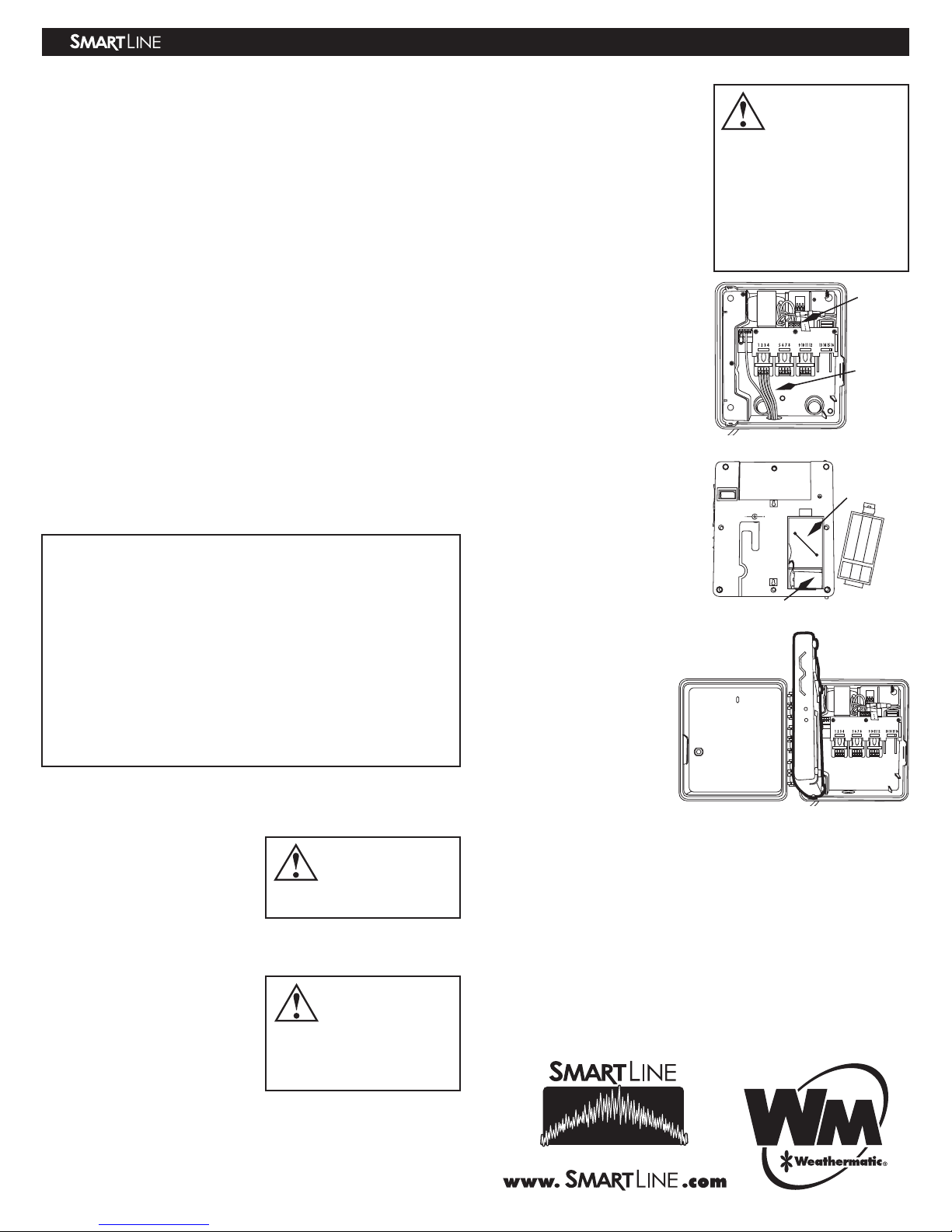
9V Battery Installation (optional)
SL1600 controllers with firmware
versions later than 1.10 do
not require a battery for
clock time retention. A 9-volt
battery may be installed for
operating the display when
the panel is open or for pro-
gramming while the panel is
outside the housing.
6. Control Panel Installation
• With the controller and
optional SLW On-Site
Weather Station installation
complete, re-insert the con-
trol panel into the housing. To do this, hold the operating panel at a 90
degree angle from the housing (see photo at right) and position the top
of the panel slightly toward the housing and slip the top post into the
top hinge, then push the bottom post into the lower hinge. The panel
should now swing open and close freely on the hinges.
• The SL1600 controller will automatically restore power and communica-
tion to the control panel as soon as it is firmly closed. No ribbon cable
is required.
Installation is complete! Proceed to your Owner’s Manual to program your
SL1600 controller.
RESET
VDC
Battery
Compartment
Back of Control Panel
9V Battery installed
TEST
AC1
RED
BLACK
SILVER
SEN
SEN
COM
P/MV
TEST
AC1
Note: If you are NOT
using an optional
rain or freeze sensor,
the wire jumper must be in
place for your valves to turn
ON. The jumper must also
be in place if you are using
the SLW weather station. SLW
WEATHER STATION DOES
NOT ATTACH TO THESE
TERMINALS.
TEST
AC1
SEN
SEN
COM
P/MV
RED
BLACK
SILVER
Test Pos
ADSL1600 REV E
SL1600 Controller Installation Instructions