
Smarthome Group Bio-Eagle Manuel utilisateur
Bio-Eagle Users Manual
1
Bio-Eagle
Biometrics
Time Attendance
&
Access Control

2
Directory
1. Introduction........................................................4
1.1 Basic Concepts.................................................... 6
1.1.1 User Enrollment........................................................................6
1.1.2 User Verification.......................................................................7
1.1.3 Match Threshold Levels ...........................................................7
1.1.4 User ID Numbers......................................................................8
1.1.5 Authority (status) Levels...........................................................8
1.1.6 Start-up window........................................................................8
2.1 How to place the finger....................................... 9
2. Enrollment and Verification Procedures .......... 11
2.1 Enrolling Users.................................................. 11
2.2 Testing an Enrollment ....................................... 17
2.3 Enrolling a User with the Display Finger Option
On............................................................................ 17
2.4 Verifying Your Identity...................................... 17
2.4.1 Start-up window......................................................................18
2.4.2 Password Verification.............................................................18
2.4.3 ID number & Fingerprint........................................................19
2.5 Hints for Successful Enrollments...................... 20
3. System Options................................................22
3.1 System Options ................................................. 22
3.1.1 Date Time ...............................................................................23
3.1.2 Changing the Default Language.............................................23
3.1.3 Advanced Options...................................................................23
3.2 Power Manager ................................................. 24
3.3 Communication Option..................................... 25
3.4 Log Options....................................................... 26
3.5 Access Options.................................................. 26
3.6 Auto Test............................................................ 27
4. Download fingerprints & AC Records.............27

Bio-Eagle Users Manual
3
4.1 Install Attendance Management System........... 27
4.2 Connect PC and Bio-Eagle with RS232 ........... 28
4.3 Setup PC Com port rate:115200 or 9600.......... 28
4.4 Connecting and Download AC Records ........... 31
4.5 Upload staff's name to TAP-01 ......................... 35
4.6 Connect PC and TAP-01 with TCP/IP.............. 38
5. System Information..........................................39
6. Trouble shooting ..............................................39
4
1. Introduction
This chapter shows the Bio-Eagle Fingerprint T&A basic concepts
and how to place the finger.
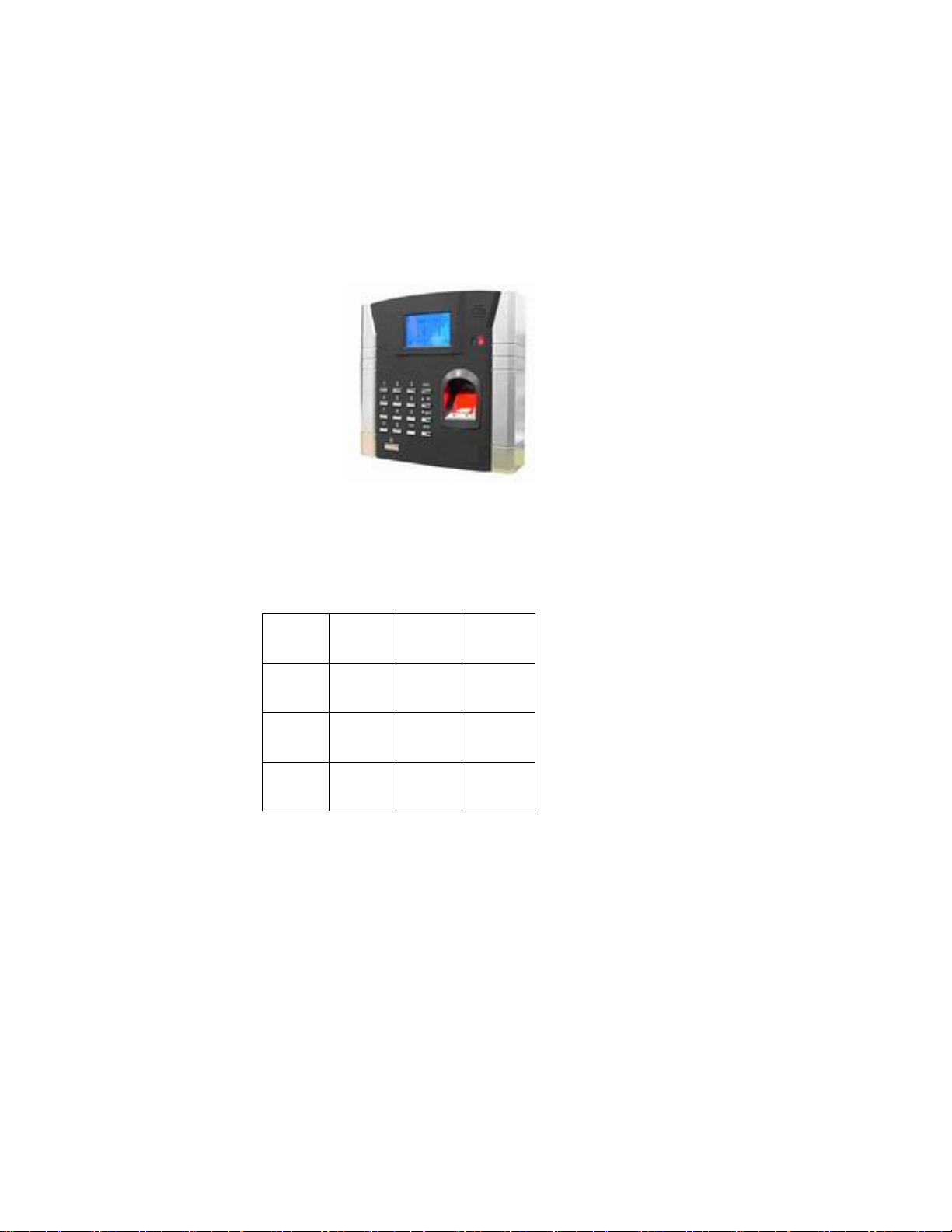
Figure (Model: Bio-Eagle)
Figure (Model: Bio-Eagle) keypad
1 2 3 ESC
4 5 6 ▲
7 8 9 ▼
~ 0 OK MENU

Bio-Eagle Users Manual
5
Keypad Definition
Confirm the current present.
Access to manage.
Escape or cancel.
Scroll up.
Scroll down.
Power button.
ˉˉ :Numerical key.

6
1.1 Basic Concepts
This section contains definitions and descriptions of Time Recorder
Fingerprint T&A Concepts, including:
·User Enrollment
·User Verification
·Match Threshold Levels
·User ID Numbers
·Authority (Status) Levels
The two most important TimeClock Fingerprint T&A Functions
are user enrollment and user verification.
1.1.1 User Enrollment
Enrollment is the process of create an ID number and scanning a
user’s finger to create a template three times. This template is
associated with a user ID number and stored.
During user verification, the stored template is compared to the
current fingerprint scan to confirm the user’s identity.
Enrollment is performed at designated Time Recorder units. The
user can verify on the time recorder that enroll his fingerprint. The
enrollment process takes approximately 2 seconds.
Up to ten fingers can be enrolled for the same ID number, so the
user may have more verifications way.
Ideally, everyone finger on each hand should be enrolled so that if
the user injures the enrolled finger had, an alternate finger template is

Bio-Eagle Users Manual
7
available. While recording the finger type is optional, it is
recommended such as left or right index, so that at verification the
user is prompted as to which finger to use.
1.1.2 User Verification
Verification occurs when a user either enters an ID number or
places a finger in the fingerprint sensor, then input password for
comparison with the stored template.
1.1.3 Match Threshold Levels
The Mach Threshold is a number that represents the degree to
which verification is examined to ensure that the person is the person
claimed.
The Match Threshold Levels establishes a balance between False
Acceptance Rate (FAR) and False Rejection Rate (FRR). FAR measures
how often a non-authorized user is falsely recognized and granted
access to the system. FRR measures how often an enrolled and
authorized user, who should be granted access to the system, is
denied on the basis that the system did not recognize him.
You can set match threshold levels on a per-use basis. For the
fingerprint verification is difficult, you can adopt ID & Fingerprint
verification (match one to one).
Raising the threshold increases security, while lowering it
increases throughout. The correct balance is essential.
For users with worn or damaged fingers, match threshold levels
can (and should) be reduced.
Different sites have different requirements.
Table 1-1 Suggested Match Threshold Settings
FRR FAR One-to-many One-to-one

8
High Low 45 25
Middle Middle 35 15
Low High 25 10
1.1.4 User ID Numbers
Before beginning fingerprint enrollment, a user is assigned User
ID Number. This ID number is used to call up the fingerprint
template each time that verification is requested.
ID numbers are normally called up via the keypad, but they can be
called up through other means such as RF Card.
1.1.5 Authority (status) Levels
TAS Clock Fingerprint T&A has four authority or status levels:
·Users are people whose identity must be verified, such to gain
access to a facility or to have their attendance recorded.
·Managers can do other operations, except set advanced option
and enroll manager’s authority.
Note: Without Manager status in the system, the Enroller will
enroll them.
1.1.6 Start-up window
Click the power button and the screen showed on, a display of a
window was called the Start-up window. The following appears:
Welcome
04
-
01
-
02
Thu

Bio-Eagle Users Manual
9
2.1 How to place the finger
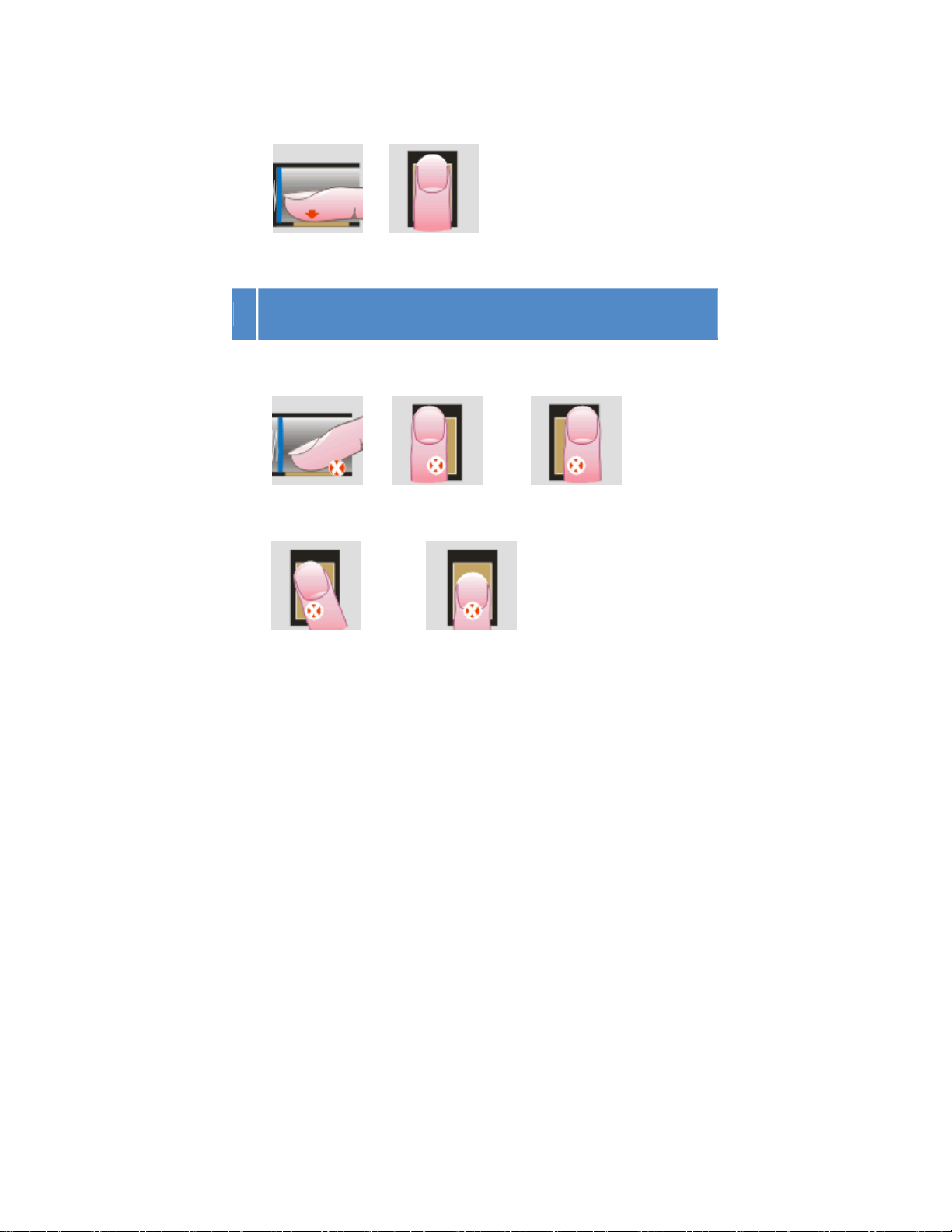
1.The correct way is:
Place a finger flatwise on the sensor surface
Place it to the center of the sensor surface
2.When registering, please place finger on sensor surface for about 1
second.
3.If the quality of finger registry is very bad, please register another
fingers to instead of.
Notice :
Correct Ways:
① The area of finger on the sensor surface should be
larger.
② Place a finger flatwise on the sensor surface
③ Place finger to the center of the sensor surface
10
Incorrect Ways
①Touching ②put on the left ③Put on the right
④not straight ⑤Put on the lower place
Note: Please adopt the correct way to place the finger; this
company assumes no responsibility for errors from the use
of the Time Recorder. This company reserves the right to
revise document and to make changes from time to time in
the contents here of without obligation to notify any person
Table des matières


