
SmartElex 10D Manuel utilisateur
SmartElex 10D Dual Channel DC
Motor Driver (Powered by Raspberry Pi)
1
SmartElex 10D Smart Motor
Driver

SmartElex 10D Dual Channel DC
Motor Driver (Powered by Raspberry Pi)
2
INDEX
1) Introduction
2) Features
3) Overview
4) Specifications
5) Dimensions
6) Connections/Wiring
7) Control Mode
10) Warranty
SmartElex 10D Dual Channel DC
Motor Driver (Powered by Raspberry Pi)
3
Introduction:
SmartElex 10D is a dual channel motor driver capable of supplying 10
amps continuous with peak currents up to 25 amps (10Sec) per channel. It
can be operated from radio control, analog, TTL serial and PWM. A variety
of operating modes including with mixed and independent mode in radio
control, analog and in PWM mode. Operating modes allow for operation,
such as switching between radio controls and PWM mode or switching
between any of 4 modes via 4 position DPDT mode switch.MOSFETs are
switched at 16 KHz to ensure quiet operation and no annoying whining
sound. Besides, it also equipped with a microcontroller unit to provide smart
features such as multiple input modes and current limit and thermal
protection. If temperature of board is reaches 80 degree then motor speed
becomes half and speed will be normal once temperature reaches below 70
degree. Motor driver will be shut down at 100 degree.

SmartElex 10D Dual Channel DC
Motor Driver (Powered by Raspberry Pi)
4
Features:
•Supplying 20 amps continuous with peak currents up to 25 amps (10
Sec) per channel
•Support motor voltage from 7V to 22V.
•On board Low Internal resistance MOSFETs are switched at 16 KHz
frequency.
•Over current protection and indication.
•Thermal protection.
•Multiple input modes: RC, Analog, PWM, Serial Packetized.
•On board push buttons for test and manual operation.
SmartElex 10D Dual Channel DC
Motor Driver (Powered by Raspberry Pi)
5
Overview:
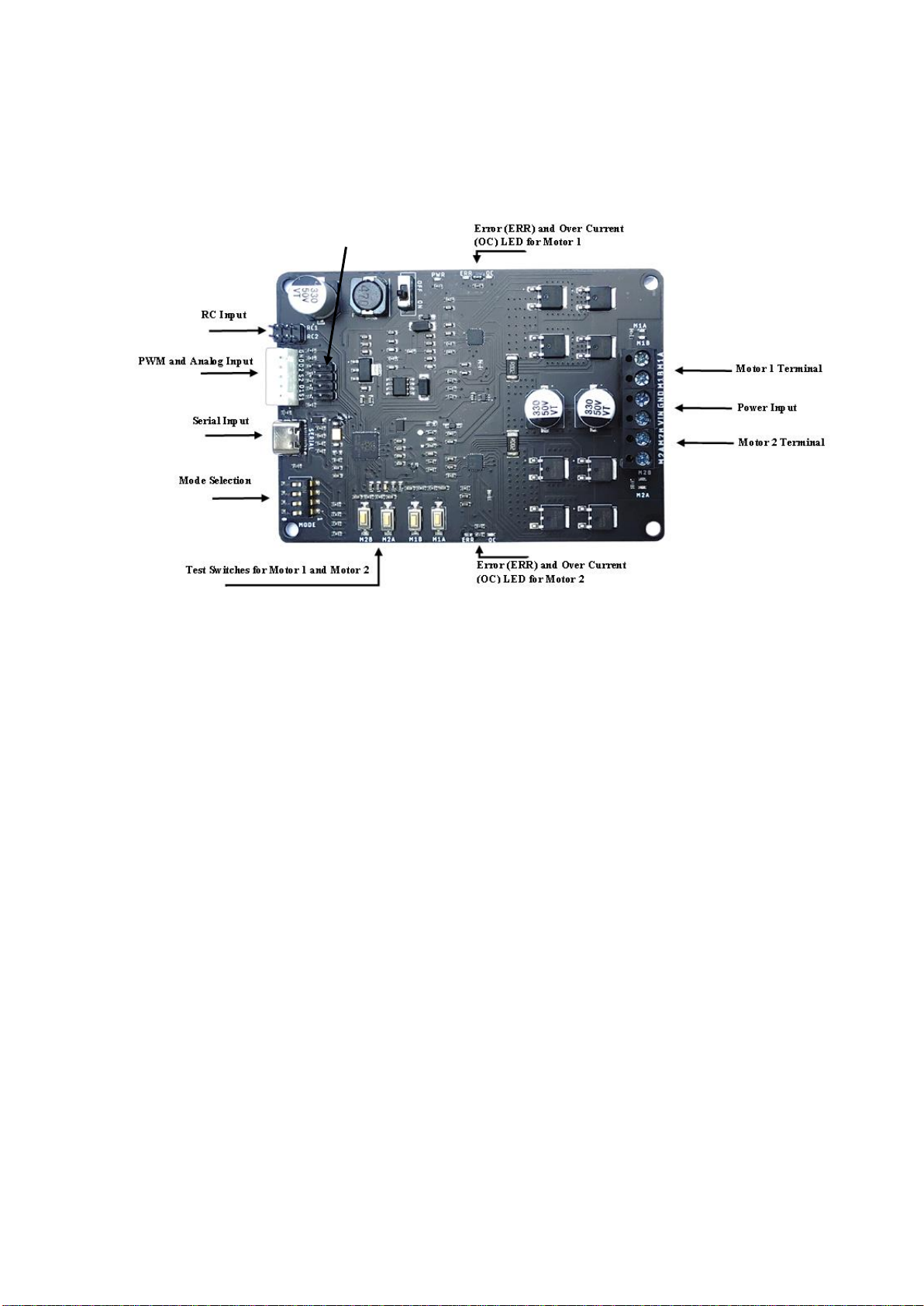
Power Input: Connect to a 7V-22V Battery or Power Supply.
Motor 1 and Motor 2 Terminal: Connect Motor 1 to Motor 1 Terminal. Connect
Motor 2 Motor 2 Terminal.
Mode Selection: These are used to set the operating mode and options.
Error (ERR) and Over Current (OC) LEDs: Error LED glows when Under
Voltage Lockout (Input Voltage less than 7V) .Overcurrent LEDs glows due to
current greater than 30 AMP.
RC Input: 2 channel Radio Controller receiver connected to these pins.
I/P Logic Select: For 3V3 Logic- Place Jumpers
For 5V Logic- Keep Open
I/P Logic Select

SmartElex 10D Dual Channel DC
Motor Driver (Powered by Raspberry Pi)
6
Specifications:
Sr.No
Parameter
Min
Max
Unit
1
Input Voltage
7
22
V
2
Maximum Continuous Current Imax
-
10
A
3
Peak Motor Current for 10 Sec
-
30
A
4
VIOH (Logic Input –High Level)
3
5.5
V
5
VIOL (Logic Input –Low Level)
0
0.5
V
6
PWM frequency
-
490
Hz
SmartElex 10D Dual Channel DC
Motor Driver (Powered by Raspberry Pi)
7
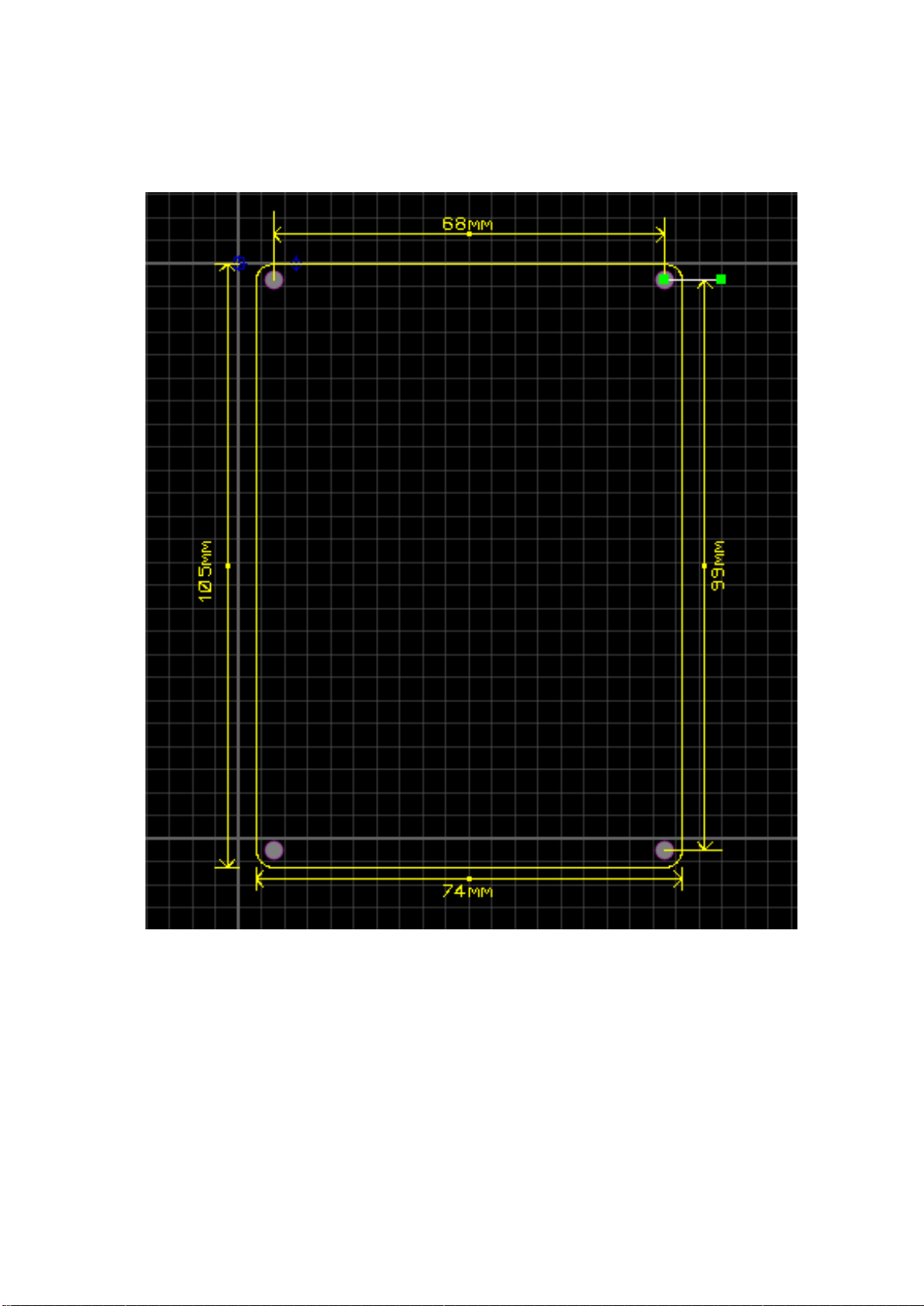
Dimensions:

SmartElex 10D Dual Channel DC
Motor Driver (Powered by Raspberry Pi)
8
Connections/Wiring:
SmartElex 10D can be used with power supplies or batteries. Input power is connected to
the center power terminals labeled VIN and GND. The input voltage range is 7V to 22V. The
input current is dependent on the motors being used and the load placed upon them.
As a general rule of thumb, you should use the thickest wire that is practical to make power
connections, especially on the battery leads. Using undersized wire will lead to the wire
getting hot, and can lead to elevated temperatures on the SmartElex 30D as well.
The main power connections to the SmartElex 10D are on the rear edge of the board.
Connections are made to large black screw terminals. These terminals will accept 10 to 28
gauge wire. Using stranded wire it is possible to run twinned 10 gauge wire connections to
the battery terminals. This is often a good idea if your design will be running both motors
near or above the 10 amp continuous limit. For the motor connections, single 12 gauge wires
should be sufficient for all applications.

SmartElex 10D Dual Channel DC
Motor Driver (Powered by Raspberry Pi)
9
Control Mode:
SmartElex 10D supports four different types of input mode:
1. Radio Control (RC)
2. Microcontroller PWM.
3. Analog
4. Serial USB.
The DIP switch settings for each mode and the function for input pin are
summarized on the table below.
Mode
Mode Name
DIP Switch
Sw1
Sw2
Sw3
Sw4
0
Test Mode
0
0
0
0
1
RC Liner Independent
0
0
0
1
2
Analog Liner Independent
0
0
1
0
3
PWM Liner Independent
0
0
1
1
4
Serial 9600
0
1
0
0
5
RC Exponential Independent
0
1
0
1
6
Analog Exponential Independent
0
1
1
0
7
PWM Exponential Independent
0
1
1
1
8
Serial 115200
1
0
0
0
9
RC Linear Mixed
1
0
0
1
10
Analog Linear Mixed
1
0
1
0
11
PWM Linear Mixed
1
0
1
1
12
RC Exponential Mixed
1
1
0
0
13
Analog Exponential Mixed
1
1
0
1
14
PWM Exponential Mixed
1
1
1
0
15
Test Mode
1
1
1
1

SmartElex 10D Dual Channel DC
Motor Driver (Powered by Raspberry Pi)
10
1. Radio Control (RC) Mode:
In this mode, Speed and direction of Motor is controlled by RC1 and RC2
channel of receiver or anything that can generate servo signals can be used to
drive a SmartElex 10D in Radio Control mode.
Mode
RC
Independent Linear Mode
RC1 control Speed(Linear) and Direction of Motor 1
RC2 control Speed(Linear) and Direction of Motor 2
Independent Exponential Mode
RC1 control Speed(Exponential) and Direction of Motor 1
RC2 control Speed (Exponential) and Direction of Motor 2
Mixed Linear Mode
RC1 control Speed (Linear) in Forward and Reverse Direction of Motor1
and Motor 2 Simultaneously.
RC2 control Speed (Linear) in Left and Right Direction of Motor 1 and
Motor 2 Simultaneously.
Mixed Exponential Mode
RC1 control Speed (Exponential) in Forward and Reverse Direction of
Motor 1 and Motor 2 Simultaneously.
RC2 control Speed (Exponential) in Left and Right Direction of Motor 1
and Motor 2 Simultaneously.
Table des matières
Manuels Matériel réseau populaires d'autres marques

Matrix Switch Corporation
Matrix Switch Corporation MSC-HD161DEL Manuel utilisateur

B&B Electronics
B&B Electronics ZXT9-IO-222R2 Manuel utilisateur

Yudor
Yudor YDS-16 Manuel utilisateur

D-Link
D-Link ShareCenter DNS-320L Manuel utilisateur

Samsung
Samsung ES1642dc Instructions d'utilisation

Honeywell Home
Honeywell Home LTEM-PV Instructions de montage


