
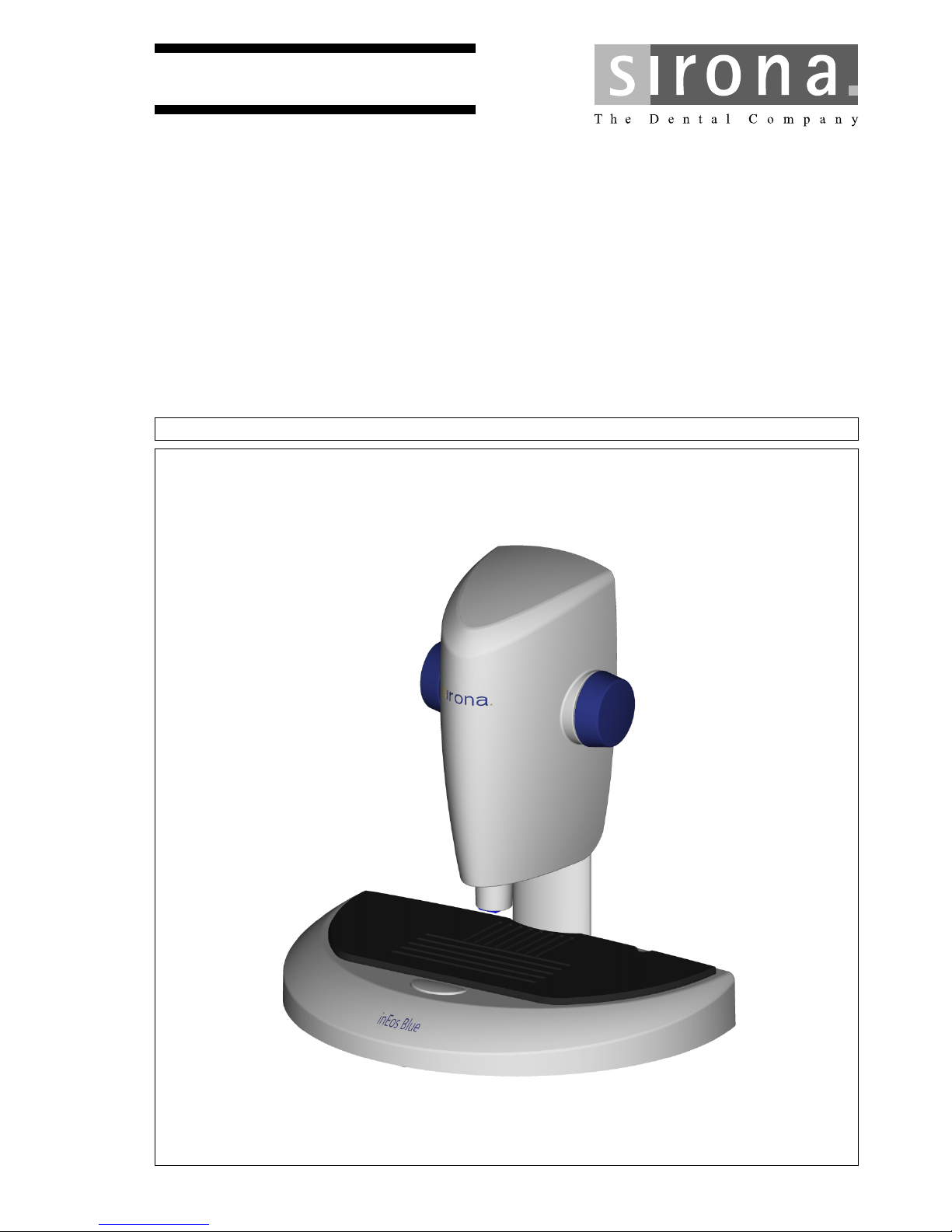
Sirona inEos Blue Manuel utilisateur
MSKOMNM
áåbçë=_äìÉ
kÉï=~ë=çÑW==
båÖäáëÜ
léÉê~íáåÖ=fåëíêìÅíáçåë

62 99 205 D3446
2D3446.201.02.02.02 06.2010
Sirona Dental Systems GmbH
Table of contents Operating Instructions inEos Blue
Table of contents
1Dear Customer, ........................................................................................................ 5
2General information.................................................................................................. 6
2.1 Structure of the documents ........................................................................... 6
2.1.1 Identification of danger levels............................................................. 6
2.1.2 Formats and symbols used................................................................ 7
2.2 Legend .......................................................................................................... 7
2.3 Warranty........................................................................................................ 7
3Safety ....................................................................................................................... 8
3.1 Basic safety information ................................................................................ 8
3.1.1 Prerequisites ...................................................................................... 8
3.1.2 Connecting the unit ............................................................................ 8
3.1.2.1Connection to the CEREC 3 acquisition unit...................................... 8
3.1.2.2Connection to the CEREC AC acquisition unit................................... 9
3.1.3 Connection of external equipment ..................................................... 10
3.1.4 Maintenance and repair ..................................................................... 10
3.1.5 Accessories........................................................................................ 10
3.1.6 In case of damage.............................................................................. 10
3.2 Intended use ................................................................................................. 10
3.3 Certification ................................................................................................... 11
4Technical description................................................................................................ 12
4.1 Design and function ...................................................................................... 12
4.2 System components...................................................................................... 12
4.2.1 Components of the inEos Blue........................................................... 13
4.2.2 Accessories (included in the scope of supply) ................................... 14
4.2.3 Calibration parts (included in scope of supply) .................................. 15
4.2.3.13D acquisition system ........................................................................ 15
4.2.3.2XYZ axis alignment ............................................................................ 15
4.3 Technical data............................................................................................... 16
4.4 System requirements .................................................................................... 16
5Transport to the installation site ............................................................................... 17
5.1 Transport and unpacking .............................................................................. 17

62 99 205 D3446
D3446.201.02.02.02 06.2010 3
Sirona Dental Systems GmbH
Operating Instructions inEos Blue Table of contents
båÖäáëÜ
5.2 Installation site.............................................................................................. 17
6Initial installation of the software.............................................................................. 18
6.1 Installation of the user software and initial start-up ...................................... 18
6.2 Connecting the unit to the PC ...................................................................... 18
6.3 Switching the unit on and starting the software............................................ 19
6.4 Selecting the 3D acquisition system............................................................. 19
6.5 Adding inEos Blue to the device configuration ............................................. 20
7Connecting the unit.................................................................................................. 21
7.1 Connecting the inEos Blue to the PC........................................................... 21
7.2 Connecting the inEos Blue to the power supply........................................... 22
7.3 Connecting the rotation mouse .................................................................... 23
7.4 Connecting the foot switch ........................................................................... 23
8Controls and displays .............................................................................................. 24
8.1 Controls on the inEos Blue........................................................................... 24
8.2 Ready LED ................................................................................................... 25
9Switching the system on.......................................................................................... 26
10 Calibration ............................................................................................................... 27
10.1 General information on calibration ............................................................... 27
10.2 Calibrating the 3D camera system ............................................................... 27
10.3 Calibrating the XYZ axis alignment .............................................................. 28
11 Performing 3D acquisition ....................................................................................... 32
11.1 General......................................................................................................... 32
11.1.1 Scan models ..................................................................................... 32
11.1.2 Focusing the image........................................................................... 33
11.1.3 Overlap area during acquisition ........................................................ 33
11.1.4 Deleting images ................................................................................ 33
11.1.5 Operating the foot switch .................................................................. 34
11.2 Raster scans ................................................................................................ 34
11.2.1 Preparing the model.......................................................................... 34
11.2.2 Taking a scan.................................................................................... 34
11.3 Free scans.................................................................................................... 35
11.3.1 Preparing the model.......................................................................... 36
11.3.2 Taking a scan.................................................................................... 36

62 99 205 D3446
4D3446.201.02.02.02 06.2010
Sirona Dental Systems GmbH
Table of contents Operating Instructions inEos Blue
11.3.3 Performing detail scans...................................................................... 37
11.4 Rotational scans............................................................................................ 38
11.4.1 Preparing the model........................................................................... 38
11.4.2 Taking a scan..................................................................................... 38
11.5 Acquiring impressions ................................................................................... 38
11.6 Examples ...................................................................................................... 40
11.6.1 Scan of a 3-unit bridge....................................................................... 40
11.6.1.1Acquiring a preparation .................................................................... 40
11.6.1.2Rotational scans............................................................................... 42
11.6.1.3Acquiring an antagonist.................................................................... 43
11.6.1.4Bite registration ................................................................................ 44
11.6.1.5Buccal scan...................................................................................... 44
11.6.1.6Terminating acquisition .................................................................... 45
11.6.2 Acquisition of a veneer....................................................................... 46
11.6.3 Acquisition of a crown cap ................................................................. 47
11.6.4 Exposure of an inlay........................................................................... 48
11.6.4.1Acquiring a preparation .................................................................... 48
11.6.4.2Considering the antagonist .............................................................. 50
11.6.4.3Terminating acquisition .................................................................... 50
12 Cleaning and care .................................................................................................... 51
12.1 Care of the 3D camera system ..................................................................... 51
12.2 Cleaning the outer surface ............................................................................ 51
12.3 Protection against medicaments ................................................................... 51

62 99 205 D3446
D3446.201.02.02.02 06.2010 5
Sirona Dental Systems GmbH Dear Customer,
Operating Instructions inEos Blue
båÖäáëÜ
1Dear Customer,
Thank you for purchasing your inEos Blue® from Sirona.
Improper use and handling can create hazards and cause damage. Ple-
ase read and follow these operating instructions carefully and always
keep them within easy reach.
To prevent personal injury or material damage, it is important to observe
all safety information.
To safeguard your warranty claims, please complete the attached Instal-
lation Report / Warranty Passport when the system is handed over and
send it to the indicated fax number.
Your
inEos Blue Team
62 99 205 D3446
6D3446.201.02.02.02 06.2010
General information Sirona Dental Systems GmbH
Structure of the documents Operating Instructions inEos Blue
2General information
Please read this document completely and follow the instructions exactly.
You should always keep it within reach.
Original language of the present document: German.
2.1 Structure of the documents
2.1.1 Identification of danger levels
To prevent personal injury and material damage, please observe the war-
ning and safety information provided in this document. Such information
is highlighted as follows:
NOTE: Application information and other useful information
Tip: Work simplification information
CAUTION
Be sure to observe all warnings!
Please observe the warning and safety information provided to prevent
personal injury and material damage. Any such information is highligh-
ted by a signal word, i.e. DANGER, WARNING, CAUTION or NOTICE.
DANGER
In the event of imminent danger, which results in severe injuries or even
death.
WARNING
In the event of a potentially dangerous situation, which could result in se-
vere injuries or even death.
CAUTION
In the event of a potentially dangerous situation, which could result in mi-
nor personal injuries.
NOTICE
In the event of a potentially harmful situation, which could lead to dama-
ge of the product or an object in its environment.

62 99 205 D3446
D3446.201.02.02.02 06.2010 7
Sirona Dental Systems GmbH General information
Operating Instructions inEos Blue Legend
båÖäáëÜ
2.1.2 Formats and symbols used
The symbols and character formats used in the present manual have the
following meaning:
2.2 Legend
Year of manufactu re
Year of manufacture
2.3 Warranty
To safeguard your warranty claims, please complete the attached Instal-
lation Report / Warranty Passport when the unit is handed over. Then fax
it to the specified fax no.
✔ Prerequisite
1. First action step
CAUTION! Action step war-
ning
2. Second action step
or
➢ Alternative action
Result
Requests you to do something.
see "Formats and symbols used" Identifies a reference to another
text passage and specifies its page
number.
●List Identifies a list.
"Command/menu item" Identifies commands, menu items
or quotations.
20XX
62 99 205 D3446
8D3446.201.02.02.02 06.2010
Safety Sirona Dental Systems GmbH
Basic safety information Operating Instructions inEos Blue
3Safety
3.1 Basic safety information
3.1.1 Prerequisites
3.1.2 Connecting the unit
Description
Perform connection by following the directions given in the present ope-
rating instructions.
3.1.2.1 Connection to the CEREC 3 acquisition unit
Warning: inEos connected to CEREC 3 acquisition unit
NOTICE
Important information on the building installation
The building installation must be performed by a qualified expert in com-
pliance with the national regulations. DIN VDE 0100-710 applies in Ger-
many.
NOTICE
Restrictions regarding installation site
The system is not intended for operation in areas subject to explosion
hazards.
NOTICE
Do not damage the unit!
The unit can be damaged if opened improperly.
It is expressly prohibited to open the unit with tools!
WARNING
No acquisitions in the patient's mouth
As long as an inEos Blue is connected to a CEREC 3 acquisition unit,
no acquisitions may be made in the patient's mouth using the connected
CEREC 3D camera.
62 99 205 D3446
D3446.201.02.02.02 06.2010 9
Sirona Dental Systems GmbH Safety
Operating Instructions inEos Blue Basic safety information
båÖäáëÜ
3.1.2.2 Connection to the CEREC AC acquisition unit
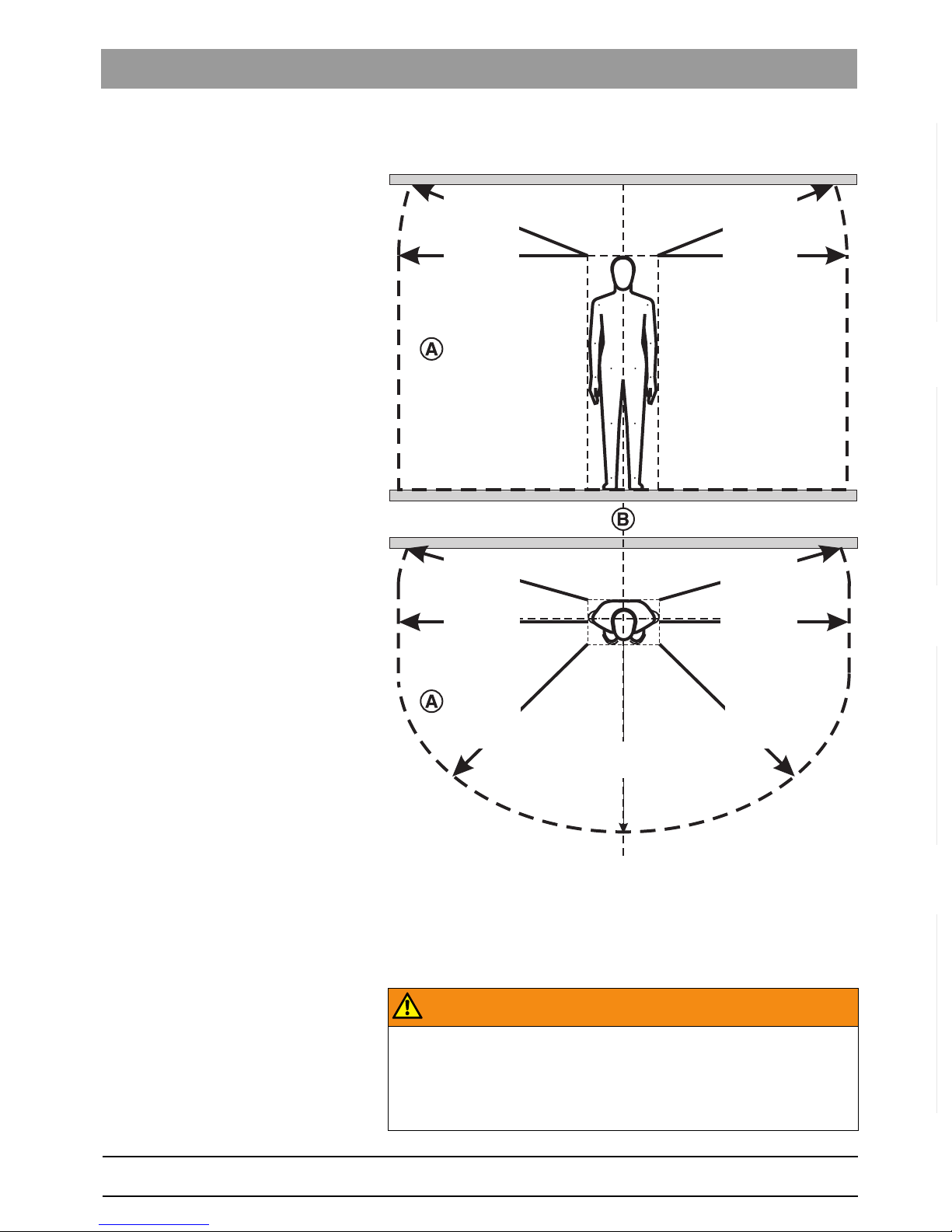
Patient environment
Patient environment
Within the patient environment (A), direct contact is only permissible with
devices or system parts that are approved for use in the patient environ-
ment (A).
This applies to all possible patient positions (B) during the examination or
treatment.
inEos outside of patient environment
WARNING
No acquisitions in the patient's mouth within the patient environment
As long as an inEos Blue is connected to a CEREC AC acquisition unit,
no acquisitions may be made in the patient's mouth using the connected
CEREC Bluecam if the inEos Blue is located outside of the patient envi-
ronment.
1500mm
59”
1500mm
59”
1500mm
59”
1500mm
59”
1500mm
59”
1500mm
59”
1500mm
59” 1500mm
59”
1500mm
59”
1500mm
59”
1500mm
59”

62 99 205 D3446
10 D3446.201.02.02.02 06.2010
Safety Sirona Dental Systems GmbH
Intended use Operating Instructions inEos Blue
3.1.3 Connection of external equipment
If any equipment not approved by Sirona is connected, it must comply
with the applicable standards:
● EN 60 950 for information technology equipment, and
● EN 61 010-1 for laboratory equipment.
3.1.4 Maintenance and repair
As manufacturers of dental instruments and laboratory equipment, we
can assume responsibility for the safety properties of the unit only if the
following points are observed:
● The Maintenance and repair of this unit may be performed only by Si-
rona or by agencies authorized by Sirona.
● Components which have failed and influence the safety of the unit
must be replaced with original (OEM) spare parts.
Please request a certificate whenever you have such work performed. It
should include:
● The type and scope of work.
● Any changes made in the rated parameters or working range.
● Date, name of company and signature.
Changes to the product
Modifications to this unit which may affect the safety of the operator, pa-
tients or third parties are prohibited by law!
3.1.5 Accessories
In order to ensure product safety, this product may be operated only with
original Sirona accessories or third-party accessories expressly approved
by Sirona. The user assumes the risk of using non-approved accessories.
3.1.6 In case of damage
In case of noticeable malfunctions or damage, stop using the instrument
immediately and notify your dental depot or the manufacturer.
3.2 Intended use
This system is used for 3D digitization of single tooth or complete jaw
saw-cut models and impressions.
Follow the operating instru ctions
If the unit is used for any purpose other than the one mentioned above, it
may be damaged.
Proper use also includes observing the present operating instructions and
the relevant maintenance instructions.
NOTICE
Follow the instructions
If the instructions for operating the unit described in this document are
not observed, the intended protection of the user may be impaired.
Autres manuels pour inEos Blue
2
Table des matières
Autres manuels Sirona Scanner


