
Simplified Manufacturing MV2 Manuel utilisateur
MV2
VER 1.0

1
Thank you for purchasing this device
The Simplified Manufacturing MV2 is designed to provide years of
reliable service. At Simplified MFG, we want the experience with
this device to be the best possible and are committed to helping
achieve that experience.
Surge protection device recommended
This product contains sensitive electrical components that may
be damaged by electrical spikes, surges, electric shock, lighting
strikes, etc. Use of surge protection systems is highly
recommended in order to protect and extend the life of your
equipment.

2
Table of Contents
1. Introduction..............Error! Bookmark not defined.
2. Features ................................................................ 3
3. Package Contents ......Error! Bookmark not defined.
4. Specifications ......................................................... 4
5.Operation Controls and Functions.............................. 6
5.1 Front Panel .................................................... 6
5.2 Rear Panel..................................................... 7
6. Display Modes........................................................ 9
7. Remote Control .................................................... 10
8. Application Example.............................................122
9. Warranty……………………...........................................12
10.Contact…………………………..………………………………….13

3
1. Introduction
The MV2 is a “frameless” four inputs to two parallel outputs (1
HDMI & 1 VGA) switch that features the ability to process the inputs
into four different multi-view formats. Four 1080p inputs can be
shown simultaneously on a 4K display (up to 4K @30Hz.). In
multi-view mode, the analog audio output can be switched to output
any of the pictures in the multi-view.
1. Features
•“Frameless” instant switching
•Automatic resolution sensing/scaling
(480p~4K 30Hz., 800x600~4K30Hz.)
•HDMI1.4b/HDCP1.4 up to 10.2Gbps capable
•5 viewing modes
•HDMI output can be set to 5 different outputs including
720p, 1080p, and 4K @ 30Hz.
•VGA output can be set to 4 different outputs up to 1920 x
4
1200. Please note VGA will not support 4K
•Compact size
•Audio breakout is 3.5mm minijack (stereo)
•Control functions are via supplied remote and IR signals
and front panel switching
2. Package Contents
•1 x MV2 Switch with multi-view
•1 x 12V/1A DC Power Supply
•1 x IR Remote Control
•2 x Mounting brackets
•1 x User manual
3. Specifications
Technical
HDMI Compliance
HDMI 1.4b
HDCP Compliance
HDCP 1.4
Video Bandwidth
10.2Gbps

5
Video Resolutions
3840x2160@30Hz,1920x1080@50/60
Hz,1280x720@50/60Hz,1920x1200@6
0Hz,1024x768@60Hz
Color Depth
8-bit
Color Space
RGB, YCbCr 4:4:4, YCbCr 4:2:2
Analog Audio
Formats
LPCM2.0 44.1KHz 48KHz
ESD Protection
Human-body Model
:
±8kV (Air-
gap discharge) , ±4kV
(Contact discharge)
Connections
Inputs ports
4x HDMI Type A [19-pin female]
1x SERVICE [Micro USB, Update port]
Outputs ports
1x HDMI Type A [19-pin female]
1x VGA [VGA-D]
1x Audio [3.5mm Stereo Mini-jack]
Mechanical
Housing
Metal Enclosure
Color
Black
Dimensions
185mm (W)×128mm (D)×20mm (H)
6
Weight
595g
Power Supply
Input: AC100~240V 50/60Hz, Output:
DC12V/1A
(US/EU standards, CE/FCC/UL
certified)
Power Consumption
7.68W (max)
Operating
Temperature
0°C ~ 40°C / 32°F ~ 104°F
Storage Temperature
-20°C ~ 60°C / -4°F ~ 140°F
Relative Humidity
20~90% RH (non-condensing)
5.Operation Controls and Functions
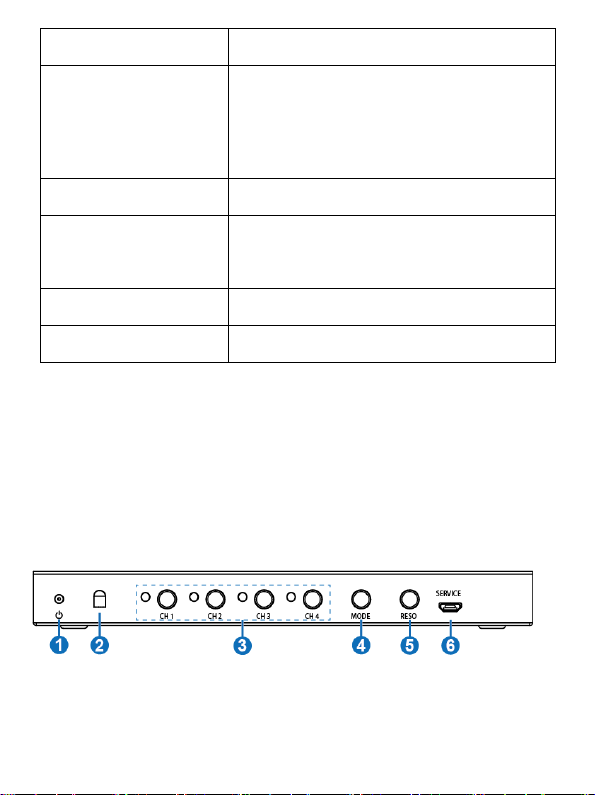
5.1 Front Panel

7
Number
Name
Function description
1
POWER
LED
The LED will illuminate green when the
unit is
working, red when the unit is in standby
mode.
2 IR
IR receiver window. It accepts the
remote control signal of this device only.
3
CH1/CH2/
CH3/CH4
button
Selects input channel button (Please see
“6. Display Modes” detail description).
4
MODE
button
Press this button to cyclical selection
display mode output (Please see “6.
Display Modes” detail description). Press
this button up to 5s, the output screen is
full screen and equal proportion display.
5
RES.
Cycling select different output resolution.
Press this button up to 5s to opening or
closing window display frame.
6
SERVICE
port
Firmware update used. (Manufacture use
only.)
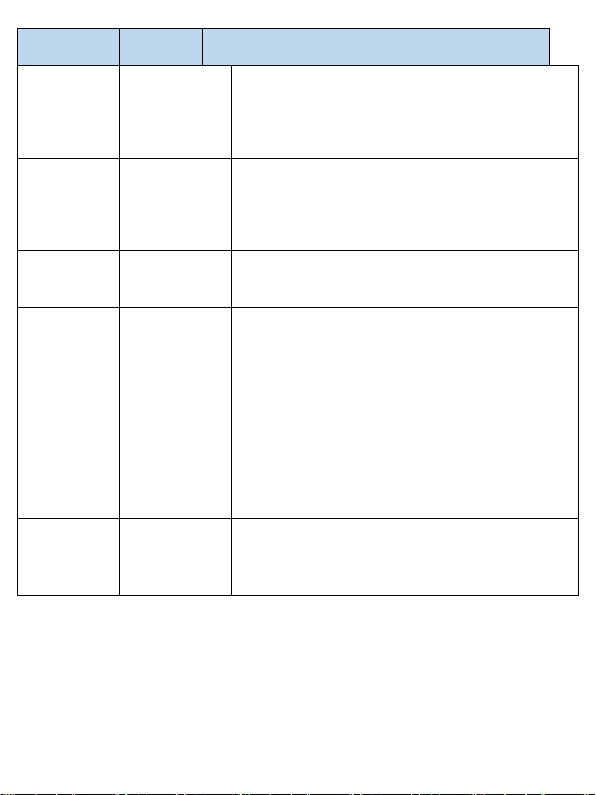
5.2 Rear Panel
8
Number
Name
Function description
1
HDMI
INPUT
HDMI input ports for the four sources
that this device will switch/mulit-view
2
HDMI
OUTPUT
Connection for display up to 4K @ 30Hz.
3
VGA
OUTPUT
VGA output port that is in parallel with
HDMI output (does not support 4K)
4
AUDIO
OUTPUT
Analog audio output port. (Note: If the
HDMI output is MODE 1, the audio
output follows the video content. If the
HDMI output is MODE 2/3/4/5, press
CH1/CH2/CH3/CH4 up to 5s to selecting
audio output or using remote control to
cyclical selection audio output. The
default status is CH1 screen audio
output.)
5
DC 12V
Plug the 12V/1A DC power supply into
the unit and connected the adapter to an
AC outlet.
9
6. Display Modes
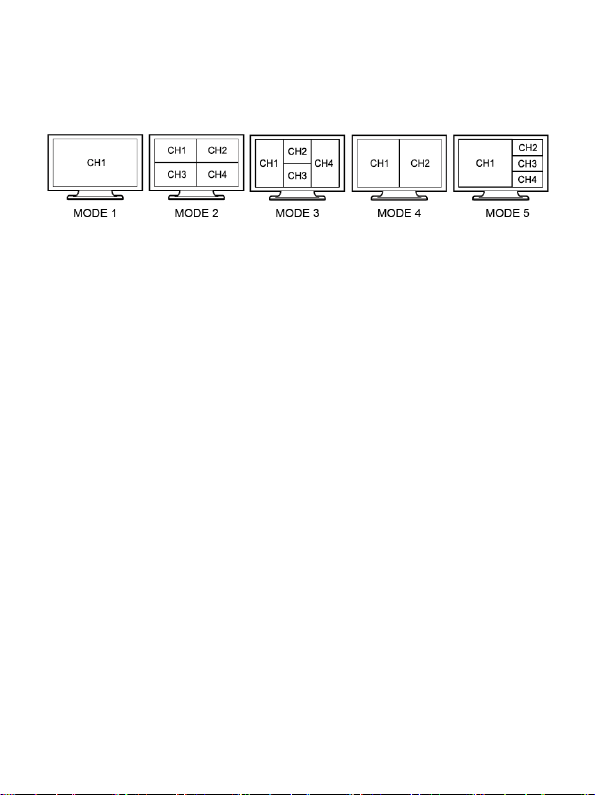
The MV2 has 5 display modes. Please see the below;
MODE 1: The MV2 will display each input separately. Press the
CH1/CH2/CH3/CH4 buttons on-panel or using IR remote control to
select the source. The LED indicators will indicate which source is
selected.
MODE 2: The MV2 divides four HD inputs into a “quad” view on the
screen. The LED indicator “4” is on. In the CH1 window, you can
press the CH1 button on-panel or use the remote control to cyclical
input position in the quad view. In the CH2 window, you can press
the CH2 button on-panel or use the remote to cycle input 2’s source,
etc. The rest can be done in the same manner.
MODE 3: The MV2 divides four HD inputs and display on a screen.
The LED indicator “4” is on. Operation method is the same as MODE
2.
Table des matières


