
Sima SUR-20 Manuel utilisateur

SUR-20
Learning Universal Remote
With LCD touch screen
User Manual


The SUR-20 User’s Manual
i
Preface
About this manual
This manual is designed to make using the SUR-20 Smart Remote
Control as easy as possible. Information in this document has been
carefully checked for accuracy; however, no guarantee is given to the
correctness of the contents. The information in this document is
subject to change without notice.
Copyright
© Copyright 2001
This document contains proprietary information protected by
copyright. All rights are reserved. No part of this manual may be
reproduced by any mechanical, electronic or other means, in any
form, without prior written permission of Sima Products Corp..
Trademarks
All trademarks and registered trademarks are the property of their
respective owners.
Sima Products Corp.
140 Pennsylvania Ave.
Bldg. # 5
Oakmont, PA 15139
800-345-7462 412-828-3700
412-828-3775 FAX
www.simacorp.com
Pn 21632 rev.20013

ii
Table of Contents
CHAPTER 1 - INTRODUCING THE SUR-20 ...................................... 1
Unpacking the SUR-20............................................................ 2
SUR-20 features....................................................................... 2
Identifying components.......................................................... 3
CHAPTER 2 -GETTING STARTED ...................................................... 4
Batteries ................................................................................... 4
Battery low icon ................................................................. 5
Battery tips and precautions............................................. 5
The LCD.................................................................................... 6
Turning the LCD on............................................................ 6
Touch screen precautions ................................................ 6
SUR-20 touch screen buttons ................................................ 7
CHAPTER 3 - OPERATING THE SUR-20..............................................
Changing the LCD layout ....................................................... 8
The AUX device button ......................................................... 11
CHAPTER 4 -THE LEARNING FUNCTION .........................................
Before you use the learning function.................................. 12
Using the learning function............................................. 13-16
CHAPTER 5 - LOADING PRE-PROGRAMMED CODES ...................
Loading the Manufacturer's Code ..................................17-19
Manufacturer's Code Tables ...........................................20-25
CHAPTER 6 -THE DELETE FUNCTION...............................................
Using the delete function ..................................................... 26
Delete device button ................................................... 26-29
CHAPTER 7 -THE MACRO FUNCTION ...............................................
Macro......................................................................30
Setting up a Macro example............................................ 30-33
Running the Macro................................................................ 33
Quick Start Macro setup Guide....................................... 34

Table of Contents
iii
CHAPTER 8 - SPECIAL FEATURES......................................................
Adjusting the LCD backlight............................................35-37
Turning off the beep signal ..................................................38
Recalling the original LCD layout ........................................ 39
APPENDIX A.......................................................................................
Specifications and Accessories...........................................40
APPENDIX B.......................................................................................
Troubleshooting ...............................................................41-42
Quick Start Function Guide.......................................................... 43
WARRANTY........................................................................ 44


1
Chapter 1
Chapter 1Chapter 1
Chapter 1
Introducing the SUR-20
Congratulations on your purchase of the Sima
SUR-20 Universal Remote Control. The SUR-20 is a
digital universal remote control that is easy to use,
enabling you to control all of your electronic devices
equipped with an infra-red (IR) remote.
The SUR-20 uses a touch screen control panel,
which changes its display when you select a different
device. The touch screen eliminates the need for
dozens of buttons. It’s easy to find the functions you
want. Simply select a device and the appropriate screen
appears. You can control up to eight devices, including
VCRs, DVDs, TVs, and satellite dishes.
The SUR-20 is easy to set up. You can quickly
configure each device in your household or office using
the “learning eye”. In addition, the advanced macro
function enables you to initiate a chain of up to 25
commands with the touch of a single button.
Convenient and easy to use, the SUR-20 provides
you with a central control solution.
This manual will help you learn how to use all the
advanced features of the SUR-20. It will not explain
how to use the functions for your devices. Please
refer to your device’s user manual for information
related to your device.

The SUR-20 User’s Manual
2
Unpacking the SUR-20
After you have unpacked the SUR-20, check the
contents to make sure the following items are included.
• SUR-20
• This User’s Manual
If any of the above items are missing or appear
damaged, contact your dealer immediately. Do not
throw the shipping carton away in case you need to ship
your SUR-20.
SUR-20 features
The following list identifies the SUR-20’s key features.
For more information on getting the most from these
features, refer to Chapters 2 and 3.
• Large touch screen display with automatic backlighting for
visibility in dim lighting.
• Macro sequence function—each macro can store 25
commands.
• Controls up to eight devices including DVD, TV, Satellite,
VCR and CD.
• Learns the IR codes from your existing remote controls to
quickly set up devices.
• Adjustable backlight with four levels of ambient light
sensitivity.
• Pre-programmed manufacturer’s codes for many models.
Chapter 1 —Identifying Components
3
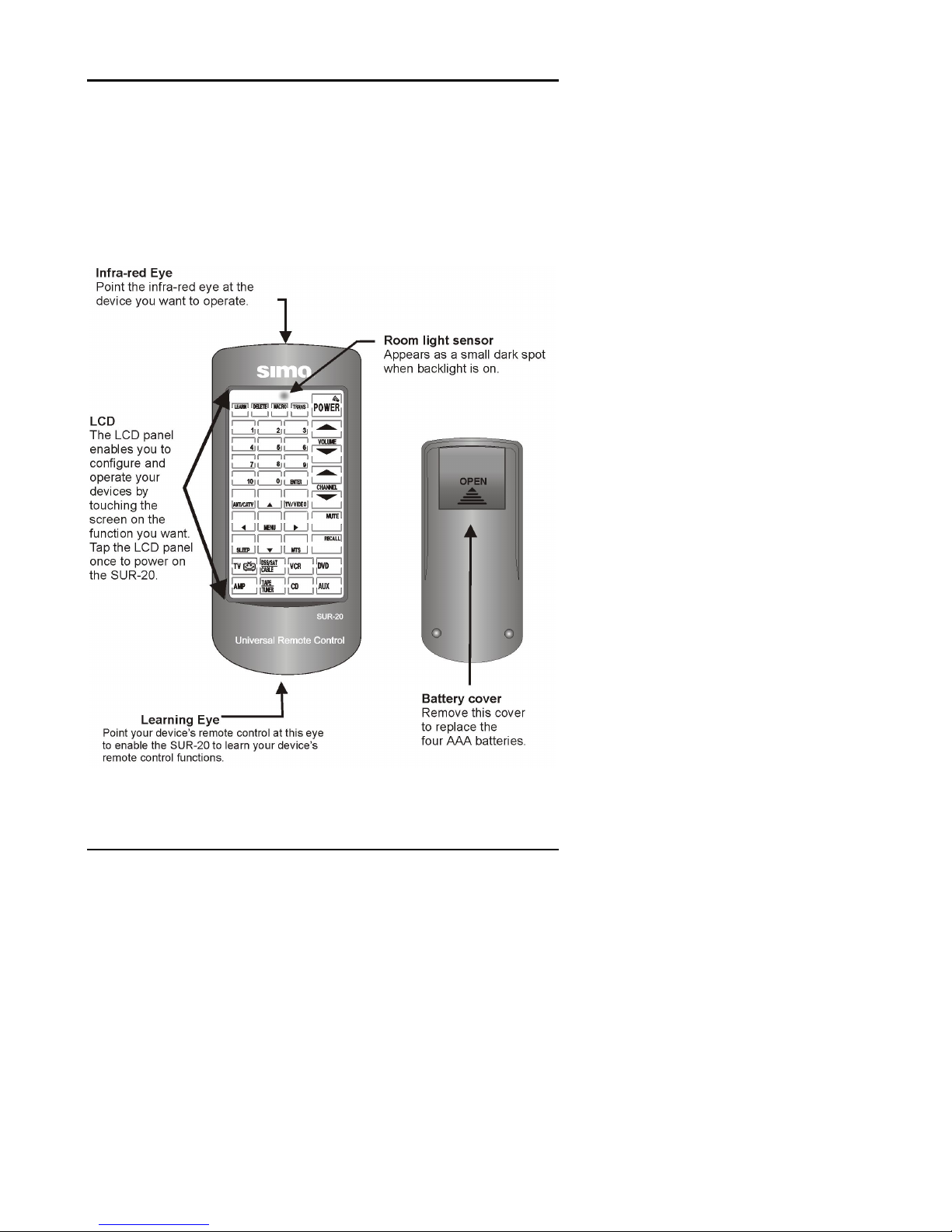
Identifying components
Please refer to the following illustrations to identify the
features of the SUR-20. This section provides an
overview of the SUR-20’s features and controls. Refer
to Chapters 3-8 for detailed descriptions on using the
LCD panel and controls.
Figure 1-1: Front and rear view

4
Chapter 2
Getting Started
This chapter will guide you through the steps for
inserting the batteries and using the many features.
Batteries
The SUR-20 operates on four AAA batteries (not
included). Batteries must be inserted before you can
operate the SUR-20. To insert the batteries, refer to the
following illustration:
Open the battery
case cover by
pushing in the
direction of the
arrow.
OPEN
A.
OPEN
Ensure
that you
insert
the batteries
according to
the marking
inside the
battery case.
Insert the
batteries.
B.
Figure 2-1: Inserting the batteries
Autres manuels pour SUR-20
1
Table des matières
Autres manuels Sima Télécommande universelle


