EN - 6
EN
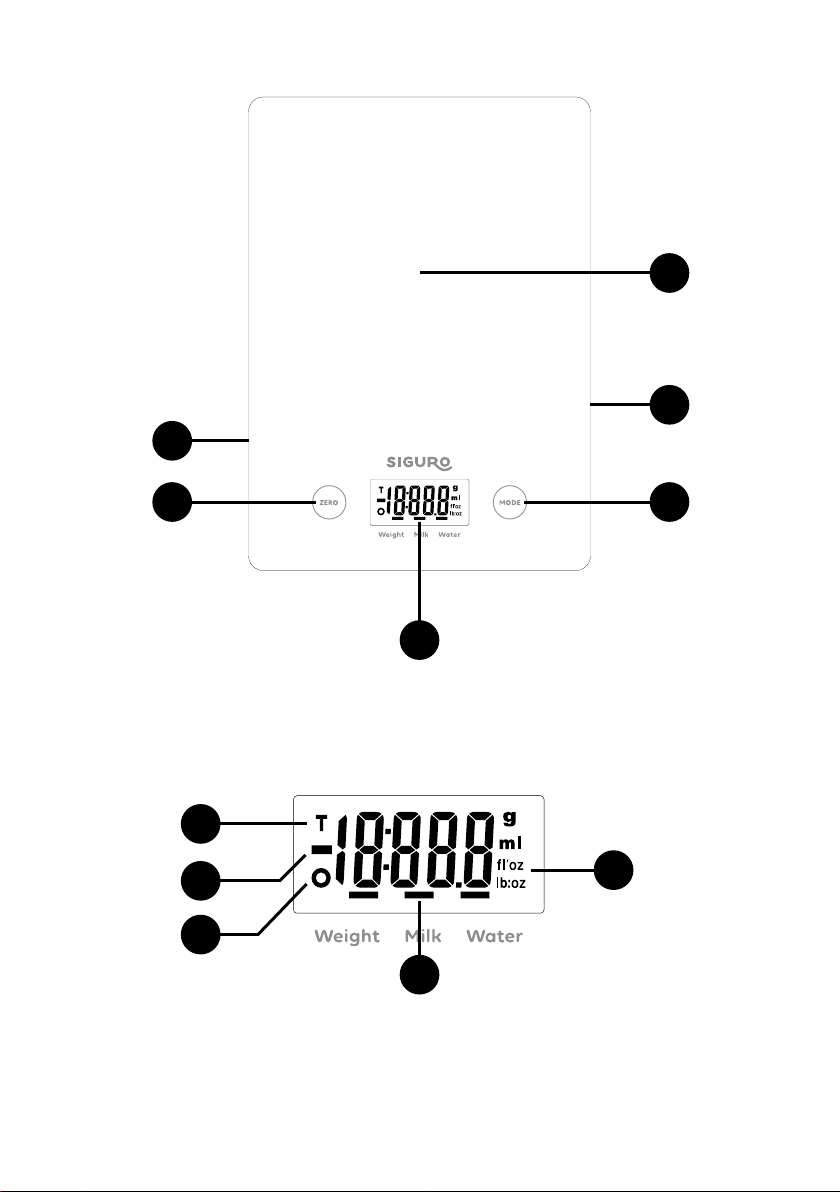
1 Display
2 Weighing area
3 Battery cover (on the bottom side)
4 ZERO button for resetting /
switching on the scale
5 MODE button for switching modes
and weighing units
6 UNIT button for weighing units
switching (on the bottom side)
Display:
1 TARE function indicator
2 Weighing to value function indicator
3 Negative value indicator
4 Mode indicator (measuring weight /
volume of water / volume of milk)
5 Weight / volume unit indicator
Before use
• The device is powered by asingle
button battery type CR2032.
• If the scale cannot be switched on,
check that the battery is inserted or
that the battery is not empty. Insert
the battery back or replace the bat-
tery with anew one.
Inserting / replacing batteries
1. First, remove the insulating foil from
the contact of the new battery.
2. Open the battery compartment cover
on the bottom of the scale.
3. Use a sharp object to remove the
used battery (e.g. with tweezers).
4. Insert a new battery by placing one
side of the battery under the stopper,
and then push the other side. Make
sure the polarity is correct.
Basic weighing
1. Place the scale on an even, firm and
stable surface.
2. Before
switching on the scale, place
akitchen bowl on the weighing area if
necessary (not included in the package).
3. Press the ZERO button to turn on the
weighing mode.
4. Wait until the LCD display shows all
the information.
5. Place the object to be weighed on the
scale (or in the bowl) and the LCD dis-
play will show the determined weight
of the object.
Switching modes using
the MODE button
1. Place the container on the weighing area.
2. Press the ZERO button to reset the
weight of the bowl, the display shows „0“.
3. Press the MODE button switch between
the individual measuring modes. Fol-
lowing modes are available:
Weight for weight measuring (units are g)
Water to measure the volume of water
(units are ml)
Milk to measure the volume of milk
(units are ml)
Topping up weight
and tare function
These functions are used to measure the
weight of the additional batches gradu-
ally added to the previous ones, which
remain on the scale. Place the first batch
on the scale and the weight will appear
on the display. Touch the ZERO button