
SIGNIFY EA1440 Manuel utilisateur
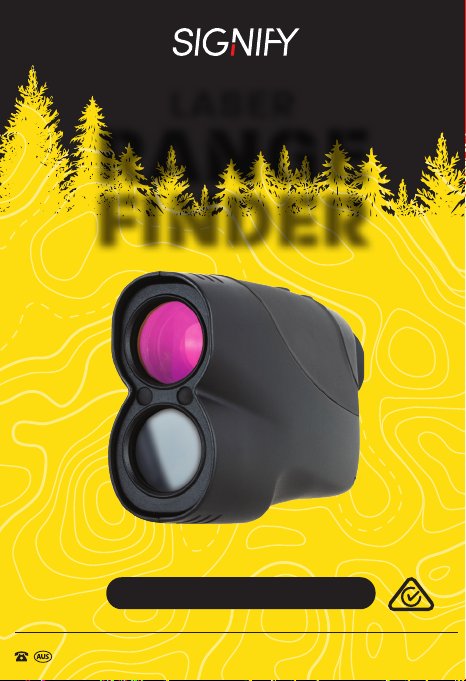
Model Number: EA1440
INSTRUCTION MANUAL
AFTER SALES SUPPORT
1300 777 137
LASER
RANGE
FINDER

AFTER SALES SUPPORT
1300 777 137
MODEL: EA1440 PRODUCT CODE: 6619 04/2019
02
Welcome
Congratulations on choosing to buy a Signify product.
All products brought to you by Signify are manufactured to the
highest standards of performance and safety, and, as part of
our philosophy of customer service and satisfaction, are backed
by our comprehensive 1 Year Warranty and customer technical
support line.
This comprehensive instruction manual will provide you with
a detailed guide on how to operate your product and will
also assist you in troubleshooting any problems that you may
encounter.
If you have any queries regarding the use of this product, please
feel free to phone our technical support line for some friendly
advice. If you are experiencing difculties or believe that the
product may have a technical fault, we will assist you in rectifying
the issue. We can generally solve most problems simply and
quickly over the phone, so please always phone us rst!
We are sure that you will enjoy using this product and you can
expect to gain years of service from this product when it is used
and maintained in the correct manner.

03
AFTER SALES SUPPORT
1300 777 137
MODEL: EA1440 PRODUCT CODE: 6619 04/2019
Contents
Welcome 02
Warranty Details 04
General Information and Safety Instructions 05
Product Overview 07
Before First Use 09
Instructions 10
Technical Specications 12
Repair and Refurbished Goods or Parts Notice 13
Other Useful Information 14
Cleaning and Maintenance 14
Storage 14
Responsible Disposal 15
Specication Table 15

04
AFTER SALES SUPPORT
1300 777 137
MODEL: EA1440 PRODUCT CODE: 6619 04/2019
REGISTER YOUR PURCHASE AT www.aldi.com.au/em/about-aldi/product-registration/
TO KEEP UP TO DATE WITH IMPORTANT INFORMATION
The product is guaranteed to be free from defects in workmanship and
parts for a period of 12 months from the date of purchase. Defects that
occur within this warranty period, under normal use and care, will be
repaired, replaced or refunded at our discretion. The benets conferred
by this warranty are in addition to all rights and remedies in respect of the
product that the consumer has under the Competition and Consumer Act
2010 and similar state and territory laws.
Our goods come with guarantees that cannot be excluded under the
Australian Consumer Law. You are entitled to a replacement or refund for
a major failure and for compensation for any other reasonably foreseeable
loss or damage. You are also entitled to have the goods repaired or
replaced if the goods fail to be of acceptable quality and the failure does not
amount to a major failure.
Laser Range Finder
Warranty Details

05
AFTER SALES SUPPORT
1300 777 137
MODEL: EA1440 PRODUCT CODE: 6619 04/2019
RETAIN FOR FUTURE USE
Read this manual thoroughly before rst use, even if you are familiar with
this type of product. The safety precautions enclosed herein reduce the risk
of re, electric shock and injury when correctly adhered to. Please keep this
user manual in a safe place along with your purchase receipt, warranty card
and carton for future reference. If applicable, pass these instructions and
packaging on to the next owner of the product. Always follow basic safety
precautions and accident prevention measures when using an electrical
product.
1. Read all instructions before using the Laser Range Finder.
2. The Laser Range Finder is not intended for use by persons with
reduced physical, sensory or mental capabilities, or lack of experience
and knowledge, unless they have been given supervision or instruction
concerning use of the product by a person responsible for their safety.
3. Do not use the Laser Range Finder for anything other than it's
intended use.
4. Do not immerse the Laser Range Finder in water or any other liquids.
5. Repairs to the Laser Range Finder should only be performed by
qualied personnel. Improper repairs may place the user at serious risk
and will void the warranty.
6. Do not use the Laser Range Finder if it has been dropped or damaged
in any way.
7. This product is not a toy. Keep the Laser Range Finder out of reach
of children.
8. This product is not user-serviceable. Contact with high voltage
components may cause a risk of electric shock, therefore do not
attempt to open the cover of the Laser Range Finder.
9. The manufacturer and retailer are not responsible for any eventual
damages caused by improper or faulty use.
10. Do not place the Laser Range Finder near a hot burner (gas or
electric), other heat emitting sources or open ames.
General Information and Safety Instructions
AFTER SALES SUPPORT
1300 777 137
MODEL: EA1440 PRODUCT CODE: 6619 04/2019
06
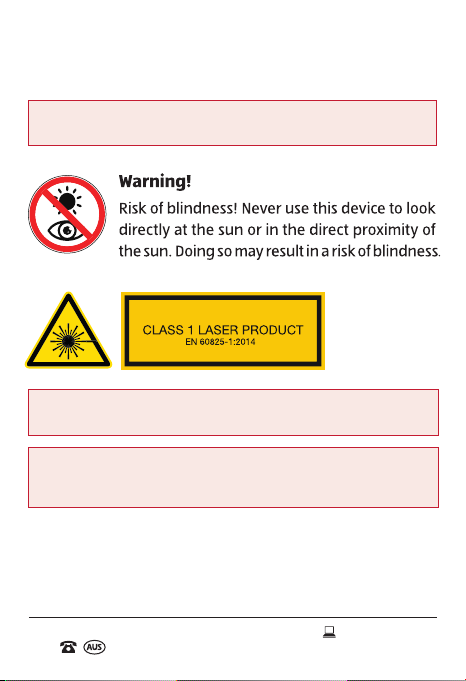
WARNING: This product contains class 1 laser radiation. Please avoid
direct eye exposure.
CAUTION: Danger of explosion if battery is incorrectly replaced.
Replace only with the same or equivalent type.
IMPORTANT: Dispose of all used batteries at designated disposal
points. Never dispose of batteries in a re as this may cause an
explosion or leakage of dangerous chemicals and fumes.
General Information and Safety
Instructions (cont.)
07
AFTER SALES SUPPORT
1300 777 137
MODEL: EA1440 PRODUCT CODE: 6619 04/2019
Product Overview
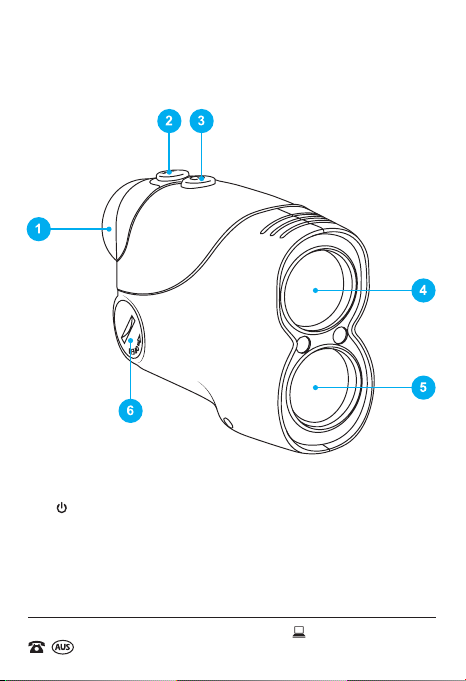
Included (not pictured): Case, Strap, Lens Cloth Cleaner,
Lithium Battery - CR2 (3V), User Manual, Warranty Card
1. Eyepiece (Inner - Lens Display)
2. MODE Button
3. Power Button
4. Laser Emitting Lens
5. Laser Receiver Lens
6. Battery Cover
Laser Range Finder Body
AFTER SALES SUPPORT
1300 777 137
MODEL: EA1440 PRODUCT CODE: 6619 04/2019
08
Product Overview (cont.)
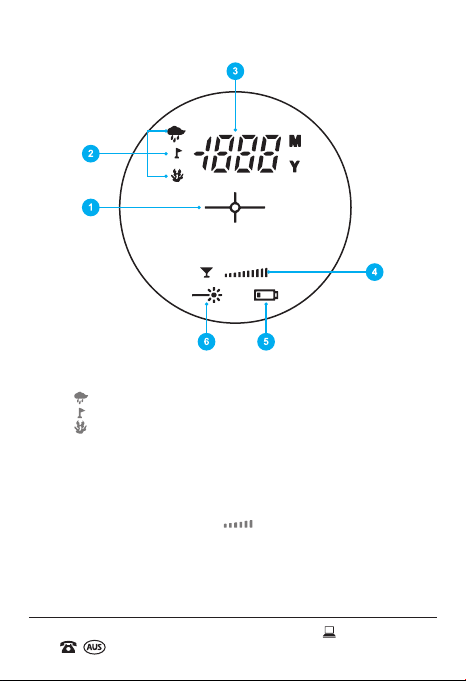
1. Crosshair (symbol for Aim or Target)
2. Mode of Measurement:
• - Set for rainy conditions, when measuring objects beyond 60m.
• - Set to measure close objects as a priority.
• - Set to measure far objects as a priority.
• No Icon - Standard conditions.
3. Distance Measurement (in metres or yards)
4. Quality of Measurement:
• This indicator refers to the current quality of measurement under the
current conditions. Please continue to select the appropriate Mode of
Measurement until six bars " " or more are shown on the lens
display. If under six bars are shown, the return-wave (the strength and
quality of the reception between the device and the object) will not be
strong enough to measure and display the distance.
5. Low Battery Indicator
6. Laser Emission Indicator
Lens Display

09
AFTER SALES SUPPORT
1300 777 137
MODEL: EA1440 PRODUCT CODE: 6619 04/2019
Before First Use
Inserting the Battery
Remove cover of the battery compartment, using a tool (e.g. a coin), turn
the lock in an anticlockwise direction, whilst asserting pressure on it. Insert
a new battery of type "CR2 (3V)" with the positive sign facing upwards, as
shown in the diagram below.
After inserting the battery, place the cover back onto the battery
compartment by rmly turning the battery cover in a clockwise position.
If this symbol appears on the display, the battery is low. In this case,
replace the battery.
WARNING: Do not expose batteries to excessive heat, direct sunlight,
open ames or any other heat sources (please see page 6 for more
information).
AFTER SALES SUPPORT
1300 777 137
MODEL: EA1440 PRODUCT CODE: 6619 04/2019
10
Instructions
This Laser Range Finder, combined with the function of a common
telescope and laser distance-measuring instrument, can measure the
distance from its scope to an object in the distance. The Laser Range Finder
is safe for your eyes, small in size and lightweight. It only requires a single
CR2 3V battery to function, which is included for your convenience. Its
measurement system isn't affected by inclement weather, nor is it affected
by small obstructions such as wires, branches, etc. The Laser Range Finder
can be used in sports and recreational activities (eg. golng or hunting).
Measuring Distance
1. Firmly place the Laser Range Finder in your dominant hand and bring
the eyepiece to your eye. Rotate the eyepiece of the Laser Range
Finder until the object is clear in your eld of vision.
2. Next, hold down the button. The lens will display “ ”, which are
the crosshairs. Aim the Laser Range Finder at your desired object.
Press the button again and hold for it for up to three seconds until
the distance of the object is displayed on the lens.
3. In order to ensure accuracy, keep holding the button for more than
three seconds until the distance of the object registers for the second
time.
NOTE: If no distance is displayed on the lens, select the appropriate
Mode of Measurement until six bars or more are shown (please see
page 8 for further information).
NOTE: The Laser Range Finder will turn off automatically if it is not
used within fteen seconds of turning it ON.
Table des matières
Manuels Instrument de mesure populaires d'autres marques


Endress+Hauser
Endress+Hauser Proline Promag 50 Caractéristiques techniques

Siemens
Siemens SITRANS F Coriolis FCT030 Manuel de la liste des pièces

KLINGER
KLINGER CMF V Series Manuel utilisateur

EXFO
EXFO FTB-2 Manuel d'exploitation et d'entretien

Keysight
Keysight M8290A Manuel utilisateur

ADTEK
ADTEK MW-5 Manuel utilisateur