
SIGNIFY EA0749 Manuel utilisateur
01
AFTER SALES SUPPORT
AUS 1300 777 137 EMAIL service@unclebills.com.au
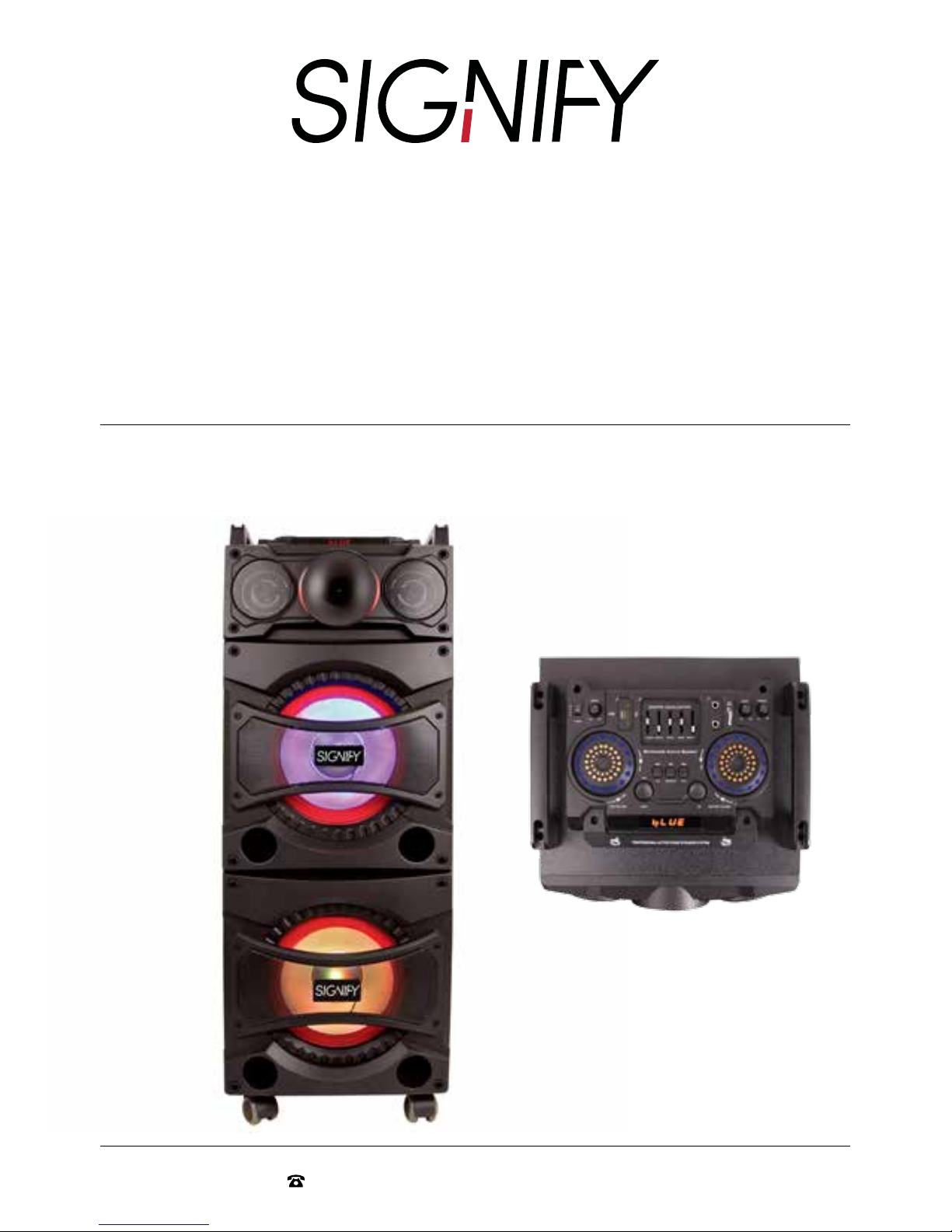
High Powered Entertainment
System with Karaoke Function
and Bluetooth®
Model Number: EA0749
INSTRUCTION MANUAL

02
AFTER SALES SUPPORT
AUS 1300 777 137 EMAIL service@unclebills.com.au
Contents
Welcome 03
Important Safety Instructions 04
Box Content 06
Product Overview 07
Top Panel 07
Panels 08
Remote Control 09
Before First Use 12
Instructions 13
Using the Audio Modes 13
Preparing the FM Antenna 13
Auto-Search for FM Radio Stations 13
Manual Searching for AM/FM Radio Stations 13
Using the USB Input Function 13
Using the SD Card Input Function 14
Using the Bluetooth® Function 15
Using the Microphone 17
Technical Specifications 18
Tips and Troubleshooting 18
Warranty Details 19
03
AFTER SALES SUPPORT
AUS 1300 777 137 EMAIL service@unclebills.com.au
Welcome
Congratulations on choosing to buy a Signify®product.
All products brought to you by Signify® are manufactured to the highest standards of performance
and safety, and, as part of our philosophy of customer service and satisfaction, are backed by our
comprehensive 1 Year Warranty.
This comprehensive instruction manual will provide you with a detailed guide on how to operate your
product and will also assist you in troubleshooting any problems that you may encounter.
If you have any queries regarding the use of this product, please feel free to phone our technical
support line for advice. If you are experiencing difficulties or believe that the product may have a
technical fault, we will also assist you in rectifying the issue. We can generally solve most problems
simply and quickly over the phone, so please always phone us first!
We are sure that you will enjoy using this product and you can expect to gain years of service from this
product when it is used and maintained in the correct manner.
IMPORTANT: Only audio files in MP3 format can be played successfully on your Entertainment
System. Please ensure your audio files loaded on your USB drive and SD card are converted to MP3
format before playing on the Entertainment System.

04
AFTER SALES SUPPORT
AUS 1300 777 137 EMAIL service@unclebills.com.au
Important Safety Instructions
RETAIN FOR FUTURE USE
Read this manual thoroughly before first use, even if you are familiar with this type of product.
The safety precautions enclosed herein reduce the risk of fire, electric shock and injury when
correctly adhered to. Please keep this user manual in a safe place along with your purchase receipt
and carton for future reference. If applicable, pass these instructions on to the next owner of the
product. Always follow basic safety precautions and accident prevention measures when using an
electrical product.
1. Before installing the Entertainment System, ensure the electrical voltage and circuit frequency
correspond to the voltage stated on the rating label of your product and your power outlet is
properly earthed.
2. Do not use the Entertainment System with an extension cord unless this cord has been checked
and tested by a qualified electrician. If an extension cord is used, please ensure that it has a rating
equal or exceeding the rating of this product.
3. Do not pull or carry by the cord, use the cord as a handle, close a door on the cord, or pull the
cord around sharp edges or corners. Check the power cord regularly for visible damage. If it is
damaged, please contact the After Sales Support line for further advice.
4. Check the power cord regularly for visible damage. If it is damaged, please contact the After Sales
Support line for further advice.
5. When the Entertainment System is not in use, switch it off and unplug from the power outlet. Do
not leave the product unattended when connected to the power supply. To unplug, grip the plug
and pull from the power outlet. Never pull by the cord.
6. This product is not user-serviceable. Contact with high voltage components may cause a risk of
electric shock, therefore do not attempt to open the back cover of the Entertainment System.
7. The installation of a residual current device (safety switch) is recommended to provide additional
safety protection when using electrical devices. It is advisable that a safety switch with a rated
residual operating current not exceeding 30mA be installed in the electrical circuit supplying the
device. See your qualified electrician for professional advice.
8. This Entertainment System is not intended for use by persons (including children) with reduced
physical, sensory or mental capabilities, or lack of experience and knowledge, unless they have
been given supervision or instruction concerning use of the product by a person responsible for
their safety.
9. Install and operate the Entertainment System in a cool and sufficiently ventilated room to ensure it
does not overheat.
05
AFTER SALES SUPPORT
AUS 1300 777 137 EMAIL service@unclebills.com.au
Important Safety Instructions (cont)
10. Never block the ventilation holes and openings. Do not place this product against soft surfaces,
drapery or fabric that may block the ventilation holes. The product should not be placed in an “in-
built” installation unless all ventilation holes are provided with adequate ventilation.
11. Do not expose the Entertainment System near water, rain moisture, liquids or dust. Do not store or
use the Entertainment System in high moisture environments. Moisture can damage the speaker
cone and surround and cause corrosion of electrical contact and metal parts.
12. Unplug the Entertainment System in cases of electrical storms to protect against the possibility of
power surges damaging the device.
13. The manufacturer and retailer are not responsible for any eventual damages caused by improper
or faulty use.
14. This Entertainment System is intended to be used indoors, for household use only. Do not use the
device outdoors.
15. The Entertainment System and its power adaptor have no user-serviceable parts contained within.
Do not attempt to repair, disassemble or modify the Entertainment System. This will void the
warranty.
16. Never operate the Entertainment System with wet hands, submerge under water or spill liquids
into or onto the device.
17. Do not place the Entertainment System near a hot burner (gas or electric), other heat emitting
sources or open flames.
18. Always position the Entertainment System on a flat and stable surface.
19. Be careful when transporting the Entertainment System. This unit is equipped with wheels and
will roll if it's not secure. Please ensure it is secure so it does not come into contact with any other
items or people.
20. If the Entertainment System has been exposed to strong fluctuations in temperature (for example,
after transport), do not switch it on immediately. Moisture and condensation could damage the
equipment. Do not switch on the equipment until it has reached room temperature.
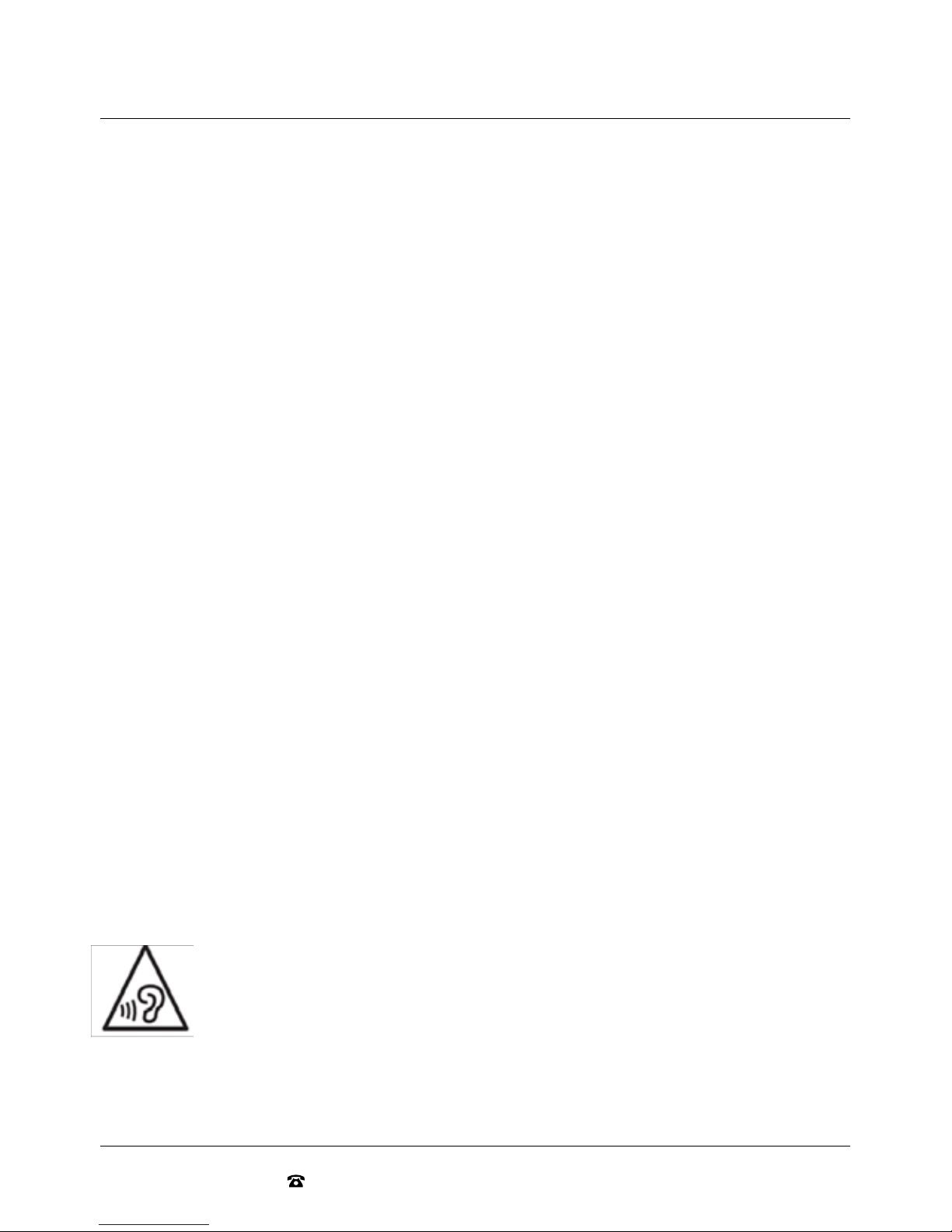
To prevent possible hearing damage, avoid listening at high volume levels over long
periods of time. Even exposure to short bursts of loud noise can result in hearing loss.
Please keep the volume consistently at a comfortable level.

06
AFTER SALES SUPPORT
AUS 1300 777 137 EMAIL service@unclebills.com.au
Box Content
Please ensure you carefully unpack the product package and check you have the below accessories
before you dispose the package:
1. Signify High Powered Entertainment System with Karaoke Function and Bluetooth®
2. AC Power cord
3. Remote Control
4. Wireless Microphone
5. RCA Stereo Audio Cable
6. 2 x AAA batteries (included)
7. 2 x AA batteries (included)
8. User manual
07
AFTER SALES SUPPORT
AUS 1300 777 137 EMAIL service@unclebills.com.au
Product Overview
7
6
89
101112
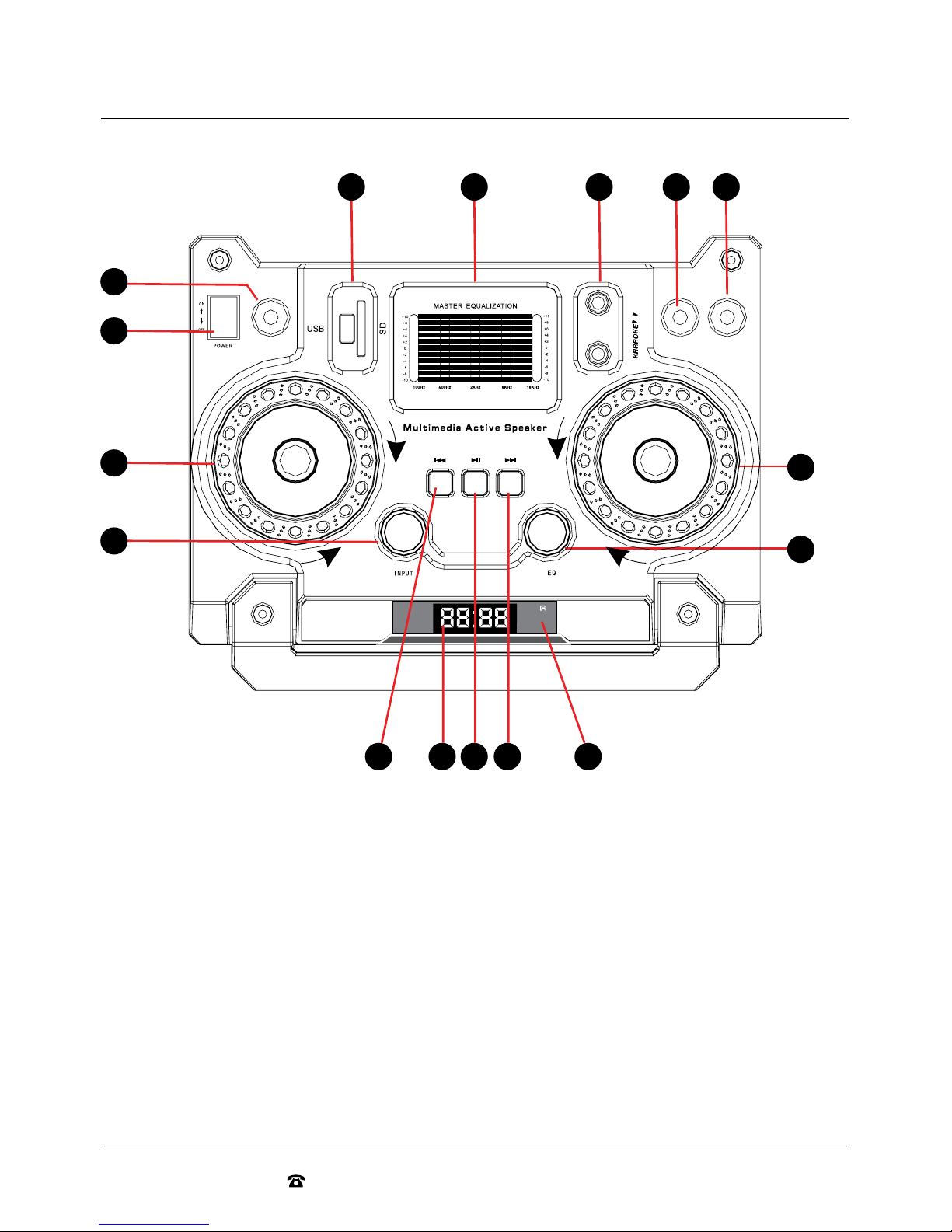
Top Panel
1. USB/SD Input
2. 5 Band Equaliser
3. Microphone Input Sockets
4. Bass Control
5. Treble Control
6. Master Volume Control
7. EQ Selector
8. Remote Control Receiver
9. Next Song/FM Next Frequency
10. Pause/Play/FM Search
11. Mode Display
12. Previous Song/FM Previous Frequency
13. AUX/BT/FM/USB/SD Mode Select
14. Microphone Volume Control
15. Power On/Off
16. Microphone Echo Control
-1 0+ 10-1 0+ 10
BASS TREBLE
-1 0+ 10
ECHO
MAX
MIC
INPU T
PROFESSIONAL ACTIVE STAGE SPEAKER SYSTEM
MIC VOLUME MASTER VOLUME
MIN
MAX
MIN
1
16
15
14
13
2 3 4 5
08
AFTER SALES SUPPORT
AUS 1300 777 137 EMAIL service@unclebills.com.au
Product Overview (cont)
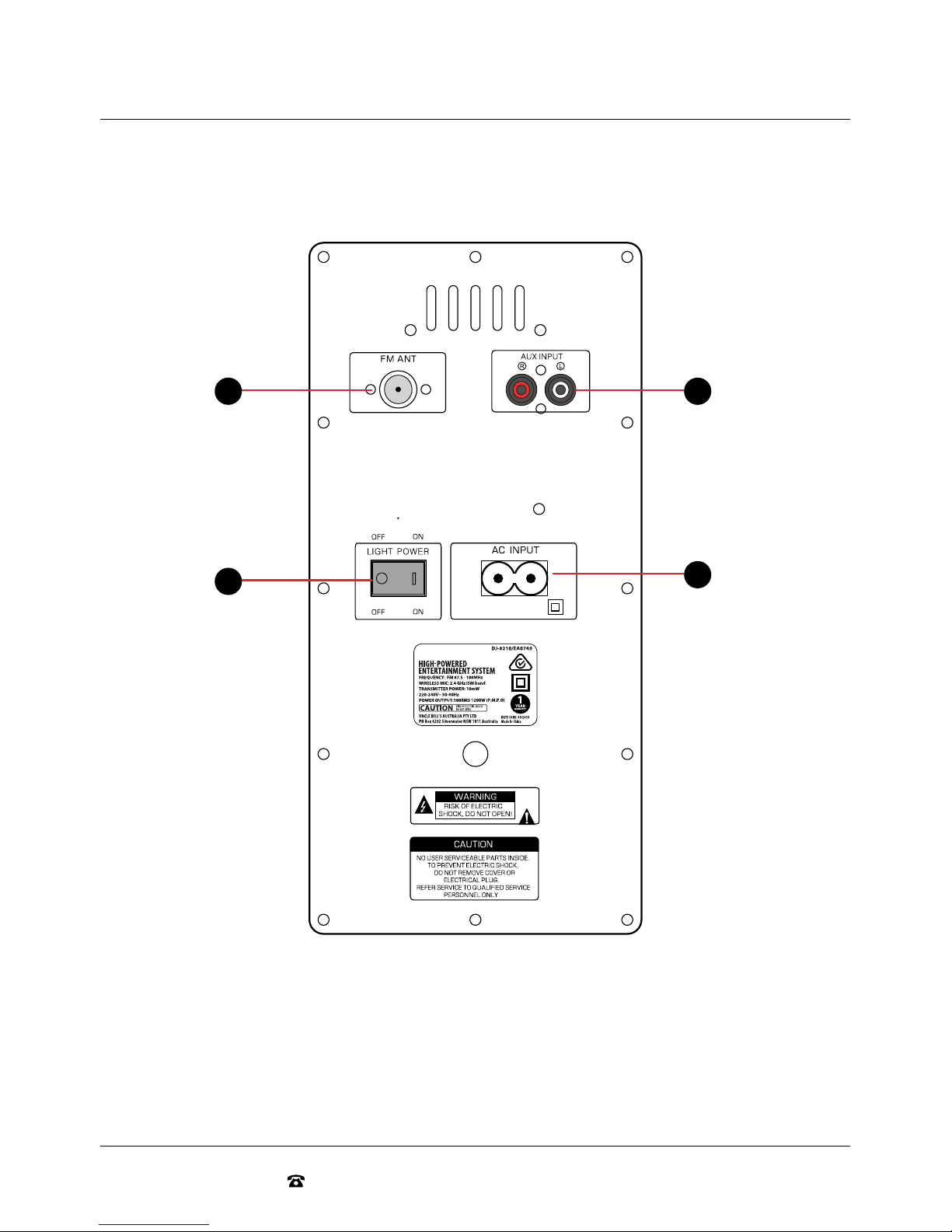
Rear Panel
1. RCA Audio Input: Connect a CD player, TV, DVD, or other audio play equipment
2. AC Power Input
3. FM Antenna Input
4. LED Light Power Switch On/Off
2
23
4
09
AFTER SALES SUPPORT
AUS 1300 777 137 EMAIL service@unclebills.com.au
Product Overview (cont)
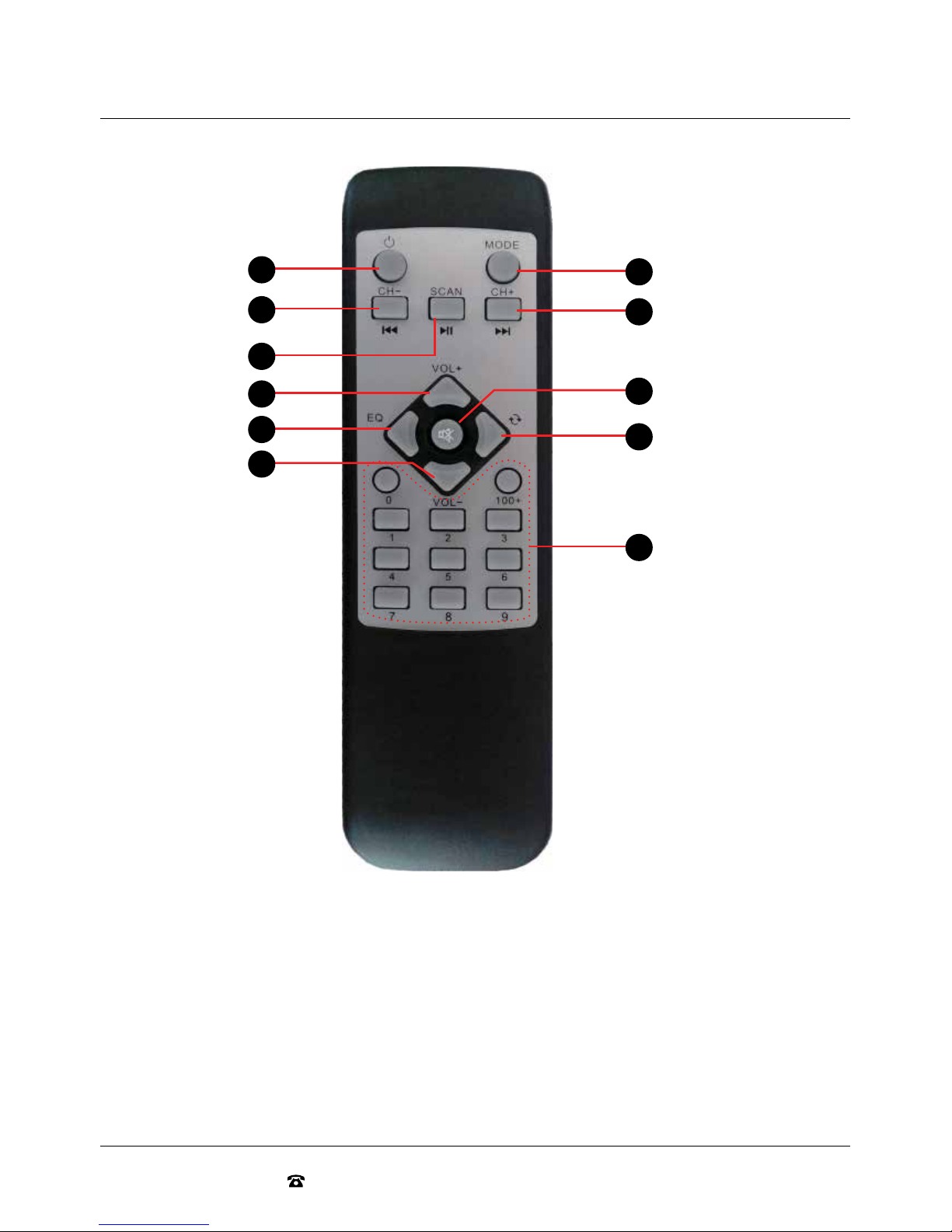
Remote Control
1. Standby
2. Previous Track/FM Previous Frequency
3. MP3 Pause/Play/FM Auto Scan
4. Volume Control Up (+)
5. EQ Selector
6. Volume Control Down (-)
7. Mode Selection: AUX/BT/FM/USB/SD
8. Next Track/Next FM Frequency
9. Mute
10. Select Repeat Function
(Single Repeat or All Repeat)
11. 0~9: Song Selection/Manual FM Radio
Frequency Selection. 100+ skips 100 tracks.
7
8
10
5
4
2
1
3
6
11
9

10
AFTER SALES SUPPORT
AUS 1300 777 137 EMAIL service@unclebills.com.au
Product Overview (cont)
USB/SD Input
Use the USB/SD input to play tracks directly from your USB or SD device. To use the USB/SD
function, simply turn the Entertainment System on and insert a USB or SD device and the device will
automatically begin to play.
Master Equalization
The Entertainment System features a 5 band custom equalizer. This allows you to increase or decrease
the gain for specific frequency ranges and adjust the audio output to your own personal listening
preferences.
To adjust the equalizer settings, move the slider bars for each of the 5 frequency ranges.
Microphone
Included with your Entertainment System is a wireless microphone. Two Microphone Input Sockets
have also been included in your Entertainment System, for your enjoyment.
To use the microphone, ensure the batteries are correctly inserted into the bottom of your microphone
(refer to page 12 for more detailed instructions) and slide the on/off button all the way up to switch on.
The green indicator light will illuminate.
To connect your wired microphone (not included) to the Microphone Input Socket located on the front
panel, you will require an adaptor if your wired microphone does not use a 1/4'' plug.
Select a mode to play and adjust the volume of the microphone by turning the Mic Volume Adjustment
dial located on the top of the Entertainment System. If you want to hear the music at the same time,
then ensure you also adjust the Master Volume Control up to your preferred volume level.
Bass Control
To enhance the bass of your tracks and audio sounds you can manually adjust the bass by turning the
bass adjustment dial clockwise till you reach a preferred bass setting.
Treble Control
To enhance the treble of your tracks and audio sounds you can manually adjust the treble by turning
the treble control dial clockwise till you reach a preferred treble setting.
Master Volume Control
Use the Master Volume dial to control the volume of the Entertainment System. To increase the
volume, turn the Master Volume dial clockwise and to decrease, turn the dial anticlockwise.
EQ Selector
Press the EQ button to select from a range of EQ (tone) settings (Classic, Rock, Jazz, Pop and Country).
Table des matières
Manuels Système de karaoké populaires d'autres marques


Karaoke Warehouse
Karaoke Warehouse Player 2000 Manuel utilisateur

VocoPro
VocoPro DVG-888K II Manuel utilisateur

ION
ION DISCOVER KEYBOARD USB Manuel utilisateur

The Singing Machine
The Singing Machine SMVG-620 Manuel utilisateur

Singsation
Singsation CENTER STAGE FREESTYLE Manuel utilisateur

RSQ
RSQ NEO K-2 Manuel utilisateur


