
SIGN RACER 1600 LED Manuel utilisateur
1
SignracerLEDFlatbedInkjetPrinter
OperationManual

2
TableofContents
Foreword.................................................................................................................................................................... 4
SafetyPrecautions ..................................................................................................................................................... 5
1.Indicationsofsymbols ................................................................................................................................... 5
2.Precautionsofoperations.............................................................................................................................. 6
Briefintroduction....................................................................................................................................................... 7
1. PrinterApplications .................................................................................................................................... 7
2.PrinterFeatures ............................................................................................................................................. 7
3.PrinterConfigurations.................................................................................................................................... 8
4.StructureDiagrams ........................................................................................................................................ 9
4.1Frontviewoftheprinter ............................................................................................................................. 9
4.1.1 Operation panel................................................................................................................................... 10
4.2Thefrontviewofthecarriage ................................................................................................................... 11
4.3Electronicpanel ......................................................................................................................................... 12
PrinterInstallation ................................................................................................................................................... 14
1.Loadingandtransporting............................................................................................................................. 14
2.Unpackingtheprinter.................................................................................................................................. 15
2.Workingenvironment.................................................................................................................................. 16
3.Computerconfigurations............................................................................................................................. 16
4.Installationinstructions ............................................................................................................................... 17
4.1Checkandacceptance ............................................................................................................................... 17
4.2Installationofthecomputerattachments................................................................................................. 17
4.3Levelingadjustment................................................................................................................................... 18
4.4Powerinput................................................................................................................................................ 18
4.5Softwareanddriverinstallation ................................................................................................................ 19
TopjetSoftwareinstallation............................................................................................................................. 19
4.6Functionaltests.......................................................................................................................................... 27
4.7Printheadinstallation ............................................................................................................................... 28
4.8 Filling ink................................................................................................................................................... 31
4.9Degassingoftheprinthead........................................................................................................................ 32
4.10Printheadcalibrationandalignment....................................................................................................... 33
4.10.1Nozzlesstate ......................................................................................................................................... 33
4.10.2Verticalalignment................................................................................................................................. 33
4.10.3Horizontalalignment ............................................................................................................................ 35
4.10.4Leftandrightheadsoffset.................................................................................................................... 36
4.10.5Bidirectionalcalibration....................................................................................................................... 37
4.10.6Steppingcalibration.............................................................................................................................. 38
4.10.7Basepointercalibration........................................................................................................................ 38
StartupandshutdownInstructions........................................................................................................................ 40

3
1.Startupandshutdownoperation ....................................................................................................................... 40
1.1Printstartupoperation............................................................................................................................. 40
1.2Printershutdownoperation ...................................................................................................................... 41
PrinterMaintenance................................................................................................................................................ 42
1.Periodicmaintenanceforprinterparts(basedonan6hourdailyproduction) ......................................... 42
2.Maintenanceofthemechanicalparts......................................................................................................... 42
3.Precisionpartmaintenance......................................................................................................................... 43
4.Printheadmaintenance ............................................................................................................................... 43
4.1Dailyroutinemaintenance ........................................................................................................................ 43
4.2Printheadpreservationduringpowerfailure............................................................................................ 43
4.3Printheadpreservationduringlongvacation............................................................................................ 44
5.Replacementofconsumableparts.............................................................................................................. 45
5.1Replacementofinkpump.......................................................................................................................... 45
5.2Inkrefill ...................................................................................................................................................... 46
5.3Replacementofinkfilter ........................................................................................................................... 46
5.4Replacementofairpump .......................................................................................................................... 47
Troubleshooting....................................................................................................................................................... 48
1.Buzzindicationsandtroubleshooting.......................................................................................................... 48
2.Pressuresystemproblems........................................................................................................................... 49
2.1Unstablenegativepressure ....................................................................................................................... 49
2.2Thepressureindicatorreads“0”............................................................................................................... 49
2.3Pressurecannotrisewhenpriming(negativepressureisnormal)........................................................... 49
2.4Singlebuzzalert......................................................................................................................................... 49
3.Inklinemalfunction ..................................................................................................................................... 50
3.2Inkleakageofthenozzles.......................................................................................................................... 50
4.Printheadstrike............................................................................................................................................ 51
4.1.Howtoavoidheadstrikewiththemedia................................................................................................. 51
4.2.Dealingwithheadstrikeproblem............................................................................................................. 52
5.Carriagemovingmalfunction....................................................................................................................... 53
5.1Carriagemovingfailure.............................................................................................................................. 53
6.Automaticheadheightadjustmentmalfunctions....................................................................................... 54
7.Printingqualitytroubleshooting.................................................................................................................. 55
Appendix .................................................................................................................................................................. 56
1.RoutineMaintenanceGuide........................................................................................................................ 56
4.ToolsandMaterialsneeded: ....................................................................................................................... 58
5.ChannelinformationofRicohGen5 ............................................................................................................ 59
5.1Singlearraycarriageset............................................................................................................................. 59
5.2Doublearraycarriageset........................................................................................................................... 62
6.SignracerLEDtimingsettings………………………………………………………………………………………………………………….72

4
SignracerLEDhybridUVinkjetprintersareahighqualityandcosteffectiveequipmentspecially
designedforcommercialandindustrialprintingenterprises.AssembledwithhighperformanceRicoh
Gen.5piezoheadsthatenablesanoutputspeedof2350 ㎡/handprecisionupto1200X1200dpi,the
printerachievestheperfectbalancebetweenspeedandquality.
TheSignracerhybridmodelsare1600LED,2500LEDand3200LED.Themodelsarespeciallydesigned
forcontinuousrunningof24hours/7daysindustrialproduction.Anyprintedmediawiththethickness
of050mmcanbefirmlyfixedontheplatformduetothefunctionalvacuumsuction.Theprinterhas
userfriendlyoperationinterfaceanditsoptionalwhitecolormeetsdiversifiedprintingrequirements
inthecommercialprintingbusiness.
Foreword
TheSignracerLEDhybridisaprecisionmachineequippedwithextremelyfinemechanismsand
integratedcircuits.Withaviewtousetheprinterinanoptimalcondition,wehaveestablished
thisoperationmanualforyourreference.
Thismanualhasbeenpreparedforenduserseasyunderstandingandusingofthisprintersafely
andefficiently.Pleasereadeverycontentcarefullybeforedetailoperations.Changingpartscan
onlybedoneafterpassingatechnicaltrainingweretheseoperationsareexplained.Ifnot
receivedand/orattendthistrainingonlyexperiencedtrainedtechniciansareallowedtoexchange
spareparts
Alterationsofanycontentsinthismanualaresubjectedtochangewithoutnoticefortechnical
updates.
Thismanualiswrittenwiththebestcareandintentionshowevermistakesmightoccur.
Signracerand/oritsdealersanditsemployeesexcludestheliabilityfordamageandlosses,
causedbydirectorindirectuseand/ormalfunctionoftheprinter,ink(andit’sapplications)even
inthecaseofpersonalinjuriesusingthisequipment.Liabilityisexcludedforlossesduetoshut
downtimeoftheprinter.
SignracerLEDprintersdonotexhaustOzonebutUVradiationisemitted.Makesurenottolook
directlyintotheUVlightandwearUVprotectionglasses.UVEXhavedifferentmodelswithUV
protection.
Workingwithinkneedsappropriateclothingasinkmightbespilledontoit.Useglovesand
protectiveglasseswhencleaningtheheadsorcleaningtheprinter.
Ifyouhaveanyquestiononusingthisprinter,pleasedonothesitatetocontactyourlocaldealeror
ourtechnicalassistance.

5
SafetyPrecautions
1.Indicationsofsymbols
Notethespecificfeaturesgivenwiththesesymbolsinordertoavoidpropertydamageandpersonal
injuryintheoperatingprocess.

6
2.Precautionsofoperations
Caution
Pleasesupplytheprinterwithratedvoltageandfrequency,improperpowerinputmaycause
functionalabnormalityordamagetotheprinter.
Anyunauthorizedalterationisstrictlyprohibited
,
oritmightcausepartsmalfunctionordamageto
theprinter.
Neverusetheprinterinanonventilatedorstuffyworkplace,oritmayleadtotoxichazardsto
operators.Aventilatorisalwaysanecessity.
Anydisassemblyorreplacementofthepartsandcablesisstrictlyprohibitedinthestateof
poweron.
Avoidanybodycontactwiththemovingpartsintheprocessofprinterworking,oritmayleadto
equipmentbreakdownorpersonalinjury.
Theprinterisaprecisionequipmentandshouldalwaysavoidstrongimpactorshakeinanyprocess
ofloading,installationandoperation,oritmayresultinequipmentdamage.
Avoidanyliquidspilledontheelectronicpartsoritmayresultinpartsmalfunctions.
Keepthechemicalconsumablesawayfromnonqualifiedindividualsandstoredaccordingtothe
specificlocalinstructions.
Avoidsettingfootorheavyitemsplacedontheprinteroritmayresultinequipmentdamage.
Verifythattheprinterisproperlygroundwiredoritmightcausesomeelectricshockrisks.
Theoperatormustbewellproperlytrainedandshouldoperatethemachineunderthe
instructions,oritmayeasilycauseequipmentdamageorpersonalinjury.
Alwaysremembertopressthescramstopatanyemergency,andtheprintershouldnotbe
activateduntilallthemalfunctionsaresettled.
Avoideyecontactwiththeultravioletsofthelamp.
Incasethatanychemicalliquidspilledonhumanbody,flushwithadequatepurifiedwater
immediatelyandseeadoctorafterwards.
Verifythatthereisnoindividualoritemwithintheprintingarea.
Thetreatmentofthewastechemicalsshouldcomplywithlocalenvironmentregulations.

7
Briefintroduction
1. PrinterApplications
TheUVdigitalprinterisabletoprintdirectlyondiversifiedmedia.Themodelcanbeusedin
advertisingproductionsuchasbanner,panelled,POPstand,vinyldisplay,meanwhilemakecreative
innovationtothetraditionalcraftworkinthedecorationindustry,ofwhichfineartglass,wooden
products,naturalorartificialleather,ceramictilesandwallpaper,etc,canalsobeprintedon.
2.PrinterFeatures
HighperformanceEuropeanLEDsystem,whichhasanadjustableperformancefrom29.5Watt
Professionalassemblycraftsguaranteetheperfectqualities.
Adoptexcellentqualitypartsofworldwidefamousbrands,e.g.towlineofIGUS.GERMANY,servo
motorofFUJI.JAPAN,synchronousbeltofMEGARDYNE
IronicbeamplusdualleadrailsassemblyonXdirectionalmechanicalstructureenablesthe
carriagetorunstable.
Highprecisionlinearencoderstripforthepositioningofthecarriage.
Opticalfiberwithamaximumtransmittingspeedof1.25Gb/Sandzerointerferenceability.
IndustrialPCIdatatransmittinginterfacewithexcellentprooftoelectricmagneticinterference.
Automaticheadheightadjustmentenablestheheadheightadjustabletodifferentmedia
thicknessof050mm.
Anticrashingattachmentcaneffectivelyreducetheheadstrikerisks.
Selfcheckingonprinterrunningmalfunctions.
Doubleclassinkheatingautomaticcontrolguaranteestheoptimumviscosityofinkforprinthead
continuouslydischarging.
Backupstoragebatteryactivatedautomaticallyfornegativepressuresysteminthestateofmain
poweroff.
Moreintuitiveanduserfriendlyoperatinginterface.
Withtheabilityto24hoursX7dayscontinuousrunningofcommercialprintingproduction.

8
3.PrinterConfigurations
Models
Signracer1600LED,2500LED,3200LED
Printheadtype
RICOHGen.5highperformancedropondemandpiezoheads
Printheadarray
28Pcs
Maximumresolution
1200x1200dpi
Printingspeed1600
4Pass
6Pass
8Pass
4heads
23
18
14
Printingspeed2500
4heads
29
21
16
Printingspeed3200
4heads
31
23
17
Printsize
1.6m,2.5m,3.2m
Mediatype
Hardandsoftmaterials
Printedthickness
050mm
Applications Glass,acrylic,woodenboard,ceramictile,metals,PVCboard,
corrugated
board,plasticboardandmanymore
Inktype
AmethystSR100(nonVOC),SR150,SR200
Colormode C,M,Y,K,Lc,Lm,W,Vdependingondifferentmodelsand
configurations
Supportfile
AdobePostscriptLevel3,PDF,JPEG,TIFF,EPS,AI
SupportRIP
Onyx,Caldera,Colorgate
Computersystem
Windows2000/XP,Windows7
NET.weight
950KG,1.200KG,2650KG
Dimension(H,W,L)
131x310x87,135x485x103,145x548x142
Powerconsumption
4,56KW
Powerinput
AC, 3PH, 380V (±10%)
,
50 / 60 Hz
Workingenvironment
Individual,clean,shadowyanddustfreeworkplacewithassociated
ventilation
temperature:19ºC ~ 28ºC
humidity
:
30%
~
70%(frostfree)
Certificate
CE
,
FCC
Remark.Alltechnicalconfigurationsaresubjectedtochangewithoutnotification.
9
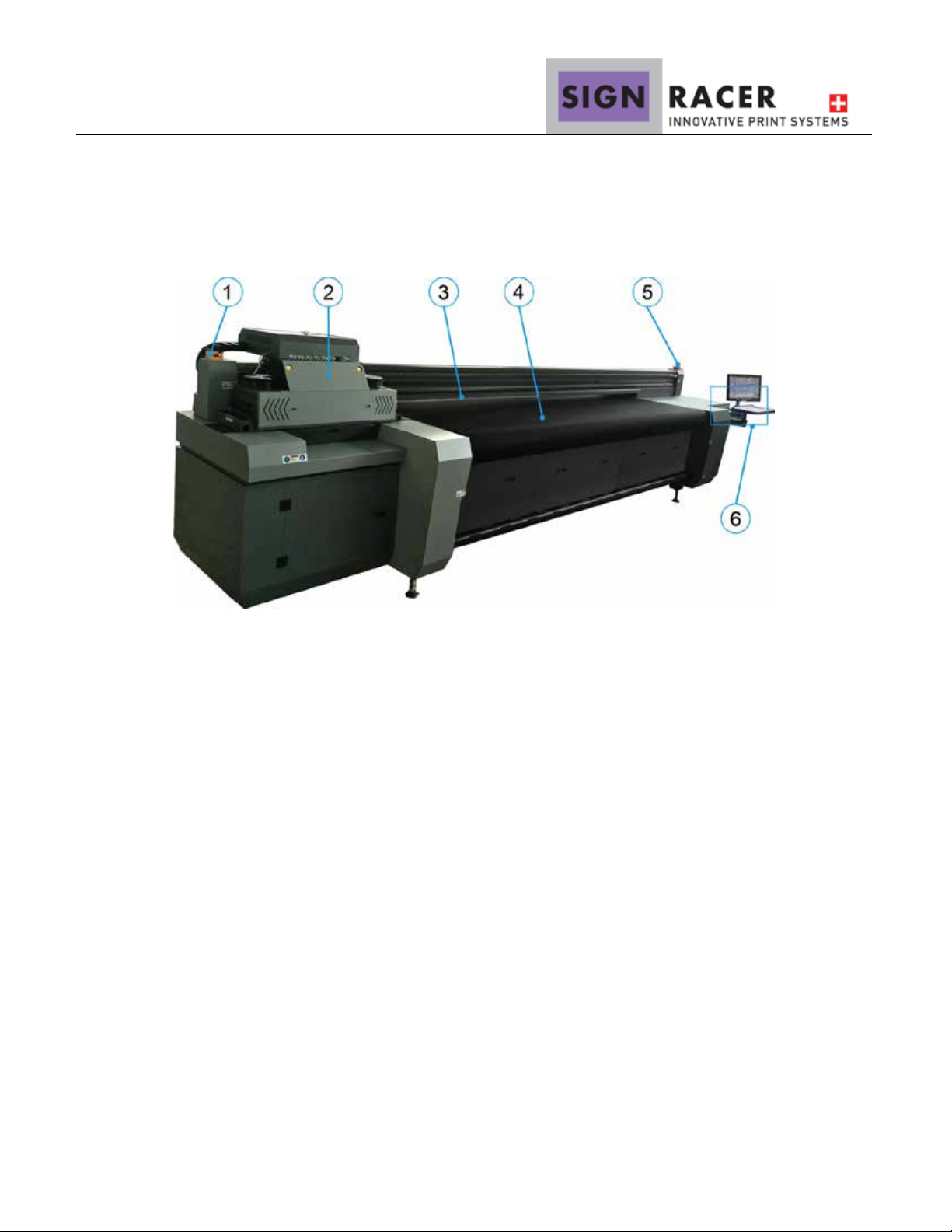
4.StructureDiagrams
4.1Frontviewoftheprinter
PartsIllustrated:
1 Leftemergencystopbutton
2 CarriageAssembly
3 Mediaalignmentbar
4 ConveyorBelt
5 Rightemergencystopbutton
6 Operationpanel(See4.1.1Operationpanel)
*Note:Thecarriageinthepicturemightlooksdifferentdependingontypeandlampassembly
10
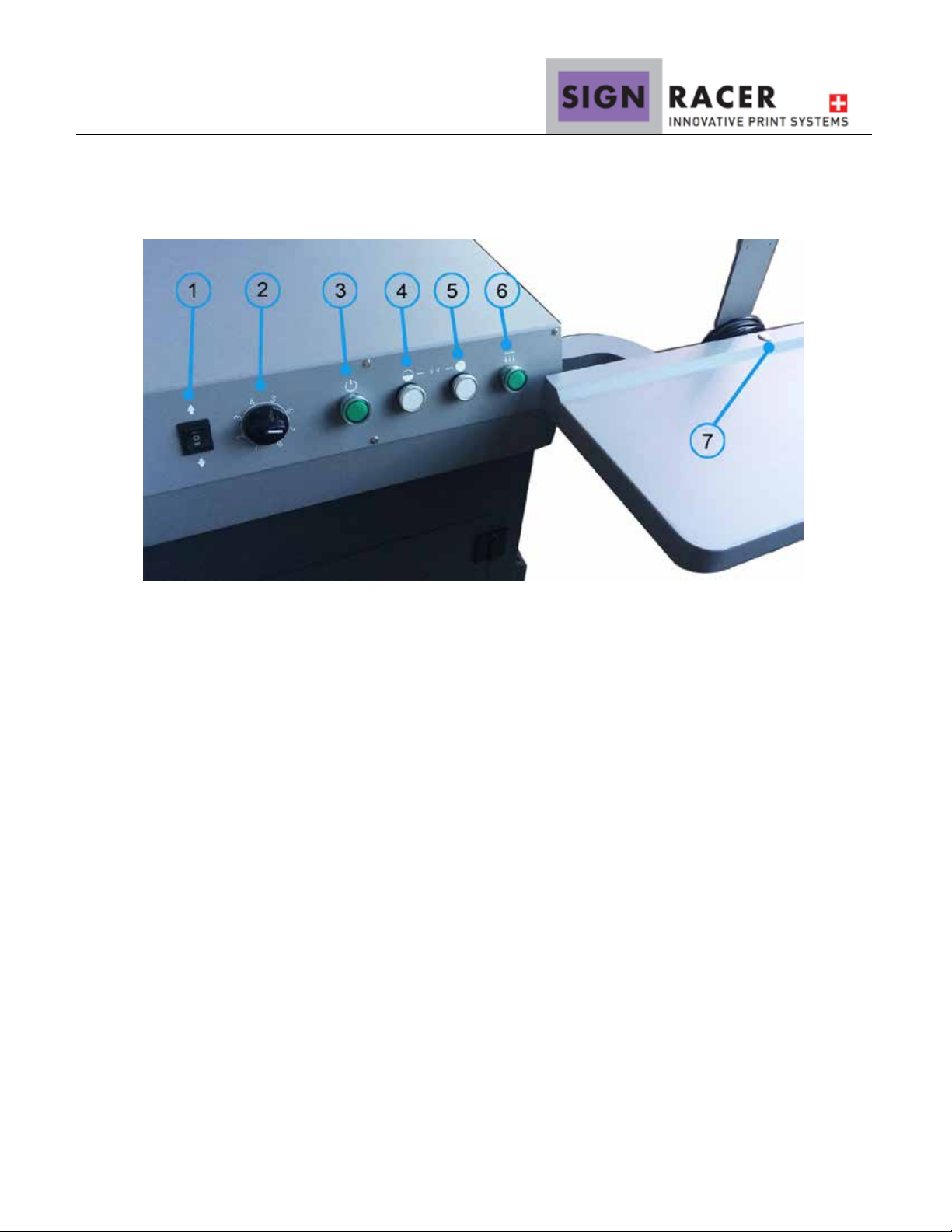
4.1.1 Operation panel
① Mediatakeupdirectioncontrol
② Mediatakeuptensioncontrol
③ Printerstartupbutton
④ UVlampSwitch1
⑤ UVlampSwitch2
⑥ Vacuumpowerbutton
⑦ Computerstartupbutton
Ce manuel convient aux modèles suivants
2
Table des matières


