
Sigberg Audio 10D Manuel utilisateur

S I G B E R G
A U D I O
SUBWOOFER
USER MANUAL
10D & INKOGNITO

WE CAN’T WAIT TO PLAY
YOUR FAVORITE MUSIC!

INTRODUCTION
Thank you for purchasing a Sigberg Audio product. We
have done our best to provide a high quality product
that will be yours to enjoy for many years to come.
Please read this manual carefully to ensure that you
get the most out of your investment! It includes
information about how to install, set up and care for
your subwoofer.
SIGBERG AUDIO SUBWOOFER USER MANUAL © 2020-2021 Sigberg Audio 3

INSTALLATION
& SETUP
For advice on optimal placement of your subwoofer, please
refer to the articles section of our website:
www.sigbergaudio.no
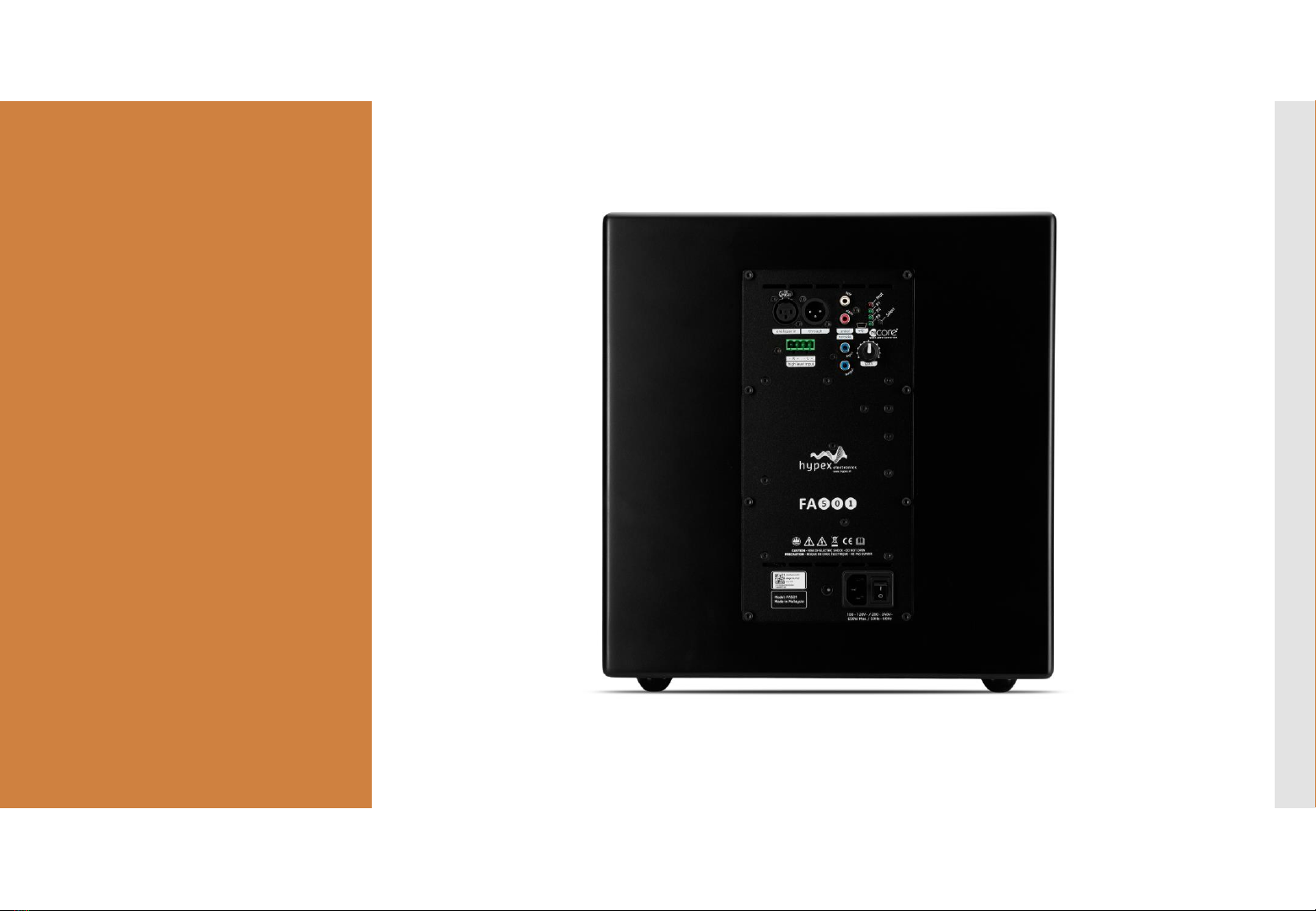
CONNECTIONS
Balanced (XLR) connection
Balanced analogue input and
through output.
Unbalanced (RCA) connection
A stereo input signal is internally
mixed to mono. For mono use,
simply connect only one of the
channels (left or right) or use an Y-
split.
High level input
The high level input can be used
to connect to your existing
amplifier if no pre-out is available
(use included adapter).
USB input
Connect your laptop to access the
parametric EQ and additional
settings. Otherwise for
maintenance / service only.
USB audio not supported
SIGBERG AUDIO SUBWOOFER USER MANUAL © 2020-2021 Sigberg Audio 5

BASIC
OPERATIONS
BASIC
OPERATIONS
SIGBERG AUDIO SUBWOOFER USER MANUAL © 2020-2021 Sigberg Audio 7
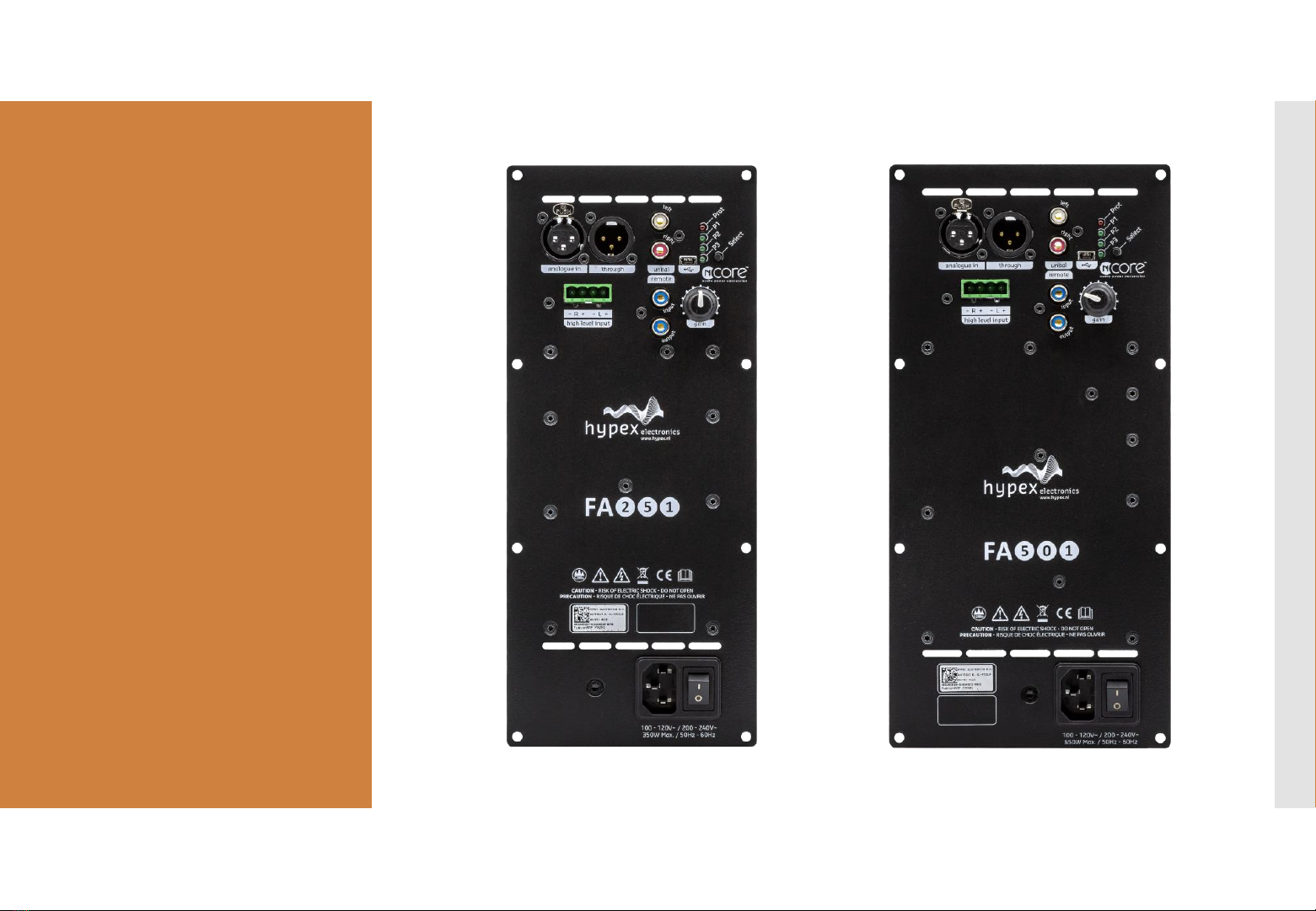
Amplifier overview
FA251:
Inkognito 10
FA501:
Inkognito 12 & 10D

BASIC
OPERATIONS:
BACK PANEL
Powering on and off
We recommend leaving the subwoofer on, unless it will not be used for an
extended period of time.
Always make sure the subwoofer is powered OFF before
connecting/disconnecting cables.
Gain
Default position is directly up (“12 O’clock”). The Gain can be offset up to 12dB
in each direction from the default position.
Presets
3 EQ presets are available to adjust the frequency range of the subwoofer (see
next chapter for more information).
Click the “select” button on the back of the subwoofer to switch between
presets.
The green LED lights marked P1 / P2 / P3 will indicate the active setting.
SIGBERG AUDIO SUBWOOFER USER MANUAL © 2020-2021 Sigberg Audio 8

BASIC
OPERATIONS:
ADJUSTING
DEFAULTS
You may override or adjust the settings below using a laptop connected to the
USB port.
Auto on/off (enabled by default)
If no input is detected for 30 minutes, the subwoofer will enter power saving
mode. It will automatically wake up again when a signal is detected.
Power saving settings can be adjusted by changing the “Activate signal
detection” parameters under Device settings.
Autodetect signal source
By default the amplifier will autodetect signal from any of the inputs.
If autodetect is enabled and no input is detected for 15 seconds, the subwoofer
will mute (green led blinking).
Signal auto-detect can be disabled on the main screen by changing the “Force
input” setting to the active input
Note: this setting is defined independently per preset.
SIGBERG AUDIO SUBWOOFER USER MANUAL © 2020-2021 Sigberg Audio 9
The software needed to access
these settings can be
downloaded from
www.sigbergaudio.no
After installing the software,
locate the Hypex filter
designer and launch the
software. Connect the
subwoofer to your computer
via the includedUSB cable,
and the software will
automatically detect your
subwoofer.
(Windows 7 or higher required)
PRESETS
Ce manuel convient aux modèles suivants
1
Table des matières
Autres manuels Sigberg Audio Subwoofer


