
Shuttle HOT-245 Manuel utilisateur

16-Bit PnP Sound Pro 1
HOT-245
Spacewalker Sound System PnP
16-BitStereo
(OPTi 931)

NOTICE
Copyright 1996.
All right reserved
Manual Ver 245_1.0
All information, documentation, and specifications contained in this manual are subject to change
without prior notification by the manufacturer.
The author assumes no responsibility for any errors or omissions which may appear in this document nor
does it make a commitment to update the information contained herein.
TRADEMARKS
Ad-Lib is a registered trademark of Ad-Lib Inc.
IBM PC/AT, PS/2 are registered trademarks of International Business Machines Corp.
Media Rack is registered trademark of Willow Pond Corp.
MPU-401 is registered trademark of Roland Corp.
MS-DOS, Windows 3.1 and Windows Sound System are registered trademarks of Microsoft Corp.
OPTi is registered trademark of OPTi Inc.
Sound Blaster, Sound Blaster Pro are registered trademarks of Creative Labs, Inc.
Yamaha OPL3 and OPL4 are registered trademarks of Yamaha Corp.
All other product names are for identification only and are trademarks of their respective companies.
FCC Notice:
This equipment has been tested and found to comply with the limits for a Class B digital device, pursuant to Part 15 of FCC
Rules. These limits are designed to provide reasonable protection against harmful interference in a residential installation.
This equipment generates, uses and can radiate radio frequency energy and, if not installed and used properly. In strict
accordance with the manufacturer’s instructions, may cause harmful interference to radio communications. However,
there is no guarantee that interference will not occur in a particular installation. If this equipment does cause interference
to radio or television reception, which can be determined by turning the equipment off and on, the user is encouraged to
try to correct the interference by one or more of the following measures :
Reorient or relocate the receiving antenna.
Increase the separation between the equipment and receiver.
Connect the equipment into an outlet on a circuit different from that to which the receiver is connected.
Consult the dealer or an experienced radio/television technician
for help and for additional suggestions.
The user may find the following booklet prepared by the Federal Communications Commission helpful “How to Identify
and Resolve Radio-TV Interference Problems.” This booklet is available from the U.S. Government Printing Office. Wash-
ington, DC 20402, Stock o. 004-000-00345-4
FCCWarning
The user is cautioned that changes or modifications not expressly approved by the manufacturer could void the user’s
authority to operate this equipment.
Note : In order for an installation of this product to maintain compliance with the limits for a Class B device, shielded
cables and power cord must be used.
CE Notice:
Following standards were applied to this product, in order to achieve compliance
with the electromagnetic compatibility:
- Immunity in accordance with EN 50082-1: 1992
- Emmitions in accordance with EN 55022: 1987 Class B.

16-Bit PnP Sound Pro 3
Table of Contents
Introduction ........................................................................... 4
Features.............................................................................................................................4
What is in your package?..............................................................................................4
System Requirements.....................................................................................................5
Hardware Installation ........................................................... 6
Default Configuration....................................................................................................6
Installing the OPTi931.................................................................................................6
Connecting External Devices.......................................................................................6
OPTi931 Card Layout & Devices connect...............................................................7
Windows 3.1/DOS Software Installation ............................. 8
Device Driver Installation............................................................................................8
Windows 3.1 Configuration.......................................................................................11
Windows 3.1 Application...........................................................................................14
DOS Configuration and Utilities...............................................................................15
Notes on Software Installation.................................................................................17
Windows 95 Software Installation ...................................... 18
Windows 95 Mode.......................................................................................................18
Real Mode DOS.............................................................................................................19
931 Audio Uninstall....................................................................................................21
Media Rack Installation ..................................................... 22
Media Rack Installation under Windows 3.1x.......................................................22
Media Rack Installation under Windows 95...........................................................23
Media Rack Overview.................................................................................................24
Media Rack Components...........................................................................................24
The Alarm Clock.........................................................................................................25
MIDI Player, Wave Player, and CD Player's Buttons.........................................26
System Mixer................................................................................................................26

16-Bit PnP Sound Pro 4
Introduction
The OPTi931 is a 16-bit stereo sound card based on the OPTi 82C931 Plug-and -Play
integrated Audio controller chip.The OPTi931 is compatible with the Sound Blaster
TM
and Sound Blaster Pro
TM, as well as Windows Sound System
TM, MPU-401 and Ad Lib
TM.
The OPTi931 sound card also has multiple input and output ports for recording and
playback of stereo sound.
Features
The OPTi931 is a full-featured sound card which include the following:
ISA Plug-and-Play (PnP)— Support the Plug and Play Specification 1.0a which allows the
system to automatically detect and configure devices that confirm to the standard. This
eliminates the user having to know and configure the correct IRQ, DMA, and I/O channel
settings.
Wave Audio — Maximum recording and playback sampling rate of up to 48 kHz
stereo.
16-bit digital-to-analog and analog-to-digital converter— 16-bit and 8-bit digitizing
in stereo and mono mode.
22-Voice FM Music Synthesizer— Built-in high quality 22 voice, 52 operator,
OPTiFM music synthesizer with enhanced bass.
Full duplex operation — Record and playback simultaneously using two 8- or 16-bit
DMA channels.
Digital/Analog Mixer — Mix analog stereo from CD-audio, Line-In, FM music &
Digitized voice sources. Digital stereo mixing from Microphone, Line-in, CD-audio
and Line-out.
Built-in Stereo Amplifier — About 2-watt per channel stereo amplifier.
MIDI Interface/Joystick Port— Built-in integrated MIDIMPU-401 interface with FIFO,
IBM PC joystick/game port.
Other Interfaces — Wave-table synthesizer interfaces, Speaker Out, Line In, and
Microphone In.

16-Bit PnP Sound Pro 5
What is in your package?
You should have the following items in your package:
OPTi931 Sound Card
OPTi931 DOS/Windows 3.X/Windows 95 Driver Installation Diskette
Media Rack Diskette
OPTi931 User Manual
System Requirements
The OPTi931 is manufactured for IBM PC compatible computers, software, and related
computer components :
IBM-compatible computers modules AT, 286, 386, 486, Pentium, PS/2 (model 25/30)
and compatibles (486 for Windows 95)
At least 2MB RAM (4MB RAM for Windows 3.1 applications, 8MB for Windows 95)
VGA or SVGA graphics adapter and monitor
2MB free on hard disk for installing all OPTi931 software
MS DOS or PC DOS 3.1 or later, MS Windows 3.1 and Windows 95
Windows 3.1 for games and applications in Windows
External speakers, microphone or headphones (optional)

16-Bit PnP Sound Pro 6
Hardware Installation
The hardware installation of the OPTi931 is easy and can be performed in just a few
steps. The OPTi931 has no switches. The OPTi931 installation program configures all of
the settings.
Default Configuration
The OPTi931 supports both Sound Blaster Pro and Windows Sound System applications.
The OPTi931 defaults to Sound Blaster Pro mode when the system is booted up in DOS.
It switches to Windows Sound System mode when Windows 3.1 is launched. The
default configuration of a system that supports the Plug and Play 1.0a specification will
depend on the available system resources.
If your system is not PnP compatible the default configuration is as follows :
Operation Mode Sound Blaster Pro Compatible
IRQ 5
DMA Channel 1
I/O Port Address 220h
Installing the OPTi931
To install the board :
1With your computer system's power off, remove the cover, find a empty 16-bit
expansion slot, and remove the metal bracket.
2Insert the OPTi931 into the expansion slot firmly and evenly. Take care not to force
it into the slot. Once you have properly positioned the OPTi931 into the slot,
secure the OPTi931 with the bracket screw.
3Replace the cover of the computer.
4Connect your speaker or headphones to the external output connections on the
OPTi931 bracket.
Connecting External Devices
The OPTi931 provides a number of ways for you to connect external devices to it, such
as headphones, microphones and speakers. The OPTi931 supports the following
external devices :
Speakers Headphones
Power amplifier Microphones
Joystick MIDI Adapter
Please have the user reference manuals of the external devices on hand for reference.
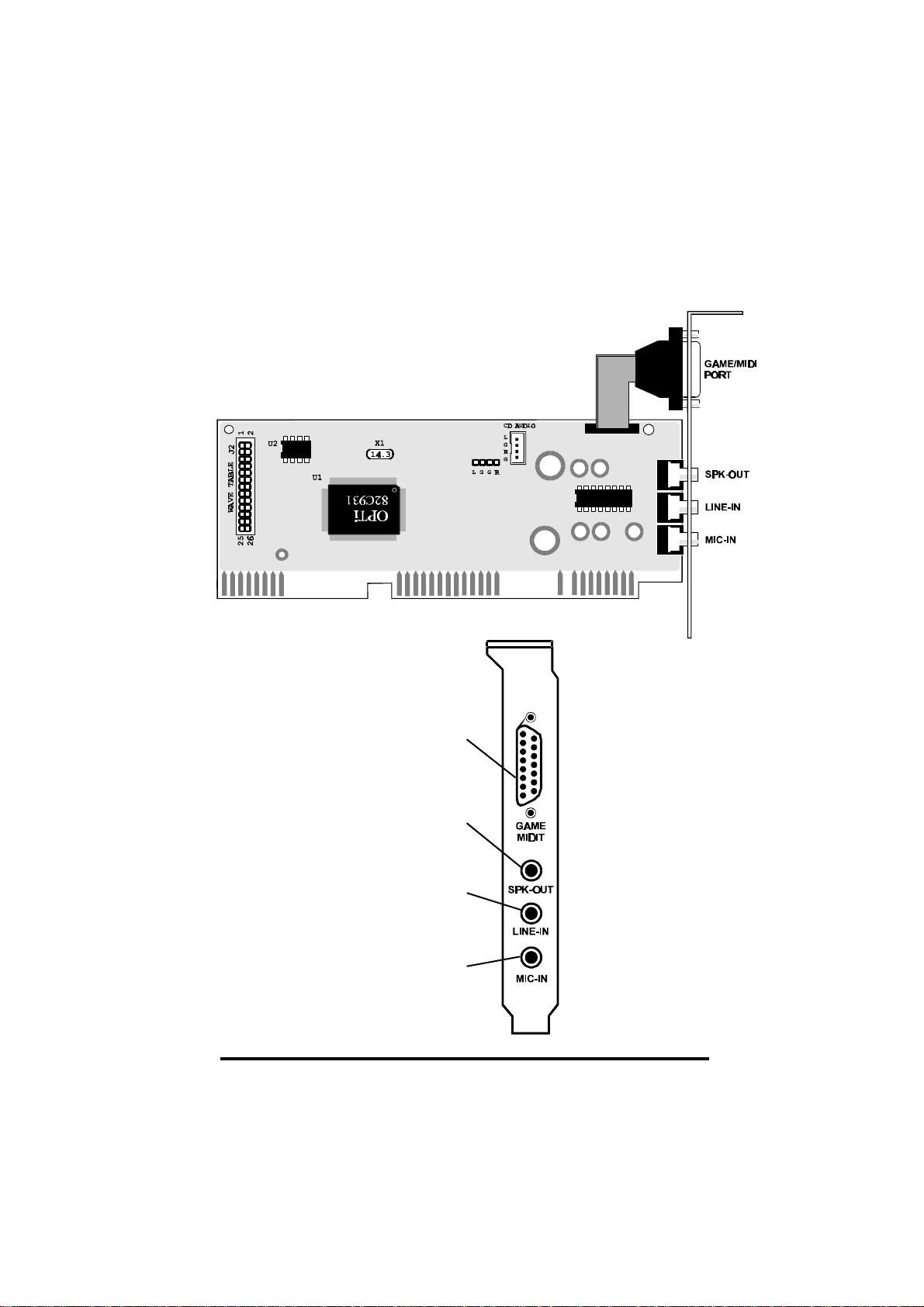
16-Bit PnP Sound Pro 7
OPTi931 Card Layout & Devices Connect
Speaker Out: to
amplified speakers
Line In: to
CD-ROM Audio or
other line-out devices
Microphone In: to
microphone
Joystick/MIDI: to
game paddle,
joystick, or MIDI
devices

16-Bit PnP Sound Pro 8
Windows 3.1/DOS Software Installation
The OPTi931 installation program (SETUP.EXE) will install all of the Windows 3.1 and
DOS software drivers and application needed to achieve both Sound Blaster Pro and
Windows Sound System compatible operation.
Device Driver Installation
The following steps will guide you through the full software installation and configuration
for the OPTi931. We recommend that you read through them now, and become familiar
with them before installing the software.
1Insert the OPTi931 drivers and utilities disk in your floppy drive.
2Entering Windows and selectFile and Run.
3Type a:\setup and click OK as shown.
4The OPTi931 menu driven installation program will copy the installation files to
your hard drive.
5After the install files are copied, the installation program will start.
It is strongly recommended that you exit all Windows programs before running this
Setup Program.
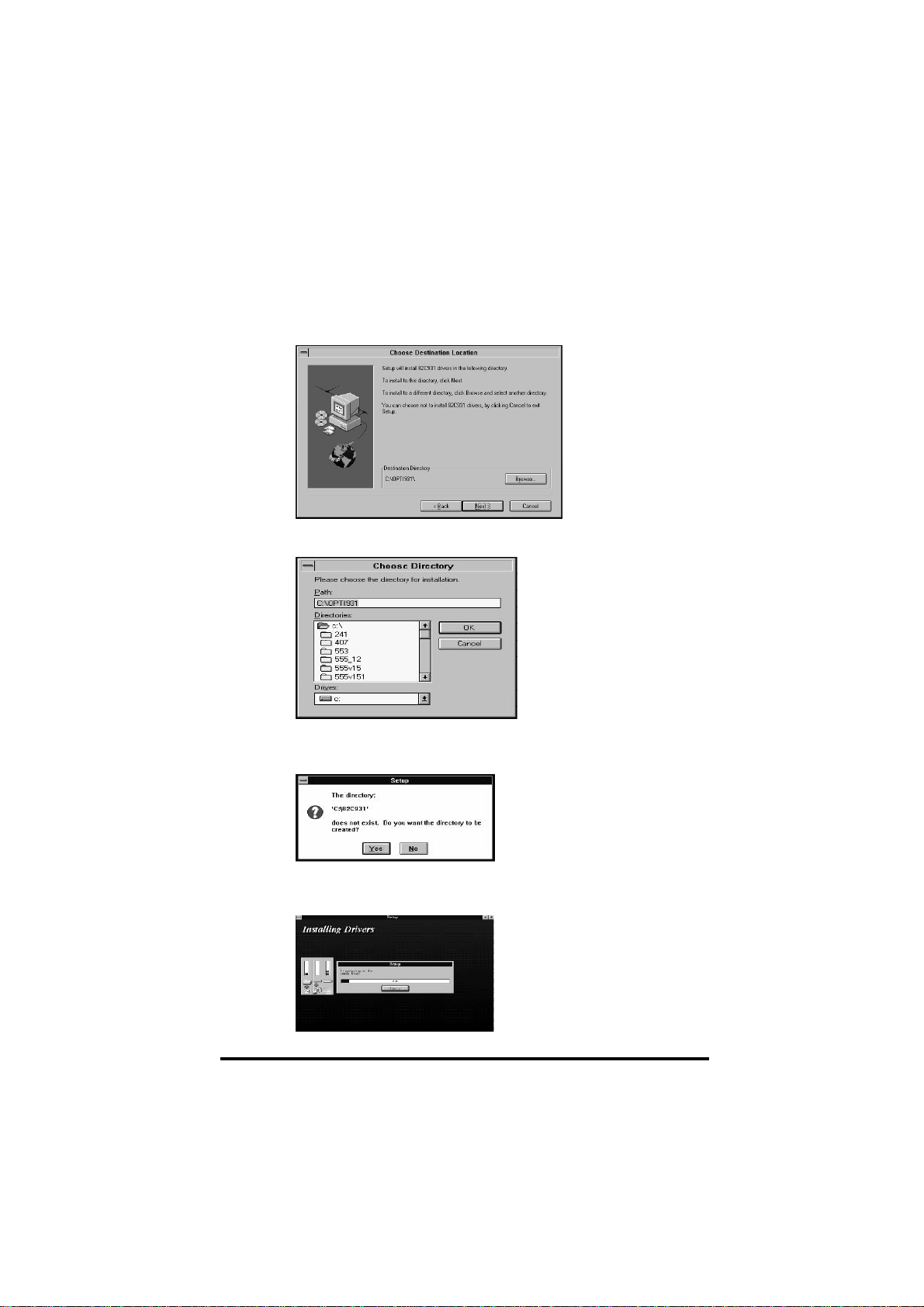
16-Bit PnP Sound Pro 9
Click Cancel to quit and then close any programs you have running. ClickNext to
continue with the Setup program.
6The next screen lets you select a directory to install the software. The default is
82C931.
7If you don't want to install the files in this directory, click onBrowse to change it.
You will see the following screen.
8From here, either select a directory that exists or type in the name of a new
directory. If you type in a new directory you will be asked: ChooseYes.
9Select Next to continue the installation. The install program will be begin copying
the files to the directory you selected.
16-Bit PnP Sound Pro 10
10 When it has finished you will be asked if you wish to view the README file. It is
recommended that you select yes because this file will have the latest information
available about this sound card.
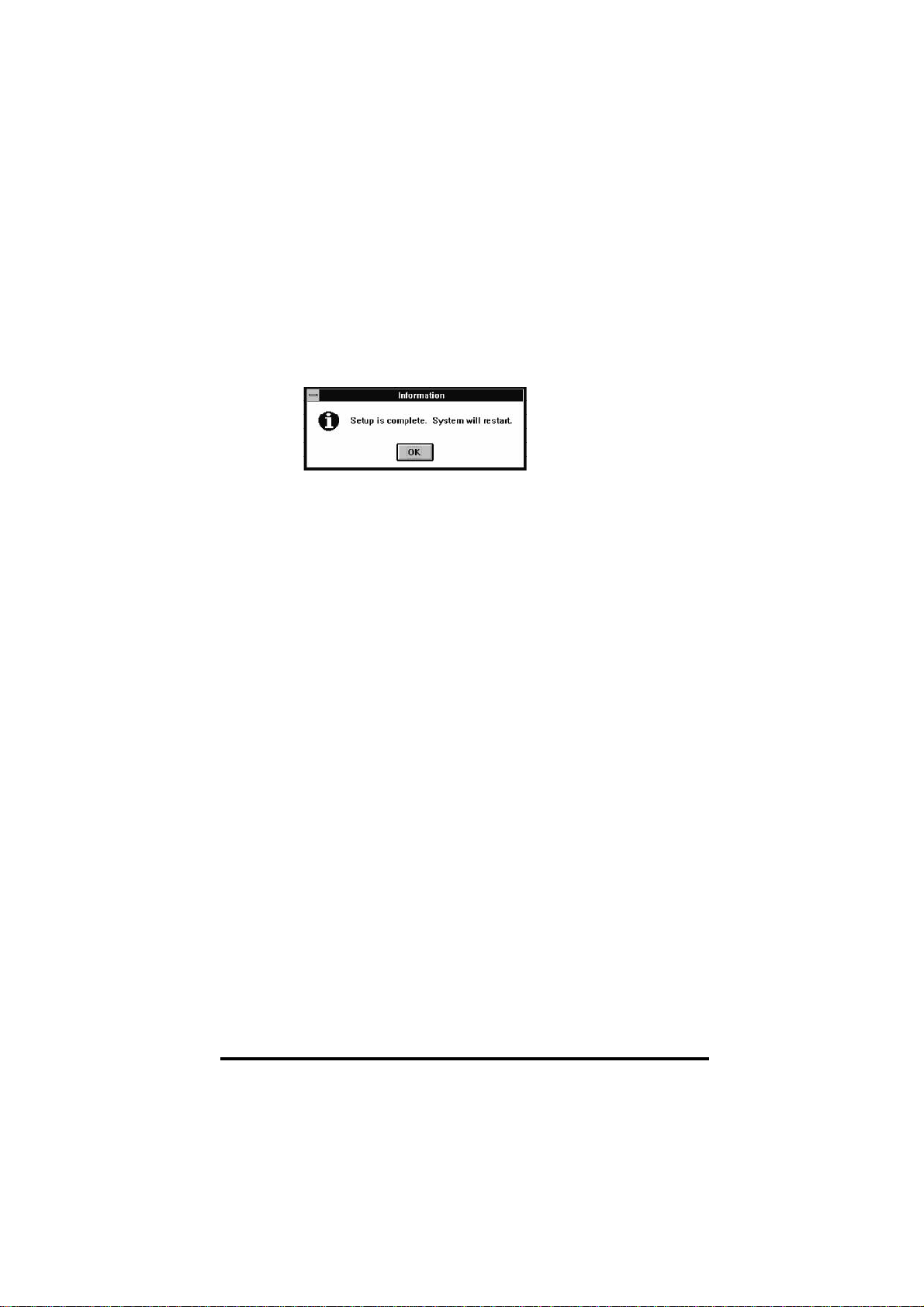
11 This concludes the installation and the program will prompt you to REBOOT your
system, be sure to selectOK and then press Ctr-Alt-Del when prompted. This will
insure that the OPTi931 is properly configured.
The software installation will then be completed and a new product group will be
visible in Windows. The utilities in this group allow you to reconfigure the settings
of the card and configure the audio mixer and karaoke features. Refer to the next
section for more information.
Ce manuel convient aux modèles suivants
1
Table des matières
Autres manuels Shuttle Carte son


