
SHENZHEN SUNGWORLD ELECTRONICS Pluto A1 Manuel utilisateur

User Manual
Model:Pluto A1
Manufacture:SHENZHEN SUNGWORLD ELECTRONICS CO., LIMITED

Table of Contents
Main Screen 2
Punch Status 3
Administrator Login screen 3
Administrator Option Menu 5
User Management Screen 6
Add User 7
Access Group Management 8
User Role Management 9
Attendance Log Screen 11
Data Management Screen 11
Access Control Management 12
Work Code Management 15
Message Management 16
Settings 17

Use to unlock main menu, if admin exist, you need to input user pin &
password or finger to unlock menu
If authorized, punch attendance using password
Use to change punch status
User can punch attendance in this mode
Admin Unlock
Main Screen
Admin Unlock
Password Punch
Password Punch
Splash Screen
Punch Status
Manual Punch Status
Change Punch Status
Note

The Password Login menu occurs only when admin is registered, else
anyone can directly login into the main menu
Password
Login
Finger
Login
Punch Status
Administrator Login Screen
Note
Password Punch
Password Login

The Finger Login menu occurs only when admin is registered, else
anyone can directly login into the main menu
The above punch status is valid for only one punch, after punch or
timeout status will change to default
Finger Login
Finger Login Message
Manual Punch Status
Note
Note

Invalid punch or illegal punch indicate invalid time period or invalid holiday
punch
Administrator Option Menu
Main Menu
Invalid Punch
Indicate Registered Users
User Present Today
Invalid Punch
In & Out Stats
Punch Time Interval

Red indicate not applicable;
Green indicate applicable
Remove all finger will erase all the fingers for given user and you have to re-
enroll all the finger
User Management Screen
Note
Remove All Fingers
User Name
User Pin
Settings
Add New User
Edit User Data
Remove Users

Add User
User Pin (Numeric only)
User Name
Select User Role
Enroll Fingers (Max 10)
Enroll Password
Enroll Process Indicator

Even though group work code is disabled, user can be assigned work code if
available.
If group code is enabled and you want to exclude particular user, the option
can be enabled
User can assigned verification mode type, based on the selected verification
mode user has to punch the attendance for example: if password & finger is
selected then user has to punch attendance using both authentication mode
and if successful then punch will be logged
If this option is enabled then timeperiod assigned to the above access group
will be used, if disabled then timeperiod defined above will be use
Access Group is defined for individual users, if want to assign to group of
users u can always use access options from main menu, Maximum six
timeperiod can be assigned per group or user, more details regarding
timeperiod is explained below.
Access Group Management
User can be assigned access group
options after registering user,
he/she can be assigned individual
access options or group access
options
Enable Work Code
Disable Group Work Code
Verfication Mode
Disable Group Work Code
Note
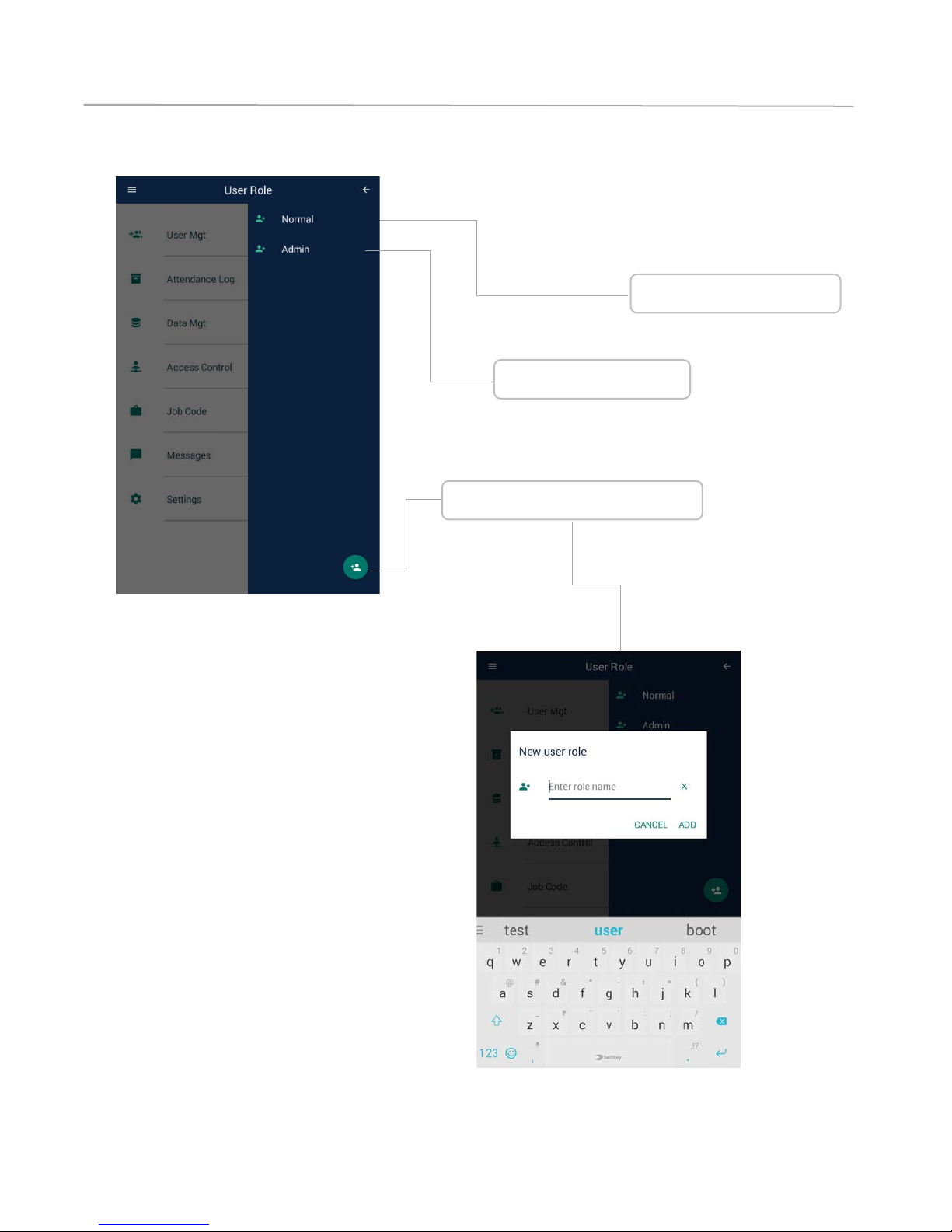
User Role Management
Normal User Role
Admin User Role
Add Custom User Role
Table des matières


