GD230V Data Transceiver Instruction Manual
7
There are 16 channels that can be programmed. To enter your own frequency pairs into these
channels, you need a “Programmer”, a programming software and a computer. A programmer is a
hard ware device which has a DB9 connector at one end and a RJ-45 connector at the other end.
By the time you have connected these three pieces together, turn the on the transceiver and start
executing programming software from the computer.
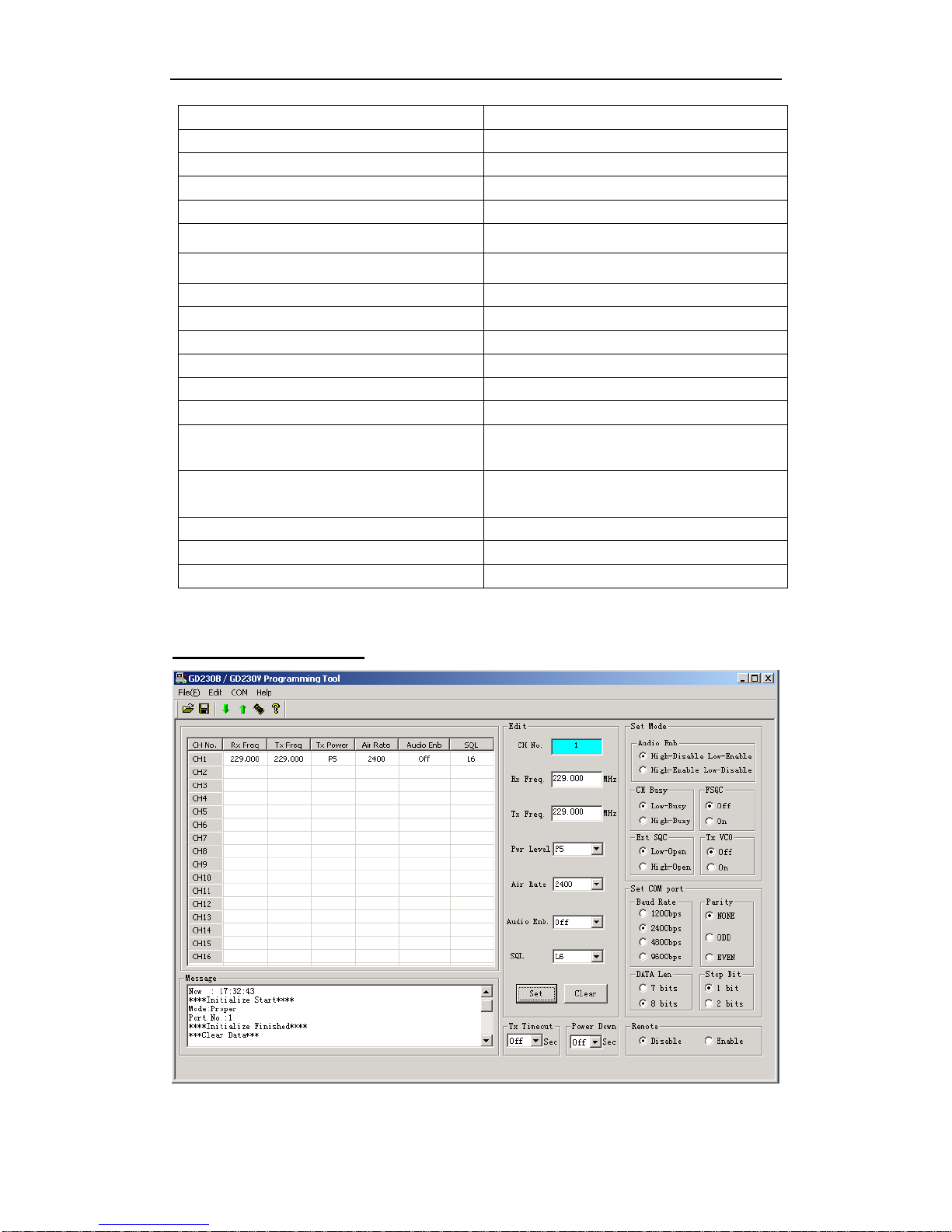
GDTool is an integrated software for GrandComm GD230V wireless data transceiver which is
used to program the radio’s parameters such as RX frequency, TX frequency, the RF output power
and squelch level of each channel, the interface baud rate / data bit / parity bit / stop bit and so on.
The software is a pull-down menu driven program which is divided into four categories:
“File”, ”Edit”, ”COM” and ”Version”.
4.1 File
There are totally sixteen channels in the radio which can be programmed. Parameters can be saved
under different file name, retrieved and most of all, uploaded from or downloaded to the radio.
On the “File” menu, use [UP], [DOWN] keys to highlight the item you need and press [RETURN]
or simply move the mouse to the item you need and left-click it to access.
4.1.1 Open
Execute this item to load parameters from diskette. Click the name of the file you need to load and
the contents of the file will be fetched into computer’s memory. Then you can do any modification
to it , but the file on your diskette still remains the same unless you have it be overwritten.
4.1.2 Save
Execute this item to save radio parameters in computer’s memory into diskette. You may
overwritten an old file with the same name or enter the name of a new file in full.
4.1.3 Save As
Execute this item to save radio parameters in computer’s memory into diskette with a new name.
You should select the path and enter the full name.
4.1.4 Printer Set
Execute this item to set up your printer.
4.1.5 Print
Execute this item to print radio parameters in computer’s memory.
4.2 Edit
4.2.1 Channel 1-16
There are totally 16 channels and for each channel there are two frequencies, the “transmit” and
“receive”, can be entered. For each frequency, a value can be directly entered into this field.
Frequencies effective only when it is within the frequency band.
You can program each channel’s RF output power and / or squelch level separately.