
Shenchen LabV Series Manuel utilisateur
Shenchen Precision Pump
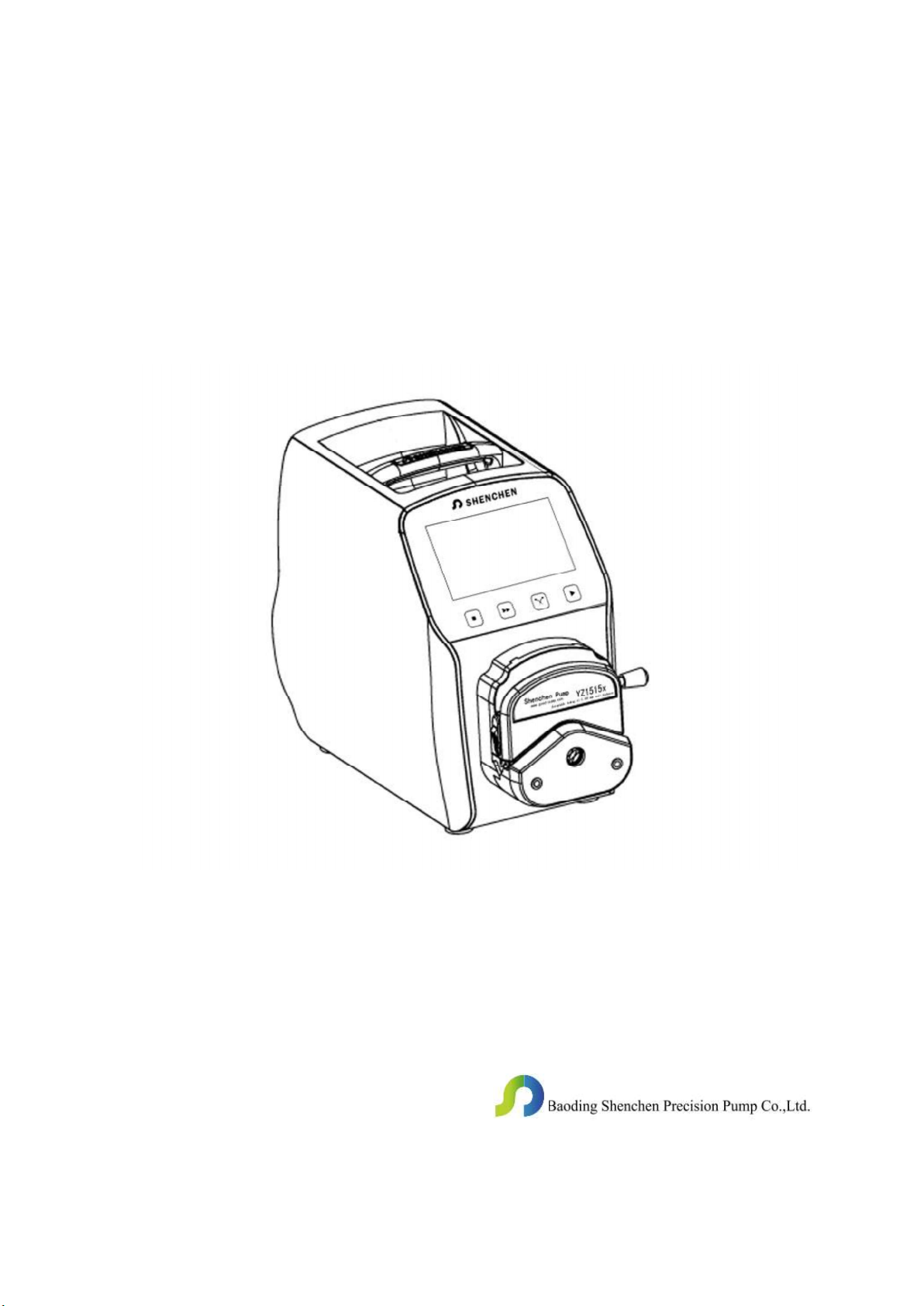
Manual of LabV Series
Important Information
Please read the manual carefully before operating the product.
Warning
Tubing may have crack due to wear. It results in the overflow of
fluid from tubing. In that time human body and instruments may be
damaged. So user must check usually and change tubing in time.
Connect directly the power line to the wall socket, and avoid using
the extense electric line.
If the power line or plug had wear and other damage, please hold
the plug to unplug it, not hold the line.
If following situations happened, please turn off the electric power
and unplug the plug, holding the plug and not the line.
1. Fluid splash on the pump.
2. You think the pump need to maintain or amend.
The
grounding

Catalogue
LabV Series Product Introduction: ............................................... - 1 -
LabV Series Product Appearance ................................................. - 1 -
LabV Series Keyboard Instruction ............................................... - 2 -
LabV Series Operation Interface Structure: ................................. - 3 -
Main Functions Operation Process ............................................. - 14 -
LabV Series Technical Specification .......................................... - 18 -
LabV Series Function and Features ............................................ - 18 -
Product Dimension (mm): .......................................................... - 19 -
External Control Interface Instruction .................................... - 20 -
Maintenance ................................................................................ - 24 -
Warranty and After Service......................................................... - 24 -
Shenchen Pump
LabV
Series
-
1
-
LabV Series Product Introduction:
4.3 inch color touch screen control; dynamic display working status; flow data,
setted parameters and system settings displays in the same screen. Intelligent
calibration and online micro adjusting function; three measurement mode; fixed
volume measurement, fixed time and volume, timer start and stop. It can load
different pump head. It is the ideal choice for laboratory, industrial production and
equipment supporting.
The pump can load different pump head: YZ1515x, YZ2515x easy load pump head;
MC series multichannel pump head(MC1-MC12);SN series standard pump head
(SN15,SN25).
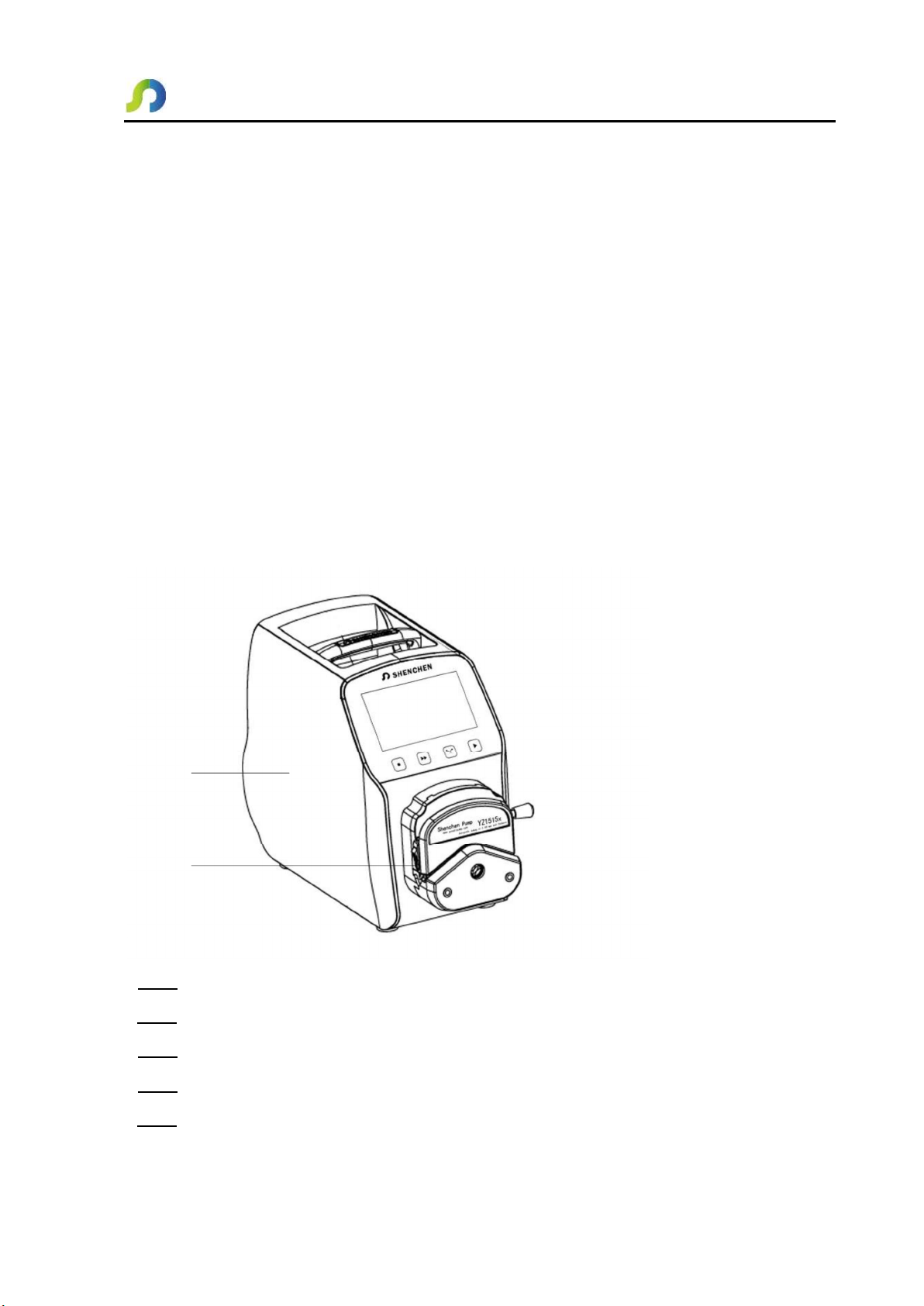
LabV Series Product Appearance
A
B
A Drive
B Pump Head
C Power Switch
D Power Port
E External Control Input Port

Shenchen Pump
LabV
Series
-
2
-
C
D
E
LabV Series Keyboard Instruction
Stop Button Press stop button, stop working. Forbidden buttons can be used on the
main interface.
Full Button When stop state or transferring state, press this button, the pump will
running with highest speed. This button can be used for wash tube or fast filling

Shenchen Pump
LabV
Series
-
3
-
liquid.
CW/CCW Button: Press this button, the motor will change running direction.
When the pump working with fixed volume measurement function or fixed time and
volume function, this button does not work.
Start Button: Press this button, the motor start running. When fixed volume
measurement function or fixed time and volume function turn on, press this button,
the pump will start work with the function.
LabV Series Operation Interface Structure:
LabV Series Operation Interface Instruction
1. Boot Interface:
After power on the system, enter the welcome interface, choose system language,
Chinese/English. If do not choose, it will enter the English main interface after 2.5
seconds automatically.
Shenchen Pump
LabV
Series
-
4
-
2. Main Interface:
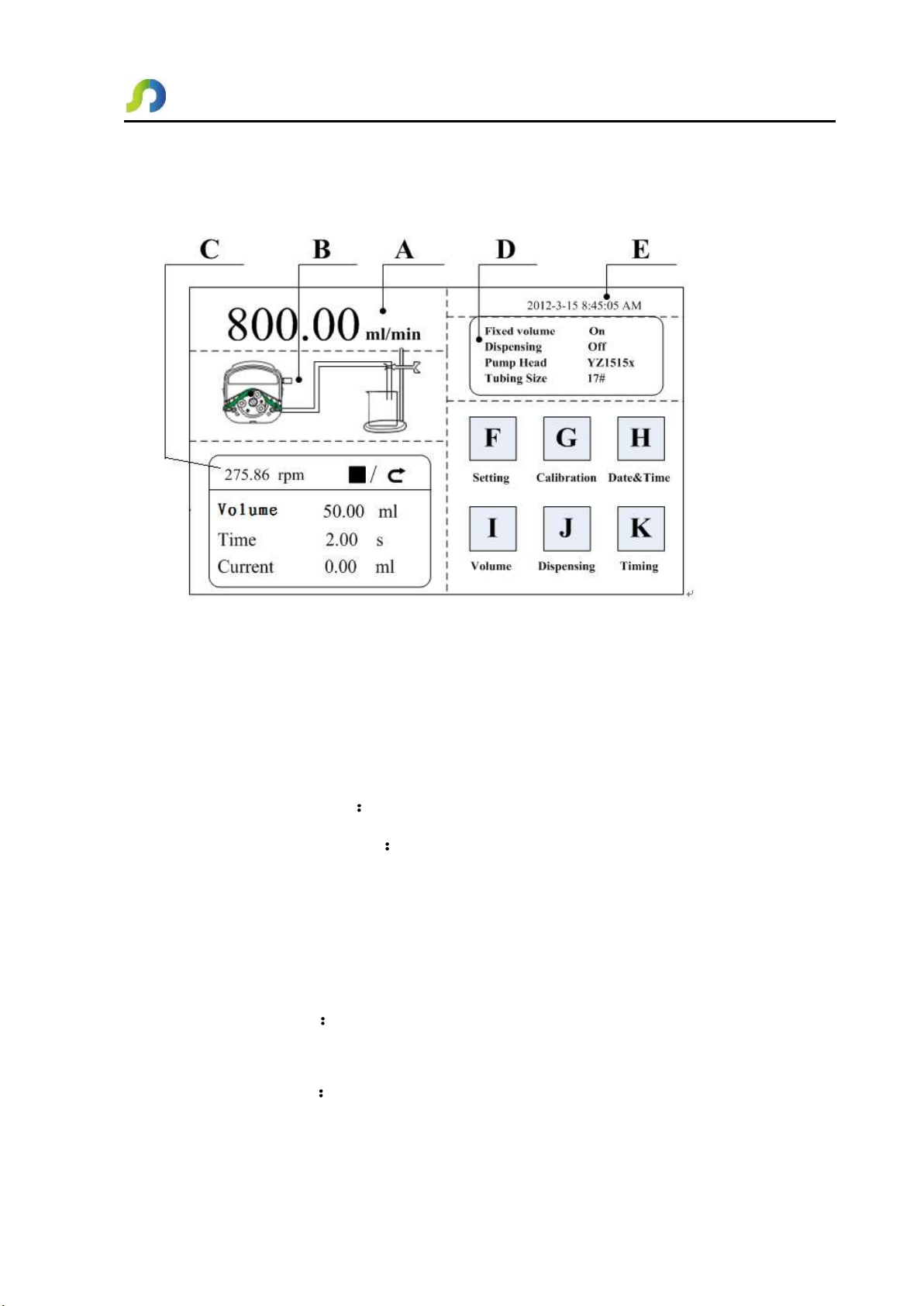
Main Interface Composition as below:
Speed/Flow Rate Display: In the flow rate mode, display the current flow rate, the
motor speed is displayed at the C frame. In the rotating speed mode, display the
current set up speed, flow rate is displayed at the C frame. Click A to amend the
flow rate or speed. When fixed time and volume function turn on, A is forbidden,
not allowed to amend the flow rate or speed.
Real-time Dynamic Display Display the current running state.
Real-time Parameter Display Display the current running state and set up
parameter. When the fixed volume measurement turn on, display the fixed volume
measurement parameter; when the fixed time and volume function turn on, display
the fixed time and volume parameter. When these two functions turn off, display the
parameter is all 0.
Set Parameter Display Display the fixed volume measurement, fixed time and
volume state information, the model of pump head and tube size.
Date and Time Display Display the current data and time, you can change it in the
system setting. When it display an alarm clock on the right side, it means the timer

Shenchen Pump
LabV
Series
-
5
-
start and stop function is turn on.
System Setting Button Click this button, set up other parameters.
Flow Calibration Button Click this button enter the flow rate calibration interface.
Date & Time Button Click this button enter set up current date and time interface.
Fixed Volume Measurement Button: Click this button, enter the fixed volume
measurement interface.
Fixed Time and Volume Button: Click this button, enter fixed time and volume
interface.
Timer Start and Stop Button: Click this button, enter timer start and stop
interface.
3. Numeric Keypad Input Interface:
Numeric keypad input interface as below:
Flow mL/min
800.00
7 8 9 Unit
4
1
5
2
6
3
.
0
ESC
ENT
Input information
display
Input data
display Display unit
Unit Unit switch
Clr Clear input
Input digital area
Backspace
Return
Confirm
Input Information Display The information displayed is the current operation
object.
Input Data Display: Display the current input data, range is 0.01-9999.
Unit Display: Display input units when input flow rate or volume.
Input Digital Area: Numeric keypad.
Shenchen Pump
LabV
Series
-
6
-
Unit/Clr Button When input flow rate or volume, this button is unit switch, you
can choose different unit. When it is Clr, you can clear the current input data.
Backspace Button: Delete an input digital.
ESC Button: Cancel the current input, back to prev interface.
ENT Button: Confirm the current input.
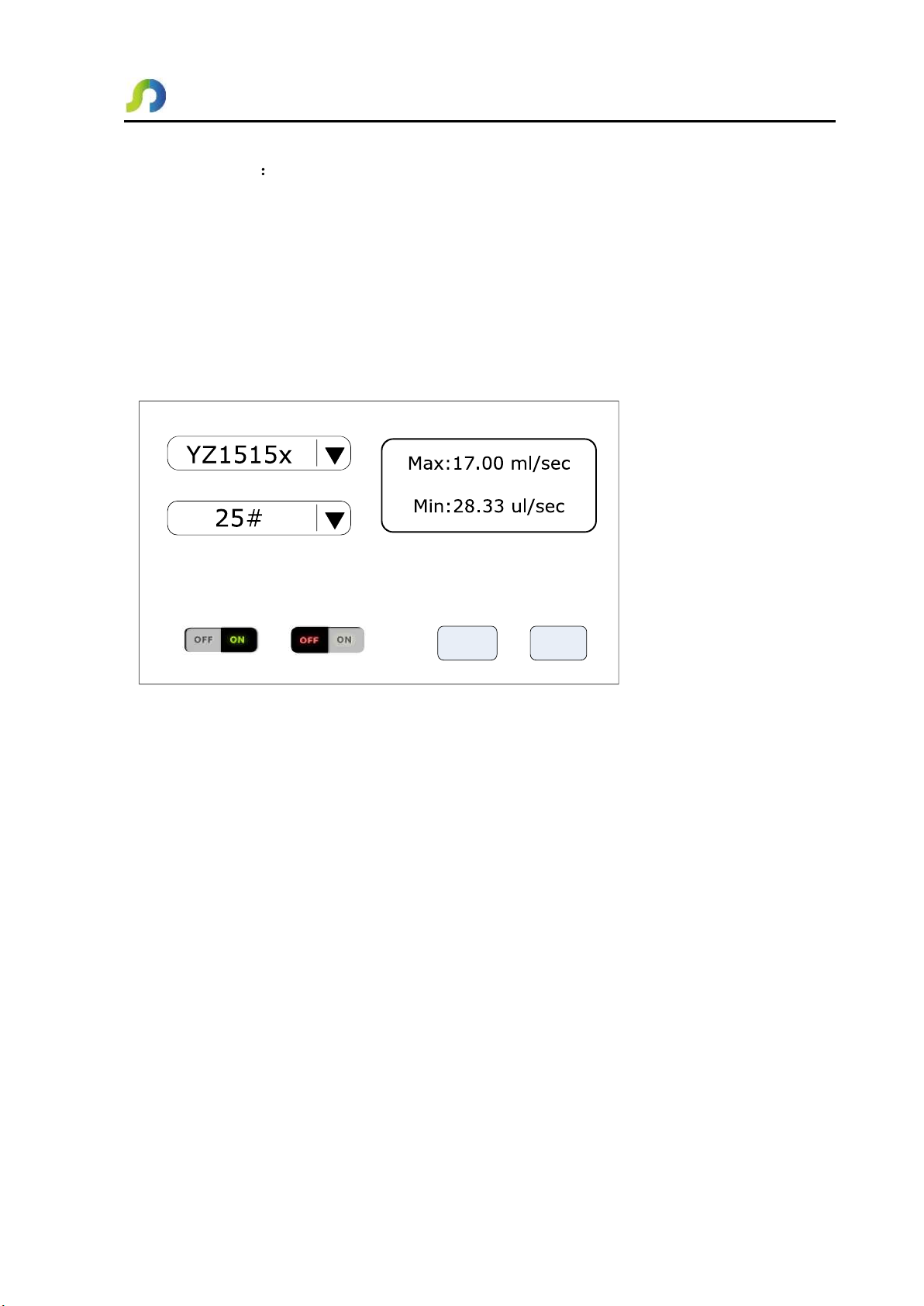
4. The Basic Configuration Interface:
The basic configuration interface:
Pump Head Reference Flow Rate
Tubing Size
OK Cancel
Flow Rate Rotation Speed
Click the pump head and tubing size to choose the pump head and tubing.
Reference flow rate display the max. and min. flow rate with the current pump head
and tubing.
Click the flow rate mode or rotating speed mode button to choose the working mode.
When you choose the flow rate mode, the flow rate is adjustable, the speed will
change with the flow rate. When you choose the rotating speed mode, the speed is
adjustable, the flow rate will change with the rotating speed.
Click the confirm button back to the main interface.
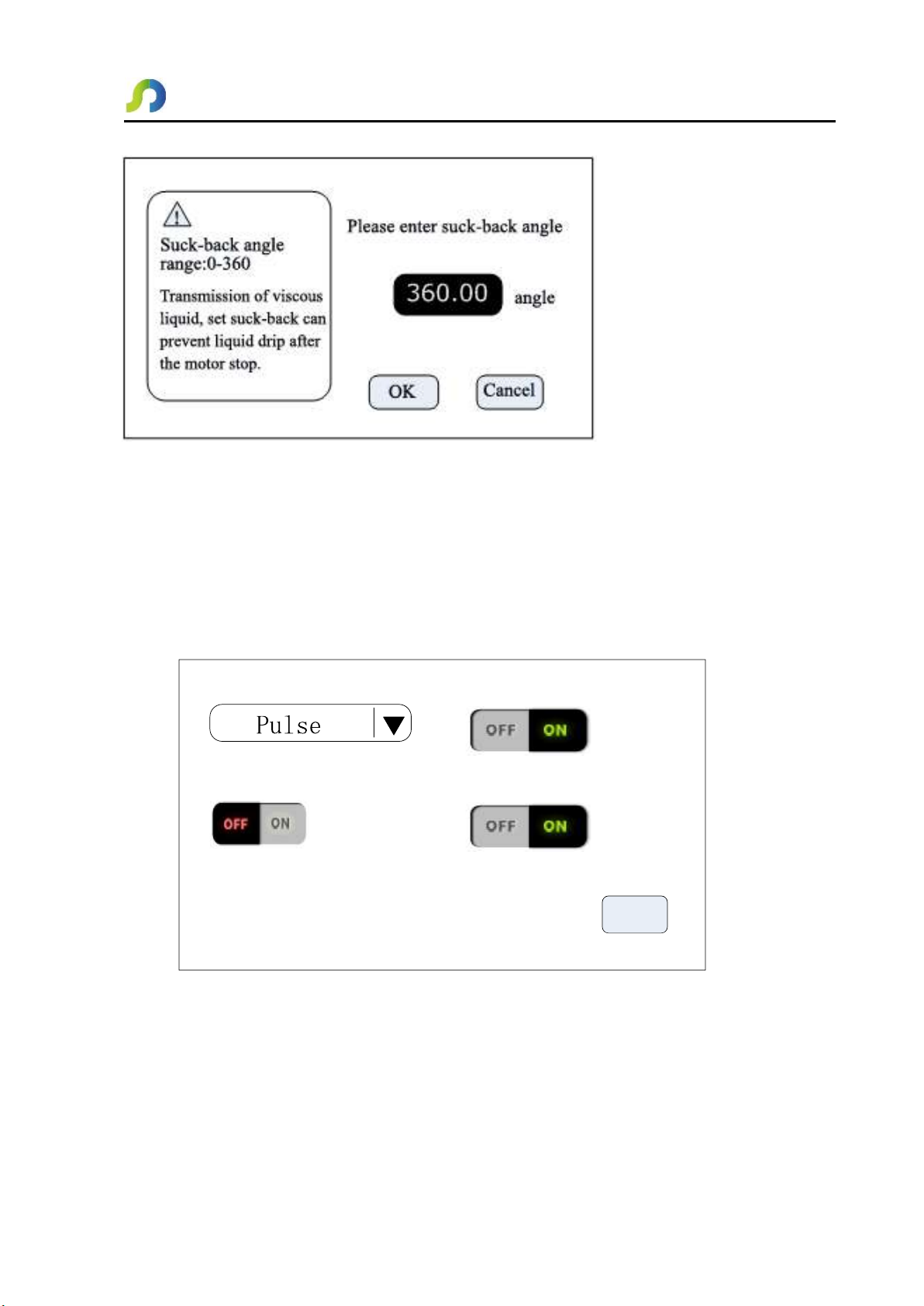
5. Back Suction Angle Interface:
The back suction angle interface as below:
Shenchen Pump
LabV
Series
-
7
-
Click the Setting button in the main interface, then click Suck-Back button to enter
the back suction angle setting interface. Click angle button, enter suck-back angle
then click ENT. This can set all suck-back angle when motor stop running, except
dispensing is ON.
6. External Setting Interface:
External Setting Interface as below:
OK
External control signal Ext.Start/Stop
Ext.CW/CCW
Foot switch setting
Click Setting button in the main interface, then click External control to enter
External Settings interface.
A. External control of the motor start-stop and reserving signal is divided into two
kinds : level mode and pulse mode, Specific interface, see details in describes
Table des matières
Autres manuels Shenchen Pompe à eau


Manuels Pompe à eau populaires d'autres marques


Sykes AmeriPumps
Sykes AmeriPumps GP100M Guide de dépannage

DUROMAX
DUROMAX XP WX Series Manuel utilisateur

BRINKMANN PUMPS
BRINKMANN PUMPS SBF550 Manuel utilisateur

Franklin Electric
Franklin Electric IPS Manuel utilisateur

Xylem
Xylem e-1532 Series Manuel utilisateur

Milton Roy
Milton Roy PRIMEROYAL Manuel utilisateur