
Seiko Z120 Manuel utilisateur

QUARTZ TIME RECORDER
USER'S MANUAL
1
1. The details of this User's Manual are subject to change without prior notification.
2. This User's Manual has been prepared with the utmost care to cover all aspects of the time
recorder's use.
If you feel, however, that some explanations are inadequate, unclear, or difficult to
understand, please do not hesitate to contact the dealer or the shop from whom you have
purchased your Time Recorder.
3. Be sure to use your Time Recorder after you have fully understood the hardware and
software specifications and limits.
4. No part of this publication may be reproduced, stored in a retrieval system, or transmitted,
in any form or by any means, mechanical, photocopying, recording or otherwise.
5. Place the time recorder at the position close to the wall outlet so that it is easily accessible
to disconnect.
6. This device is not intended for use in the direct field of view at visual display workplaces.
To avoid incommoding reflections at visual display workplaces this device must not be
placed in the direct field of view.
INTRODUCTION
Thank you for purchasing our Quartz Time Recorder. For safe and
proper operation, please carefully read this manual before using it and
save it for reference.
Q0910-61200
ALL RIGHTS RESERVED
©2013

TABLE OF CONTENTS
3
5
5
5
7
7
8
10
11
12
12
12
13
13
13
14
15
15
16
17
18
19
20
23
25
25
25
26
27
29
29
30
30
31
32
1. PRECAUTIONS
2. GETTING STARTED
- Packing Contents
- Overview
- SETUP: AC Adapter
- SETUP: Remove/Attach the Cover
- Installing the Ribbon Cassette
- Mounting Unit on Wall
- Connecting the External Time Signal
3. DAILY OPERATION
- Punching
- Override Punching
4. SETTING: Date and Time
- Setting the Display Hours
- Setting the Time
- Setting the Date
5. SETTING: Function
- Setting the Pay Period
- Setting the Day Advance Time
- Setting the Print Format
- Setting the Language
- Setting the Signal Length
- Setting the Weekly Program
- Setting the Daylight Saving Time
6. OTHERS
- Setting/Changing the Password
- Inputting the Password
- Reset
- List Printing
7. INFORMATION
- Error No. Causes and Actions
- Other Failures
- Environmental Conditions
- Default Settings
- Specifications
w

1. PRECAUTIONS
This user's manual is prepared for safe and proper use of the unit. Please follow all the
instructions to avoid possible danger to yourself or others and damage to the unit.
Signs
Various warnings and cautions are provided throughout this manual along with signs.
Remember each sign and its explanation listed below for your safety and proper
operation of the unit.
Caution
Warning
Improper handling may cause electric
shock DANGER.
DO NOT disassemble the unit.
"Don't" sign.
"Must-Do" sign.
Be sure to remove the line cord plug
from the outlet.
Do not disassemble the unit. There is a high voltage present inside, possibly leading to an
electric shock.
Do not use any voltage of the power source other than designated.
Do not share a single outlet with another plug. These may lead to fire or shock hazards.
Do not damage, break, or modify the power cord. Do not put a heavy object on, pull, or
forcefully bend the cord, either. These may damage the cord, possibly resulting in a fire or
electric shock.
If any anomaly occurs, for example, heat or smoke is generated or an odor is emitted, unplug
the unit immediately and contact your dealer for servicing. There is a danger that further use
may cause a fire or electric shock.
Do not modify the unit. Modifications may cause a fire and/or electric shock.
Warning
Improper handling may cause bodily accidents including
death and serious injury.
Improper handling may harm the human body or material.
e

If foreign matter should get in the unit (including a piece of metal, water, or liquid), disconnect
the plug from the outlet immediately and contact your dealer for servicing. There is a danger
that further use may cause a fire or electric shock.
Do not place the unit on an uneven or tilted surface. This may result in injuries due to the unit
dropping or falling off.
Do not put a water-filled container or a metal object on top of the unit. If water is spilled or the
metallic object slips inside, a fire or shock hazard may occur.
Do not place the unit near kitchen counter or humidifier. Oil, smoke, or steam generating from
them may cause fire or shock hazards.
Do not yank the power cord to disconnect from the outlet. Hold the plug with your hand to do
so, or the cord may be damaged, possibly leading to a fire or electric shock.
Remove the line cord plug from the outlet before transferring the unit, or it may damage the
cord, possibly leading to a fire or electric shock.
Make sure to insert the power plug as far as it will go. Improper insertion of the plug may
develop fire or shock hazards.
Do not insert or drop any other time card than specified into the slot. Such misuse may cause a
fire or electric shock.
If the unit should be dropped or the case be broken, unplug the unit and contact your dealer for
servicing. Further use may lead to a fire or shock hazard.
Be careful not to contact the print head, as you may get hurt or burned.
Do not install the unit in a humid or dusty environment. It may cause a fire or electric shock.
Do not plug or unplug the unit with a wet hand. You may get an electric shock.
Daily Care
For cleaning, turn the power off and wipe the case clean of dust and dirt with a dry
cloth, etc.
Caution
r

Overview
2. GETTING STARTED
Packing Contents
User's manual Wall mount
hardware Ribbon cassette
Keys
Daylight saving time indication
< Display (punching mode) >
Key hole
Cover
Display
Control buttons
Card slot
Wall-mounting
holes
Day of the week indication
Current date
AM/PM
indication
Current column indication Current time
t
AC adapter Small cover
and screw
AM PM

Button Label OTHER RESET
SETTING MODE
Control Buttons
PUNCHING MODE
Selectable items
SETTING
Select setting items
for DATE/TIME
Select setting items
for FUNCTION
Change (increment) flashing number
Change (decrement) flashing number
Set flashing number
Enter/Exit setting mode
DISPLAY HOURS
TIME
DATE
PAY PERIOD
DAY ADV. TIME
PRINT FORMAT
LANG.
SIGNAL LENGTH
WEEKLY PROGRAM
DAYLIGHT SAVING
Move to
1st column
Move to
2nd column
Move to 3rd column
Move to 4th column
Move to 5th column
Move to 6th column
Override punching
Password Setting
(Press both
buttons at the
same time)
List Printing
Ink Ribbon Change
Error Cancellation
(press for 3 sec.)
All clear Reset
(Press reset
button while
pressing
1 and 3
buttons)
1
2
3
4
5
6
Refer to "Reset" in this manual to learn how to use the RESET button.
DATE/TIME
FUNCTION
+
-
SET
SETTING
START/END
y
S
M
TWTFS
UOUEHRA
Z120
PASSWORD
WEEKLY
PROGRAM
DAYLIGHT
SAVING
SET
TIME DATE
DISPLAY
HOURS
DAY ADV.
TIME
PRINT
FORMAT
SETTING
LIST
SETTING START/END
Press
LANG.
PAY
PERIOD
FUNCTIONDATE/TIME
SIGNAL
LENGTH
Short : Setting
Long (3 sec.): Ribbon Change
Error Cancellation
123456
SETTING
Button
RESET
Switch
DATE/TIME
Button FUNCTION
Button Button Button SET
Button

Cover
Projections
Key Hole
<1>
<2>
u
SETUP: AC adapter
1Put the bottom face of a time recorder
toward you. Connect a plug of AC
adapter into the time recorder, and run
the cord into the groove on the bottom.
Then, plug the AC adapter into AC
outlet.
SETUP: Remove/Attach the Cover
1
2
3
4
Turn the key to unlock.
Remove the cover.
<1> Pull the top of the cover toward
you supporting the bottom side of the
cover.
<2> Pull it to front and upper
direction. Then, remove the cover.
Attach the cover.
Fit the right and left sides on the
bottom of the cover in projections of
the unit. Then, attach the cover in the
reverse order of <1> and <2> in step 2.
Turn the key to lock.

i
Place the ribbon cassette inside the
time recorder as shown in the figure.
Push the ribbon cassette until it snaps
into the clasps on both sides. If it is
difficult to insert the ribbon cassette,
try it while turning the knob.
Knob
Tab
Clasps
(located on both sides)
Knob
Installing the Ribbon Cassette
Remove the cover, and press
[SETTING] button for three seconds.
Then, display will change as follows
and a ribbon cassette moves to the
replacement position.
Note: Ribbon cassette is not factory
installed.
When you replace an installed ribbon
cassette to a new one, pull up the ribbon
cassette just above with the tab.
Make sure the power is on before installing.
[SETTING]
button
12
Turn the knob of the new ribbon cassette
in the same direction as the arrow to
tighten the ribbon.
Note: Must not turn the knob in the
opposite direction. Improper handling
causes malfunction of a ribbon cassette.
3
4

Install the ribbon cassette so that the ribbon is between the print head and the ribbon
mask (see the figure on the left). Printing will not come out properly if the ribbon is
placed behind the ribbon mask (see the figure on the right).
When you finish changing the ribbon
cassette, press [SETTING] button for
three seconds to be back to normal
punching mode.
Turn the knob of the ribbon cassette in
the direction of the arrow to tighten
the ribbon.
Knob
Print head
Ribbon mask
Ribbon
Print head
Ribbon mask
Ribbon
CORRECT WRONG
5
67
o
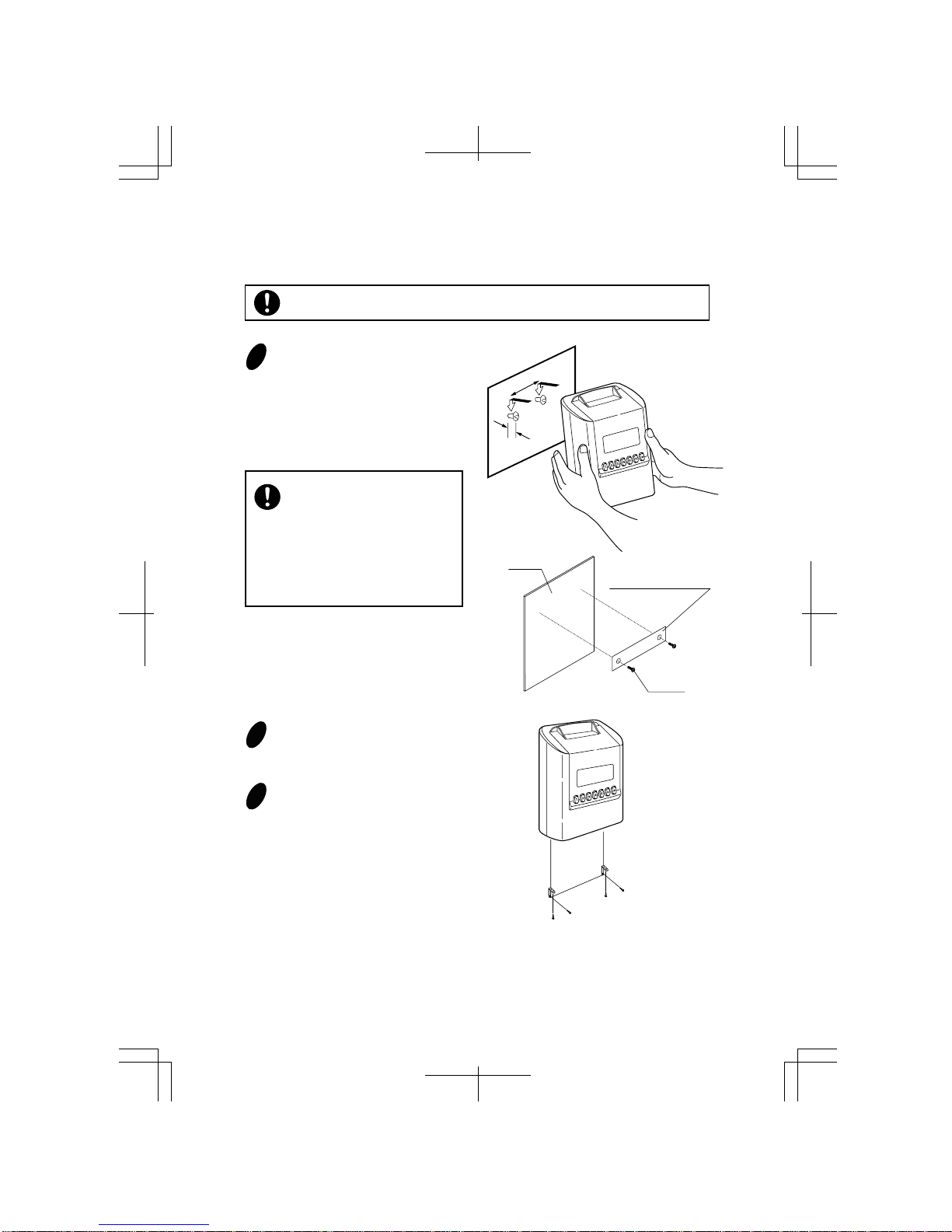
Mounting Unit on Wall
The supplied screws are intended
for use on a thick wooden wall
or wooden column. Do not use
them on any other materials.
There is a danger that the unit
may come off if used on the
other materials.
Install wall mount screws (supplied)
into a wall 10 cm (3-15/16") apart. Be
sure to keep about 3 mm (1/8") of the
screw head out of the wall. Use
template on the bottom of the back
side of this manual if you prefer.
10cm (3-15/16")
3mm
(1/8")
Mount the wall mount fittings
as shown on the right.
Plug the unit into power, and
the unit is ready to use.
The unit can be mounted on a wall using the supplied mounting fittings.
1
2
3
!0
Wall
Wall Mount Template
Screws
Make sure the power is off before mounting.
Table des matières
Autres manuels Seiko Horloge

Seiko
Seiko QR-350 Manuel utilisateur

Seiko
Seiko QC-6M4 Manuel utilisateur

Seiko
Seiko QR-550 Manuel utilisateur

Seiko
Seiko Precision QR-6550 Manuel utilisateur

Seiko
Seiko QC-6M5 Manuel utilisateur

Seiko
Seiko TP-20 Manuel utilisateur

Seiko
Seiko QHL073 Manuel utilisateur

Seiko
Seiko QP-400GS Manuel utilisateur

Seiko
Seiko QC-5500 Series Manuel utilisateur
Manuels Horloge populaires d'autres marques

Silicon Laboratories
Silicon Laboratories SI5324 Manuel utilisateur

Heathkit
Heathkit GC-1005 Manuel utilisateur

Oregon Scientific
Oregon Scientific PRYSMA RMR221P Manuel utilisateur

Andrew O'Malley
Andrew O'Malley DOTKLOK Manuel utilisateur

ALGE-Timing
ALGE-Timing ASC3 Manuel utilisateur

Bodet
Bodet Profil 960 Manuel utilisateur


