
Schmalz VSi Series Manuel utilisateur

Vacuum/Pressure Switch VSi / VSi-...-D
Operating instructions
WWW.SCHMALZ.COM EN-US · 30.30.01.00956 · 03 · 05/22

Note
The Operating instructions were originally written in German. Store in a safe place for future reference.
Subject to technical changes without notice. No responsibility is taken for printing or other types of er-
rors.
Published by
© J.SchmalzGmbH, 05/22
This document is protected by copyright. J.SchmalzGmbH retains the rights established thereby. Repro-
duction of the contents, in full or in part, is only permitted within the limits of the legal provisions of
copyright law. Any modifications to or abridgments of the document are prohibited without explicit writ-
ten agreement from J.SchmalzGmbH.
Contact
J. Schmalz GmbH
Johannes-Schmalz-Str. 1
72293 Glatten, Germany
T: +49 7443 2403-0
www.schmalz.com
Contact information for Schmalz companies and trade partners worldwide can be found at:
www.schmalz.com/salesnetwork
2 / 44 EN-US · 30.30.01.00956 · 03 · 05/22

Contents
EN-US · 30.30.01.00956 · 03 · 05/22 3 / 44
Contents
1 Important Information ...................................................................................................................................5
1.1 Note on Using this Document ............................................................................................................ 5
1.2 The technical documentation is part of the product ........................................................................ 5
1.3 Symbol.................................................................................................................................................. 5
2 Fundamental Safety Instructions...................................................................................................................6
2.1 Intended use ........................................................................................................................................ 6
2.2 Non-Intended Use ............................................................................................................................... 6
2.3 Personnel Qualification....................................................................................................................... 6
2.4 Warnings in This Document................................................................................................................ 6
2.5 Residual Risks....................................................................................................................................... 7
2.6 Modifications to the Product.............................................................................................................. 7
3 Product description.........................................................................................................................................8
3.1 General Description............................................................................................................................. 8
3.2 Versions................................................................................................................................................ 8
3.3 VSi Design (without Display) .............................................................................................................. 8
3.4 Design of VSi ... D (with Display) ........................................................................................................ 9
4 Technical Data ...............................................................................................................................................10
4.1 General Data...................................................................................................................................... 10
4.2 Electrical Data.................................................................................................................................... 10
4.3 Mechanical Data................................................................................................................................ 11
4.4 Factory Settings ................................................................................................................................. 12
5 Installation.....................................................................................................................................................13
5.1 Mounting ........................................................................................................................................... 13
5.2 Electrical Connection......................................................................................................................... 13
6 IO-Link Commissioning.................................................................................................................................15
7 Interfaces .......................................................................................................................................................16
7.1 Digital Switching Outputs (SIO)........................................................................................................ 16
7.2 Analog output ................................................................................................................................... 16
7.3 IO-Link................................................................................................................................................ 16
7.4 Replacement of the Device with a Parameterization Server.......................................................... 17
7.5 NFC Interface ..................................................................................................................................... 18
8 Operating Concept........................................................................................................................................19
8.1 Manual Operation of the Display Version ....................................................................................... 19
8.2 Display of Vacuum and Pressure Values .......................................................................................... 19
8.3 Navigating in the Menu.................................................................................................................... 20
8.4 Editing Parameters ............................................................................................................................ 20
8.5 Entering a PIN Code .......................................................................................................................... 22
8.6 Leaving the Menu Automatically ..................................................................................................... 22
8.7 Main Menu ........................................................................................................................................ 22
8.8 Extended Functions menu (EF) ......................................................................................................... 23
8.9 Info Menu (INF) ................................................................................................................................. 24
8.10 Displaying the Basic Settings (Slide Show)....................................................................................... 24

Contents
4 / 44 EN-US · 30.30.01.00956 · 03 · 05/22
9 Description of Functions...............................................................................................................................25
9.1 Overview of Functions ...................................................................................................................... 25
9.2 Measurement of Pressure and/or Vacuum....................................................................................... 26
9.3 Monitoring the Operating Voltage.................................................................................................. 26
9.4 Switching Points ................................................................................................................................ 26
9.5 Teach-in for Switching Points ........................................................................................................... 29
9.6 Additional Switching Point Settings ................................................................................................ 30
9.7 Display Screen.................................................................................................................................... 31
9.8 Access Rights...................................................................................................................................... 31
9.9 Device Identification ......................................................................................................................... 32
9.10 System Monitoring and Diagnostics................................................................................................. 33
9.11 System Commands............................................................................................................................. 34
10 Help with Malfunctions................................................................................................................................35
11 List of Error Numbers....................................................................................................................................36
12 Cleaning the Product ....................................................................................................................................37
13 Warranty........................................................................................................................................................38
14 Decommissioning and Recycling..................................................................................................................39
14.1 Disposing of the Product .................................................................................................................. 39
14.2 Materials Used ................................................................................................................................... 39
15 Accessories ....................................................................................................................................................40
16 EU Declaration of Conformity......................................................................................................................41
17 VSi_DataDictionary_21.10.01.00097_03 2022-04-20.PDF............................................................................42

Important Information
EN-US · 30.30.01.00956 · 03 · 05/22 5 / 44
1Important Information
1.1Note on Using this Document
J.SchmalzGmbH is generally referred to as Schmalz in this document.
The document contains important notes and information about the different
operating phases of the product:
• Transport, storage, start of operations and decommissioning
• Safe operation, required maintenance, rectification of any faults
The document describes the product at the time of delivery by Schmalz and is aimed at:
• Installers who are trained in handling the product and can operate and install it
• Technically trained service personnel performing the maintenance work
• Technically trained persons who work on electrical equipment
1.2The technical documentation is part of the product
1. For problem-free and safe operation, follow the instructions in the documents.
2. Keep the technical documentation in close proximity to the product. The documentation must be ac-
cessible to personnel at all times.
3. Pass on the technical documentation to subsequent users.
ðFailure to follow the instructions in these Operating instructions may result in injuries!
ðSchmalz is not liable for damage or malfunctions that result from failure to heed these instructions.
If you still have questions after reading the technical documentation, contact Schmalz Service at:
www.schmalz.com/services
1.3Symbol
This symbol indicates useful and important information.
üThis symbol represents a prerequisite that must be met prior to an operational step.
4This symbol represents an action to be performed.
ðThis symbol represents the result of an action.
Actions that consist of more than one step are numbered:
1. First action to be performed.
2. Second action to be performed.

Fundamental Safety Instructions
6 / 44 EN-US · 30.30.01.00956 · 03 · 05/22
2Fundamental Safety Instructions
2.1Intended use
The vacuum/pressure switches VSi-… / VSi-…-D are used only to measure vacuum and pressure. For further
information, see the technical data. Any other use is considered improper by the manufacturer and is
deemed as contrary to the designated use.
The product is built in accordance with the latest standards of technology and is delivered in a safe oper-
ating condition; however, hazards may arise during use.
The product is intended for industrial and commercial applications.
Intended use includes observing the technical data and the installation and operating instructions in this
manual.
2.2Non-Intended Use
Schmalz accepts no liability for damages caused by the use of the product for purposes other than those
described under "Intended Use."
Non-intended use includes the following:
• Use in potentially explosive atmospheres
2.3Personnel Qualification
Unqualified personnel cannot recognize dangers and are therefore exposed to higher risks!
The operating company must ensure the following points:
• The personnel must be commissioned for the activities described in these operating instructions.
• The staff must be at least 18 years of age and physically and mentally capable.
• The operating staff have been instructed in the operation of the product and have read and under-
stood the operating instructions.
• Installation, maintenance, and repairs must be carried out only by specialists or by persons who can
prove that they have undergone appropriate training.
Valid for Germany:
A qualified employee is defined as an employee who has received technical training and has the knowl-
edge and experience – including knowledge of applicable regulations – necessary to enable him or her to
recognize possible dangers and implement the appropriate safety measures while performing tasks. Qual-
ified personnel must observe the pertinent industry-specific rules and regulations.
2.4Warnings in This Document
Warnings warn against hazards that may occur when handling the product. The signal word indicates the
level of danger.
Signal word Meaning
WARNING Indicates a medium-risk hazard that could result in death or serious injury if
not avoided.
CAUTION Indicates a low-risk hazard that could result in minor or moderate injury if
not avoided.
NOTE Indicates a danger that leads to property damage.

Fundamental Safety Instructions
EN-US · 30.30.01.00956 · 03 · 05/22 7 / 44
2.5Residual Risks
WARNING
Serious injuries due to improper mounting!
4Carry out mounting and removal only when the device is in an idle, depressurized
state.
4Use only the connectors, mounting holes and attachment materials that have been
provided.
WARNING
Uncontrolled movements of system components or falling objects caused by incor-
rect activation and switching of the Ejector while persons are in the plant (safety
door opened and actuator circuit switched off)
Serious injury
4Ensure that the valves and ejectors are enabled via the actuator voltage by installing a
potential separation between the sensor and actuator voltage.
4Wear the required personal protective equipment (PPE) when working in the danger
zone.
CAUTION
Noise pollution from leakage
Hearing damage
4Correct position.
4Wear ear protectors.
NOTE
Incorrect power supply
Destruction of the integrated electronics
4Operate the product using a power supply unit with protected extra-low voltage
(PELV).
4The system must incorporate safe electrical cut-off of the power supply in compliance
with EN60204.
4Do not connect or disconnect the connector under tension and/or when voltage is ap-
plied.
2.6Modifications to the Product
Schmalz assumes no liability for consequences of modifications over which it has no control:
1. The product must be operated only in its original condition as delivered.
2. Use only original spare parts from Schmalz.
3. The product must be operated only in perfect condition.

Product description
8 / 44 EN-US · 30.30.01.00956 · 03 · 05/22
3Product description
3.1General Description
The vacuum switch and pressure switch versions belonging to the VSi series are referred to
only as the switch below.
The VSi-series switch can be operated in two operating modes.
• Via direct connection to discrete inputs (standard I/O = SIO) or
• Via connection through the communication line (IO-Link class A)
Switching points are indicated using one or two orange LEDs. If the switching point is not active, opera-
tional readiness is indicated by a green LED at switching point 1. The LED for switching point 2 remains
deactivated.
Additionally, a multitude of information and status reports for the switch can be accessed using wireless
communication with NFC (near-field communication).
The parameters can also be set using two buttons on the display version (VSi-…-D). The current system
status and the settings are shown on a display.
The fluid connection offers the opportunity to align the switch in a screwed-in position.
3.2Versions
Each switch has a precise item designation (e.g. VSi-V-D-M8-4) that is composed of the following type
keys:
Type Pressure range Analog output Display Electrical connection
VSi V (-1 to 0bar) SA
(only available in
combination with
pressure range V)
D
(with integrated
display)
M12-4 (1xM12, 4-pin)
VP8 (-1 to +8 bar) M8-4 (1xM8, 4-pin)
P10 (0 to +10 bar)
3.3VSi Design (without Display)
1234
1 Fluid connector 3 Position of the NFC antenna
2 Switching point 1 display, ORANGE or op-
erating voltage display, GREEN
4 Electrical connection M12-4 or M8-4
Product description
EN-US · 30.30.01.00956 · 03 · 05/22 9 / 44
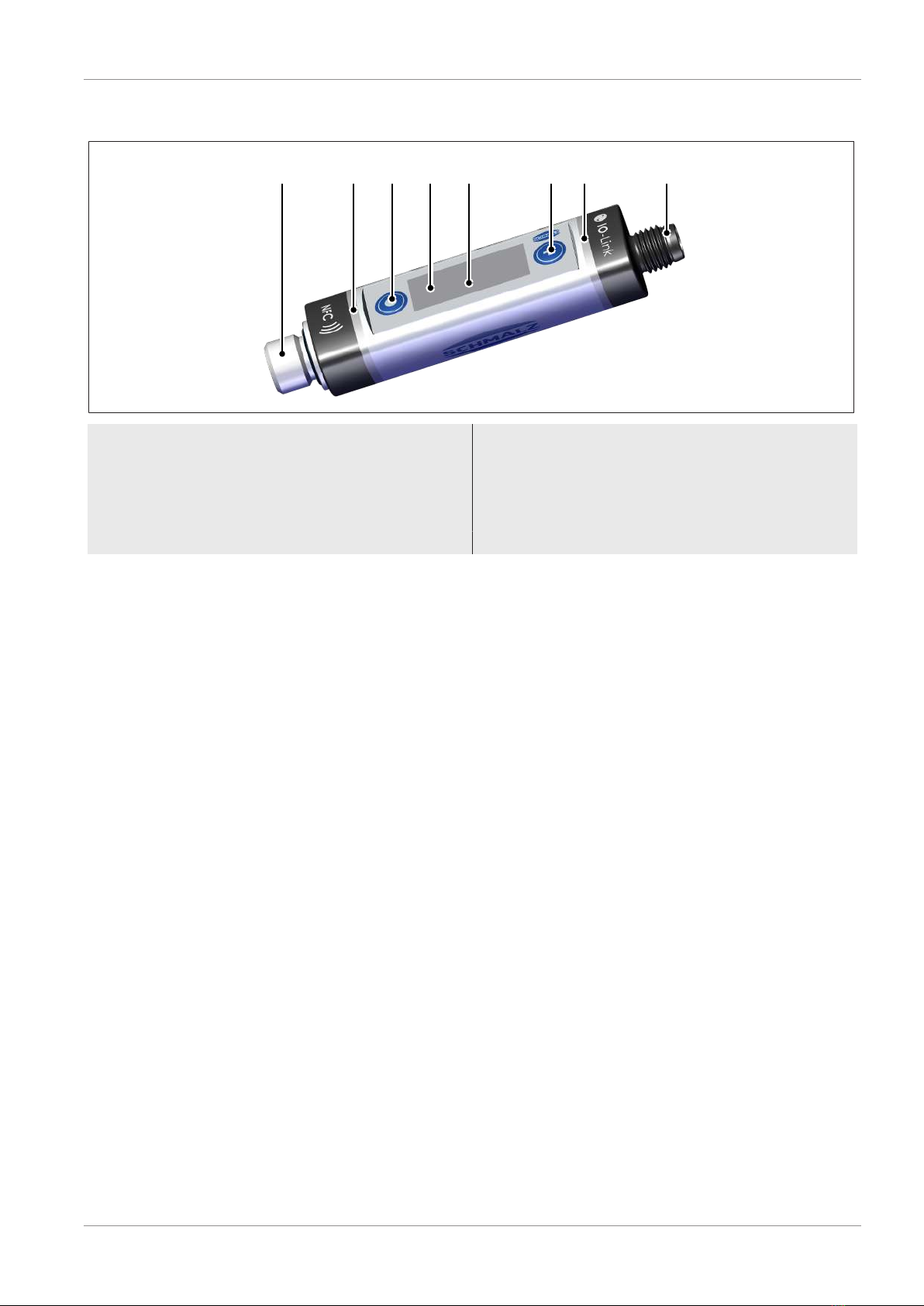
3.4Design of VSi ... D (with Display)
1 2 4875 6 3
1 Fluid connector 5 MODE button
2 Switching point 1 display, ORANGE or op-
erating voltage display, GREEN
6 Display
3 Position of the NFC antenna behind the
display
7 SET button
4 Electrical connection M12-4 or M8-4 8 Switching point 2 display, ORANGE

Technical Data
10 / 44 EN-US · 30.30.01.00956 · 03 · 05/22
4Technical Data
4.1General Data
Property Version V Version P10 Version VP8
Operating pressure
range
-1 to 0bar 0 to 10bar -1 to 8bar
Overpressure resistance 8bar 15bar 12bar
Solution 1mbar 11mbar Vacuum 2mbar/pres-
sure 11mbar
Degree of protection IP 65 (M8/M12 plugged in)
Working temperature 0 to 50°C
Storage temperature -10 to 60°C
Permitted humidity 10 to 90% RH (free from condensation)
Accuracy ± 3% FS 1)
Measuring medium Non-aggressive gases; dry, oil-free air
Weight VSi
VSi ... D
12g
16g
1) The accuracy applies to the entire measuring and temperature range.
4.2Electrical Data
Property VSi VSi-...-D
Power consumption (where U = 24V) < 35mA < 35mA
Display — 3-digit, 7-segment display
with decimal point
Display resolution — Vacuum: 1mbar
Pressure: 10mbar
Analog output (VSi-V-SA only) 1 to 5V (corresponds lin-
early to 0 to -1000mbar)
—
Analog output load impedance (VSi-V-SA
only):
>5kohms 2) —
Supply voltage 10 to 30VDC (PELV)1)
Current load rating per output 100 mA
Polarity reversal protection Yes, all connections
Overload/short circuit OUT1/OUT2 Automatic switch-off of both outputs
NFC NFC Forum Tag type 4
IO-Link IO-Link 1.1 Class A
Baud rate COM2 (38.4 kBits/s)
Minimum cycle time 2.3 ms
(also see separate data dictionary)
1) The power supply must correspond to the regulations in accordance with EN60204 (protected extra-low
voltage).
2) Do not short-circuit the analog output, this can lead to thermal overheating and damage to the prod-
uct.
Autres manuels pour VSi Series
1
Ce manuel convient aux modèles suivants
1
Table des matières
Autres manuels Schmalz Changer

Schmalz
Schmalz VS-W-D Series Manuel utilisateur

Schmalz
Schmalz VSi Series Manuel utilisateur

Schmalz
Schmalz VSi-HD Manuel utilisateur

Schmalz
Schmalz VSi HD Manuel utilisateur

Schmalz
Schmalz VS W-D-K-2C Series Manuel utilisateur

Schmalz
Schmalz VS-P-W-D K 3C-D Manuel utilisateur

Schmalz
Schmalz VS-V-W-D PNP K 3C-D Manuel utilisateur
Schmalz
Schmalz VS-V-D-PNP Manuel utilisateur

Schmalz
Schmalz VS-W-D-K Series Manuel utilisateur


