Sattrans wi-fi commstation Fiche technique

Operating and Installation Manual
Sattrans Wi-Fi CommStation
for Iridium Satellite Phones
- Extreme (9575)
- 9555
SATTRANS
USA & Americas: +1 877 688 4635
Europe: +48 17 71 58 100
Asia & Africa: +971 44 356 105
Russia: +7 495 981 0477
Ukraine: +380 44 490 3900
support@sattrans.com
www.sattrans.com
© 2015 SATTRANS. All Rights Reserved. Sattrans, the Sattrans logo are owned and registered by SATTRANS
and its affiliates. All other registered names, trademarks are the property of their respective owners. SATTRANS
assumes no responsibility for any errors that may appear in this manual. Information contained herein is subject
to change without notice.


Sattrans Wi-Fi CommStation
Table of Contents
Introductory information 2
1. Important Notes 2
Installation of Sattrans Wi-Fi CommStation 4
2. Box Contents 4
3. Wi-Fi Comm Station positioning and mounting 5
4. Installing satellite phone cradle 6
5. Satellite phone insertion and removal 7
Operating guidelines 9
6. Functions of Sattrans Wi-Fi CommStation 9
LED indicators (Green and Red) 9
Direct connection to Internet – no data compression 10
Connection to Internet – with data compression 13
7. Connecting to Wi-Fi CommStation 14
Configuration of Wi-Fi CommStation 15
Password management 15
Changing language 19
Configuration of Iridium Mail & Web application 21
Sending and receiving Email 23
Configure of Web surfing 24
Configuration of Asterisk 26
Adding a new user (SIP client) 26
Configuration of XGate Phone application 29
8. Configuration of Wi-Fi repeater 31
9. Firmware update 35
Further information 39
Warranty Information 39

2Introductory information
1. Important Notes
Dear Customer,
Thank you for choosing this high-quality product manufactured by BURY and exclusively distributed
worldwide by SATTRANS Group. Please read this user manual before installing and using this product.
Safety information
• This product should be installed so that its components do not interfere with operation and
safety features of your vehicle, such as airbags, safety belts, windshield, etc.
• Do not attempt to operate this product if the cables, plugs or other components are defective.
• Please do not attempt to open, disassemble or repair the product as it could damage its compo-
nents and make the warranty void.
Important Notes
• Product’s functionality and its performance should be tested when it is powered on.
• If the satellite phone is inserted correctly into the cradle, charging of the phone’s battery starts
as soon as the power is turned on.
Installation Note
• All components for installation of this product are supplied in the retail box. No tools are pro-
vided with the product.
Operating Notes
• Communication via the Iridium satellite network has several specific features, which are different
from mobile phone communications. Such obstructions as tall buildings, trees, hills or mountains
can block the reception and transmission of signals between the vehicle antenna and the satellites,
thus decreasing the quality of calls or making them impossible. It is therefore recommended that
satellite calls be made in open areas, far from any obstructions. Before starting the call, please
make sure the satellite signal level is sufficient.
• Sattrans Wi-Fi CommStation broadcats a Wi-Fi network accessible within up to 20 m (~60 feet).
However, the impact range (effective distance) can vary substantially depending on the placement
of Sattrans Wi-Fi CommStation. For example, thicker or a great number of walls between the Wi-Fi
CommStation and user devices will decrease the effective range of the CommStation.
• In order to get the best preformance, the Wi-Fi CommStation should be placed:
- In the middle of the area with Wi-Fi-enabled devices which will connect via Sattrans Wi-Fi Com-
mStation, preferably at “the eye level” of these devices.
- In the vicinity of an AC electric outlet and Ethernet cable ends of computers which connect wire-
lessly.
- Away from electrical appliances which are potential sources of interference such as valve ceiling
rails, home security systems, microwave ovens or bases of cordless phones.

3
- Away from big metal surfaces such as doors made of solid metal or big concentration
of aluminium rivets. The strength of signal is also influenced by big surfaces of other materials,
e.g. glass, insulated walls, aquariums, mirrors, bricks or concrete.
Important:
Failure to obey these recommendations may cause substantial deterioration of the Wi-X
Fi signal and and decreased quality of communication or complete lack of possibility of
connecting to the Internet.
Warranty & Liability Notes
• This product is covered by a 2-year worldwide warranty from date of purchase with proof
of purchase submitted.
• SATTRANS shall not be liable for any damages resulted from misuse, abuse, neglect, accident,
repair, alteration or maintenance by any person or party other than our own service facility or the
modification of this product in any way.
• Obligations of SATTRANS and its affiliates shall be limited to repair or replacement with the same
or similar unit, at our option. When returning the product for repair, please pack it carefully and
include an explanatory note.
We hope you will be satisfied with the use of your Sattrans Wi-Fi CommStation and wish
you a pleasant ride.

4Installation of Sattrans Wi-Fi CommStation
2. Box Contents
Iridium Extreme (9575) Cradle OR Iridium 9555 cradle
100-240V
Sattrans Wi-Fi CommStation unit is offered for deifferent models of Iridium phone. All versions of the
device are described in these operating guidelines.
Description of components:
1) Iridium phone cradle for Wi-Fi CommStation
2) Sattrans Wi-Fi CommStation (baseplate)
3) Power supply adapter (100-240 VAC)
4) Car power supply
5) Operating and Installation Manual
Operating and Installation Manual
Sattrans Wi-Fi CommStation
for Iridium Satellite Phones
- Extreme (9575)
- 955 5
S A T T R A N S
USA & Americas: +1 877 688 4635
Europe: +48 17 7158 100
Asia & Africa: +971 44 356 105
Russia: +7 495 981 0477
Ukraine:+380 44 490 3900
support@sattrans.com
www.sattrans.com
©2015SATTRANS.AllRightsReserved.Sattrans,theSattranslogoareownedandregisteredbySATTRANS
andits affiliates.All other registered names, trademarks arethe property oftheir respective owners. SATTRANS
assumesno responsibility for any errors thatmayappearin thismanual.Information contained herein issubject
to change without notice.

5
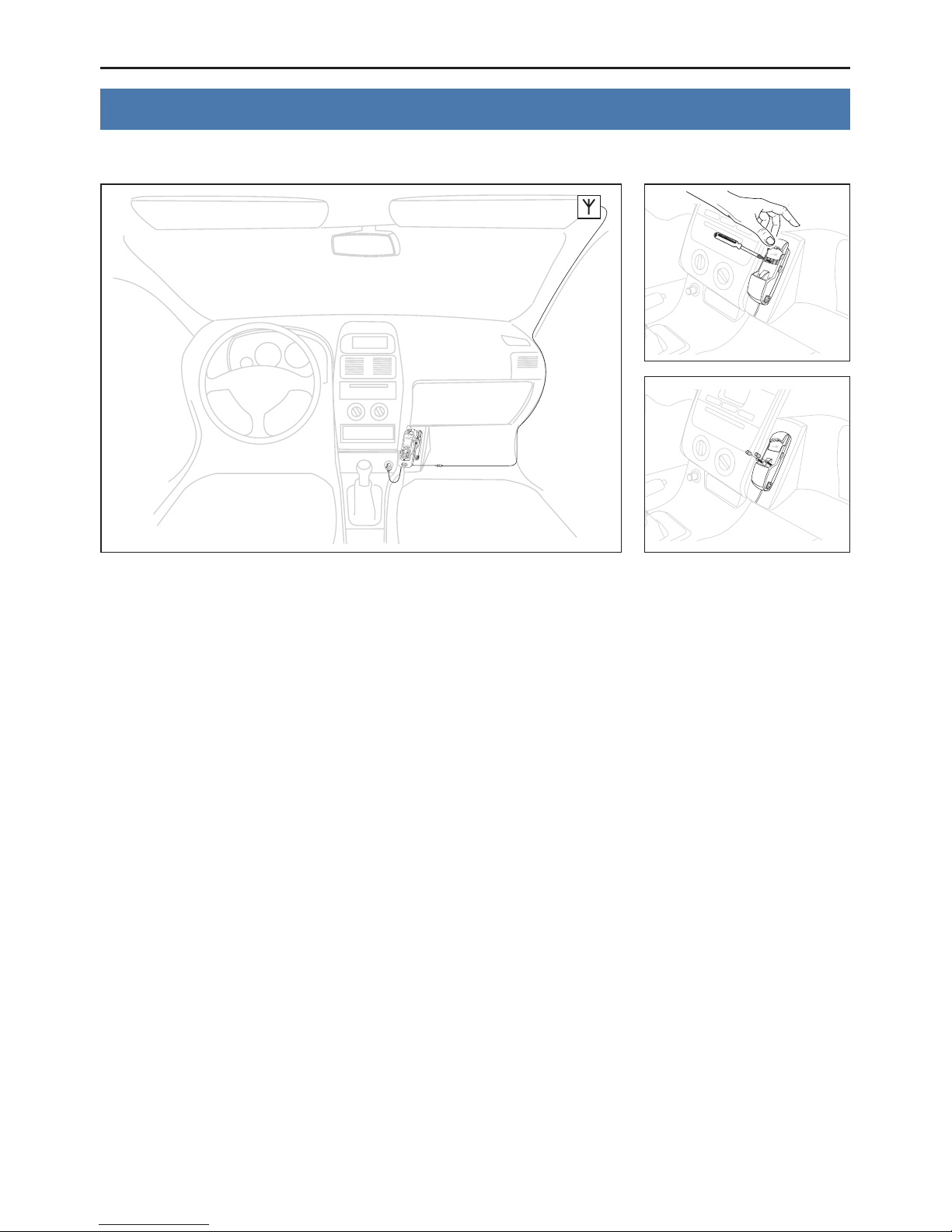
3. Wi-Fi CommStation positioning and mounting
Example of car installation
After installing Sattrans Wi-Fi CommStation, connect it to a power source via the AC power supply
adapter OR via the car adapter to a cigarette lighter socket in your vehicle or boat.
Note:
Failure to use compatible power adapters and sources may result in a permanent dam-X
age to Sattrans Wi-Fi CommStation. It is recommended that one should use original
power supply adapter which is included in the retail box.

6Installation of Sattrans Wi-Fi CommStation
4. Installing Satellite Phone Cradle
Place the Satellite Phone cradle in the Sattrans Wi-Fi CommStation.
Important:
If the cradle is mounted correctly, into the baseplate you will hear a distinctive click.X
Removing the cradle from the Sattrans Wi-Fi CommStation.
Important:
In order to remove the cradle, press and hold the locking button on the right side ofX
the Wi-Fi CommStation baseplate, move the cradle upwords and pull the lower section of
the cradle towards you.

7
5. Satellite phone insertion and removal
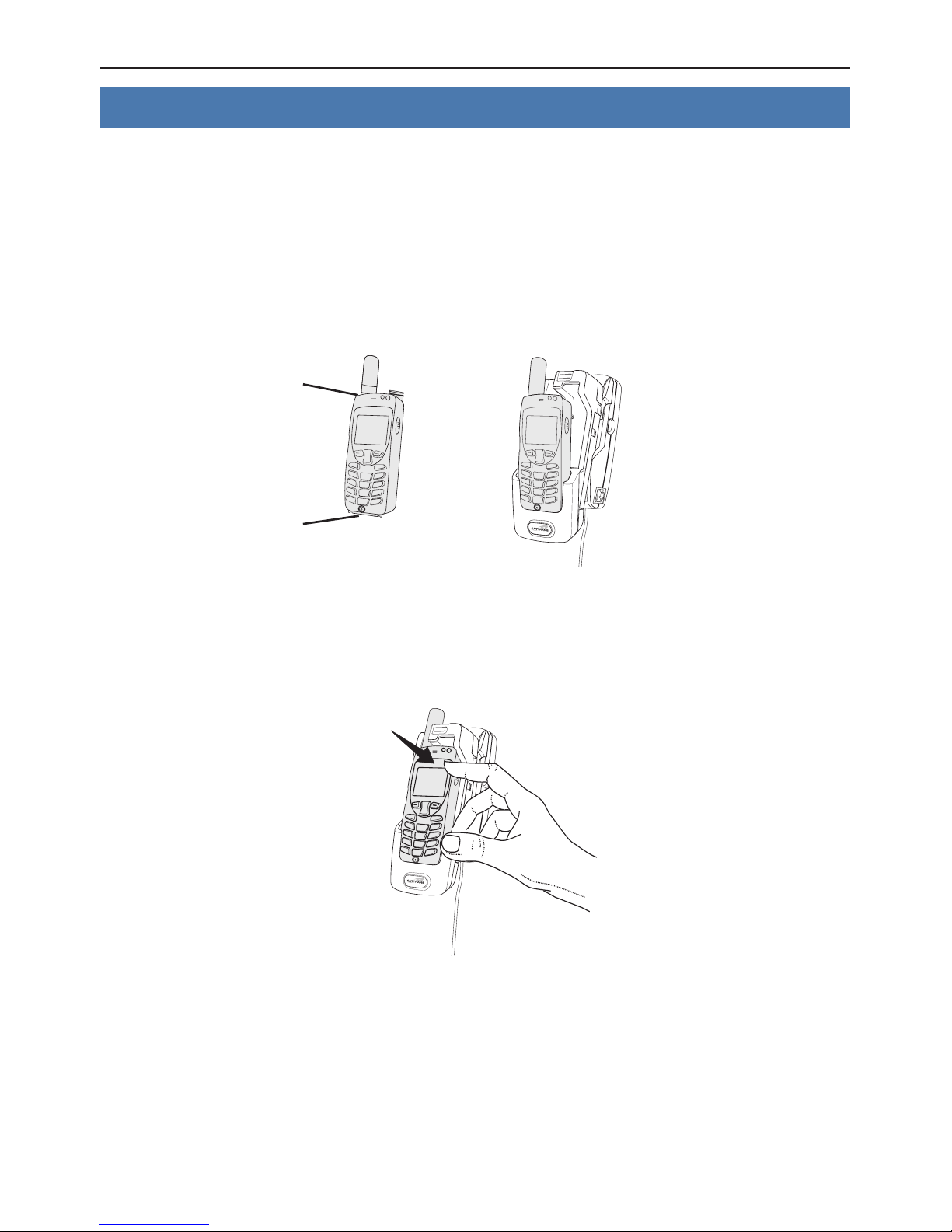
Inserting satellite phone into cradle.
Important:
Please remove the antenna cover (9555 phone) or the bottom connector cover (ExtremeX
phone) before inserting the phone into the cradle.
Place the satellite phone in the cradle starting from the bottom connector.
Push the top part of the satellite phone until you hear the phone click into the cradle. The correct position-
ing of the satellite phone in the cradle is signalled by a perceptible ‘clicking’ sound.
antenna cover
connector cover

8Installation of Sattrans Wi-Fi CommStation
Removing the satellite phone from the cradle.
To release the locking mechanism press the button on the top of the cradle.
Now remove the satellite phone by lifting it out of the cradle.
Table des matières
Autres manuels Sattrans Station d'accueil