
Saab R4 Manuel utilisateur

Saab TransponderTech
OPERATOR’S MANUAL
R4 Navigation System

Copyright
The entire contents of this manual and its appendices, including any future updates and
modifications, shall remain the property of Saab TransponderTech AB at all times. The
contents must not, whether in its original form or modified, be wholly or partly copied or
reproduced, nor used for any other purpose than the subject of this manual.
Disclaimer
While reasonable care has been exercised in the preparation of this manual, Saab
TransponderTech AB shall incur no liability whatsoever based on the contents or lack of
contents in the manual.
Caution
No single navigation aid should ever be relied upon as the exclusive means for navigating
a vessel. The navigator is responsible for checking all aids available to confirm his posi-
tion. Electronic aids are intended to assist, not replace, the navigator.
Software
This manual reflects the capabilities of R4 Navigation Display software version 5.0.90
onwards.
Operators Manual Part Number and Revision
Part number 7000 109-143, revision F2.
This manual is a replacement for the earlier manual 7000 109-143 rev F.
Safety Instructions
Note the following compass safe distances:
How To Contact Us
For Information on New Products and Dealers:
Please visit our home page www.transpondertech.se
For Installation, Service and Technical Support:
Please contact your R4 Navigation System dealer.
Equipment Standard magnetic
compass
Steering magnetic
compass
R4 Display 0.6 m 0.3 m
R4 Navigation Sensor
(GPS and DGPS)
0.6 m 0.4 m

3
Table of Contents
Table of Contents
Product Description ................................................. 7
System Overview 7
Main Features 8
Concepts and Terminology ..................................... 9
Getting Started ...................................................... 11
Front Panel Keys 11
How to Operate the R4 Display 12
Views and Function Keys 12
Change Settings 12
Alarm Pop-ups 13
Turning On and Off the R4 Display 13
System Modes 14
Status Bar 16
Status Icons 16
RAIM Accuracy Level 17
Show Current Position 18
Create Waypoints 18
Create New Waypoint 19
Sail To a Waypoint 20
Create a Route 22
Insert Waypoints Into the Route 23
Adjusting Navigation Algorithm and RAIM Accuracy Level 25
Finish Creating a Route 26
Review an Existing Route 27
Start Sailing a Route 29
Navigate Towards a Waypoint and Follow a Route 30
Plot the Active Route 31
View the Active Route 32
Visual Settings 33
Reference .............................................................. 35
Status LEDs 35
R4 Display LEDs 35
R4 Navigation Sensor LEDs 35
Icon Description 36
Message Symbols 36
Redundant Operation Status Symbols 36
GPS Status Symbols 36
Miscellaneous Symbols 36

4
Adjusting Settings 37
Man Over Board 39
Event Mark 40
Alarm Pop-ups 41
Changing System Mode 42
Navigate Mode 43
Overview 43
Position 45
GPS Status 46
Beacon Status 47
Satellite Info 48
SBAS Info 48
Set RAIM 49
Nav 50
Active Route 53
Edit Active Route 56
Plot 59
User Defined 60
Trip Logs 63
Trip Log Details 64
Anchor Watch 65
Route List 67
Plan Voyage Mode 69
Overview 69
Route List 71
Sail Route 73
Sail To 73
Edit Route 75
Create Route 78
Create Route From 79
View Route 79
Route Related Views 81
Select Waypoint 81
Insert Waypoints 82
Select Route 83
Waypoint List 85
Waypoint Related Views 88
View Waypoint 88
Edit Waypoint 88
Create Waypoint 90
Alarms & Msgs Mode 91
Overview 91
Alarm List 92
DGPS Message 93
Scheduled Alerts 93
Scheduled Alert Related Views 94
Create Time Alert 95
Create ETA Alert 96
Edit Time Alert 97
Edit ETA Alert 97

5
Table of Contents
View Time Alert 97
View ETA Alert 97
Config Mode 99
Overview 99
Time Config 101
Display Config 102
Visual Config 102
Sound Config 103
Nav Config 103
Alarm Config 105
Units Config 106
GPS/DGPS Config 107
GPS Config 107
Beacon Config 109
SBAS Config 111
Redund Config 112
I/O Config 114
Input Config 114
Compass Config 115
Depth Config 115
Wp/Rte Input 116
Output Config 117
Port Rate Config 118
System Info 121
Appendix .............................................................. 123
Alarm Messages 123
Navigation Alarms Description 123
Transfer Waypoints and Routes 126
Download Waypoints and Routes 126
Waypoint and Complete Route Downloads 126
Working Route Downloads 126
Upload Waypoints and Complete Routes 126
Output Working Route and Remaining Waypoints 127
Glossary ............................................................... 129
Index .................................................................... 131

6

7
Product Description
System Overview
Product Description
System Overview
The R4 Navigation System is available in two configurations: GPS and DGPS. Both con-
figurations feature an R4 Display. The GPS configuration also features an R4 GPS Nav-
igation Sensor and an MGA-2 GPS antenna, while the DGPS configuration features an
R4 DGPS Navigation Sensor and an MGL-4 combined GPS/Beacon antenna.
The R4 Display provides a graphical interface to the system. Via the display it is possible
to create, edit and modify routes and waypoints, navigate following a route, plot the route,
view sensor data, perform setup as well as supervise the systems status.
The R4 GPS Navigation Sensor features a high-precision GPS receiver, capable of receiv-
ing WAAS, EGNOS and MSAS differential corrections. The R4 DGPS Navigation Sen-
sor has all the features of the GPS Sensor, as well as a dual channel beacon receiver for
reception of IALA radio beacon DGPS corrections.
The R4 Navigation Sensor is connected to the antenna, either an MGA-2 GPS antenna or
an MGL-4 combined GPS/Beacon antenna. The MGL-4 antenna is capable of receiving
and interpreting both radio beacon and satellite signals.
Together the R4 Display and the R4 Navigation Sensor provides three configurable serial
user ports, of which two are bidirectional and one used only for output of data. There are
also a binary Speed Log and an Alarm Output port, as well as an Alarm Acknowledge in-
put port.

Main Features
8
Main Features
• High resolution, sunlight readable, 6'' graphic day and night display.
• Signal integrity monitoring calculations (RAIM) according to the IEC 61108-1 (2nd
edition) standard. The RAIM function detects whether an expected user defined navi-
gation accuracy is achieved.
• Reception and use of differential corrections from SBAS, from the serial interface in
RTCM SC-104 format and, in the DGPS configuration, from IALA radio beacons.
• Automatic or manual SBAS satellite selection modes.
• Navigational views with next waypoint information and cross-track error visualiza-
tion.
• Display of latitude, longitude, speed over ground and course over ground.
• Up to five user defined views providing a large variety of graphical as well as numer-
ical presentation options according to customer preferences.
• Capability to handle and store up to 2000 individually named waypoints and up to 100
different routes.
• Man Over Board (MOB) and Event Mark functionality.
• Two trip log counters with indication of average speed and accumulated time during
motion.
• Anchor Watch position deviation alarm.
• Scheduled Alerts, user configurable time alarms and time to ETA alarms.
• Time frame related to UTC or user defined local offset.
• Synchronization of waypoint/route database and settings with an external R4 Naviga-
tion system in dual redundant installations.
• Input and output of IEC 61162-1 sentences configurable on sentence level and per
port, providing control over interpreted, ignored and transmitted sentences.
• User interface design centred around modes of operation corresponding to typical
operator activities such as voyage planning, status monitoring and ship navigation.
• Upgradeable without hardware modifications due to fully integrated DSP solution.
• Output of GPS positioning information on User port 1 and 2, enabling external sys-
tems to connect to and use the GPS information from the R4 Navigation Sensor.
• Meets the following standards:
• IMO Performance Standard for GPS
• IEC 61108-1, second edition
• IEC 61162-1, second edition

9
Concepts and Terminology
Concepts and Terminology
This chapter describes some of the commonly used terms of this Operator’s Manual, and
the implied meaning when used in this manual.
Waypoint
A waypoint is a position on the earths surface, represented by latitude and longitude,
which is given a unique name. A waypoint is typically used for navigation direct to a cer-
tain position or as part of a route.
MOB Waypoint
A waypoint created when using the Man Over Board (MOB) functionality. The system
can store up to 20 MOB waypoints at the same time, if more are created the oldest one is
deleted. It is not possible to use MOB waypoints in routes.
Route
A route is a named, ordered sequence of waypoints, which together describes a path from
the start to the end waypoint. The route that currently is being sailed is called the active
route.
Active Route
The active route is the route currently being sailed and used for navigation. When starting
to sail a route, a copy of the route is made into the active route. Changes made to the active
route does not affect the source route, unless the active route is explicitly stored. Only one
route can be active at any point in time.
Leg
A leg is the segment of a route between two consecutive waypoints. A route with the way-
points A, B and C has two legs: “A to B” and “B to C”. For each leg in a route, the navi-
gation algorithm and RAIM accuracy level can be set.
RAIM
RAIM is a GPS integrity monitoring scheme that evaluates the quality of the position data
and is able (under normal circumstances) to detect a satellite malfunction that results in a
large range error.
RAIM Accuracy Level
The RAIM accuracy level is the radius that is used to calculate current RAIM status.
RAIM Status
The RAIM status can be one of safe, caution and unsafe, and is indicated by the LEDs on
the front of the R4 Display.
Navigation Algorithm
The navigation algorithm is the algorithm used for calculating the course to steer to reach
the next waypoint. It is also used for calculating the distance to the waypoint. The navi-
gation algorithm can be either great circle or rhumb line.
10
Great Circle Navigation
The great circle navigation algorithm calculates a course line that is the shortest path be-
tween two points on the surface of the earth. Using this navigation algorithm, course to
steer when navigating towards a waypoint is not constant. The resulting track of this nav-
igation algorithm will differ from the straight line drawn on a Mercator projected chart.
Rhumb Line Navigation
The rhumb line navigation algorithm calculates a course line that corresponds to a straight
line on a Mercator projected chart, and cuts across all meridians at the same angle.
Waypoint Pass Criterion
The criterion used to determine when a waypoint in the active route is considered passed.
The waypoint pass criterion can be any of Manual, Distance, Bisector Line and Perpen-
dicular Line.
Manual Waypoint Pass Criterion
Using this pass criterion, the waypoint is only considered passed when the operator skips
the waypoint.
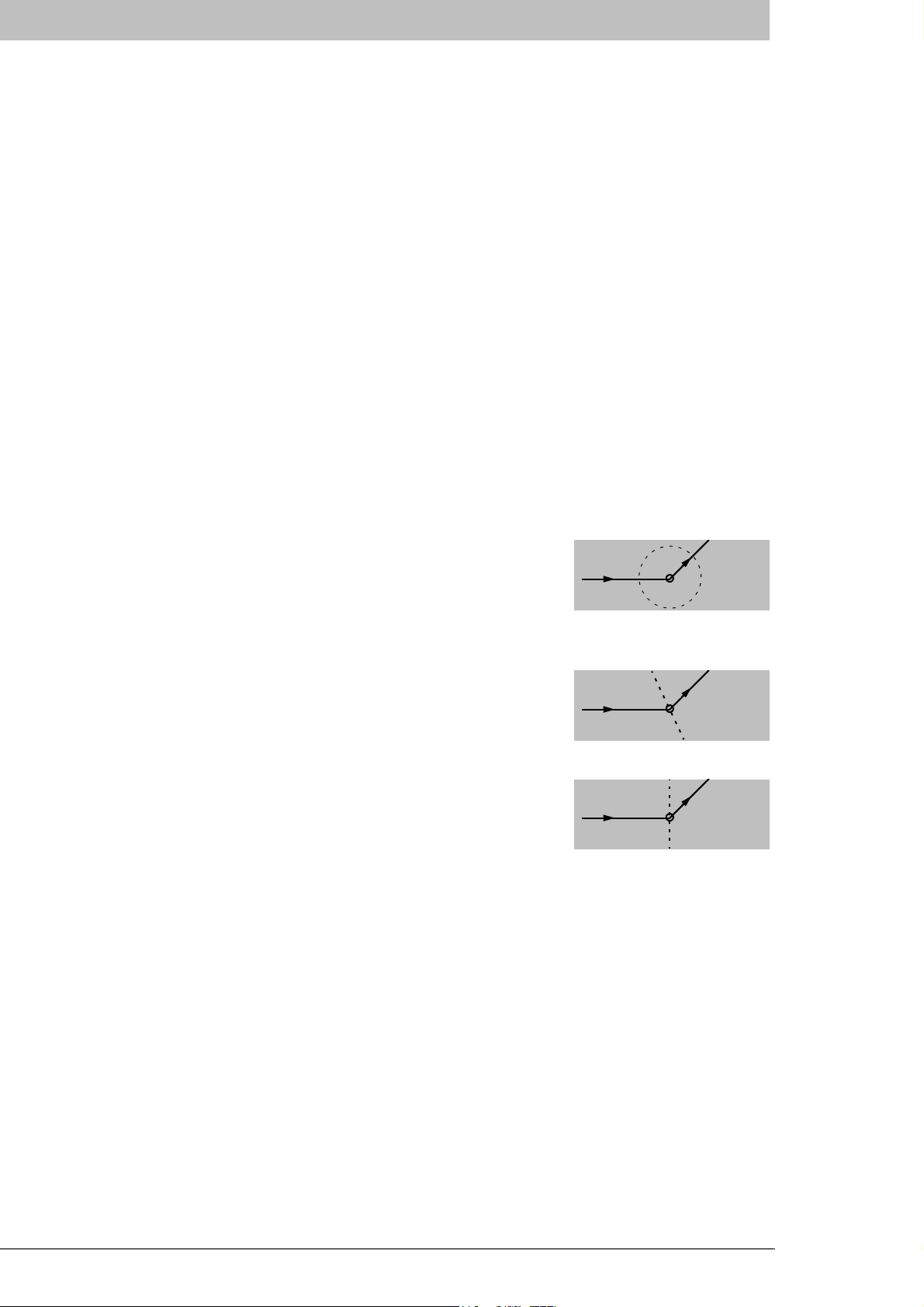
Distance Waypoint Pass Criterion
Using this pass criterion, the waypoint is considered passed
once the ship has reached an imaginary circle around the way-
point. See illustration to the right. The radius of the circle is
configurable.
Bisector Line Waypoint Pass Criterion
Using this pass criterion, the waypoint is considered passed
once the ship has reached an imaginary bisector line of the an-
gle between current and next leg. See illustration to the right.
Perpendicular Line Waypoint Pass Criterion
Using this pass criterion, the waypoint is considered passed
once the ship has reached an imaginary line perpendicular to
current leg. See illustration to the right.
Autres manuels pour R4
1
Table des matières
Autres manuels Saab Système de navigation automobile

Saab
Saab 12 787 151 Manuel utilisateur

Saab
Saab R5 SUPREME AIS Manuel utilisateur

Saab
Saab R5 SUPREME MkII Manuel utilisateur
Saab
Saab 12 787 151 Manuel utilisateur

Saab
Saab 32 025 681 Manuel utilisateur

Saab
Saab 12 832 506 Manuel utilisateur

Saab
Saab 400 132 239 Manuel utilisateur

Saab
Saab R5 SUPREME AIS Manuel utilisateur

Saab
Saab 12 832 506 Manuel utilisateur


