
RTscan RT206 Guide de configuration rapide

RT206 Integration Guide
RT206
OEM Scan Engine
Integration Guide

RT206 Integration Guide
Table of Contents
Chapter 1 Introduction...................................................................................................................................................... 1
Overview............................................................................................................................................................................1
Illumination........................................................................................................................................................................ 1
Aimer.................................................................................................................................................................................. 1
Chapter 2 Installation........................................................................................................................................................ 2
General Requirements.................................................................................................................................................... 2
ESD................................................................................................................................................................................2
Dust and Dirt................................................................................................................................................................ 2
Thermal Considerations............................................................................................................................................. 2
Installation Orientation................................................................................................................................................2
Optics................................................................................................................................................................................. 4
Window Placement..................................................................................................................................................... 4
Window Material and Color....................................................................................................................................... 4
Scratch Resistance and Coating.............................................................................................................................. 5
Window Size.................................................................................................................................................................5
Ambient Light............................................................................................................................................................... 6
Eye Safety.................................................................................................................................................................... 6
Mounting............................................................................................................................................................................ 7
Front View (unit: mm)................................................................................................................................................. 7
Side View (unit: mm)...................................................................................................................................................7
Top View (unit: mm)....................................................................................................................................................8
Chapter 3 Electrical Specifications............................................................................................................................... 9
Power Supply....................................................................................................................................................................9
Ripple Noise......................................................................................................................................................................9
DC Characteristics.........................................................................................................................................................10
Operating Voltage..................................................................................................................................................... 10
Operating Current..................................................................................................................................................... 10

RT206 Integration Guide
Chapter 4 Interfaces........................................................................................................................................................ 11
Host Interface Connector..............................................................................................................................................11
Dimensions of the Host Interface Connector (unit: mm).................................................................................... 12
FFC Cable (unit: mm)............................................................................................................................................... 13
Communication Interfaces............................................................................................................................................14
Control Interfaces...........................................................................................................................................................15
Reset........................................................................................................................................................................... 15
Trigger......................................................................................................................................................................... 15
Beeper.........................................................................................................................................................................16
Good Read LED........................................................................................................................................................ 17
Chapter 5 Development Tools...................................................................................................................................... 18
EVK.................................................................................................................................................................................. 18

1
RT206 Integration Guide
Chapter 1 Introduction
Overview
T M
The RT206 supports all mainstream 1D as well as PDF417, QR Code (QR1, QR2, Micro QR), Data Matrix,
GS1-DataBarTM(RSS) (Limited/ Stacked/ Expanded versions) and Chinese Sensible Code.
Illumination
The RT206 has two red LEDs for supplementary lighting, making it possible to scan barcodes even in
complete darkness. The illumination can be programmed On or Off.
The RT206 uses red LEDs for illumination, so the engine shows better reading performance on barcodes
printed in non-red colors. For applications involving red barcodes, it is advised to turn off the engine’s
illumination and use non-red supplementary lighting (such as green) instead. The user can conduct some
tests to determine the proper wavelengths to be used.
Aimer
The RT206 has a view finder that produces a solid circle-shaped aiming pattern to help the user to easily
position the target barcode within the engine’s field of view to increase scan efficiency. The aiming pattern
can be turned On or Off. It is advisable to turn it on when scanning barcodes.

2
RT206 Integration Guide
Chapter 2 Installation
General Requirements
ESD
ESD protection has been taken into account when designing the RT206 and the engine is shipped in ESD
safe packaging. Always exercise care when handling the engine outside its package. Be sure grounding
wrist straps and properly grounded work areas are used.
Dust and Dirt
The RT206 must be sufficiently enclosed to prevent dust particles from gathering on the imager, lens and
circuit board. Dust and other external contaminants will eventually degrade the engine’s performance.
Thermal Considerations
Electronic components in the RT206 will generate heat during the course of their operation. Operating the
RT206 in continuous mode for an extended period may cause temperatures to rise on CIS and decoder
chip. Overheating can degrade image quality and affect scanning performance. Given that, the following
precautions should be taken into consideration when integrating the RT206.
Reserve sufficient space for good air circulation in the design.
Avoid wrapping the RT206 with thermal insulation materials such as rubber.
Installation Orientation
The RT206 has two threaded mounting holes for machine screws in its bottom. The following figure
illustrates a front view of the RT206 after correct installation.

3
RT206 Integration Guide

4
RT206 Integration Guide
Optics
Window Placement
The window should be positioned properly to let the illumination and aiming beams pass through as much
as possible and no reflections back into the engine (reflections can degrade the reading performance).
The window should be mounted close to the front of the engine (parallel). The maximum distance is
measured from the front of the engine housing to the farthest surface of the window. In order to reach
better reading performance, the distance from the front of the engine housing to the furthest surface of the
window should not exceed 3mm and the distance from the front of the engine housing to the nearest
surface of the window should not exceed 2mm.
If the window is required to be in a tilted position, the distance requirements above should be met and tilt
angle should ensure no reflections back into the lens.
Window Material and Color
CIS’s responsiveness (mainly to wavelengths of red light )should be taken into consideration when
choosing window material and color, in order to achieve the possible highest spectral transmission, lowest
haze level and homogeneous refractive index. It is suggested to use PMMA or optical glass with spectral
transmittance over 90% and haze less than 1%. Whether to use an anti-reflection coating or not depends
on the material and application needs.
≤ 2mm
≤ 3mm

5
RT206 Integration Guide
Scratch Resistance and Coating
Scratch on the window can greatly reduce engine performance. It is suggested to use abrasion resistant
window material or coating.
Window Size
The window must not block the field of view and should be sized to accommodate the illumination
envelope shown below.
Horizontal:
1
FOV Envelope 44゜
Illumination Envelope 60゜

6
RT206 Integration Guide
Vertical:
1
FOV Envelope 33.2゜
Illumination Envelope 60゜
Illumination Envelope 60゜
Ambient Light
The RT206 shows better performance with ambient light and it is well able to handle the flicker in
fluorescent lights using 50-60Hz AC power. However, high-frequency pulsed light can result in
performance degradation.
Eye Safety
The RT206 has no lasers. It uses LEDs to produce illumination and aiming beams. The LEDs are bright,
but testing has been done to demonstrate that the engine is safe for its intended application under normal
usage conditions. However, the user should avoid looking into the beam.
7
RT206 Integration Guide
Mounting
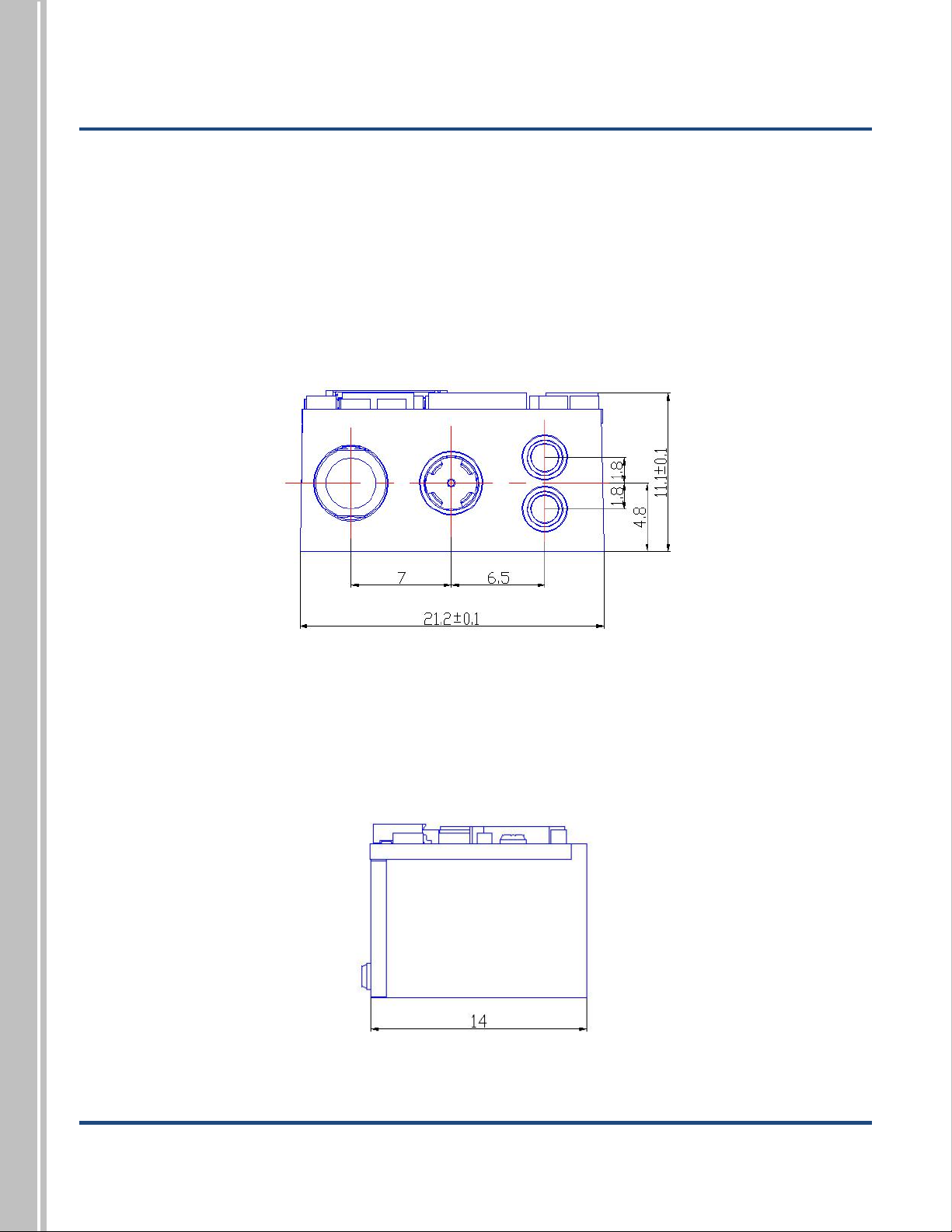
The illustrations below show the mechanical mounting dimensions for the RT206. The structural design
should leave some space between components.
Front View (unit: mm)
Side View (unit: mm)
Autres manuels pour RT206
2
Table des matières
Manuels Accessoires pour scanner populaires d'autres marques

HP
HP Scanjet 5370C Series Mode d’emploi

imacon
imacon Flextight Damaged Original Kit Manuel utilisateur

ARS-Imago
ARS-Imago POLAROID SCAN MASK Manuel utilisateur

Epson
Epson B813112 Manuel d'utilisation

Datalogic
Datalogic GFC-2 00 Series Manuel utilisateur

Colortrac
Colortrac MK4 UNIVERSAL REPRO STAND Manuel utilisateur


