
RS 8802201 Manuel utilisateur

Professionallyapprovedproducts.
User Manual
FULL HD
Video-Blackbox
Article no: 8802201

2
Index
A. Feature Description ................................................................................................ 3
B. Specification ........................................................................................................... 4
C. Accessories ............................................................................................................ 4
D. Schematic Diagram of The Installation Steps ......................................................... 5
E. Product Function Introduction ................................................................................. 7
F. SD Card Installation ................................................................................................ 8
G. OSD Menu .............................................................................................................. 9
H. Remote Controller Description .............................................................................. 10
I. Recording / Stop Recording .................................................................................. 11
J. The RS component Player .................................................................................... 12
1. Operation icon introduction.............................................................................12
2. Capture...........................................................................................................12
3. Configuration..................................................................................................13
4. File backup.....................................................................................................15
5. Playback.........................................................................................................16
6. Progress bar...................................................................................................16
7. Play speed......................................................................................................17
8. Volume control................................................................................................17
9. G-SENSOR....................................................................................................17
10.Format............................................................................................................17
K. Estimated Recording Time .................................................................................... 19
L. Appendix: Bright and dark spot on the LCD .......................................................... 20

3
A. Feature Description
Full HD real-time recording (with H.264 compression technology)
105° Wide-angle CMOS Lens
2.5”TFT LCD
GPS sensor
Record video with sound inside and outside the car
Compatible with SDHC Card up to 32GB
Automatic loop recording
Emergency recording, file save to separate area to prevent overwritten
Built-in GPS for tracking speed and position
Built-in G-Sensor, to automatically record footage in case of an accident
Made in Taiwan, with a 1 year warrantee – the longest of any dash-camera

4
B. Specification
Items Description
Sensor CMOS
View Angle 105° Wide-angle
Resolution NTSC 30fps / PAL 25fps
V / A DC5V±5% / 1A
Operating tmp. -10ºC ~ +60ºC
Display 2.5” TFT LCD
Storage 4GB - 32 GB SDHC Card ( 『SanDisk』or『Transcend』Class
10 or above is recommended)
Manner of
Recording Automatic recording on power on,
Recording is stopped on power off
Recorded
content Date, Time, Image, Sound,
G-Sensor data, GPS data
Storage Format Proprietary format,
playback on device or bundled software
Audio Input Built-in microphone
Time setting Internal calendar adjustable via GPS,
remote control or bundled software
G-Sensor Built-in 3D G-Sensor
C. Accessories
Adapter / IR remote control / Software CD / Bracket / 3M sticker / 8 GB Class 10 SDHC
Card

5
D. Schematic Diagram of The Installation Steps
1. Install the device on the windshield using bundled 3M or suction cup mount
2. Find the optimal position of device on
the windshield 3. Adjust to the appropriate recording
angle
4. Plug in the DC5V Power Supply 5. Plug in the Cigarette charger
Sticker Adhesive S
p
ot
Stick-Holder
6
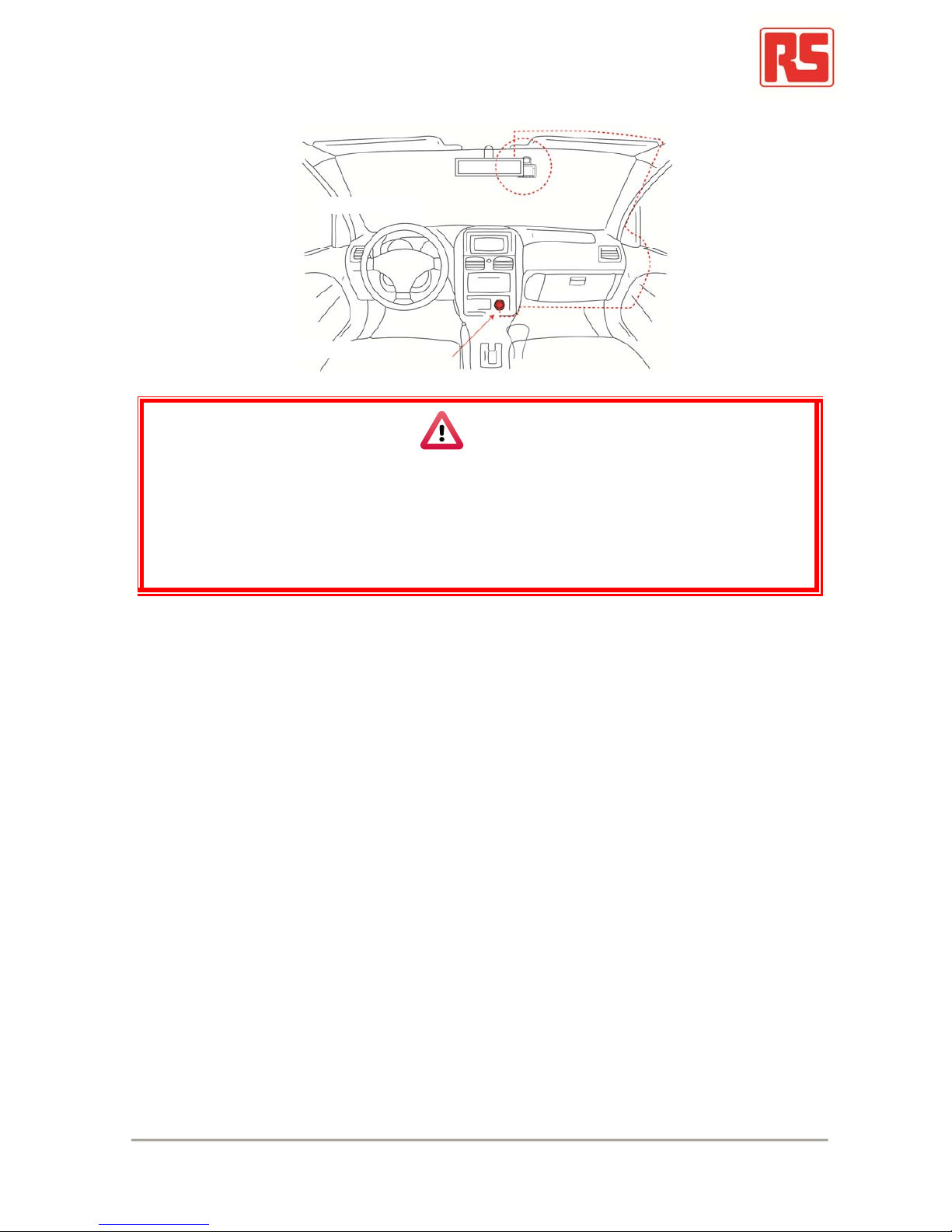
6. Diagram of recommended device installation
Notice
(1). This device should be installed within the area of the windshield wipers
(2). Format the SD card before first-time use
(3). Set date and time on the OSD, or auto-calibration via GPS
(4). Set NTSC or PAL through OSD
Best location
Cigarette adapte
r

7
E. Product Function Introduction
Secure recording Menu Up Down Enter
SD card Slot
DC5V
Power input
Lens

8
F. SD Card Installation
(1). To format the memory card; please refer to the other chapter “Formatting the
memory card” for more detail.
Warning
(1). “SanDisk” or “Transcend” Class 10 or above SDHC cards are
recommended (4GB minimum)
(2). If memory card is not formatted using the bundled software, the device
will automatically erase all the data on the memory card and start
recording at default settings
(3). Please don’t use a Micro SD to SD card adapter for recording, to avoid
damage during recording
(4). Fragmentation of the memory card storage during writing is normal.
Regular inspection of the memory card and playback using bundled
software is recommended to ensure good read/write performance

9
G. OSDMenu
Press to open the OSD (On Screen Display) menu shown below:
1. Video standard: Click to choose NTSC / PAL
2. Time setting: Click to adjust clock
3. Display sleep: Click to set delay time of display sleep
4. Firmware Version: to show firmware version
NTSC / PAL
Time setting
Display sleep
Firmware version

10
H. Remote Controller Description
Display On/Off Force Recording
Volume Down
Stop Voice Recording
Menu
Confirm
StopPlay
Pause
Up / Down
Left / Right
Speaker On/Of
f
Volume Up
Table des matières


