
Rosco CubeConnect Manuel utilisateur

DESIGNED BY THE BLACK TANK
™USER’S MANUAL


Table of Contents
03
Your CubeConnect™ Transceiver
Product Description....................................................................................... 5
Transceiver Modes.......................................................................................... 6
What’s In the Box............................................................................................. 7
CubeConnect™ Transceiver Modes
CubeConnect™ Transceiver Interface......................................................... 8
Basic Operation................................................................................................ 11
Normal Input Mode........................................................................................ 12
Locked Mode.................................................................................................... 13
DB9 Serial In Mode.......................................................................................... 15
Bluetooth In Mode.......................................................................................... 17
DMX In Mode..................................................................................................... 20
Wireless In Mode.............................................................................................. 21
CubeConnect™ Transceiver Configurations
Antenna Mounting Options............................................................................ 22
Using Multiple Transceivers........................................................................... 23
Dongle Pairing................................................................................................... 26
CubeConnect Compression Propagation.................................................... 9

Table of Contents
04
Your CubeConnect™ Dongle
Product Description...................................................................................... 27
What’s In the Box............................................................................................ 28
CubeConnect™ Dongle Modes
CubeConnect™ Dongle Interface................................................................ 29
Basic Operation............................................................................................... 30
Network Operation........................................................................................ 32
CubeConnect™ Dongle Support
FCC Warning.................................................................................................... 35

Product Description
05
CubeConnect™ Transceiver
The Transceiver provides a way of sending wireless lighting control
information to CubeConnect™ Dongles or wireless fixtures with antennas. It
can also serve as a receiver itself and act as a wireless in, DMX out endpoint.
The Transceiver accepts lighting control commands (input) from DMX512,
BlueTooth Limited Energy (BLE)*, or a Serial DB9 connection, and sends the
data back out on either the wireless antenna or on the DMX output.
The Transceiver also has a locking function that can hold the last sent lighting
intensity values. This provides the capability of remembering and holding a
static scene indefinitely without the need of a permanently connected
source.
*Bluetooth Technology Coming Soon
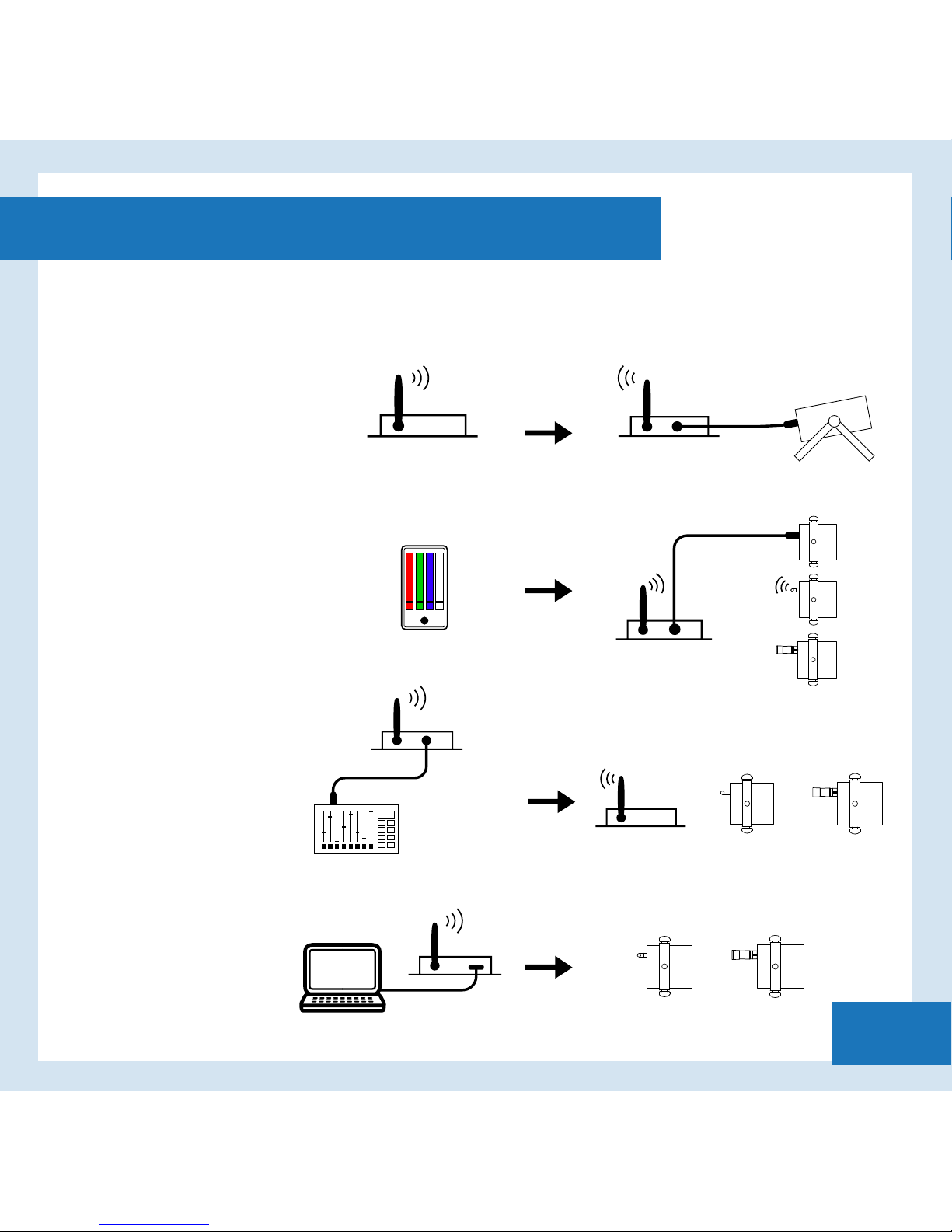
Transceiver Modes
06
Bluetooth In
Wireless/DMX Out
DMX In
Wireless Out
Serial In
Wireless/DMX Out
Serial In
Wireless/DMX Out
DMX In
Wireless Out
Bluetooth In*
Wireless/DMX Out
Wireless In
DMX Out
DMX OUT
ANTENNA
CUBE
WIRELESS IN
DMX Out
ANTENNA
CUBE
IPHONE
APP
CUBE WITH
DONGLE
CUBE WITH
DONGLE
ANTENNA
CUBE
CUBE WITH
DONGLE
NOTE: When using DMX Out of a Transceiver you can use any DMX Capable
Device.
Wireless In
DMX Out
DMX
FIXTURE
DMX
FIXTURE
*Bluetooth Technology Coming Soon

What’s In the Box
07
CubeConnect™ Transceiver
Power Supply

CubeConnect™ Transceiver Interface
08
Wireless Antenna
MODE SELECT BUTTON
MODE LED
s
Locked Data/Wireless & DMX Out
Wireless In/DMX Out
BlueTooth In/Wireless & DMX Out
DMX In/Wireless Out
Dongle Pair/Wireless Out
DB9 Serial In/Wireless & DMX Out
LEARN Button
LEARN indicator
Channel 1 Diagnostic
Channel 2 Diagnostic
Channel 3 Diagnostic
Channel 4 Diagnostic
Power Indicator
BLE
BLUETOOTH LIMITED
ENERGY MODULE
Power
In
DB9
Serial
Input
DMX
In
DMX
Out

CubeConnect Compression Propagation
09
The CubeConnect system was designed for applications which can not
support expensive 3rd party full-speed wireless DMX hardware, but require
dynamic or static eects. The patented CubeConnect algorithm
automatically compresses the incoming DMX data to maximize throughput to
the dongles by only sending DMX channels which changed from the previous
frame.
Creative techniques can be implemented to maximize the CubeConnect
performance when many fixtures are being controlled:
Doubling up fixtures addresses will help minimize propagation delay. Shows
can also be composed with the compression method in mind. For example,
instead of a normal cross fade from red to green, a "streak" eect could be
applied - this is a common eect used by programmers and can be used here
to creatively optimize the performance of the entire system (as only 1 address
is changing at any point in time).
See chart on the next page for a detailed prediction of the propagation delay.

10
CubeConnect Compression Propagation
Table des matières


